Get all your news in one place.
100’s of premium titles.
One app.
Start reading
Tom’s Guide
Tom’s Guide
Technology
Nikita Achanta

The Turtle Beach Vulcan II Max’s optical switches and bright RGB are a delight — but at this price, I expected more

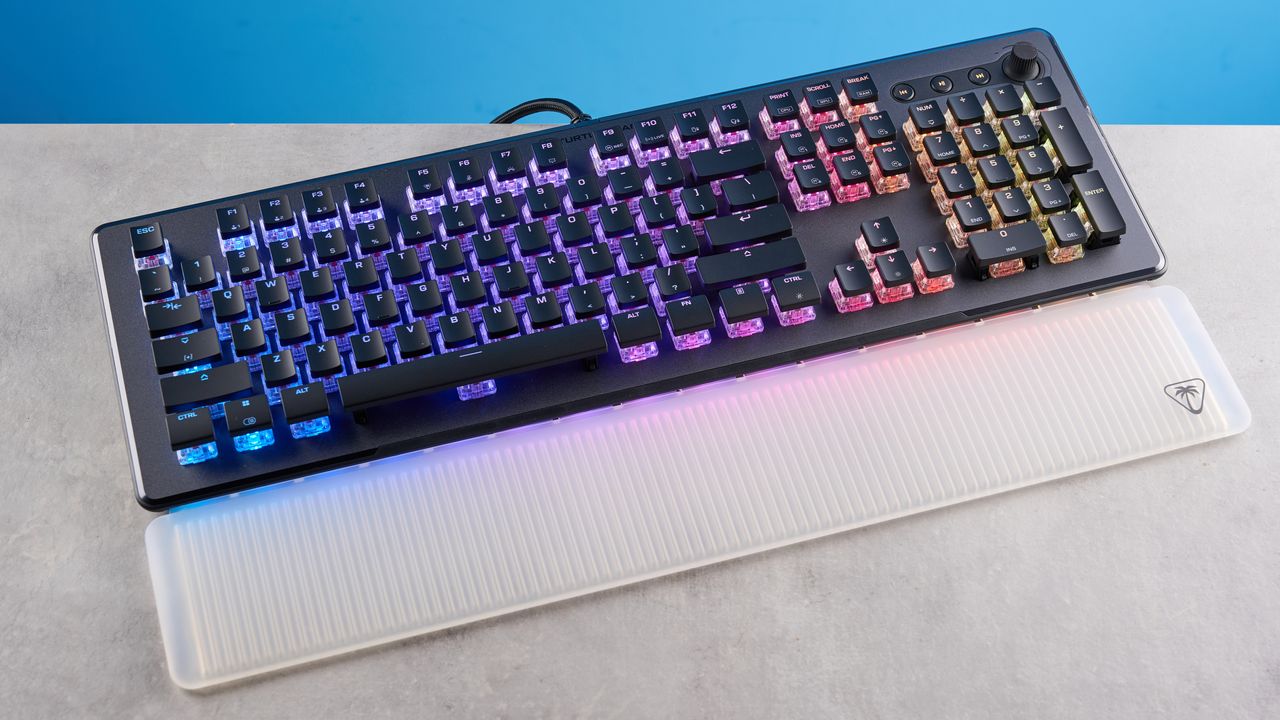
A black Turtle Beach Vulcan II Max keyboard.

I’ve tested nearly every variant of Turtle Beach’s Vulcan lineup of keyboards. While they’ve been good at some things, they’ve been very bad at others — and the Turtle Beach Vulcan II Max is no different. The good news is that it’s built extremely well and it offers a great typing experience. It packs a 1,000Hz polling rate and N-key rollover, both of which contribute to powerful gaming performance. Its RGB lighting is highly customizable too, and it can synchronize with other Turtle Beach products.

But the bad news is that the Vulcan II Max costs a premium which feels difficult to justify given its faults. It can’t be used wirelessly. Switch choice is very limited. The ABS keycaps tend to get shiny very quickly. These flaws are disappointing given you’d be spending upwards of $200 on it.

So, could this still be the best keyboard for you? Read my full Turtle Beach Vulcan II Max review to find out.

Turtle Beach Vulcan II Max review: Specs

Specs

Turtle Beach Vulcan II Max

Price

$229 / £194

Switches

TITAN II optical (linear)

Keycaps

ABS

Construction

Anodized aluminum + ABS plastic

Layout

100%, 104 keys

Operating system

macOS, Windows

Backlighting

AIMO RGB

Polling rate

1,000Hz

Paired devices max

1

Connectivity

Wired

Battery

Built-in

Measurements

18.23 x 9.29 x 1.32 inches

Weight

2.86lbs (with palm rest)

Colors

Black, White

Turtle Beach Vulcan II Max review: Cheat sheet

  • What is it? A 100% full-sized keyboard with optical switches and 1,000Hz polling
  • Who is it for? Casual gamers and typists
  • How much does it cost? The Turtle Beach Vulcan II Max is available for $229 / £194
  • What do we like? The premium construction, bright RGB lighting, great gaming performance, lovely typing experience, and companion software
  • What don’t we like? The shiny keycaps, wired-only design, limited switch choice, and premium price tag

Turtle Beach Vulcan II Max review: The ups

The Turtle Beach Vulcan II Max is built well and it features bright RGB lighting that can synchronize with other Turtle Beach products. It boasts strong gaming performance and a great typing experience too.

Premium construction

(Image credit: Tom's Guide)

Just like its Vulcan stablemates — the Vulcan TKL ($99) and the Vulcan II TKL Pro ($149) — the Turtle Beach Vulcan II Max is built extremely well. It features an anodized aluminum top plate and a plastic chassis, so it boasts premium construction. Thanks to the aluminum plate, there’s no flex in the body, so the keyboard doesn’t twist if you, well, twist it by holding its sides. The keys don’t dip into the PCB either, which is something we’ve seen with plasticky keyboards, such as the Epomaker Cypher96 ($89), but this keyboard costs a premium, so that’s not something I’d expect to happen anyway.

I also really like the styling and design of the Vulcan II Max’s keycaps. Though they’re made of ABS and that has its drawbacks (more on that soon), I love their soft matte finish which feels nice to touch with my fingertips. They feel similar to the ones on my MacBook Air M2’s keyboard, a laptop I’m more than familiar with and enjoy using. The Vulcan II Max is fitted with a textured volume wheel in the top-right corner which adds to the overall premium feel of the keyboard. It gives good tactile feedback when it’s turned.

Also adding to the Vulcan II Max’s build quality is its detachable wrist rest which is fairly comfortable for long periods of time. I like the translucent design too, which reflects the keyboard’s RGB lighting when it’s turned on. The Vulcan II Max feels like the ideal full-sized keyboard to have on your desk if it’s premium build quality you’re after. It measures 18.23 x 9.29 x 1.32 inches and weighs 2.86lbs (with palm rest) so it isn’t exactly portable. I’d recommend the smaller 80% Turtle Beach Vulcan TKL if you want a compact keyboard. But as full-sized ones go, the Vulcan II Max is great.

Bright RGB lighting

(Image credit: Tom's Guide)

If you’re a fan of in-your-face RGB lighting, you’ll love the Turtle Beach Vulcan II Max. It utilizes Turtle Beach’s AIMO illumination technology which, essentially, synchronizes the lighting between the brand’s keyboards and mice. This needs to be enabled via the companion software (more on that shortly) and once it’s enabled, the RGB effects will flow in sync, react accordingly and spread from one device to another if you’re using, say, the Vulcan II Max and the Turtle Beach Kone XP Air ($129) mouse.

In addition to that, the Vulcan II Max’s RGB lighting is very bright, and the see-through optical switches light up the entire board, making it easier to type in the dark as you can see the see-through legends on the keycaps as well. I love a good RGB system on keyboards, and the Vulcan II Max’s hasn’t disappointed me so far. The RGB lighting can be customized even further via companion software which is very easy to use.

Great gaming performance

(Image credit: Tom's Guide)

The Turtle Beach Vulcan II Max is, first and foremost, a gaming keyboard as it’s advertised as such. It has a 1,000Hz polling rate straight out of the box and its TITAN II linear optical switches are highly responsive. Not only is every input and command instantaneously registered, but I didn’t experience any latency issues either. The linear switches require 45g of force to activate and they have a pre-travel distance of 1.4mm, so you don’t need to press the keys all the way down for them to activate.

I played a few rounds of Counter-Strike 2 and a couple hours of Clair Obscur: Expedition 33 to test the Vulcan II Max. In both games, the Vulcan II Max performed well. All of my commands were promptly registered and my fingers and hands didn’t feel fatigued after hours of gaming either.

The keyboard also features N-key rollover with 100% anti-ghosting. N-key rollover enables multiple inputs to be registered at the same time, which can come in clutch in FPS titles and even RPGs as it gives you a bit of a competitive advantage. You can basically press two keys at the same time and both commands will be registered by your computer and executed. As an example, if you press Ctrl and Q together in Counter-Strike 2, you can duck and draw your last used weapon simultaneously.

(Image credit: Tom's Guide)

100% anti-ghosting also means that regardless of how many keys you press together, each and every press will be registered by your computer. I tried this out by pressing WASDUHJK together with a Google Doc open, and all eight letters showed up on screen instantly. For competitive gamers, N-key rollover and anti-ghosting are essential as you don’t want your keyboard to fail to register an action or not execute a complex chain of commands.

All of this contributed towards me executing perfectly-timed parries and counter-attacks in Clair Obscur: Expedition 33 too. As I didn’t need to press the key to parry all the way down, I could quickly and confidently execute it, knowing full well that the Vulcan II Max wouldn’t let me down.

Lovely to type on

(Image credit: Tom's Guide)

The Turtle Beach Vulcan II Max is a delight to type on, and its productivity performance is just as solid as its gaming performance. First of all, you get 24 multi-function Smart Keys which can be customized and can enhance your productivity. These are dual-function keys toggled via the Easy-Shift[+] feature, and doing so unlocks a second layer of commands. Basically, they serve as macros, and you can execute two actions via one button.

These keys can be programmed to answer/reject incoming video calls, control audio playback, etc. If you’re someone who relies on your keyboard to execute certain commands, you’ll appreciate the Smart Keys, and I’d recommend playing around with them to find the best combination that works for you.

Adding to the Vulcan II Max’s productivity capabilities is the smooth typing experience the keyboard offers. Its TITAN II optical linear switches require a moderate 45g of force to activate and they have a pre-travel distance of 1.4mm. Although I usually prefer lighter switches, such as the 35g Sea Salts on the Epomaker RT100 ($115), my fingers didn’t feel fatigued after typing on the Vulcan II Max all day long.

Keyboard

Type test speed (WPM)

Type test accuracy

Turtle Beach Vulcan II Max

93

91.85%

Keychron V1 Ultra 8K

94

92.3%

Epomaker P65

102

93.1%

GravaStar Mercury K1

103

92.09%

McHose x Unbox Therapy UT98

98

92.02%

Wobkey Rainy 75 Pro

110

96.48%

Nikita’s overall averages (all keyboards)

89.93

91.43%

To see how the Vulcan II Max fared against other mechanical keyboards I’ve tested recently, I took a typing test at 10fastfingers.com. While my words-per-minute score is lower than usual, it’s still very good, and I’m pleased with it.

Detailed companion software

To customize the Turtle Beach Vulcan II Max, you’ll need to download Swarm II on your Windows machine. The software is clean and easy to use, and it’s your one-stop shop for personalizing all your Turtle Beach products — mice, keyboards and headsets. It sports a clean interface, is signposted well, and is easy to get to grips with.

Through Swarm II, I was able to remap the Vulcan II Max’s keys, record macros, update/flash the firmware, customize the RGB lighting and effects (and there are plenty to choose from), and assign Smart Keys. You can also customize and save up to five profiles to the Vulcan II Max’s internal memory, and swap between them using key combinations.

Turtle Beach Vulcan II Max review: The downs

While the Turtle Beach Vulcan II Max is good, it isn’t without its faults. It can’t be used wirelessly, its keycaps tend to get shiny, switch choice is limited, and it’s expensive.

Wired only

(Image credit: Tom's Guide)

The Turtle Beach Vulcan II Max is a wired-only keyboard which means you can’t use it wirelessly as there’s no built-in Bluetooth or 2.4GHz dongle. This is fine as the keyboard is full-sized and most likely to stay put on your desk. However, it isn’t great news for anyone who does want to travel with the board. The Keychron V1 Ultra 8K ($114) is a great alternative for anyone who wants a wireless mechanical keyboard, and one that packs 8,000Hz wireless polling too.

Keycaps tend to get shiny

(Image credit: Tom's Guide)

As I mentioned earlier, I like the matte finish on the Turtle Beach Vulcan II Max’s keycaps — but what I hate is just how shiny they get. The keyboard’s keycaps are made of ABS, similar to the ones on the Vulcan TKL and the Vulcan II TKL Pro. They aren’t as durable as double-shot PBT keycaps, and aren’t as oil-resistant either. This means that they get shiny really quickly. After a couple hours of use, I instantly noticed the sheen on them — and this was before I’d had my lunch, so my fingertips weren’t even dirty!

This is an inherent problem with ABS keycaps, though, and isn’t something exclusive to the Vulcan II Max. The good news is that the Vulcan II Max’s keycaps are replaceable and compatible with third-party ones, so you can swap them with PBT ones if you so wish. Just remember to check out Turtle Beach’s guide to keycap compatibility and mounting requirements before buying some.

I will always recommend double-shot PBT keycaps over ABS ones. The former have never given me anything to complain about. If you want double-shot PBT keycaps straight out of the box, I’d recommend the Epomaker RT100 or the Keychron K10 Max ($119) as long as you don’t mind mechanical switches over optical ones.

Very limited switch choice

(Image credit: Tom's Guide)

The Turtle Beach Vulcan II Max comes fitted with pre-lubed TITAN II optical linear switches which I love, but if you’re looking for a more tactile or clicky feel, you’re out of luck. Unfortunately, the TITAN II linears are the only switches you can buy for the Vulcan II Max. It isn’t hot-swappable either so if you want to replace the switches, you’ll need to de- and re-solder them to the PCB which is extremely tricky and not worth doing — you’re best off buying a hot-swappable keyboard.

The much cheaper Turtle Beach Vulcan II ($119) is hot-swappable. I’d also recommend the Epomaker RT100, Keychron K10 Max, Keychron V6 Max ($99), or the McHose x Unbox Therapy UT98 ($139).

Expensive

Last but not least, the Turtle Beach Vulcan II Max is a very pricey keyboard. It retails for $229 / £194 at Amazon which is quite expensive for a wired-only keyboard whose keycaps get shiny quickly and whose switches can’t be hot-swapped. The Vulcan II Max faces fierce competition from not only mechanical keyboards, but Hall Effect ones too, which are far better for gaming and customization.

Today, you can get a more powerful Hall Effect keyboard for either the same price or cheaper, and if you need a good gaming board, I’d recommend the Lemokey L5 HE ($220), the Keychron Q12 HE ($249) or the Keychron K4 HE ($134). If a mechanical deck is more your speed, I’d recommend the Keychron V1 Ultra 8K or the Keychron V6 Max.

Turtle Beach Vulcan II Max review: Verdict

(Image credit: Tom's Guide)

The Turtle Beach Vulcan II Max isn’t the worst keyboard I’ve tested — but it’s also a far cry from the best. Don’t get me wrong: it has its upsides. Its aluminum plate and high-quality ABS plastic contribute towards a top-notch build. The keyboard features 1,000Hz polling, N-key rollover, and responsive optical linear switches, all of which are excellent for gaming. It’s nice to type on too, and the bright RGB lighting is sure to charm you.

But this keyboard costs nearly $230, and for that price, I was expecting to be blown away. Unfortunately, that wasn’t the case. The Vulcan II Max’s wired-only design and keycaps that are prone to getting shiny leave a lot to be desired. The (very) limited switch choice is another letdown, and I expected more for the price.

A 3-star rating at Tom’s Guide means the product is good but there are better options available, and that’s true in the case of the Vulcan II Max. Keychron, Lemokey and Epomaker, alas, offer far better value for your money.

Sign up to read this article
Read news from 100’s of titles, curated specifically for you.
Already a member? Sign in here
Related Stories
Top stories on inkl right now
One subscription that gives you access to news from hundreds of sites
Already a member? Sign in here
Our Picks
Fourteen days free
Download the app
One app. One membership.
100+ trusted global sources.