Get all your news in one place.
100's of premium titles.
One app.
Start reading
Tom’s Guide
Tom’s Guide
Technology
Ella Taylor

The Tom's Guide app is live — how to get it for free and everything that's new

Tom's Guide app screens.

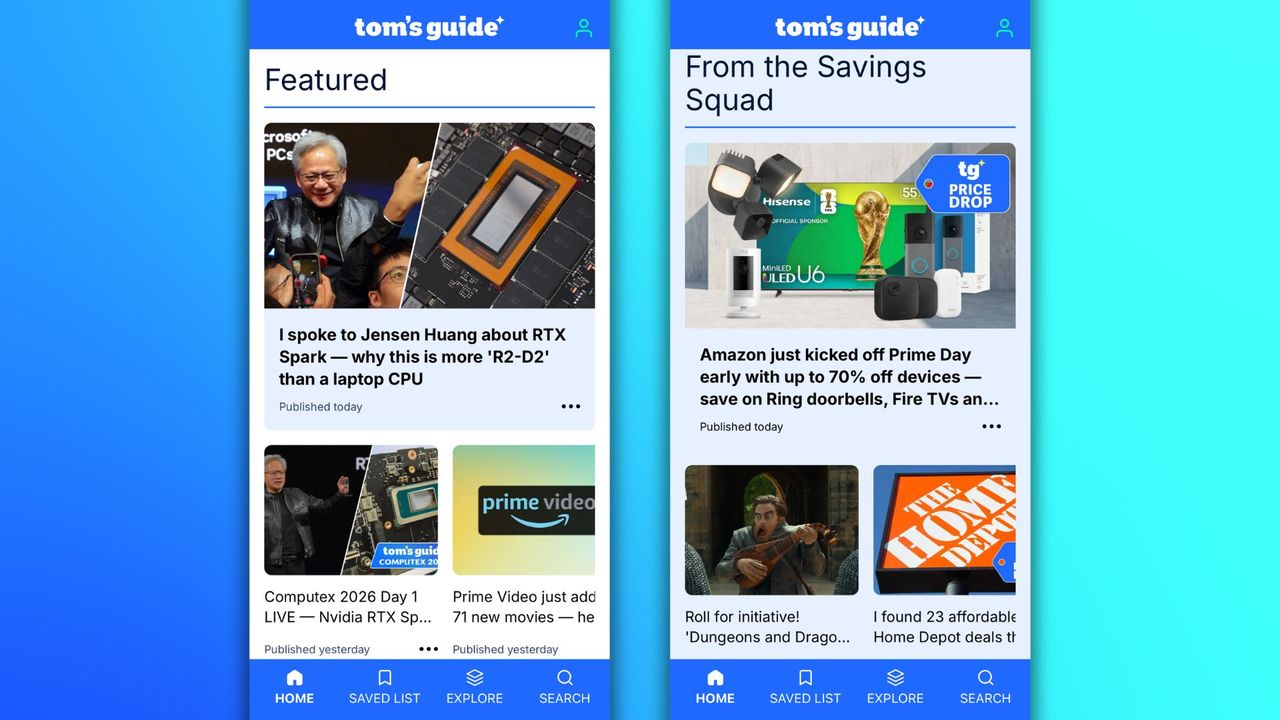
Exciting news alert: hot on the heels of our recent website relaunch, we've just released a slick new Tom's Guide app for iOS and Android — and we're inviting you to be one of the first to download it! The new app delivers our articles, videos, quizzes and more in an enhanced smartphone-friendly format that actually made me breathe a sigh of contentment when I got to test it.

Our team of developers have worked hard to bring you an interface that's cleaner, faster to load, and helps you find the content you're most interested in, quicker.

Why we think you'll love it:

  • Clutter-free reading experience tailored for phone and tablet users
  • Personalize your feed to just see what you're into
  • Save articles to easily find again later
  • Smart search tool helps you find things fast
  • Download it on Google Play or Apple App Store

Here's a sneak preview of what you can find inside.

Slick article pages and save for later

(Image credit: Future)

Download the app

(Image credit: Future)

Reading articles on the Tom's Guide app is just nicer than in my phone's browser. Our developers have streamlined the page furniture so you can get to the main event quicker, and have made elements like product boxes smaller, so you can expand them for more information when you're ready.

We guessed that reading the articles is the main thing you're here for, so we really wanted to make it easier for you to glean our advice/news/analysis as quickly as possible, with faster loading times and fewer interruptions.

(Image credit: Future)

Similarly, sometimes you'll come across an article on your commute that you know you'll want to refer back to at home later. In the app, just tap the bookmark icon on any article page to quickly add it to your Saved list. Keep it there for as long as you like or delete it when you're done — it's up to you.

Personalize your feed and find things with ease

(Image credit: Future)

I'll let you into a secret: there was talk of launching the app earlier, without this, but we were adamant that feed personalization was important. We cover a broad remit here at Tom's Guide — from phones to Fitbits, and graphics cards to gardening — and, with the best will in the world, we understand that you might not be equally as passionate about every single topic that we cover.

So with that in mind, in the Explore tab you can select the categories (and sub-categories) that you're interested in to see a more curated feed of our latest content. It's a work in progress, and future updates to the app will refine the settings, but I think it's a great start that will save you a lot of time.

(Image credit: Future)

You can also find what you're looking for using our smart-powered Search tool — which I've tested a few times and actually find more reliable than the one on our desktop site. Frontend developers of Tom's Guide, take note!

Each article is also appended with Recommended articles on similar topics, and Trending articles in that category of the website, to inspire your next read.

And of course, the Home tab is packed with the highlights from all of our main channels, including our all-important Savings Squad.

Commenting, video, Wordle and puzzles

(Image credit: Future)

Hundreds of thousands of you rely on our daily Wordle hints and enjoy playing our collection of puzzles and quizzes, so we've made sure they appear on the Home tab in the App. You should be prompted to sign in or sign up to become a free member of the Tom's Guide Club when you first open the app, so that you can save your score on our puzzles and access other membership benefits.

The app also has a carousel of our latest TikTok videos on the Home tab, as well as videos embedded in many of our article pages.

(Image credit: Future)

We love hearing from readers, and often publish 'Have Your Say' articles and Live Q&As that are explicitly designed to have you ask questions and share your thoughts on specific topics. But you can leave a comment on almost any of our articles on the site, so it was important to us that you can join in the conversation in the app as well.

As the screenshot above shows, you can leave the first comment on any story or see which conversations are hotting up already.

I've already mentioned that our developers aren't resting on their laurels; they're already working on the next iteration of the app, with ideas for better personalisation and exclusive membership features. What do you like about the new app, and what would you like to see next? Let us know in the comments below.

More from Tom's Guide

Sign up to read this article
Read news from 100's of titles, curated specifically for you.
Already a member? Sign in here
Related Stories
Top stories on inkl right now
One subscription that gives you access to news from hundreds of sites
Already a member? Sign in here
Our Picks
Fourteen days free
Download the app
One app. One membership.
100+ trusted global sources.