Get all your news in one place.
100’s of premium titles.
One app.
Start reading
Creative Bloq
Creative Bloq
Technology
Paul Hatton

Why AI video editing is the skill I’m finally learning in 2026

Filmora.

There's no getting away from it. AI is ripping its way through every aspect of our lives, and that's nowhere more evident than in the world of the best video editing software. Thus far, I've adopted a pretty dubious attitude towards most AI-centric software, but as 2026 has rolled around, I thought it was about time that I gave it a go firsthand.

So, I turned to Wondershare's Filmora, one of the most established options available. Now at version 15, the video editing package offers a broad range of features, from AI-generated video to AI extensions and background cutouts to traditional cutting and layering. With support for OpenAI Sora 2, Google Veo 3.1, and Normal Mode 2.0 models, Filmora provides access to the latest AI technology for video generation.

Having downloaded and installed the software and applied a ton of credits to my account, I was ready to proceed. I just needed to come up with an idea and quickly landed on a skydive. It's something that I've always wanted to do but never had the guts to follow through on. Maybe the power of AI can make it a reality, even if it won't be quite as impressive a story to tell friends compared to the real deal.

(Image credit: Future / Paul Hatton)

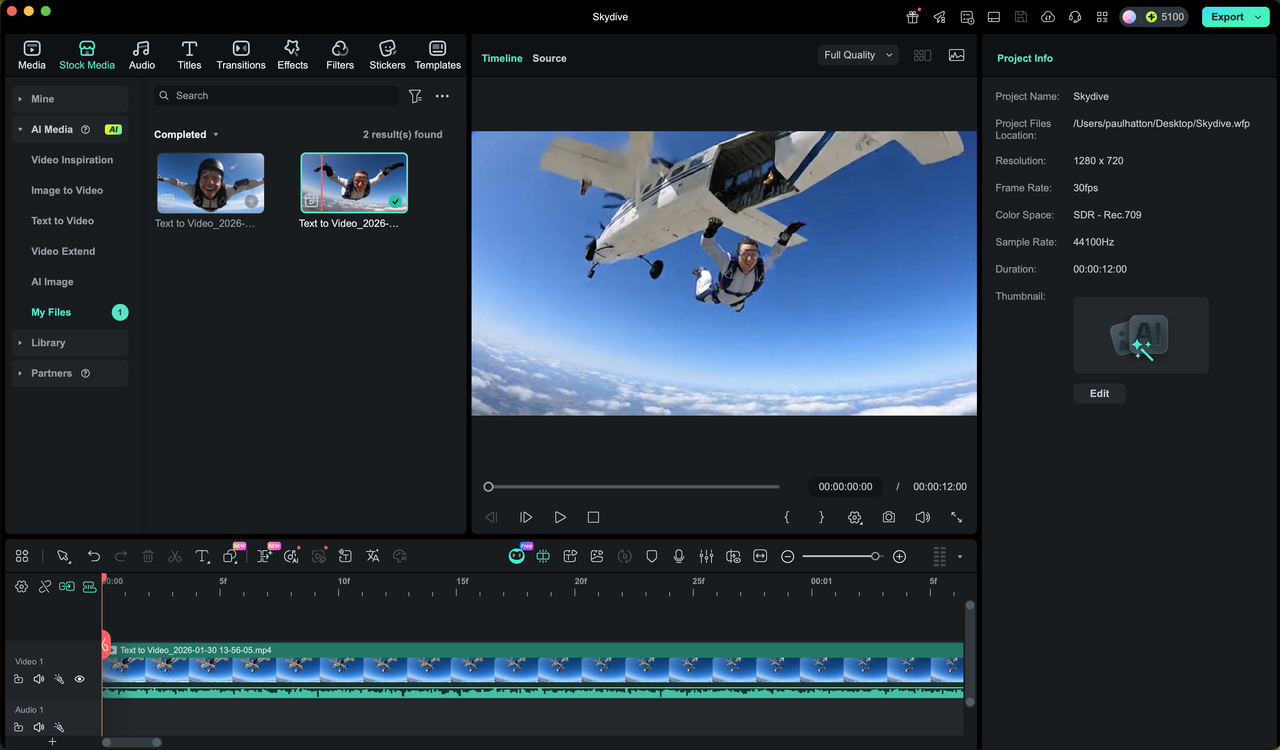
I began by uploading my profile pic, followed by a simple prompt: "This man jumping out of an aeroplane on a skydive". Filmora quickly told me it wasn't really sufficient, so I used the built-in adjustment tool to expand my prompt into something more detailed. I then hit 'Generate' and waited 10 to 15 minutes for the software to create a 12-second clip.

While I waited, I did a bit of digging into how much it would likely cost me if I used Filmora regularly. I didn't feel particularly comfortable having to part with hundreds of credits each time I wanted to do something, and I certainly wouldn't want it to be prohibitively expensive. I could genuinely see myself needing around 50,000 credits to create an AI-heavy video, which costs around $50. It's not a massive amount, but it is worth considering the impact on your bottom line.

Back to my skydive video. In truth, I wasn't expecting anything usable. I thought it might create something interesting, and a skydiver with my face on it would be slightly amusing, but I was pleasantly surprised by what it generated. I exported the footage and sent it to a few people, and none of us could spot any glaring issues. It genuinely looked like me doing a skydive.

I'm no AI expert or particularly au fait with prompt writing, but I still managed to get Filmora to do what I wanted without too much trouble. I'm not sure I'll stretch to creating AI clips for dropping into my projects, but it's nice to know the option is there if I ever need it. The learning curve was also as shallow as they come, although the process has its fair share of trial and error, which requires a bit of patience.

(Image credit: Future / Paul Hatton)

Rather than generating videos, I think I'll use it more for AI editing tools. These can be applied to video clips created with AI or shot with a real-life camera. There are options to remove objects, relight scenes, blur faces, and much more. I played around with these for a while, and even though there were a few moments where the AI detection struggled, it was generally pretty good at applying the necessary adjustments and effects. accurately.

Maybe you've been wondering about the place of AI in your creative workflows, but have, up to this point, kept your distance. I would say Filmora is a pretty straightforward, albeit potentially quite expensive, way of dipping your toes into AI video editing. It's also one of the best options for creating AI-generated videos inside a video editing package.

If you’ve spent the last few years keeping AI at arm’s length, Filmora is a compelling reason to finally lower your guard. It isn't perfect, and the credit-based cost means you’ll want to be intentional with your 'Generates', but the barrier to entry is satisfyingly low. Whether you’re looking to automate the boring stuff or generate videos using AI, Filmora could be the app to make it happen.

New to video editing like me? Get the kit:

Sign up to read this article
Read news from 100’s of titles, curated specifically for you.
Already a member? Sign in here
Related Stories
Top stories on inkl right now
One subscription that gives you access to news from hundreds of sites
Already a member? Sign in here
Our Picks
Fourteen days free
Download the app
One app. One membership.
100+ trusted global sources.