Get all your news in one place.
100's of premium titles.
One app.
Start reading
Digital Camera World
Tom May

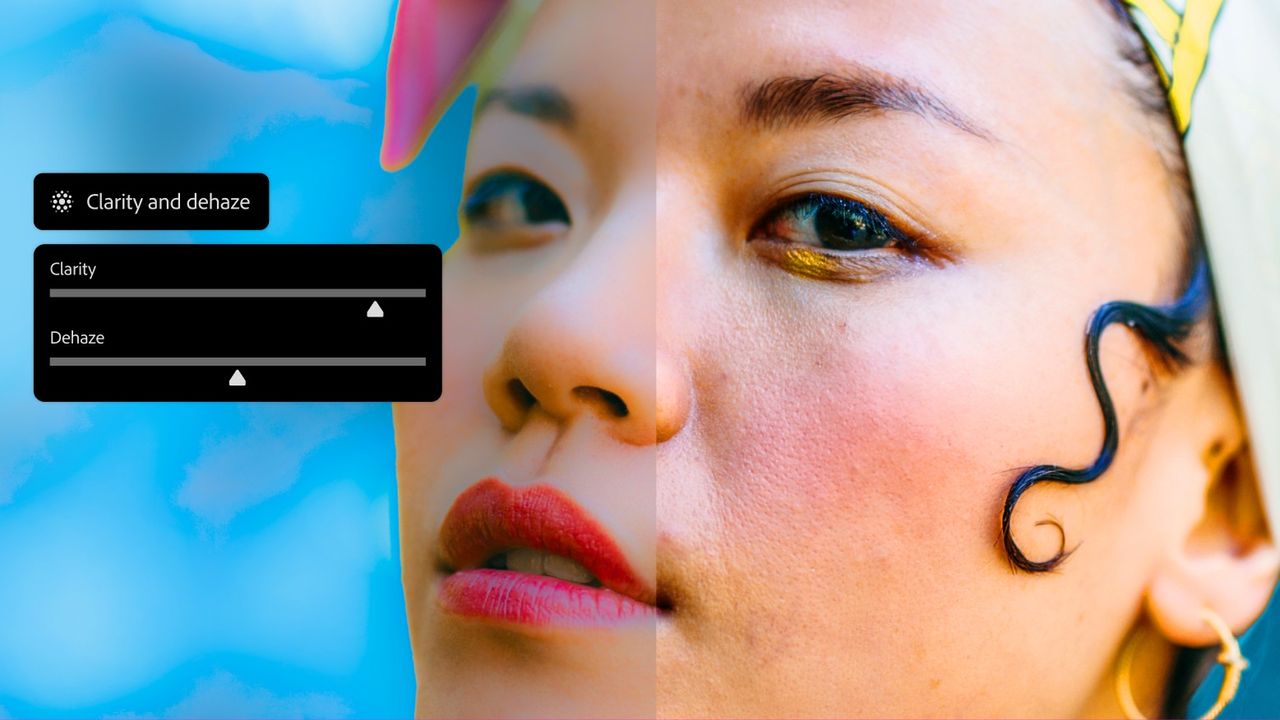
Photoshop adds Clarity, Dehaze and Grain as adjustment layers to give photographers more editing control

A split-screen comparison of a person's face showing the effect of "Clarity and dehaze" sliders in a photo editing interface.

Adobe has announced that three popular image adjustments (Clarity, Dehaze and Grain) are now available as proper adjustment layers in Photoshop. It's a workflow improvement that photo editors have been requesting for years.

Until now, these tools only existed in Camera Raw, either when opening RAW files or via the Camera Raw Filter. That meant working within a modal dialog box: make your changes, click OK, done.
Sign up to read this article
Read news from 100's of titles, curated specifically for you.
Already a member? Sign in here
Related Stories
Top stories on inkl right now
One subscription that gives you access to news from hundreds of sites
Already a member? Sign in here
Our Picks
Fourteen days free
Download the app
One app. One membership.
100+ trusted global sources.