Get all your news in one place.
100's of premium titles.
One app.
Start reading
Tom’s Guide
Tom’s Guide
Technology
Jason England

I just tested Microsoft Surface Laptop Ultra — Nvidia RTX Spark brings life to one of the best laptops I’ve ever tried

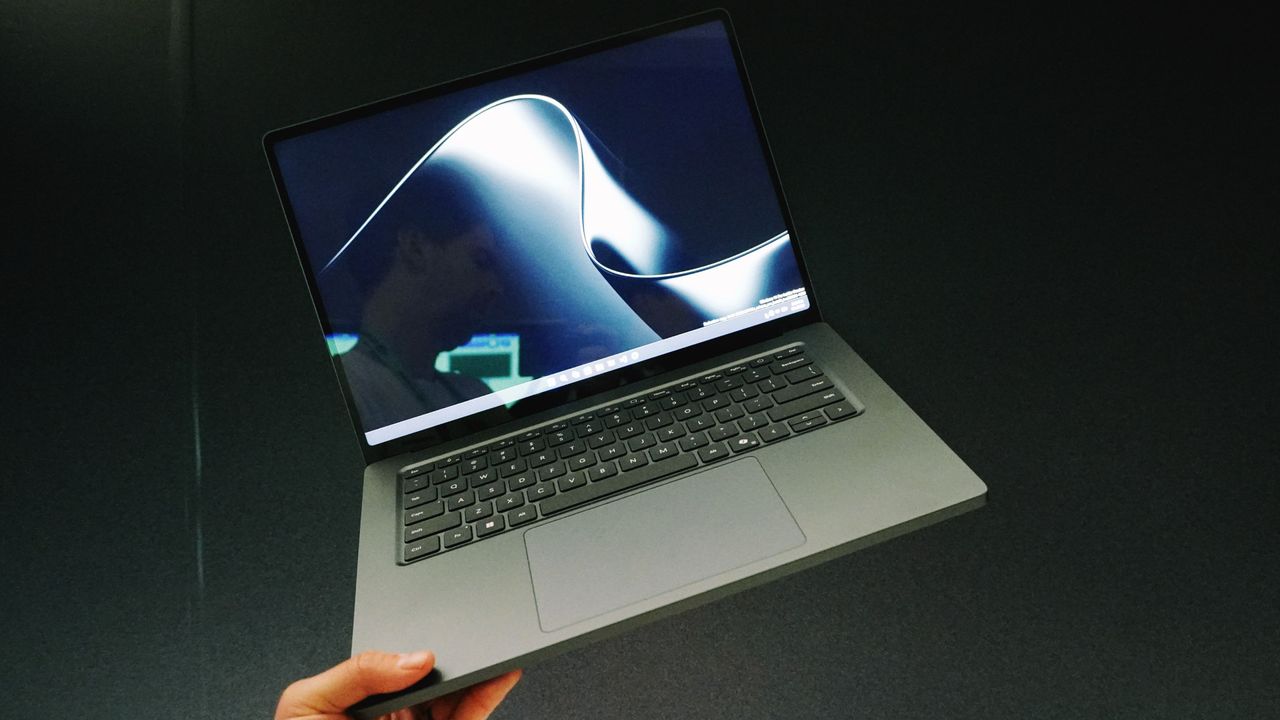
Microsoft Surface Laptop Ultra.

Eight laptops are launching with Nvidia RTX Spark inside at Computex 2026, and the Microsoft Surface Laptop Ultra is easily one of the best — so beautifully designed it almost makes Spark feel like a side character.

Gunning for the 16-inch MacBook Pro, Microsoft doesn’t miss with a seriously luxurious build, great I/O for pros, fantastic ergonomics (including a breakthrough touchpad) and a mesmerizing display.

And you’ve seen what it will be able to do from all the RTX Spark testing I’ve done. This will not be a cheap laptop with that chip inside, so Microsoft has rolled out the red carpet in utilitarian aesthetics. Let me tell you about it.

Microsoft Surface Laptop Ultra: Specs

CPU

Nvidia RTX Spark

RAM

Up to 128GB LPDDR5X unified memory

Ports

3x USB-C, 1x USB-A, 1x HDMI, 1x SD card reader, 1x 3.5mm headphone jack

Display

15-inch 2880 x 1920-pixel mini-LED PixelSense Ultra, 2000 nits peak HDR brightness

Weight

4.5 pounds

Price (rumored)

$3,000-$7,000

A seriously good looker (and worker)

(Image credit: Future)

Make no mistake about it — the Surface Laptop Ultra is built different. On the face of it, this is a Surface Laptop if it started bulking for a few months. But once you get into the details, you realize it’s so much more than that.

It starts with a beefy utilitarian presence atop any desk. This is a hefty machine, but those premium materials and the added bulk makes this feel ready to power through any task you throw at it — just like a MacBook Pro does.

The similarities also extend to the port selection, but chalk this up as a win for the Ultra with its additional USB-A for wider support. They keyboard feels gorgeous to type on, which is something that Microsoft has really excelled in in the past — giving you a nice tactility to every key press that makes it feel intentful.

(Image credit: Future)

But the real star of the show on that bottom deck is the 30% larger haptic touchpad. It’s an absolute ocean with a smooth gliding surface, with every click giving me those same snappy sensations I love from the MacBook Pro’s trackpad. But as an addition here is the haptics that actually communicate back to you.

Built directly into Windows 11, you’ll feel small hints of feedback as you do key things like snap apps to sides of the screen. On top of that, the company is working with key developers to give you those same sensations in third party apps like moving your cursor over clips in a video timeline.

It’s a feeling that when returning to my MacBook Pro, I felt like something was missing! Top it all off with that gorgeously color-accurate and smooth PixelSense display up top that can get seriously bright, and you’ve got a nice-looking beast that’s ready for anything.

Monstrous performance

(Image credit: Future)

Speaking of ready for anything, that’s where I get to the fun stuff inside. You’ve seen a lot of the software stuff it will be able to do from the Microsoft Build announcements — in short, expect a lot of agentic AI features to take advantage of that RTX Spark chip.

And as you saw in my testing of Spark itself, there’s a lot to be had here from the massive local models changing the dynamic of how you interact with a computer from it being a tool you lays idle when you’re not using it, to an active assistant machine.

But let’s compare apples and oranges and put it up against the MacBook Pro workload. You want your laptop to get the pro stuff done speedily both on and off the charger. After flying around the most dense Unreal Engine map while connected and disconnected, that’s easily proven true. There’s also tie-ins with Adobe to use much more of that built-in RTX 5070-level GPU and turboboost creator tasks beyond levels I’d seen in equivalent Apple laptops.

(Image credit: Future)

But the real killer app for me is the ability to use the same laptop to work by day and play by night. Alan Wake 2 is built natively for Arm and can run at 1600p resolution with ray tracing and DLSS 4.5 ray reconstruction at buttery smooth frame rates. Even games that are not built for this architecture like Pragmata go through the Prism emulator layer and play smoothly too. And yes, both of these were on and off the charger too!

The big unanswered question here is power efficiency, which could be affected by that emulation layer. Speaking to Nvidia, they’re not giving anything away, but did give me a cheeky smile when I started talking about what all-day battery life really means. We could be in for something special here.

Outlook

(Image credit: Future)

Ignoring the larger USB-C port mystery (my theory is it’s a magnetic breakaway USB-C socket that replaces the missing Surface Connect), what you’re left with here is a phenomenal laptop that feels powerful.

The aesthetics are clean, the ergonomics are fantastic, the display is mesmerizing and the power under the hood is awesome! Of course, there’s a big question on price, which rumors here at Computex point to a starting cost of $3,000.

This is definitely for the pros who know how to make the most of that power, and no longer is the MacBook Pro the default option at this price. A new player has come to town.

More from Tom's Guide

Sign up to read this article
Read news from 100's of titles, curated specifically for you.
Already a member? Sign in here
Related Stories
Top stories on inkl right now
One subscription that gives you access to news from hundreds of sites
Already a member? Sign in here
Our Picks
Fourteen days free
Download the app
One app. One membership.
100+ trusted global sources.