Get all your news in one place.
100’s of premium titles.
One app.
Start reading
Tom’s Guide
Tom’s Guide
Technology
Tony Polanco

I ditched the MacBook Air for a MacBook Neo for 48 hours — and I'm shocked

Macbook neo.

Although Apple recently released the powerful MacBook Air M5 and the even beefier M5 Pro and M5 Max models, the laptop I’ve found most interesting is the MacBook Neo.

Starting at $599, this entry-level MacBook matches or exceeds the best Windows laptops in that price range. With RAMageddon still forcing companies to raise costs across the board, this budget-friendly MacBook is a welcome relief, and one I can easily recommend to most people.

In our MacBook Neo review, we called it the best budget laptop ever, thanks to its premium design, bright display, and solid A18 Pro performance. There are some trade-offs, but for $599, it’s a compelling purchase for anyone looking for a wallet-friendly laptop.

I just spent 48 hours with the MacBook Neo as my main computer, and the experience was insightful, to say the least. Though it’s a fantastic machine for what it costs, it also has some trade-offs — especially if you’re used to more powerful MacBooks. Here are my hands-on thoughts.

MacBook Neo: What I like

Design

(Image credit: Tom's Guide)

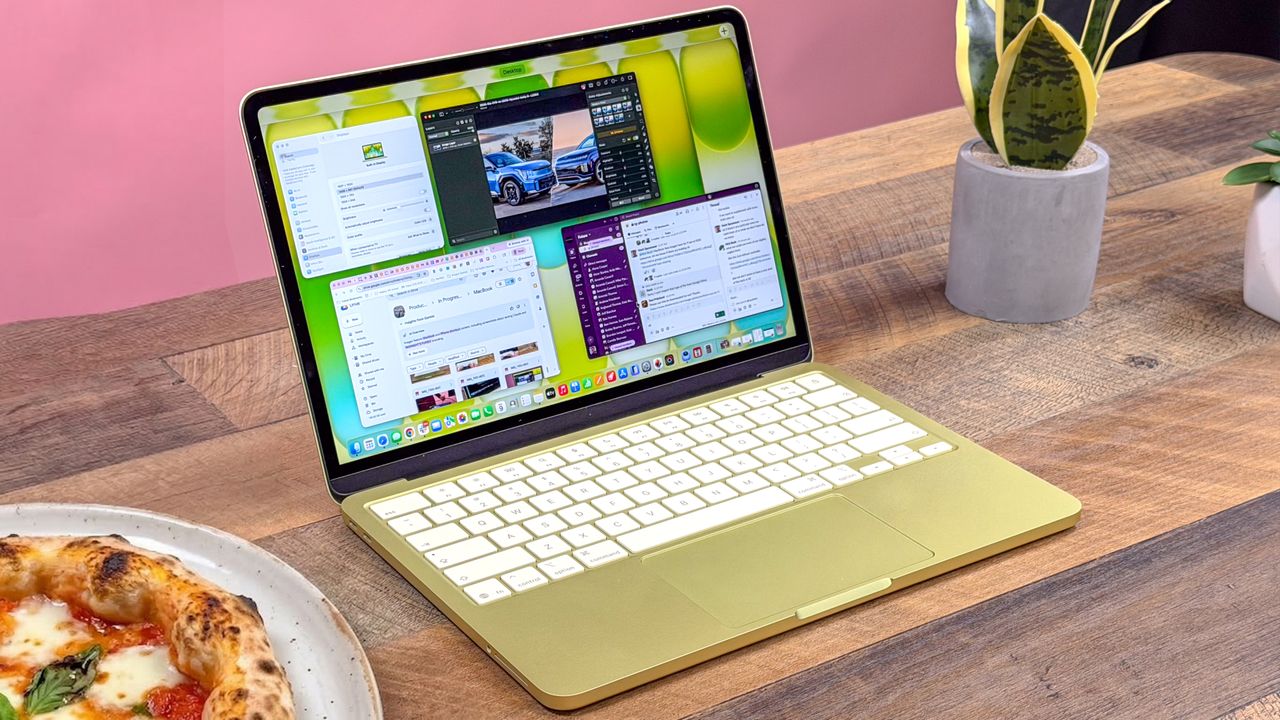
The MacBook Neo is a striking laptop, and not just because it’s available in several fun colors. Instead of the usual cheap plastic designs you see at this price, the Neo has an elegant all-aluminum frame like its pricier MacBook siblings, complete with the same rounded corners. It’s a beautiful machine that feels great to hold.

On paper, the MacBook Neo weighs 2.7 pounds, the same as the 13-inch MacBook Air. However, it feels slightly heavier because it’s a bit bulkier (and slightly thicker). Still, it’s a laptop you can easily slip into your backpack and forget it’s there.

(Image credit: Tom's Guide)

I really enjoy the Neo’s Magic Keyboard, which has the same snappy feedback as the one on the MacBook Air. It’s roomy and comfortable to type on, even if you have big hands like me. There’s no Force Touch trackpad here, but the mechanical trackpad is still plenty responsive and never misses a gesture.

Finally, the Citrus color of our review unit immediately sets this MacBook apart. My praise for it, and the other available shades (Indigo and Blush), is noteworthy, since I normally don’t care for colorful electronics. If I were buying one, I’d probably stick with boring Silver, but I love that buyers have eye-catching options.

Performance

(Image credit: Future)

There’s been plenty of negative feedback about the MacBook Neo’s 8GB of RAM. As someone who has always told people never to settle for less than 16GB, I completely understand the concern. However, unless you’re doing demanding work, the Neo won’t disappoint.

To push its RAM to the limit, I opened a bunch of Chrome tabs. With 10 tabs open, pages loaded instantly, and scrolling stayed perfectly smooth. At 15 tabs, though, pages took about half a second to load, and scrolling slowed noticeably, which is reminiscent of the behavior we showed in our TikTok video.

Geekbench (single/multi-core)

Handbrake (video transcoding) mins:secs

MacBook Neo

3535/8920

9:57

Surface Laptop Go 3

2179/6920

17:04

MacBook Air M5

4168/17067

5:08

MacBook Air M1

2347/8342

9:15

MacBook Air M2

2582/9824

9:31

The A18 Pro might be a phone chip, but it’s no slouch in the MacBook Neo. On the Geekbench 6 CPU test, the Neo scored 3,535 in single-core, which is 15% higher than the Surface Laptop Go 3. Its multi-core score was 28% higher. Compared with the MacBook Air M1, the Neo is slightly faster on both Geekbench tests. (You’ll still get better CPU performance from the M5 MacBook Air, of course.)

(Image credit: Tom's Guide)

Gaming-wise, the MacBook Neo is surprisingly capable as long as you stick to Apple Arcade titles or games optimized for Apple silicon. Resident Evil 4 Remake typically runs at around 25 fps on the Neo, but enabling MetalFX upscaling and choosing the “Performance” setting pushes frame rates into the low 40s, which isn’t the desired 60 fps but is still very playable.

You won’t be rendering 4K video or playing Cyberpunk 2077 on it. However, for everyday tasks like web browsing, Google Docs, and YouTube, it’s more than capable.

Display

(Image credit: Tom's Guide)

The MacBook Neo packs a 13-inch Liquid Retina panel with a 2408 x 1506 resolution. In our testing, it hit 480 nits of HDR brightness — literally outshining most budget Windows laptops (which usually top out around 300 nits). Color reproduction and accuracy are strong, delivering vivid, pleasing picture quality overall.

Though the Neo’s display is nearly as good as the MacBook Air’s, there are a couple of drawbacks. The 13-inch screen is smaller than the Air’s 13.6-inch panel, so you get slightly less real estate. You could argue the Neo makes up for it by ditching the notch, but I still prefer the Air’s bigger display.

Brightness (nits)

Color reproduction (sRGB/DCI-P3)

Accuracy (Delta-E)

MacBook Neo

480 (HDR)

110%/ 78.6%

0.22

Surface Laptop

322

95.1% / 67.3%

0.25

MacBook Air

474 (HDR)

117.3% / 83.1%

0.21

I’ll cover my main gripe with the screen in the next section, but your eyes definitely won’t be offended by what this panel delivers. For $599, it’s a pretty fantastic viewing experience.

MacBook Neo: What I don’t like

No True Tone

(Image credit: Tom's Guide)

The one thing I really miss is True Tone. For those unfamiliar, it automatically adjusts the display’s brightness and color temperature to match your ambient lighting, reducing eye strain, especially helpful during long work sessions or nighttime viewing.

As someone who stares at screens all day, True Tone has been a genuine eye-saver for me. Its absence stood out immediately on the Neo. While the laptop still has automatic brightness adjustment, it doesn’t feel as precise without True Tone, so I found myself adjusting the brightness with the F1 and F2 keys more often.

No Touch ID (on base model)

(Image credit: Tom's Guide)

Unless you step up to the $699 model with 512 GB of storage, you won’t get Touch ID. That might not sound like a huge deal, but if you log into password-protected sites constantly, it quickly becomes frustrating.

With every other recent MacBook, I set up Touch ID right away because it makes logging in so seamless. I caught myself instinctively pressing the power/lock button on the Neo more times than I care to admit. Touch ID is like a band’s bassist — you don’t notice how important it is until it’s gone.

The good news is that, unlike the fixed 8GB RAM, you can upgrade to Touch ID but be ready to spend the extra $100.

Other trade-offs

(Image credit: Tom's Guide)

I’m grouping these because they’re relatively minor to me (though they might matter more to others).

Limited ports

The Neo has two USB-C ports, but without MagSafe, one is essentially tied up while charging. Port speeds are also modest: only one supports fast USB 3 transfers (up to 10 Gb/s), while the other is limited to USB 2 speeds (up to 480 Mb/s). External SSD transfers will feel sluggish.

Audio and camera downgrades

The 1080p camera is fine, but it lacks Center Stage (so you’re not kept in frame when you move) and Desk View. A basic two-speaker system handles audio. That's fine for podcasts, but thin on bass for music.

No backlit keyboard

This doesn’t bother me at all (I’m a touch typist who rarely looks down), but for anyone who works in dim lighting, the lack of backlit keys could be a real annoyance.

Bottom line

At $599, the MacBook Neo delivers a surprisingly premium experience compared with other laptops in this price range. Though I’d still prefer my MacBook Air, I wouldn’t feel too limited if the Neo were my only machine.

Yes, there are compromises, but most are inconveniences rather than deal-breakers. For the price, the MacBook Neo is an excellent notebook.


More from Tom's Guide

Sign up to read this article
Read news from 100’s of titles, curated specifically for you.
Already a member? Sign in here
Related Stories
Top stories on inkl right now
One subscription that gives you access to news from hundreds of sites
Already a member? Sign in here
Our Picks
Fourteen days free
Download the app
One app. One membership.
100+ trusted global sources.