Get all your news in one place.
100's of premium titles.
One app.
Start reading
Digital Camera World
Ian Evenden

HP OmniBook X Flip 16 review: a lot of touchscreen for the money

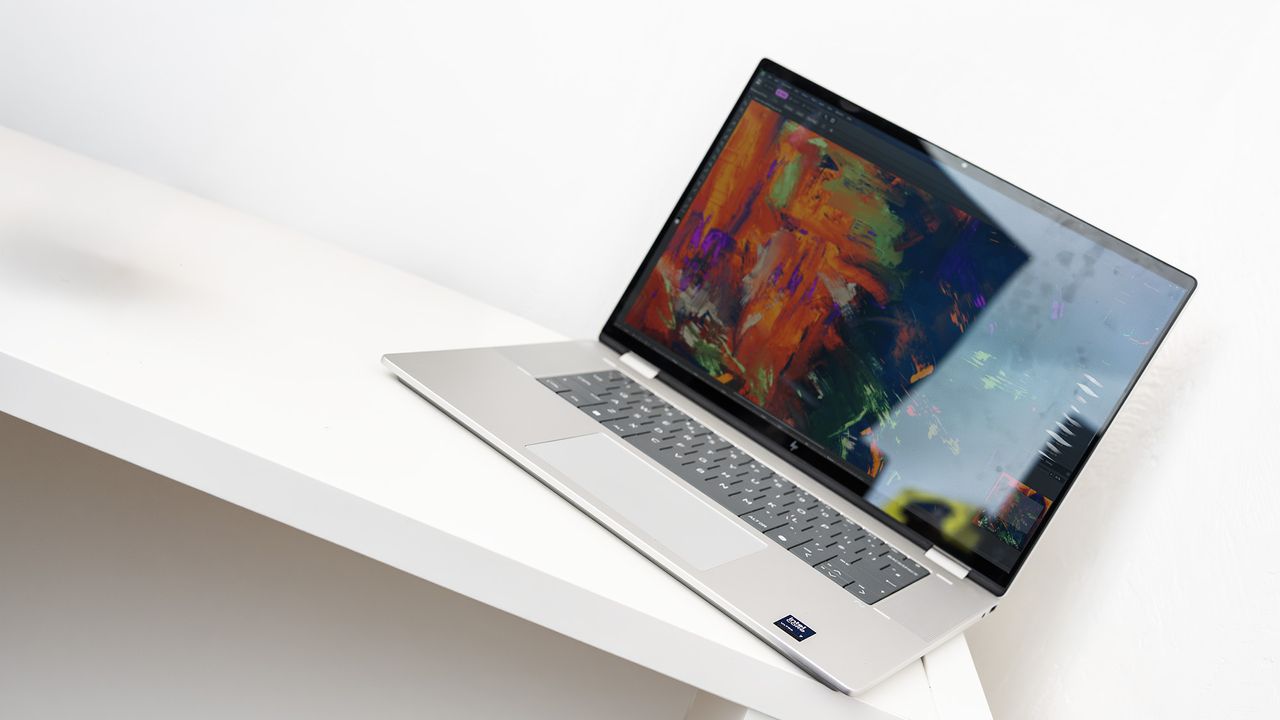
HP OmniBook X Flip 16 laptop.

A big two-in-one laptop like this is just asking to be folded back into tablet mode and used with a stylus as some kind of digital sketchbook. Windows 11 still has some drawbacks as a touchscreen operating system compared to iPadOS or Android, but a canvas of this size has advantages for all kinds of photo work, from editing your images to displaying to clients.

The form factor also makes it a versatile machine for all kinds of other uses, from office work to video calls to watching movies in bed, and while the 16in screen here has its drawbacks in terms of colour accuracy, it’s a well made example of what a two-in-one laptop can do.

(Image credit: Ian Evenden / Digital Camera World)

Specifications

CPU

Intel Core Ultra 7 256V

NPU

Intel AI Boost (47 TOPS)

Graphics

Intel Arc 140V

Memory

16GB LPDDR5

Storage

1TB SSD

Screen

16in, 1920 x 1200, IPS touchscreen, 165Hz

Ports

2x USB-A, 1x Thunderbolt 4 w DP 2.1 and charge support, 1x HDMI 2.1, 1x USB-C 10Gbps w DP 1.4 and charge support, 1 audio jack

Dimensions

356 x 15 x 245 mm

Weight

1.88kg

Price

One look at the price of the OmniBook X Flip 16 and you’ll know it has a lot of competition. Most major manufacturers will sell you something for the kind of money HP is asking, and in the case of something like the MacBook Air or gaming laptops from Asus or Acer you’ll get an excellent machine. It’s the screen size and two-in-one functionality that make this laptop stand out, however, and you won’t find that combo in too many other places.

Design & Handling

The HP Omnibook X Flip 16 is built around flexibility, and that shows throughout its design and feature set. At first glance, it looks understated and businesslike. The aluminium chassis and minimal HP branding give it the appearance of an enterprise laptop rather than a flashy creative machine, but that restraint has an upside: the build feels solid and dependable, with no flex in either the body or the screen, whether you’re using it as a laptop or tablet, making it reassuring to carry in a camera bag alongside other gear.

(Image credit: Ian Evenden / Digital Camera World)

The defining design feature is the Flip’s hinge that can fold all the way back into a tent or full tablet mode. This flexibility is particularly useful for photographers who need to review images with clients, sketch lighting setups using the (optional, rechargeable, pressure-sensitive) stylus, or make quick brush-based edits. In tablet or tent mode, the keyboard automatically disables, so you don’t have to worry about accidental key presses. Despite its large 16‑inch display, the laptop weighs less than 2kg, making it surprisingly manageable for extended sessions away from a desk. It also makes it into a much larger tablet than you’ll get from the usual suspects, the screen providing plenty of real estate for your stylus to roam across.

(Image credit: Ian Evenden / Digital Camera World)

The 16‑inch 1920x1200 IPS touchscreen uses a 16:10 aspect ratio, which is well suited to photo grids and tool-heavy editing interfaces. While its colour display is limited (managing only 62.5% of the sRGB gamut), it’s bright at 400 nits and highly responsive, making it comfortable for image selection, rough edits, and stylus-based adjustments. Other laptops in the Omnibook range get OLED panels that can display most of the DCI-P3 colour gamut, making this IPS a bit of a disappointment.

Port selection has been well thought through. The Omnibook X Flip 16 features Thunderbolt 4, plus enough extra ports to make it easy to connect external drives, card readers, or a monitor without adapters. Both USB‑C ports support charging, and HP’s usual excellent 65W USB-C charger is in the box.

(Image credit: Ian Evenden / Digital Camera World)

Performance

This HP Omnibook X Flip 16 combines an Intel Core Ultra 7 256V processor (with eight cores, and capable of processing eight threads simultaneously), plus 16GB RAM, a 1TB SSD, Intel Arc 140V integrated graphics, and an Intel AI Boost NPU that contributes to its Copilot+ status. In testing, that CPU/NPU package sits around the lower‑middle of its price class: Geekbench and Cinebench results place it slightly ahead of some thin-and-light laptops but behind heavy hitters like the MacBooks.

For stills work, the most relevant datapoint is that Photoshop runs pretty well, helped by fast SSD storage and the now-baseline 16GB memory for demanding creative use. Where the OmniBook can feel snappier than its CPU class suggests is in AI operations: these tools get a nice boost from the NPU, but you’re not going to get the kind of performance you’d get from something with a larger GPU. If you find yourself upscaling for prints or tight crops, that acceleration can be genuinely useful.

(Image credit: Ian Evenden / Digital Camera World)

The biggest performance constraint is the graphics performance for heavier workloads like video effects. Even if you primarily edit photos, this matters because many modern enhancement tools (denoise, super‑resolution, complex effects) increasingly lean on GPU acceleration, so the heaviest steps in your pipeline may take longer.

Display performance also affects editing speed, because colour confidence reduces second‑guessing. The touchscreen is bright enough and very responsive, but its limited colour coverage will be a compromise for colour‑critical work. Practically, that means you may want a calibrated external monitor for exporting files for print or anything that requires accurate colour, while using the built-in panel for selects, rough grades, and preview delivery.

Mobility is a genuine strength of the OmniBook. Battery life reached nearly 15 hours in our tests, opening up the possibility of long editing sessions on location or away from plug sockets. Connectivity helps a photo desk setup too: Thunderbolt 4 with DisplayPort plus HDMI makes it easy to run an external display, and the USB-A/USB-C mix supports fast external SSDs (charging uses up one USB‑C port, and a Thunderbolt dock is a useful thing to have here).

Verdict

Devices like this with 16-inch screens often get lumped into the ‘desktop replacement’ category - a machine that’s a little too large to slip into your bag but easy enough to tidy away when someone comes to visit. The OmniBook X Flip 16 changes this perception by creating a large two-in-one laptop with a touchscreen that can be folded back to make it a kind of pseudo-tablet, with stylus compatibility. The model we have here uses an IPS screen that’s not ideal for perfect colour reproduction, but shows how good a screen this big can be for photo editing and digital painting.

Features

★★★★☆

Fast connectivity and a large touchscreen that folds back into a tablet for drawing on.

Design

★★★★☆

It’s a big laptop, and can be cumbersome, but it’s worth it for the extra screen space.

Performance

★★★☆☆

The Core Ultra 7 processor does well enough, but the reliance on integrated graphics means complex effects can be slow.

Value

★★★★☆

There are a lot of laptops available at this price point, but if you want the big touchscreen, it’s worth the cost.

Overall

★★★★☆

Sign up to read this article
Read news from 100's of titles, curated specifically for you.
Already a member? Sign in here
Related Stories
Top stories on inkl right now
One subscription that gives you access to news from hundreds of sites
Already a member? Sign in here
Our Picks
Fourteen days free
Download the app
One app. One membership.
100+ trusted global sources.