Get all your news in one place.
100’s of premium titles.
One app.
Start reading
Windows Central
Windows Central
Technology
Harish Jonnalagadda

With the Galleon 100, Corsair integrated the Stream Deck into a mechanical gaming keyboard, and it's brilliant — this may just be the most customizable keyboard yet

Corsair Galleon 100 mechanical keyboard review on Windows Central.

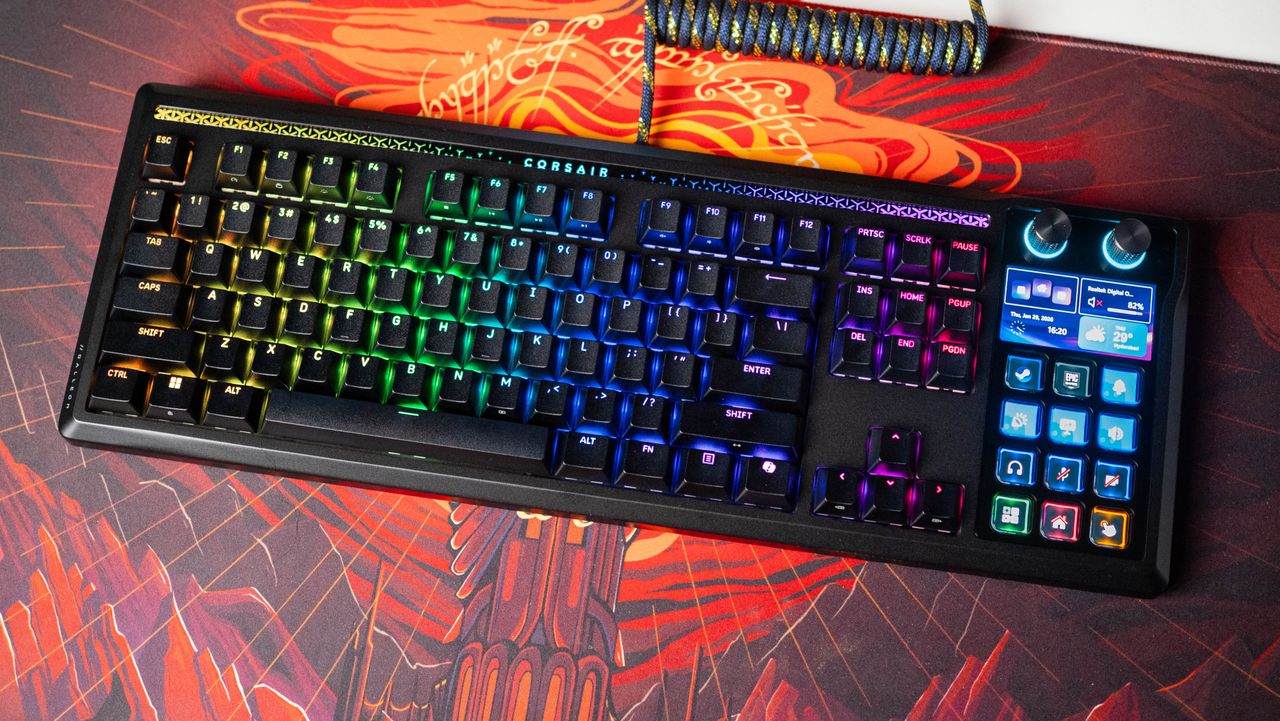
I use my Stream Deck+ every day, and I enjoy mechanical keyboards, so it's great to see Corsair combine the two products into one. The Galleon 100 is a regular full-size mechanical keyboard, but instead of the number pad, you get an Elgato Stream Deck instead, with 12 buttons that can be easily configured to do the same set of actions as any standalone Stream Deck.

If anything, Corsair is going beyond that by adding game-level integration, and it is pretty nifty. The keyboard itself has a lot going for it thanks to a new linear switch and gasket-mounted design, and having used it for all of January, I can say with some confidence that it is one of the most distinctive — and fun — mech keyboards available today.

How much does the Corsair Galleon 100 cost?

The Galleon 100 has a rigid chassis with no flex, but it's only available in a single color variant. (Image credit: Apoorva Bhardwaj / Windows Central)

Corsair debuted the Galleon 100 on January 29, and the keyboard is now available in all the countries where the brand has an official presence. It costs $349 in the U.S., CAD $499 in Canada, £309 in the U.K., and the equivalent of $349 in most global markets. Similar to other Corsair keyboards, you get a standard two-year warranty. The keyboard comes with a single switch option (the MLX Pulse linear switch) and is sold in a black color variant.

Is the Corsair Galleon 100 a good keyboard?

Corsair provides a decent magnetic wrist rest with the keyboard, and as this is a full-size keyboard, it takes up a lot of room on your desk. (Image credit: Apoorva Bhardwaj / Windows Central)

The Galleon 100 is a definite upgrade over other Corsair boards, and while it isn't quite as heavy as some of the DIY keyboards I used — like the Angry Miao Cyberboard R4 or the Keychron Q1 Pro — it has a reassuring heft, and the build quality is excellent. The keyboard has a gasket-mounted design, and it has much better feedback than the usual top-mounted designs. It isn't quite as bouncy as the Q1 Pro, but it is much better than the magnetic switch-based keyboards I tested in recent months.

The ANSI version of the Galleon 100 gets the standard 87 keys, with a 5-inch panel on the right that doubles as a Stream Deck. It's a pretty cool idea to integrate the control center into the keyboard, and the Galleon 100 isn't any bigger than regular full-size boards.

The unique Stream Deck integration is what ultimately makes this a great keyboard. (Image credit: Apoorva Bhardwaj / Windows Central)
You also get an RGB Mood Bar with customizable lighting. (Image credit: Apoorva Bhardwaj / Windows Central)
The default keys are average at best, but they're built well and have a matte texture. (Image credit: Apoorva Bhardwaj / Windows Central)
The keyboard uses a standard profile, and it has raised feet with two angles. (Image credit: Apoorva Bhardwaj / Windows Central)

It doesn't have RGB lighting zones on the sides like the K100, but there's an RGB Mood Bar above the keys that immediately identifies this as a gaming keyboard, and while it doesn't diffuse lighting that well, it is a cool ambient effect nevertheless.

If anything, the keys are the only letdown on this keyboard; the quality and feel of the keys don't quite mesh with the switches that it comes with. That said, I like the matte texture, and the keys are PBT double-shot and have shine-through legends with decent RGB lighting. It's easy enough to switch out the keys should you wish to do so, and I plan to do just that — a set of clear keys would look terrific on this board. On that note, Corsair only sells the Galleon 100 in black, and I would've liked to see a white variant.

You can switch out the keys and the underlying linear switch without any issues. (Image credit: Apoorva Bhardwaj / Windows Central)
The switch has good light transmittivity. (Image credit: Apoorva Bhardwaj / Windows Central)
This is a great overall linear switch, and one of the highlights of the keyboard. (Image credit: Apoorva Bhardwaj / Windows Central)
Unlike most recent switches, it has standard 5-pin connectors, and isn't a magnetic switch. (Image credit: Apoorva Bhardwaj / Windows Central)

The switch is a delight to use; it is a custom Corsair MLX Pulse pre-lubed linear switch with exquisite feedback, and there isn't much better you can get on a pre-built gaming keyboard. I prefer slightly heavier switches, but even with this one, the 45g actuation is pretty great, and it is the highlight of the Galleon 100. It has a 2.0mm actuation point with 3.6mm total travel, and while it isn't a magnetic switch with adjustable keystrokes, that isn't a huge limitation.

The 45g actuation is pretty great, and it is the highlight of the Galleon 100.

The keyboard has two USB-C connectors, but you need to use just one to power the board itself — the secondary cable is to enable USB passthrough. If you don't need the feature (I didn't), you can just use a single USB cable with the Galleon 100. As I use a custom CableMod coiled keyboard cable, this is what I did. Corsair bundles two decent USB-C to USB-A cables in the box, and you get a magnetic wrist rest with good padding.

Stream Deck integration brings limitless customizability

You can easily customize what shows up in this area, and the 12 buttons give you plenty of flexibility. (Image credit: Apoorva Bhardwaj / Windows Central)

Obviously, the biggest differentiator with the keyboard is a 5-inch 720p full-color LCD display that's located where you would normally see a number pad. This is where the dedicated Stream Deck with 12 buttons is housed, and there are two rotary dials above it as well. You get to take full advantage of the panel; there are six preset screensavers, and you can cycle through these with relative ease — that's just plain cool to see on a keyboard.

You can easily toggle between a standard number pad and a Stream Deck; it's the defining feature of the keyboard.

What I like about this implementation is that you can easily toggle between a standard number pad and a Stream Deck; it's the defining feature of the keyboard. As someone who likes using full-size boards, it is a definite bonus. The keys on the Stream Deck are similar to those on my Stream Deck XL, and the feature-set itself is nearly identical.

A cool addition is game integration that lets you tailor actions based on individual titles. (Image credit: Apoorva Bhardwaj / Windows Central)
Or you can just use it as a number pad. (Image credit: Apoorva Bhardwaj / Windows Central)
Or fill it up with emoji — Elgato's software has endless options. (Image credit: Apoorva Bhardwaj / Windows Central)
You get two rotary dials on the keyboard; one can be used to adjust the volume, and the other to toggle through the various panes on the control center. (Image credit: Apoorva Bhardwaj / Windows Central)

The Galleon 100 gets additional extras by way of game profiles; basically, you get the ability to customize the buttons according to individual games, and that unlocks an additional layer of customizability. I tested it with Train Sim World 6, and it was pretty cool. But it's beyond gaming where I saw the most amount of use with the Stream Deck; it's just effortless to control Spotify, view system stats in real-time, and launch utilities.

My only point of contention with this keyboard is that it needs two different software utilities to control; the keyboard part of it is handled by Corsair's Web Hub, and it's easy enough to change settings, assign lighting, and so on. I have a half-dozen Corsair products, so there isn't any way to sync lighting with the rest of the gear that connects via iCUE. With the Stream Deck, you'll need to use Elgato's utility, and it would've been nice to just have a single location to change everything.

The keyboard uses a standard profile, and it has raised feet with two angles. (Image credit: Apoorva Bhardwaj / Windows Central)
The rear of the keyboard is plain, and you don't get any weight plates — that's still limited to boutique brands. (Image credit: Apoorva Bhardwaj / Windows Central)
But there is a USB passthrough mode, which is limited to USB 2.0 devices. (Image credit: Apoorva Bhardwaj / Windows Central)
There are two USB-C ports, and they're accessible without any hassle — unlike the Vanguard 96 Pro. (Image credit: Apoorva Bhardwaj / Windows Central)
The keys have shine-through legends. (Image credit: Apoorva Bhardwaj / Windows Central)
Overall, the RGB lighting effects are quite good, while not being overbearing. (Image credit: Apoorva Bhardwaj / Windows Central)

The customizability extends to the hardware as well; you can easily change the keys or the switches, with standard 3- and 5-pin switches slotting in without any issues. That said, a big draw with the Galleon 100 is the MLX Pulse switch, and it is one of the main reasons why I used the keyboard for most of the month. The linear switch is great for gaming and regular use, and I like the feedback it offers, and the acoustics are on point within the case.

Should you buy the Corsair Galleon 100?

The RGB Mood Bar isn't distracting, and it does a good job with diffused lighting. (Image credit: Apoorva Bhardwaj / Windows Central)

You should buy this if ...

You need a great mechanical gaming keyboard

You have a need for the Stream Deck

You need a keyboard with extensive hardware and software customizability

You should not buy this if ...

You don't need the extras

You want VIA integration, or a custom gasket-mounted board with other switch choices

It's hard to stand out in the keyboard category, but that's exactly what Corsair did with the Galleon 100. You're essentially getting two products here, and the pricing reflects that — it is considerably costlier than the rest of Corsair's portfolio and the best gaming keyboards.

If you need the usability of a Stream Deck that's built into the keyboard, there really isn't anything quite as good. Otherwise, there are plenty of regular mechanical keyboards available, with Corsair's own Makr 75 Pro (which I'll be reviewing next) coming with hall effect switches in a smaller design.

Follow Windows Central on Google News to keep our latest news, insights, and features at the top of your feeds!

Sign up to read this article
Read news from 100’s of titles, curated specifically for you.
Already a member? Sign in here
Related Stories
Top stories on inkl right now
One subscription that gives you access to news from hundreds of sites
Already a member? Sign in here
Our Picks
Fourteen days free
Download the app
One app. One membership.
100+ trusted global sources.