Sending a WhatsApp message to one customer takes seconds. Sending 80 personalized messages without mixing up names, duplicating reminders, or losing track of progress is a different challenge.
For small businesses, this raises a practical question: should they invest in a customer relationship management (CRM) system, connect to the WhatsApp Business API, or use a simpler browser-based messaging tool?
The answer depends less on how many contacts a business has and more on what it needs to accomplish.
A company sending occasional updates to 100 existing customers may only need a well-organized spreadsheet and a suitable sender tool. Another company managing 50 active sales opportunities may already need a CRM.
Understanding that difference can save time, reduce unnecessary software expenses, and make customer communication easier to manage.
Why a Small WhatsApp Contact List Can Become a Big Task
Consider a tutoring center preparing class reminders for 80 parents who have agreed to receive WhatsApp updates.
Its spreadsheet contains each parent's name, phone number, course, and upcoming session date.
A typical reminder might read:
"Hi Maya, your English class starts Saturday at 10 AM. Please let us know if you need to reschedule."
Writing the message is straightforward. Sending the correct version to every parent takes more effort.
Employees must check names, update schedules, open individual conversations, and keep track of completed reminders. Interruptions or incorrect spreadsheet entries can lead to duplicate messages or inaccurate information.
The business doesn't necessarily need automated sales pipelines, customer scoring, or advanced reporting.
It needs a reliable way to move accurate information from its spreadsheet into WhatsApp messages.
This is an important distinction: sending messages efficiently and managing customer relationships are different business problems.
What Features Does a Small WhatsApp Campaign Actually Need?
Before comparing software, businesses should identify the steps involved in their communication workflow.
For a typical campaign involving 50–100 opted-in contacts, the most useful capabilities are often straightforward.
|
Requirement |
Why it matters |
|
Excel or CSV contact import |
Reduces manual phone number entry |
|
Message personalization |
Adds relevant customer details |
|
Sending controls |
Helps manage the sending process |
|
Progress tracking |
Shows which messages were processed |
|
Result export |
Supports follow-up and recordkeeping |
These functions do not automatically require a complete CRM or an API integration.
However, businesses still need accurate customer data, appropriate permission to contact recipients, and a process for responding to replies.
The goal is to reduce repetitive administration without adding software complexity that employees do not need.
When a WhatsApp Sender Extension Is Enough
A browser extension can be a practical starting point when contacts are already organized in Excel and the main task involves preparing personalized outbound messages.
Instead of repeatedly copying phone numbers and changing message details, employees can import a prepared list and use available personalization fields.
The WhatsApp Sender Extension, available as WA Bulk Message Sender in the Chrome Web Store, supports Excel contact import, message variables, customizable sending intervals, pause-and-resume controls, and sending-result exports through WhatsApp Web.
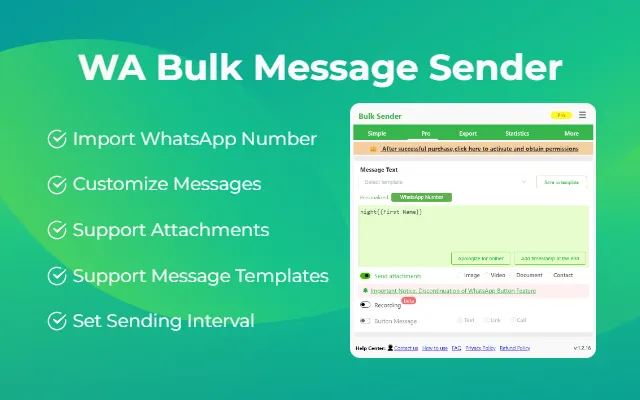
For the tutoring center, this provides a more organized way to prepare class reminders and review which sending attempts were completed or unsuccessful.
The extension also allows businesses to work with imported phone numbers without saving each recipient individually as a phone contact.
That convenience does not remove the requirement to obtain appropriate permission before sending messages.
Browser extensions are particularly useful when a business has a clearly defined contact list and a straightforward communication task.
They are less suitable when several employees need to maintain shared customer histories, assign sales opportunities, or coordinate complex support operations.
When a Web Dashboard Makes Campaign Preparation Easier
Some small businesses need a larger workspace for preparing campaigns, even though they do not require a complete CRM.
Consider a retailer announcing a product restock to customers who have previously requested updates.
The team wants to review its contact list, prepare personalized messages, attach product information, and check the sending settings before opening WhatsApp Web.
RocketSender offers a WhatsApp Sender workflow that combines a web dashboard for campaign preparation with a Chrome extension for sending messages through WhatsApp Web.
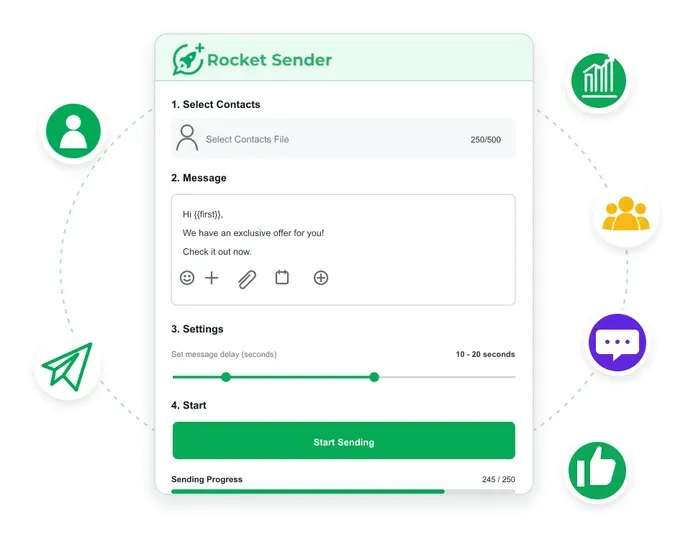
Employees can organize contacts, customize message content, add supported attachments, and configure sending intervals in the dashboard. The actual sending then takes place through the extension.
This arrangement separates campaign preparation from execution and gives employees a larger workspace to review their tasks.
It does not turn RocketSender into a CRM or an official WhatsApp Business API service.
For small teams, its value lies in organizing the outbound sending workflow rather than adding unnecessary enterprise features.
What Should Businesses Check Before Choosing a Free Sender?
Free messaging tools can be attractive to businesses that only need occasional customer updates.
However, a free plan does not necessarily include every feature or the sending capacity required for a particular campaign.
Businesses should check the current plan conditions before preparing a time-sensitive task.
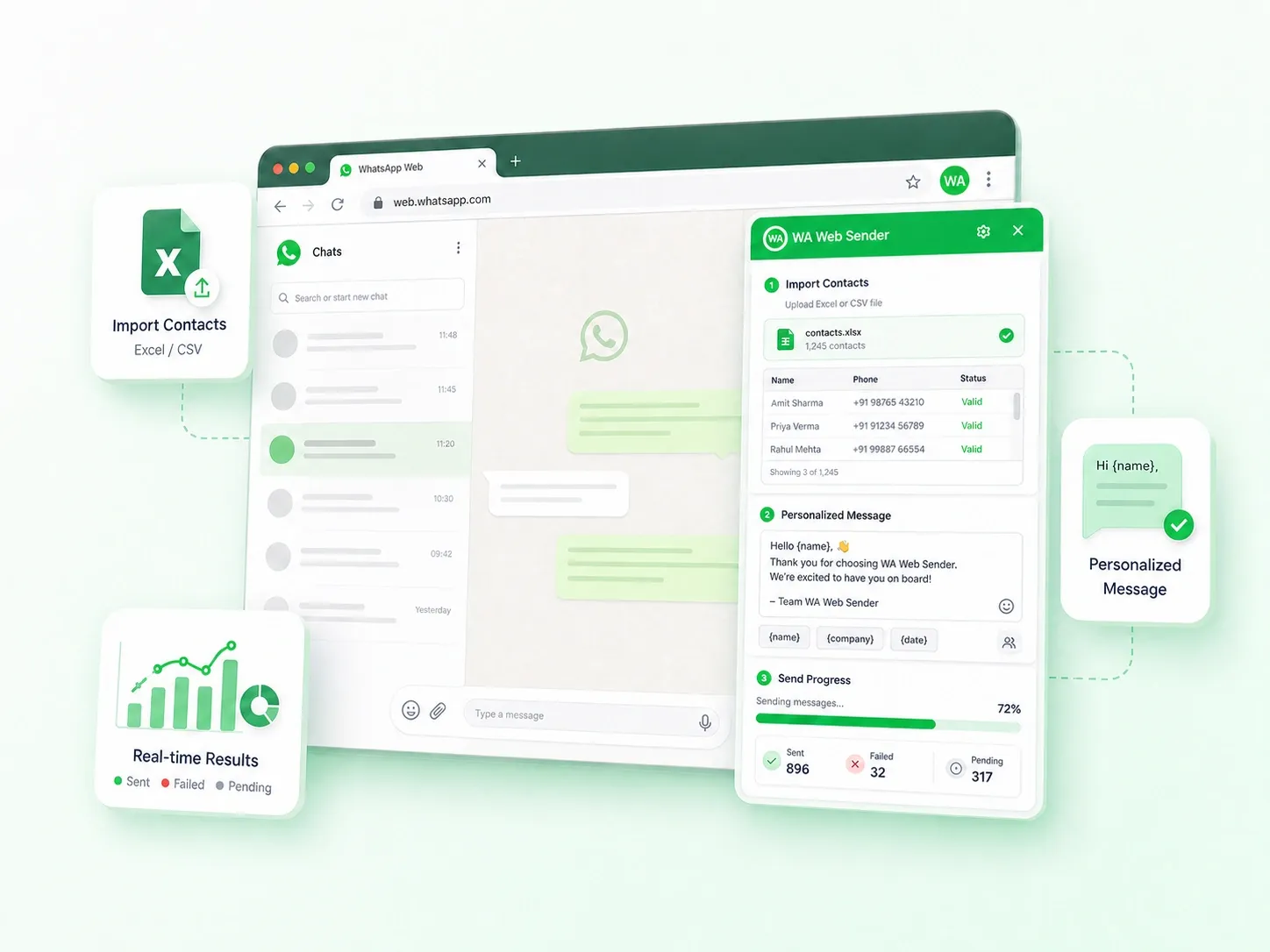
The official wa web sender website, for example, provides information about the WA Bulk Message Sender extension, including its installation process, Excel contact import, personalization features, attachments, and sending controls.
WAWebSender.com is the official website for the same extension available in the Chrome Web Store, not a separate messaging platform.
The website also explains the browser-based workflow and provides information about available free and paid options.
Before choosing a plan, businesses should confirm whether its features and sending allowances support their intended contact list, message format, and workflow.
These considerations matter more than a broad promise of free or unlimited messaging.
When Does a CRM Become the Better Investment?
Now consider a property agency managing 60 active prospects across four sales representatives.
The agency's biggest challenge is no longer sending messages. It is knowing what happens between conversations.
Employees need answers to questions such as:
- Which salesperson is responsible for each prospect?
- What properties has the customer already viewed?
- When was the last conversation?
- Which prospects need follow-up tomorrow?
- Can another employee continue the relationship without losing important information?
A basic sender extension does not automatically provide these capabilities.
A CRM becomes more valuable when businesses need shared records, customer ownership, sales stages, task assignments, and reporting across team members.
This is why contact count alone can be misleading.
A business sending updates to 500 customers may have simpler requirements than a sales team managing 50 ongoing customer relationships.
A sender helps organize message delivery. A CRM helps organize relationships and the work surrounding them.
When Is the WhatsApp Business API Worth Considering?
The official WhatsApp Business Platform is designed for businesses requiring capabilities beyond ordinary browser-based sending.
For example, an online retailer may want its order-management system to trigger transactional notifications. A larger customer support operation may need structured integrations and coordinated workflows across multiple employees.
These requirements are different from uploading a spreadsheet and preparing personalized reminders.
The Business Platform also involves approved messaging templates, technical setup, applicable Meta charges, and potentially additional service-provider fees.
Meta's October 2026 pricing changes introduced charges for qualifying service messages after the first 1,000 free service messages per business phone number each month.
Those charges concern the WhatsApp Business Platform, not the same billing model used by browser extensions operating through WhatsApp Web.
However, browser extensions do not provide the same official integrations, approved messaging infrastructure, or operational capabilities as the API.
Businesses should choose between these approaches based on what their systems need to accomplish, rather than treating them as interchangeable alternatives.
Which WhatsApp Tool Fits Your Business?
|
Business situation |
Suitable starting point |
|
Occasional direct customer conversations |
WhatsApp Business App |
|
Personalized updates from an Excel contact list |
WhatsApp sender extension |
|
Campaign preparation in a larger browser workspace |
Sender with a web dashboard |
|
Shared customer records and multiple sales representatives |
CRM |
|
Programmatic messages and business-system integrations |
WhatsApp Business API |
These approaches are not necessarily mutually exclusive. As a business grows, it may use different tools for different communication needs.
A Practical Workflow for Your First 80 Contacts
A well-prepared campaign is more useful than one that simply sends messages quickly.
For a small contact list, the process can remain straightforward.
Step 1: Confirm the Recipient List
Start with customers who have agreed to receive the relevant type of WhatsApp communication.
A phone number collected during an inquiry or purchase does not automatically establish permission for unrelated marketing messages.
Remove outdated records, duplicates, and contacts who have opted out.
Step 2: Clean the Spreadsheet
Make sure phone numbers use the correct international format and that personalization fields are accurate.
For example:
|
Name |
Phone |
Course |
Next session |
|
Maya |
Example number |
English |
Saturday, 10 AM |
|
Daniel |
Example number |
Mathematics |
Monday, 4 PM |
Clear column names make it easier to review the list and match the correct information to each recipient.
Step 3: Write a Useful, Personalized Message
Personalization should improve the information customers receive.
A reminder containing the correct appointment date is more valuable than a generic message that merely inserts the recipient's name.
Keep the message concise, explain its purpose, and make it easy for customers to respond.
Step 4: Test Before Sending
Review the recipient list, send a test message to an internal contact, and check that all personalization fields appear correctly.
If the campaign includes attachments, verify that the selected files are appropriate and supported by the available tool and plan.
Use the tool's sending controls to manage the task, but do not assume that a particular interval guarantees account safety.
Step 5: Review Results and Manage Replies
After sending, inspect the available results for unsuccessful attempts or incorrect recipient information.
A message marked as sent by a tool is not necessarily proof that the customer received, read, or responded to it.
Record completed requests, update customer information, and respect any request to stop future messages.
This final step makes the next campaign easier to prepare and reduces unnecessary repeat communication.
Is Sending to 50–100 Contacts Automatically Safe?
No. A small contact list does not create an exemption from WhatsApp's policies.
Businesses must obtain appropriate permission, respect opt-out requests, and avoid unwanted or repetitive promotional messages.
There is no universal daily sending quantity or message interval that guarantees an account will remain unrestricted.
Browser-based tools can help organize sending tasks, but they cannot guarantee message delivery or prevent WhatsApp account limitations.
The responsible approach is to prioritize customer relevance and consent rather than relying on an arbitrary sending threshold.
Frequently Asked Questions
Do I need a CRM to send WhatsApp messages to 100 contacts?
Not necessarily. If the task involves occasional personalized updates to opted-in contacts, a spreadsheet-based workflow may be sufficient. A CRM becomes more useful when businesses need shared customer records, sales pipelines, and ongoing team coordination.
Can I send WhatsApp messages without saving every phone number?
Some browser-based sender tools support importing recipient numbers directly from a spreadsheet. Appropriate permission to contact each recipient is still required.
Is a WhatsApp sender extension the same as the Business API?
No. Browser extensions operate through WhatsApp Web. The official Business Platform supports programmatic messaging, approved templates, and integrations with business applications.
Does a free WhatsApp sender include unlimited messaging?
Not necessarily. Free and paid plans can have different features or allowances. Actual sending availability also depends on WhatsApp's policies and account status.
Start With the Workflow, Not the Software
A business with 80 contacts does not automatically need an expensive CRM or API integration.
If the immediate requirement is preparing personalized messages from a spreadsheet, a browser-based sender may provide the necessary tools.
When employees want a larger workspace for campaign preparation, a web dashboard can make that process easier.
A CRM becomes more relevant when several people need to manage ongoing customer relationships. The WhatsApp Business Platform becomes appropriate when communication needs to connect directly with other business systems.
The most effective choice is not necessarily the most advanced tool.
It is the one that solves the business's actual communication problem without introducing unnecessary complexity.