Get all your news in one place.
100's of premium titles.
One app.
Start reading
Tom’s Guide
Tom’s Guide
Technology
Tom Pritchard

This is the one feature I miss from a real keyboard when I type on my phone — luckily, I've found the best alternative

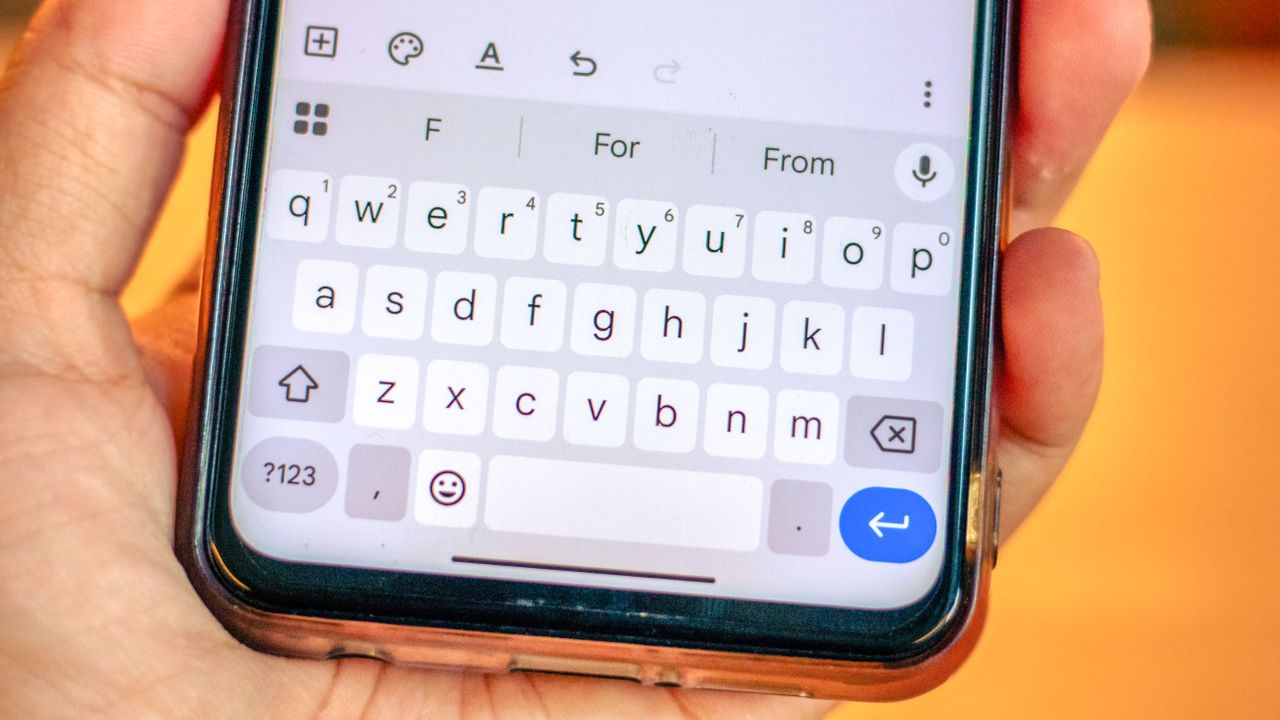
Gboard app on android.

A huge chunk of my life involves typing, and despite all the years and experience I have at throwing keystrokes and words together, I am extremely bad at it. Well, it's not an issue of speed or proficiency, just that I have fairly clumsy hands and make a boat-load of mistakes in the process.

The severity of the mistakes depends on the kind of keyboard I'm using, too. Mechanical keyboards are the best, while touchscreen keyboards are the absolute worst. Had it not been for autocorrect, the stuff I type on my phone would be totally incoherent. Actually, that still happens with autocorrect, because there are times when my typing is so appalling that it just gives up trying to figure out what I'm trying to say.

Touchscreen keyboards are not the easiest thing to self-correct with. Cursor control is possible, but there's significantly less finesse than you'd get with a physical keyboard, and it's all due to the lack of arrow keys. Some mobile keyboards do have options, but I find that none of them work quite as well as Microsoft's SwiftKey keyboard on the best Android phones.

The alternative isn't as accurate

(Image credit: OpturaDesign / Shutterstock)

By now, I imagine that most people will know all about the space bar cursor shortcut. It doesn't matter which phone you have or the keyboard you use; pressing and holding on the space bar lets you move the cursor left or right, depending on how you move your finger.

This option is great in a pinch, but it doesn't offer the same level of precision that you'd get from using a physical button. The same is true for tapping at the area you need the cursor to move to, since that offers even less precision and reliability than the gesture.

In fact, I'd place money on the little stubs we humans call fingers as the reason why such a gesture exists in the first place.

There are plenty of times when I find myself unable to sit at my desk and type on a keyboard. I have a 5-month old baby right now and, as is the case with a lot of babies, he's extremely clingy. I don't know if you've ever tried carrying 16.5 lbs of dead weight on your shoulder, while trying to type with the other hand, but I can promise you it isn't easy.

In these instances, my options are to either stop working and have to catch up later, or rely on my phone to get stuff done. Even though I often resort to dictation and GBoard's speech-to-text feature, I do need to go back and fix various spelling and grammatical mistakes along the way.

Doing that with the space bar gesture, or my particularly stubby digits, does not work very well. In fact, it's a lot more frustrating than simply trying to type one-handed - which is where SwiftKey's arrow keys come into play.

All the benefits of real arrow keys, on a keyboard

There are a couple of things I need to bring up quickly. First up is that SwiftKey only seems to offer arrow keys on Android devices. If you're using one of the best iPhones or an iPad, then you're going to be completely out of luck. Secondly, I know that it's far from the only keyboard that offers some kind of arrow key-like functionality.

Various others, including Gboard, offer a specific arrow key menu that even includes some bonus features. But I don't find them nearly as convenient, especially not when I need to do some quick edits and fix my foolish mistakes before I lose my train of thought.

The thing I like about SwiftKey's arrow keys is that they're part of the main keyboard. It's an option you have to switch on, and it does mean your keyboard takes up even more screen space as a result, but it also means you don't have to go diving back and forth between menus and sub-menus to move the cursor around accurately.

(Image credit: Future)

As you can see with Gboard, getting to the arrow keys is a two-part process. Tap the square menu and tap Text editing before you're actually able to control the cursor. Now imagine having to do that over and over, every time you needed to go back and change something. Whether it's a text message, a social media post, or if you're writing something a little more long-winded, the fact that SwiftKey's arrow keys are just there makes the process a whole lot simpler and faster. Or, that's how it's been in my experience, at least.

Though I will admit, Gboard's text select button is a very nice feature. My one real gripe with SwiftKey, aside from all the AI Microsoft has been shoveling into the app, is that selecting large portions of text is just as irritating as trying to move the cursor without arrow keys. Human fingers are not built for such fine control — especially not mine.

Then again, changing more than a couple of letters at a time is not something I do very often. If I really need to make more substantial changes, most Android phones make it super easy to switch keyboards at the tap of a button.

Bottom line

(Image credit: Microsoft)

While touchscreens are great for a lot of things, typing certainly isn't one of them, which is a shame. I imagine it's rare that most people will go longer than a day without having to type something on their phone. It doesn't matter if you're the kind of person who writes long essays correcting people on Reddit, or if you prefer to keep things short and sweet; it's all typing in the end.

Having a feature that makes it easier to fix all the mistakes you'll be making removes a whole lot of frustration from the equation. Autocorrect has improved a lot over the years, especially if you opt for third-party keyboards, but it can't fix everything. The increased popularity of the word ducking since the invention of the iPhone is a testament to that.

Arrow keys exist on physical keyboards for a reason, and it's about time that mobile keyboards figured that out. Even the ones that already have don't make the process easy, and it ensures that Microsoft retains my keyboard loyalty until they do. Which is not something I ever thought I'd say, especially not after seeing what Microsoft did to Skype.

More from Tom’s Guide

Sign up to read this article
Read news from 100's of titles, curated specifically for you.
Already a member? Sign in here
Related Stories
Top stories on inkl right now
Our Picks
Fourteen days free
Download the app
One app. One membership.
100+ trusted global sources.