Get all your news in one place.
100’s of premium titles.
One app.
Start reading
Tom’s Guide
Tom’s Guide
Technology
Nick Harris-Fry

This is the most popular free Garmin watch face — here’s 4 things I like and 3 I dislike

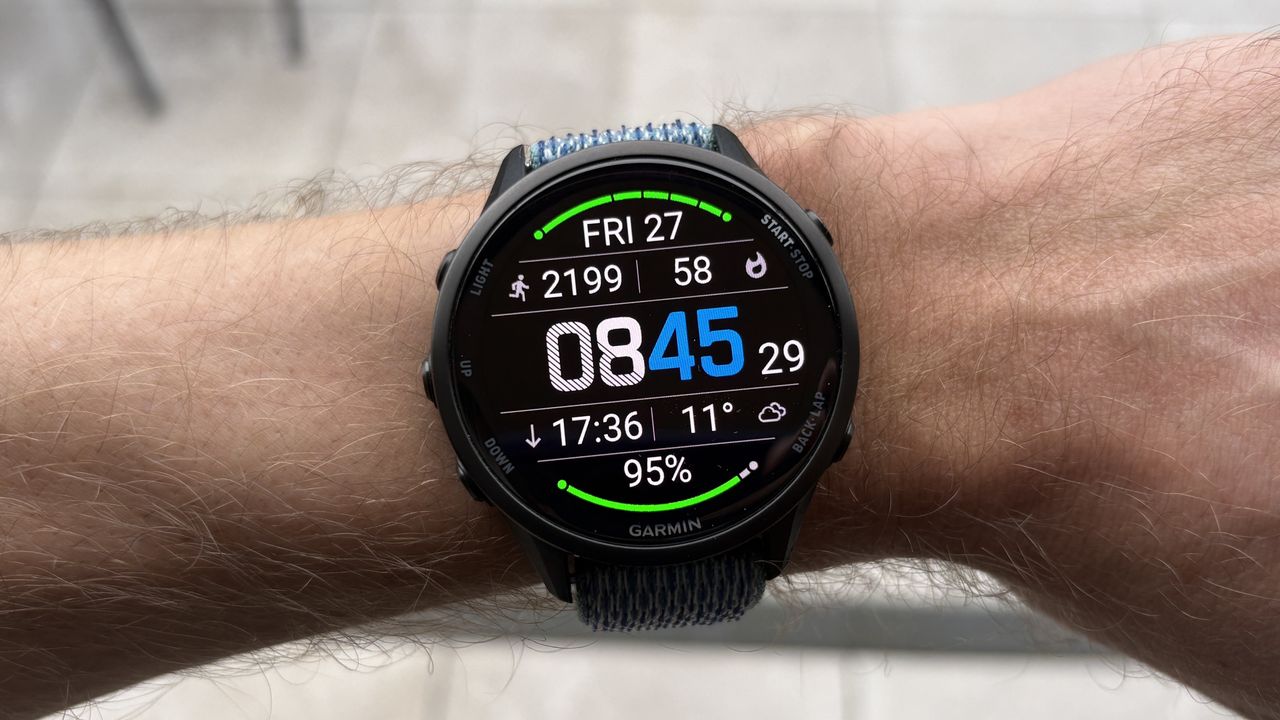
Garmin Glance Watch Face on Forerunner 970.

I love freshening up my Garmin Forerunner 970 with a new face from time to time, but it’s not always easy to find great faces available for free in the Connect IQ app store.

I don’t mind paying for watch faces, but it’s certainly more appealing to get them for free, and the popular free option in the Connect IQ rankings right now is the Glance face.

The Glance watch face was created by developer MobileDriveway, who has also made several variations on it that you have to pay for, but the original remains free and has an average rating of 4.9 out of 5 from a massive 53K reviews.

Given its popularity, I felt like I had to give it a try to see if it could match the best Garmin watch faces I’ve tested. Here’s what I liked and disliked about Glance.

Like #1: It’s very clear and easy to read

(Image credit: Future)

The Glance face lives up to its name in that you can easily see every stat it shows just by glancing at it.

However you choose to customize the face, every stat on show is clear and easy to read, including the time when the face is in always-on mode.

Ultimately, this is the most important thing with any watch face — that it shows what you want to see clearly, and the Glance face certainly ticks this box.

Like #2: The move bar is implemented well

(Image credit: Future)

If you’re sedentary for too long while wearing a Garmin, you’ll get an alert to move, and to fully clear that alert, you have to move for a while to empty your "move bar," which slowly fills up while you remain still.

The Glance face shows the move bar at the top or bottom of the screen, turning red over time while you remain still and turning green when you get up and move to clear it.

I liked the way the move bar is implemented on the watch, as it motivates you to keep tabs on how long you’ve been sitting, and to be active for an extended spell, actually to clear the bar when it’s full.

Like #3: It shows a lot of stats

(Image credit: Future)

With bars at the top and bottom of the screen, plus sections for five more stats along with the time, the Glance face shows a whole lot of data in an admirably clear way.

You can customize the data you want to see in the Connect IQ app, as well as actually make a section show no data at all if you want a less cluttered screen.

Like #4: It’s free

The Glance face’s popularity is no doubt partly down to the fact that it’s completely free, because this is becoming increasingly rare in the Connect IQ store in my experience.

Most of the watch faces I’ve tried cost $2-$5, which isn’t a lot of money, but enough to be off-putting when you get a lot of stock faces for free, and might have already spent hundreds of dollars on your watch.

Dislike #1: It looks a little dated

(Image credit: Future)

Glance had the best rating of any Garmin watch face in 2022, but the design and fonts that shone then now look a little dated in my opinion.

It reminds me of stock faces from older Garmin watches like the Forerunner 245 and doesn’t suit the bright AMOLED displays, which are now standard in the brand’s line-up.

That’s not to say it looks bad, exactly; it’s just not as elegant as some other options I use regularly, like the Portal Hybrid watch face.

Dislike #2: It doesn’t offer as many stats as other faces

Most of the Garmin watch faces I’ve tried recently show all kinds of training stats as well as the basics like step or calorie counts, but the Glance face doesn’t let you add things like weekly run distance or recovery time to the face.

These aren’t essential, and there are a lot of stats to pick from, but I like having certain stats available on all my watch faces, so I did miss them.

Dislike #3: You have to customize it in the ConnectIQ app

(Image credit: Future)

Some of the watch faces I’ve been testing out lately can be customized on the watch itself, in the same way you make changes to a native Garmin face, which is very handy.

This isn’t the case with the Glance face, which you have to set up in the Connect IQ app. It’s not a major problem, but it’s quicker and more convenient to adjust your face on the watch itself, in my experience.


Follow Tom's Guide on Google News and add us as a preferred source to get our up-to-date news, analysis, and reviews in your feeds.


More from Tom's Guide

Sign up to read this article
Read news from 100’s of titles, curated specifically for you.
Already a member? Sign in here
Related Stories
Top stories on inkl right now
One subscription that gives you access to news from hundreds of sites
Already a member? Sign in here
Our Picks
Fourteen days free
Download the app
One app. One membership.
100+ trusted global sources.