
Get all your news in one place.
100’s of premium titles.
One app.
Start reading
Creative Bloq
Creative Bloq
Technology
Jon Stapley

This is a big, beautiful printer for big, beautiful prints - with 25% off

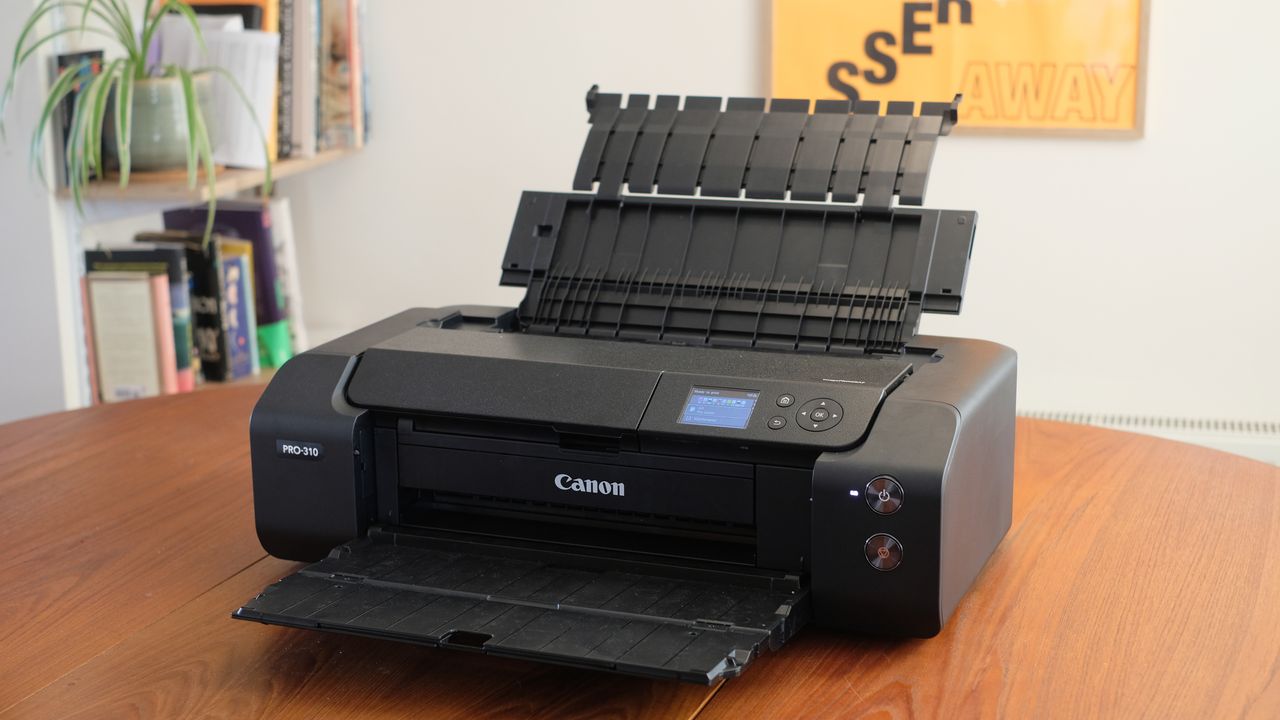
A photograph of the Canon imagePROGRAF PRO-310 printer with input and output trays unfolded.

I love this printer. I love it. I don’t remember the last time I was this sorry to send a piece of review tech back to the manufacturer, even one that took up a big chunk of my dining table. The Canon imagePROGRAF PRO-310 is a thing of beauty.

And for Black Friday, it's down from $972 to $729 at Amazon.

A lush A3+ printer that’s pitched towards photographers, the Canon imagePROGRAF PRO-310 is an updated version of the incredibly popular PRO-300, long regarded as one of the best art printers, particularly for photos. Using individual Lucia Pro II pigment ink cartridges, including a matte black ink for maximising monochrome and a Chroma Optimizer cartridge for smooth gloss, it’s designed to deliver smoothly graduated colors in gallery-quality prints that last and last.

Eager to see how well it performed, I took this printer for a few test-runs with my own photo archive, a mix of colour and monochrome. How did it hold up? Well, I’ve already ruined the suspense on that with my gushing intro, but regardless, let’s find out.

(Image credit: Jon Stapley)

Canon imagePROGRAF PRO-310 review: key specs

Ink type

LUCIA PRO II Ink Tanks: PFI-5100 MBK/ PBK/C/M/Y/PC/PM/GY/R/CO

Cartridges

10

Max. print resolution

4800 x 2400 dpi

Max. print size

A3+ (329 x 483mm)

Connectivity

Wi-Fi, USB-C, USB, Ethernet

Dimensions

639 x 379 x 200mm

Weight

14.4kg

Setup & design

In its marketing material, Canon has waxed lyrical about how ‘beautifully compact’ the PRO-310 is. While I suppose that’s somewhat true in the wider context of large-format printers, when you actually unbox this thing, believe me, ‘compact’ will be one of the last words on your mind. As mentioned it took up a hefty portion of my dining table, especially when the top feed and output tray were unfolded. At 639mm along its longest edge, it’s fine for home use, but it’s not something that’s going to perch elegantly on a desk next to a laptop, let’s be serious.

It's also heavy enough that you won't want to move it around the room on a whim. (Image credit: Jon Stapley)

When folded, the PRO-310 is a sleek black oblong, putting one in mind of Bullet Bill from Super Mario. It feels solid, weighty and well-made, with a sturdy metal chassis. Operation is conducted via the front buttons and 3-inch screen, the latter of which you’ll almost certainly stab a few times with a finger before you realise it’s not a touchscreen. The top input and bottom output trays fold out smoothly, and you can open up the central part to change inks when required, which is very easy.

Ink tanks are easily accessed... (Image credit: Jon Stapley)
... and easily swapped. (Image credit: Jon Stapley)

Indeed, the whole process of setting up the PRO-310 is beautifully smooth. Once powered up, it takes a few moments to agitate its ink, and then it’s ready. If you download the Canon PRINT software to your PC or Mac and then connect the printer via USB or USB-C, you can be ready to start printing within minutes of unboxing.

You can also use the Wi-Fi functionality to connect wirelessly. I’d seen customer reviews online complaining that the Wi-Fi setup was fiddly and annoying, so I unplugged to try it out, and: yes. It is. You have to download additional software for some reason; the printer screen tells you to ‘follow the instructions’ even though these aren’t particularly well-signposted; and you get stuck with a ‘Setting up. Please wait’ dialog for ages that offers no progress bar or any other indication that things are working. Honestly, unless you’re in a situation where doing so is completely impossible, just plug the damn thing in. Your blood pressure will thank you.

The control buttons and screen. (Image credit: Jon Stapley)

Using the screen, you can select your size and type of paper very easily – while all of Canon’s own papers are naturally at the top, the manufacturer does magnanimously include profiles for papers made by other popular manufacturers like Hahnemühle and Fotospeed.

Performance

Oh, man. When you see the deep blacks of an A3+ print on proper matte paper, or the pitch-perfect gloss of a borderless A3 print on Canon’s lustre paper, I think you’ll be blown away. The prints from this thing are gorgeous. It’s capable of capturing such subtle differences in tonality – I was absolutely poring over one image of a sunset sky, marvelling at how all the changes in light across the sky and the water had been transferred perfectly to paper. The nine inks provide impressive detail and amazingly subtle colour transitions.

(Image credit: Jon Stapley)
I just love how the small details of the water have been rendered so well here. (Image credit: Jon Stapley)

Monochrome prints look glorious, with that matte black cartridge putting in the work to produce some of the deepest blacks I’ve seen in a home-printed image. While prints looked great on matte, I have to say that my favourite images were pretty consistently the ones printed on glossy paper like Canon’s Pro Lustre.

A pair of prints made on glossy A4. (Image credit: Jon Stapley)

The colours on glossy just absolutely pop, making the most of the paper’s natural shine. The inclusion of the Chroma Optimizer cartridge – a clear coating that is applied to the prints as a finish – ensures that surface glossiness is smooth and even across the whole print, with none of the extra-shiny dark areas that can blight glossy prints made with pigment-based printers.

Images that had a lot of contrast as a digital file retain it when printed. (Image credit: Jon Stapley)

This versatility, the ability to make brilliant-looking prints on both matte and glossy paper, was a big reason why the PRO-300 was so popular, and Canon hasn’t messed with the winning formula. Unless you need to print larger than A3+, there’s no reason why you’d need another photo printer besides the PRO-310.

(Image credit: Jon Stapley)
Again, I love how well it has handled the shafts of sunlight here. (Image credit: Jon Stapley)

Of course, all that quality takes time. This is not a speedy printer in any sense – even turning it off seems to take a while – and if you have a high volume of printing to do, you can expect to be hanging around. I timed a full-colour print on A3+ matte paper, and it took six minutes and 40 seconds from sending to holding. Still, you can’t rush quality – and it’d be churlish to complain when the results are this good.

An A3+ print made on matte paper. (Image credit: Jon Stapley)

Price

The stated price of the Canon imagePROGRAF PRO-310 is currently $972, up a little from the launch price of $849, which is possibly due to tariffs (though as I write, there are some tempting Black Friday discounts still lingering). In the UK, it’s available for £699. I think that’s a pretty good price for the quality on offer here.

Ink is also a factor, of course. A full set of Lucia Pro II Ink Tanks will run you up about $150 / £154, and given that they only hold 14.4ml of ink, they’re easy to chew through quite quickly (I had to change two during my admittedly enthusiastic testing).

Who is it for?

  • Pro and enthusiast photographers who want to make gallery-quality prints of their images.
Canon imagePROGRAF PRO-310 scorecard

Attributes

Notes

Score

Design:

A big, heavy boy, but sleekly designed with a professional finish.

5/5

Features:

Brilliant suite of printing options, with a few minor operability niggles.

4.5/5

Performance:

Absolutely stunning quality in monochrome and colour.

5/5

Value:

Good value for the printer itself, though ink costs will rack up.

4/5

Buy it if

  • You have high-quality images you want to print
  • You like to use a mix of matte and glossy paper
  • You want a printer that will fit in your home

Don't buy it if

  • You need to print larger than A3+
  • You want to print quickly
  • You want to print cheaply
Sign up to read this article
Read news from 100’s of titles, curated specifically for you.
Already a member? Sign in here
Related Stories
Top stories on inkl right now
One subscription that gives you access to news from hundreds of sites
Already a member? Sign in here
Our Picks
Fourteen days free
Download the app
One app. One membership.
100+ trusted global sources.