Keychron K3 HE: One-minute review
The Keychron K3 HE is an analog keyboard with a minimalist form that belies its wealth of features.

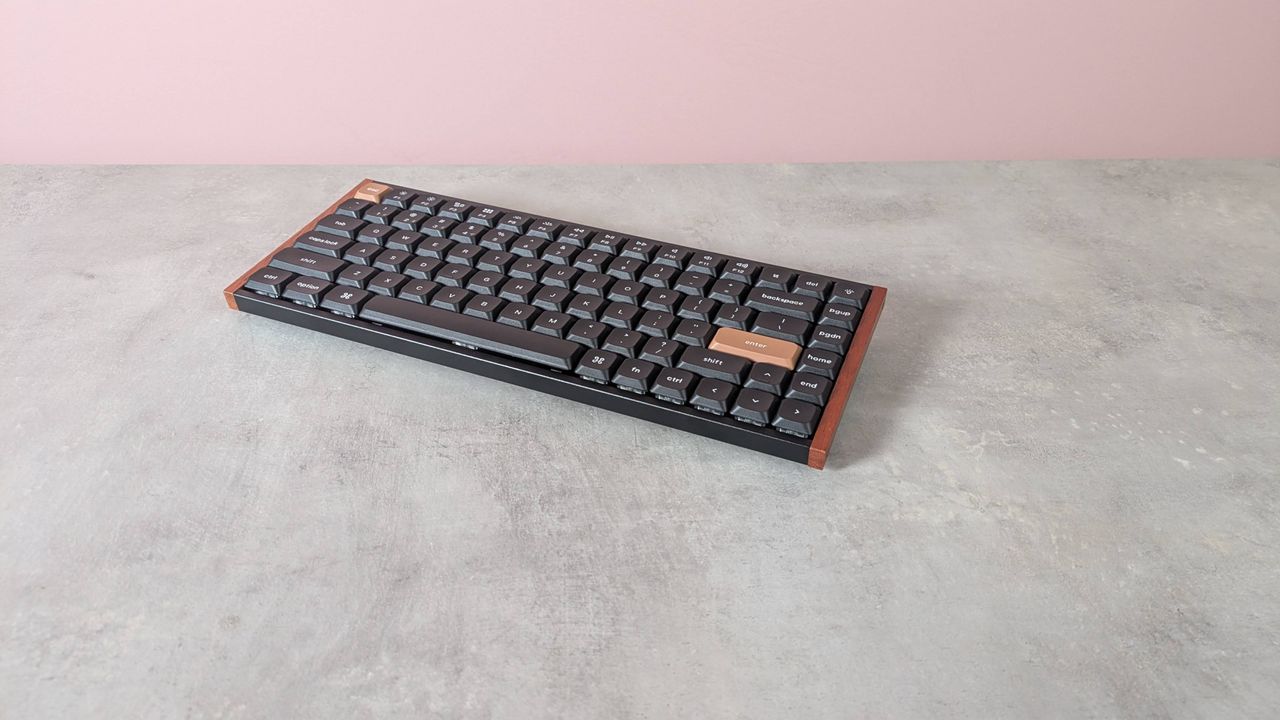
The first thing I noticed was just how compact it is. Even for a board with a 75% layout, it’s small across all dimensions. It’s also quite light, which makes it a good portable option.
More impressive is the fact that build quality doesn’t appear to have been sacrificed. It feels solid and premium, rivaling the best gaming keyboard constructions. I also liked the wooden edge trim, which lends it a certain style that sets it apart from most in this sector, dominated as it is by plastics and metals.
However, despite being quite thin, my wrists still had to bend upwards to a slightly uncomfortable degree. The K3 HE is certainly worth pairing with a wrist rest, and it’s a shame one isn’t included. The two-stage feet don’t provide enough of a tilt to mitigate this, either.
The K3 HE also lacks the dipped middle row typical of many keyboards. What’s more, the keycaps are slanted forward, which, while I found comfortable, others might not.
On top of this, the keys also feel a little heavier than I'm used to, but they’re still quick and responsive. They provide plenty of feedback and sufficient dampening.
Since the K3 HE has analog switches, there are plenty of adjustments you can make to their feel and response in Keychron’s web app. This app is based on the open-source QMK firmware. Aside from adjusting the actuation point, you can also enable Rapid Trigger, assign multiple inputs to a single key, and even adjust the curve profile, to alter sensitivity as the key travels past certain points. There’s also an option to emulate controller inputs, but I couldn’t get this mode to work in practice.
The software is clearly laid out, but there’s no standalone app, and you can only use it when the K3 HE is connected via the USB cable. What’s more, updating the firmware is needlessly complicated, and there are a few usability issues that may prove frustrating when tinkering frequently.
However, the K3 HE represents good value when you consider all that it offers. Not many can compete with its quality and feature set at this price point. If you don't mind the unique key shape and can live with slightly inefficient software, the K3 HE is a good pick for those after plenty of analog functionality without spending the earth.
Keychron K3 HE review: Price & availability
- $119.99 (about £90 / AU$170)
- Available now in black and white
- Good price for an analog keyboard
The Keychron K3 HE costs $119.99 (about £90 / AU$170) and is available now in two colorways: black and white.
This is a good price for an analog keyboard, and a hot-swappable one at that. It’s slightly less expensive than the Turtle Beach Vulcan 2 TKL Pro. Like the K3 HE, this board features various customization options, including controller emulation — which actually worked when I tested this model. However, it doesn’t feel quite as premium, and it’s not so great for typing.
For a more luxury analog experience, the Steelseries Apex Pro can’t be beat. This is probably the best analog keyboard I’ve ever used. The key feel is glorious, allowing for superb control, and the whole unit is built like a tank. It’s seriously expensive, though.
Keychron K3 HE review: Specs
Layout |
TKL |
Switch |
Analog (TMR magnetic) |
Programmable keys |
Yes |
Dimensions |
12.56 x 4.96 x 0.98 inches / 319 x 126 x 25mm |
RGB or backlighting |
Yes (customizable) |
Keychron K3 HE review: Design and features
- Light and compact
- Well-made
- Web app usability issues
The Keychron K3 HE cuts a minimal figure. It’s pleasingly light and compact, which makes it easy to move around or take with you on your travels.
It looks smart, too, and although I wasn’t sure about the wooden sides at first, they grew on me quickly. They also offer a nice counterpoint to the inorganic slabs adopted by many gaming keyboards. The RGB backlighting adds some vibrancy, but it doesn’t shine through the keycap characters, which is a shame as this would’ve made them easier to see in dark environments.
Build quality is also admirable. The plastic chassis feels smooth and solid, while the two-stage feet fold out with ease and offer a surprising amount of stability, preventing me from accidentally moving the board around, as I’ve experienced with others.
Despite the compact layout, you still get arrow and navigation keys, which I’m always pleased to see for productivity’s sake. There are also some basic but useful FN shortcuts on the F row, including one for screenshotting and several for media playback. These are all clearly labelled.
The K3 HE doesn’t feature a dipped middle row common on many keyboards, but the unique forward slant of the keycaps compensates for this somewhat. Along with their low profile, It makes it easier to hit them flush. However, I can imagine some won’t like this unique design.
Even taking into account the compact nature of the K3 HE, it still sits quite high off the ground, while the feet, despite having two-stages, fail to create much tilt. These aspects mean your wrists have to bend further than you might think to reach the keys. Using a wrist rest helped to alleviate my discomfort, but you’ll have to provide your own, since the K3 HE doesn’t come with one.
I appreciated the location of the switches for toggling connectivity modes and operating systems, too. They’re on the left side of the unit, rather than at the back as is typical, which makes them easier to reach.
However, the USB-C port is also on this side, which may prove a little inconvenient for certain setups. At least the included USB cable has an L-shaped jack, which means it doesn’t protrude as much as a standard one.
To customize the inputs of the K3 HE, you’ll need to use Keychron’s web app in a browser (there’s no standalone app you can download). You also need to be in wired mode. You can only use the web app in wireless mode to update the firmware of the 2.4GHz dongle.
However, updating the firmware is a convoluted process. You first need to download the Toolbox Driver, and then follow the process in the web app, although it’s not entirely clear when the update is complete. During this whole process, I encountered an error, with a dialog box instructing me to upload a required JSON file. It gave me no hint as to what file specifically was needed or where to acquire it, but somehow I got around the issue and the firmware successfully updated.
To update the firmware of the keyboard itself, you have to hold the escape key and disconnect the cable before reconnecting it. I then had to disconnect and reconnect the cable after this finished in order for it to be recognized again by the web app.
Keychron K3 HE review: Performance
- Key resistance provides control
- Plenty of analog tweaks available
- Some connectivity issues
The Keychron K3 HE is a competent keyboard, whether you’re gaming or typing. The keys are a mixture of thocky and clicky, although they’re slightly biased towards the latter. Dampening is reasonable, but they don’t feel very well lubed. Presses can certainly be heard, but they’re far from the noisiest out there.
What stands out most of all, though, is their resistance. They’re heavier than you might expect, but since you can adjust their actuation point, they’re still capable of responding instantly. This resistance can be beneficial, too, as it can make typing more forgiving. The generous spacing between the keys can also help to prevent erroneous presses.
Despite their resistance, I didn’t find them a chore to use. They rebound quickly, making them snappier than they otherwise would. When playing games such as Counter-Strike 2, I didn’t find the WASD keys onerous to hold for long periods at a time.
The weight also provides greater control when pressing keys part way, which you’ll need to do if you want to make full use of the K3 HE’s analog functionality. Speaking of which, there is a smorgasbord of options in this area.
In addition to setting the actuation point (which has a range of 0.2 to 2.8mm), you can also enable Rapid Trigger. This is a common feature on many analog keyboards, but with the K3 HE, you can adjust both the trigger and the reset distances, rather than just the latter.
You can toggle a progress bar to show the travel of key presses in real time, which is something I’m always pleased to see in analog keyboard software. However, Keychron’s goes one step further by accompanying this with a readout in millimeters. This is even more helpful, and not something I’ve seen before in such visualizers.
It’s a shame, however, that this visualizer doesn’t show the effects of your Rapid Trigger settings, which is the area most deserving of visual representation, given its not-so-obvious operation. It’s also annoying that you have to turn the visualizer back on every time you make adjustments to the actuation point or Rapid Trigger, or whenever you navigate back from a different section of the software. What’s more, the visualizer is only available when adjusting one key at a time, but not multiple.
Other analog functions on the K3 HE include the ability to assign up to four inputs to a single key, which trigger based on how far down you press said key. You can also adjust the curve profile by selecting one of two presets or creating your own. This is done by dragging four points on a graph to adjust sensitivity over the course of a key’s travel. This kind of adjustment is more common on the best PC controllers, but rarely seen on analog keyboards.
Speaking of which, there’s also a gamepad emulation feature in the web app, which includes the ability to mimic the analog control of joysticks and triggers. However, I couldn’t get this to work on the games I tried. This isn’t an issue with the games themselves, since I’ve got similar features to work on other analog keyboards.
In addition to analog-based customizations, the web app also has a SOCD function with a generous number of settings, and there are plenty of key mapping options. Naturally, there’s also a macro recording facility.
The K3 HE connected well via its different methods, and I didn’t experience any lag or dropouts while using the board. Hot-switching between devices was quick and easy for the most part, although there were times when it failed to re-establish a connection, particularly when switching from wired to wireless mode.
Battery life isn’t particularly great, either. After only a couple of days of using a mixture of connectivity methods, it died. Also, I couldn’t see a battery life indicator anywhere for the K3 HE, either on the board itself or in the web app, which seems like a gross oversight.
Should I buy the Keychron K3 HE?
Scorecard
Attributes |
Notes |
Rating |
|---|---|---|
Value |
The K3 HE is very well-priced for a hot-swappable analog keyboard with multiple connectivity options and plenty of customizations. |
4.5 / 5 |
Design and features |
The K3 HE is surprisingly compact and light, yet sturdy. The slanted keycaps might deter some users, though. |
4 / 5 |
Performance |
The switches are surprisingly heavy, but they’re responsive and offer good control. The finicky web app and poor battery life are blemishes. |
3.5 / 5 |
Overall rating |
The Keychron K3 HE is a very competent analog keyboard for the price. It performs well and features plenty of customizations, but it has a few drawbacks besides. |
3.5 / 5 |
Buy it if…
Don't buy it if…
Keychron K3 HE review: Also consider
How I tested the Keychron K3 HE
- Tested for several days
- Used for gaming and working
- Experienced keyboard reviewer
I tested the Keychron K3 HE for several days. I used it for gaming, working, and general browsing. I used all of its connectivity modes.
I used its web app to make as many adjustments and enable as many of its analog features as I could. I played games such as Counter-Strike 2 to test its gaming prowess.
I’ve reviewed plenty of keyboards in my time, from everyday workhorses to gaming powerhouses, with varying price points, form factors, and switch types.
- Read TechRadar’s reviews guarantee
- First reviewed: May 2026