
Get all your news in one place.
100's of premium titles.
One app.
Start reading
MusicRadar
MusicRadar
Entertainment
Matt McCracken

"The addition of NAM profile compatibility pushes it well beyond your average multi-effects pedal": Nux MG-50Li review

Nux MG-50Li multi-effects and amp modelling pedal.

What is it?

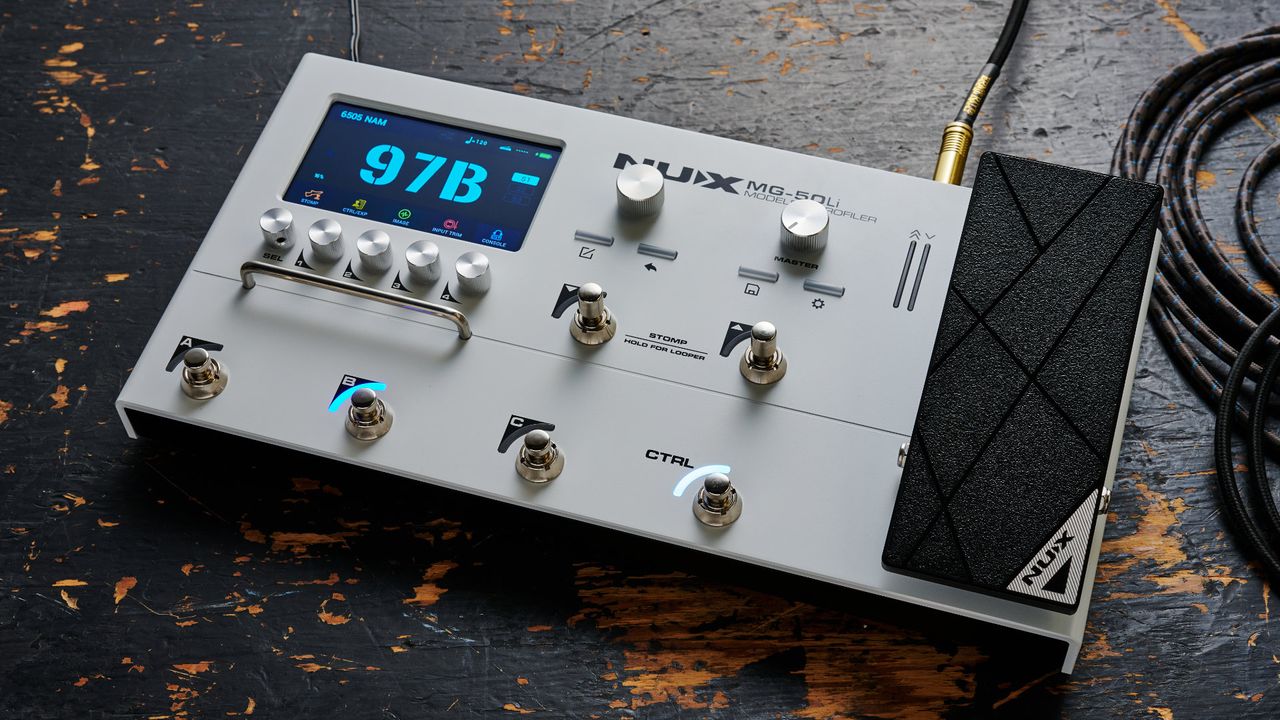
The Nux MG-50Li is the new flagship amp modeler and profiler from the Chinese brand. Nux used to be known for its budget gear, and while that remains the case today, over the past few years, they’ve begun to take steps into the intermediate level of the guitar market with some seriously advanced tech, all while retaining that value-for-money focus.

The MG-50Li is yet another entrant into the busy multi-effects pedal market, but it’s got some very unique features that help it stand out from a congested field. The first feature that caught my attention is the addition of native support for the Neural Amp Modeler (NAM), an open-source software that uses machine learning to capture tube amps, preamps, and drive pedals.

It may well be the tech that brings the cost of amp modeling down dramatically, and with access to a quarter of a million amp captures for free, it massively expands the capabilities of the MG-50Li. Previously, you needed a laptop or PC to run these due to the processing power, but different methods of shrinking down these neural captures have made them usable on DSP-equipped units. You’ll also find NAM on modelers from Hotone and Valeton, and there are rumours that bigger names are starting to adopt the technology too.

(Image credit: Olly Curtis / Future)

Surprisingly, the MG-50Li can be run on an internal lithium battery (hence the ‘Li’ in the name), which is very impressive. There’s a similar feature on the Boss GX-1, and it shows just how far we’ve come with respect to the power of amp modeling. The ability to take captures of the world’s most famous tube amps in a portable, power supply-free unit is leaps and bounds away from where we started with the Line 6 POD.

The 5-inch HD colour LCD screen doesn’t feature any touch compatibility, so 7 encoders allow for control over parameters on the unit itself. 5 of these sit below the screen for tweaking settings, while two larger ones sit to the right for more overall control. It’s got 7 footswitches, 2 that handle banking up and down, 3 that control presets, and an additional CTRL switch that can perform a variety of functions. It’s also got a full-size expression pedal that can be assigned to various roles.

There’s plenty of connectivity, too, although there’s just a single mono input. You can send signals out via dual 1/4-inch jacks or XLR outs; both carry the same signals, but the former is better for sending to FRFR cabs, while the XLR outs are for connecting to a PA system or an audio interface. There’s an additional expression out for hooking up another expression pedal or a switch, as well as a 1/8-inch aux in, headphone out, and MIDI in/out ports. Finally, there’s a USB-C port for the included N-BT1 Bluetooth dongle, and a separate USB-C for connecting to a computer. The internal battery can be charged by using the included 12V DC power supply.

Specs

(Image credit: Nux)
  • Launch price: $499 | £389 | €419
  • Type: Amp modeler & profiler
  • Controls: 7x rotary encoders, 4x buttons, 6x footswitches, 1x expression pedal
  • Features: TS/AC-4K white-box physical modeling, DeepImage profiling, stereo Cyber IR cab engine, dual send/return loops, built-in USB-C audio interface, Bluetooth connectivity, built-in rechargeable battery, 5-in. HD color LCD
  • Connectivity: Ins - 1 x 1/4", 1 x 1/8" (aux), Outs - 2 x XLR (DI), 2 x 1/4, Headphones - 1 x 1/8", Send/return - 4 x 1/4", MIDI In/Out, 2x USB-C
  • Bypass: Buffered
  • Power: 12V DC power supply
  • Dimensions: 71.8 x 392.9 x 209.8mm
  • Weight: 2.79 kg (6.17 lbs)
  • Options: Dark Blue colour option also available (White reviewed)
  • Contact: Nux

Build quality

(Image credit: Olly Curtis / Future)

Build quality rating: ★★★★½

Taking the MG-50Li out of the box, it’s a hefty bit of kit indeed. It weighs just below 3kg, which is fairly weighty for a pedal, more than the Quad Cortex and close to the similarly sized Blackstar ID:X Floor Three. It definitely takes away from the portability of it. Despite the battery operation implying use as a travel rig, it’s not quite chuck it in a gig bag and hardly notice it, that’s for sure.

It does feel durable, though, and the heavy-duty aluminium shell is very robust. My review model is a white one, but you can get it Dark Blue if you prefer something a little more muted. The expression pedal is all metal, which no doubt adds to the weight, with a textured grip surface and the Nux logo in silver in the corner. A metal bar on the left side of the pedal helps prevent you from knocking the control encoders when stomping, and the two bank footswitches come with the option of a couple of orange Nux footswitch toppers to make them more accessible.

(Image credit: Olly Curtis / Future)

The screen is recessed into the unit, which should hopefully prevent it from taking any damage, and each of the 5 encoders below can be pushed in to select parameters. The far left encoder is detented, whereas the others rotate freely. The travel of all the encoders is nice and smooth, but they do feel a little loose as I turn them, although there is a small Allen key grub screw that can be used to tighten them.

All of the footswitches offer an audible click when you press them, but it’s that soft-touch footswitch I often see on modern modellers, with none of the ‘clack’ you get on a traditional stompbox.

Usability and features

(Image credit: Olly Curtis / Future)

Usability and features rating: ★★★★☆

If you’ve never used a multi-effects unit before, the Nux MG-50Li comes with a clear card that goes over the front of the chassis, with some instructions as to which button does what, although it’s quite hard to read with light grey writing on a white background. For those who’ve already used one, operating the unit is pretty simple.

The two bank switches move you up and down, while the three footswitches marked A to C select three presets within each bank. With 99 banks, that means 297 different presets are available, which let’s face it, is more than most of us are ever likely to use. The first 64 banks are already preloaded with presets from the factory, with the remaining free for users to create their own. When you press the bank switch, the display flashes, and it’s only once you’ve settled on a patch and pressed the appropriate lettered footswitch that the sound changes.

Like most amp modellers these days, the MG-50Li has a stomp mode, accessed by pressing the far left endless encoder or by pressing both of the bank footswitches. Here, you can assign one block to each of the three lettered footswitches to treat it more like a traditional pedalboard. This mode also allows you to see the full signal chain, with 14 blocks available to chop and change your signal flow. There are options to split your signal across multiple amps or run effects in parallel, and you cycle through the chain by using the master encoder in the centre of the unit.

It takes me a while to get used to using it, however, because the controls are weirdly spread out. A push of the master encoder, for example, does not let you dive deeper into the selected block but turns it on or off. Instead, there’s a dedicated button under the encoder that allows for deeper editing, which feels backwards to me. Similarly, when I press the back button under the encoder, it doesn’t return me to the previous menu, but takes me all the way back out of editing mode to the overall preset menu.

(Image credit: Olly Curtis / Future)

Handily, the Bluetooth adapter is included with the pedal, which is a nice touch as some manufacturers like to make you pay extra for this

There are also multiple ways of doing the same thing, which in my early forays in the pedal led to a bit of confusion. Entering stomp mode shows the same screen as when I press the master encoder in. Pressing the left button under the encoder enters a slightly different - and much more useful - edit menu where images of the effects each block is simulating appear, and I can control parameters using the smaller encoders under the screen. It’s a shame there’s no way to change the effect order in this mode, as I find I much prefer working on it in this way.

No modern piece of tech would be complete without an app, so I head to Google Play to download the Nux Audio companion app. Handily, the Bluetooth adapter is included with the pedal, which is a nice touch as some manufacturers like to make you pay extra for this. The app finds it instantly, and I’m able to immediately start jumping into tweaking the effects, as the app mimics exactly what is on the screen of the MG-50Li, which is a nice touch.

Annoyingly though, on certain amp blocks, the settings don’t respond, which means I have to lean down to the pedal to change them. It only seems to be when there’s more than three parameters to control, as it works fine on those but not others where there are five controls.

(Image credit: Olly Curtis / Future)

I found that having the app open on my phone with the pedal at my feet worked really well as a workflow for playing and recording

The app is very slick indeed in its feel; there’s no discernible lag between changing something on my phone screen and the action happening on the pedal, and it’s quick and responsive to changing menus. There’s an option to use the looper via my phone, and a menu to access the global settings, including the input trim that allows you to save six different instrument settings, great if you’re swapping between active and passive pickups.

When I eventually got around to sound testing after exploring all the features, I found that having the app open on my phone with the pedal at my feet worked really well as a workflow for playing and recording. No need to bend down and change settings on the pedal itself as these were readily available on my phone, but I could still do all the quick switching, expression pedal use, and bank changing with my feet. I can also engage the looper with my phone, which is much easier than trying to hit both bank buttons at the same time.

Sounds

(Image credit: Olly Curtis / Future)

Sounds rating: ★★★★½

Plugging in my trusty Telecaster Player Plus and using two XLRs into a Universal Audio interface, I set about cycling through the presets already on the pedal. As is pretty usual, some are good, some are great, some are not so good. The sounds themselves are very hot going into my audio interface despite my relatively low-output single coils, and I frequently find myself having to turn the amp models down as they clip the inputs. Strangely, the master volume has no effect here, but they can be reined in with the expression pedal.

I like that the switching is almost completely seamless, with a drop in sound measured in milliseconds

The presets consist of the usual amp modeler fare, with all the basic food groups represented. There are Fender cleans, Marshall crunch, Diezel high gain emulations, and everything in between. Some of them sound really great from the off, others feel like they need tweaking, especially in the high end, which can get quite harsh at times. With my phone open on my desk, it’s really easy to chop and change things and get them more to my liking. I like that the switching is almost completely seamless, with a drop in sound measured in milliseconds.

With one of the big appeals of this pedal being the ability to run NAM profiles, I download the Nux Image app, which takes mere seconds, install it on my MacBook, and head to the Tone3000 website to take my pick of a cool quarter of a million different profiles. Grabbing some of the most popular ones in clean, mid-gain, and high-gain formats, I import them onto the pedal via the Nux Image App, which then converts them and allows me to load them up on a user preset.

(Image credit: Olly Curtis / Future)

There’s no getting away from that amp-like feel the NAM profile offers

First, I set up the MG-50Li’s white box Deluxe Reverb as preset A, with one of the ‘Images’, or captures/profiles depending on your preferred nomenclature, as preset B, before putting the NAM profile into preset A. I configure all the settings to be as close as I can get them, as they all slightly differ coming from different places. I also add a room block turned down very low to presets A and B, as the NAM profile also features a capture of the room. There’s a clear winner, though, as I cycle through each preset playing the same profile.

The MG-50Li white box modeled amp sounds really good, although it’s a little woolly on the low end, easily compensated for using some EQ. The Nux ‘Image’ is the worst of the bunch for me, sounding quite hollow and thin in comparison to preset A. The NAM profile is streaks ahead of the others, though. It’s that classic scooped Fender clean tone, and the response of it just feels better to me. I cycle through a few more times to be sure, but there’s no getting away from that amp-like feel the NAM profile offers.

(Image credit: Olly Curtis / Future)

I don’t stop there, though. Next up, it’s a white box Plexi 100 from Nux versus a NAM profile of a Plexi 50, as these were the closest two Marshall sounds I could get. Due to the Plexi 50s' lesser headroom, it naturally has a bit more saturation than the Nux version, and again, I try to compensate by neutralising settings on both amps to make it a fair comparison. They both sound really great, but I find the NAM profile to be superior. Even with more gain, it’s clearer when I strum open chords, and the higher notes sound smoother and less shrill than those on the stock amp.

Finally, I bring up the Nux 5150 and place it up against a NAM profile of a 6505. I match the cabs as close as possible, both using oversized Mesa 4x12 cabs with Celestion V30s, plus a Tube Screamer in front of the amp. There’s so much more bottom end to the NAM profile though, that it’s not even close here. Even when I try to amend the Nux version with EQ, that fat, controlled low end is so much more satisfying on the NAM profile. The NAM profile just does the thing straight away, meaning I keep playing rather than feeling like I need to reach for the settings.

Verdict

(Image credit: Olly Curtis / Future)

There are a lot of amp modellers and budget multi-effects out there at the moment, and the Nux MG-50Li definitely holds its own against some much esteemed and established competition. It’s got all the features you’d expect to find on a modern floor modeller, plenty of connectivity, and the addition of battery operation is a genuinely useful one – offering around five hours of use on a charge.

The real ace in the hole is the NAM profile compatibility

The UI isn’t as good as some of the competition; however, with a bit of a learning curve to get you around the unit. The inclusion of a Bluetooth adapter and using your smartphone as a remote control is a really nice touch, but it’s a shame that some functions of the app aren’t working currently.

The real ace in the hole is the NAM profile compatibility, putting instantly great guitar tones at your fingertips with just a few clicks of the mouse button. It allows it to compete with the Neural DSPs and Line 6s of the world, and all at a price that’s significantly less. The built-in modelling is overall pretty good too, although I imagine most players will want to do a bit of tweaking to get them to their liking.

MusicRadar verdict: It’s not perfect but for the money, there’s a lot to love about Nux MG-50Li. It’s a very full-featured amp and effects modeller, solidly put together, and has everything the modern player demands in terms of features and sounds. The UI and companion app can be clunky at times, but the addition of NAM profile compatibility pushes it well beyond your average multi-effects pedal, massively expanding the scope and scale of what’s possible at a reasonably low cost.

Ratings scorecard

Test

Results

Score

Build quality

Very well put together, but quite heavy versus other modellers.

★★★★½

Usability and features

UI and companion app have some flaws, but plentiful features makes up for it.

★★★★☆

Sounds

With the addition of NAM profiles, it can sound just as good as top-of-the-range modellers.

★★★★½

Overall

A full featured and great sounding multi-effects, but the UI and app could be better.

★★★★½

Also try

Hands-on videos

The Studio Rats

Elmo Karjalainen

Ola Englund

Sign up to read this article
Read news from 100's of titles, curated specifically for you.
Already a member? Sign in here
Related Stories
Top stories on inkl right now
One subscription that gives you access to news from hundreds of sites
Already a member? Sign in here
Our Picks
Fourteen days free
Download the app
One app. One membership.
100+ trusted global sources.