Get all your news in one place.
100's of premium titles.
One app.
Start reading
Tom’s Guide
Tom’s Guide
Technology
Tony Polanco

Steam Frame unboxing and tutorial videos just leaked — release could be imminent

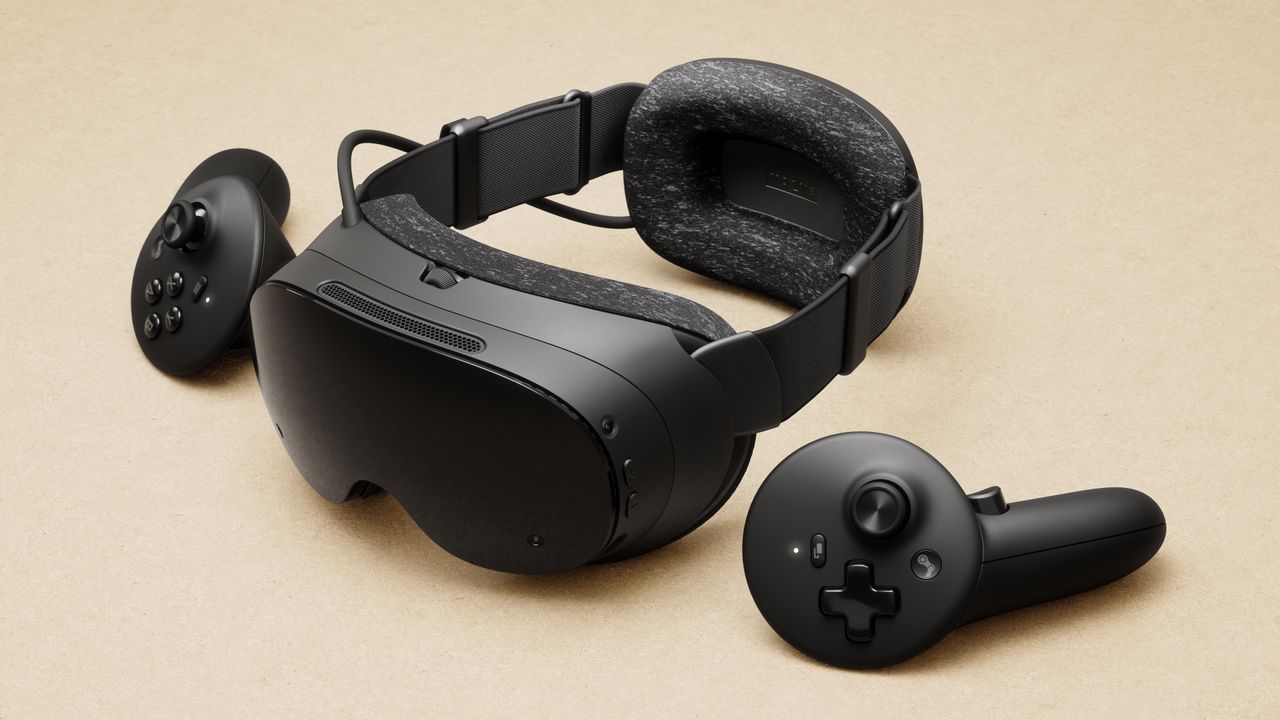
Valve Steam Frame VR headset.

Steam Frame tutorial videos just got leaked on Reddit, potentially hinting at an imminent release. The videos in question show an unboxing, how to sign in, how to adjust the device’s strap, what accessories it comes with, and more.

For the uninitiated, the Steam Frame is Valve’s answer to headsets like the Meta Quest 3. It features a Snapdragon ARM processor, an LCD with 2160 x 2160 resolution per eye, 16GB of DDR5 RAM, a refresh rate up to 120Hz, and pancake optic lenses. Along with eye-tracking, it also has camera passthrough and a 110-degree field of view (FOV). Naturally, it runs on SteamOS, effectively making it a VR version of the Steam Deck.

With the basics out of the way, here are the leaked Steam Frame videos.

Steam Frame: Unboxing

This first video (posted on X by @HardwareSteam) is an unboxing, where we get to see what you get with the Frame. In addition to the actual headset, you get a pair of controllers, a spacer, a wireless adapter, an information booklet, and a USB-C cable. This video then shows how to initially set up the device, which ships in a power-saving mode.

Steam Frame: Wireless adapter

The wireless adapter lets you connect to a Steam Machine or compatible PC. You'll need to log in to the same Steam account on both the headset and your PC, plug the adapter in, and Steam will guide you through the setup process. Games that are available for streaming will appear in your headset's Steam library.

Steam Frame: Ergonomic accessories

This video discusses some of the ergonomic accessories available for the Steam Frame. The handstraps keep the controllers securely in your hands even during intense gaming sessions. Then there’s the top headstrap, which provides extra headset stability. Lastly, the extended light blocker is for folks with smaller noses who may still see light leaking through the front of the Frame.

Steam Frame: Extended light blocker

This next video goes into more detail on how to attach and adjust the extended light blocker and top strap. While the process for each can be pretty involved, the video does a nice job of showing how to do everything one step at a time.

Steam Frame: IPD adjustment

The IPD wheel lets you adjust the spacing between the lenses until the picture you see through them looks good. Basically, you want the focus, sharpness, and overall optical comfort to look good to your eyes. There's an IPD lock to keep the lenses exactly where you want them for future sessions.

Steam Frame: Fit guide

This video is pretty self-explanatory, as it shows you the various ways to fit the headset to your nogging. Some users who wear glasses or who feel their eyes are too close to the lens can use the included spacer, which magnetically snaps into place.

Steam Frame: Controller handstrap

To keep your controllers from flying across the room, you'll want to keep them secure with the included handstraps. This video shows you how to adjust them. Like the rest of the videos, all the instructions are very easy to follow.

Outlook

You can check out the rest of the videos above for more, but suffice it to say that Valve has left no stone unturned when it comes to these Steam Frame tutorial videos. We still don’t have word on when the device will launch, but if I were a betting man, I’d say a fall release isn’t out of the question.

More from Tom's Guide

Sign up to read this article
Read news from 100's of titles, curated specifically for you.
Already a member? Sign in here
Related Stories
Top stories on inkl right now
One subscription that gives you access to news from hundreds of sites
Already a member? Sign in here
Our Picks
Fourteen days free
Download the app
One app. One membership.
100+ trusted global sources.