Get all your news in one place.
100’s of premium titles.
One app.
Start reading
Digital Camera World
Adam Juniper

Obsbot Tiny 3 review: Will a serious musician accept its bold claim that it's fit for recording artists?

Obsbot Tiny 3.

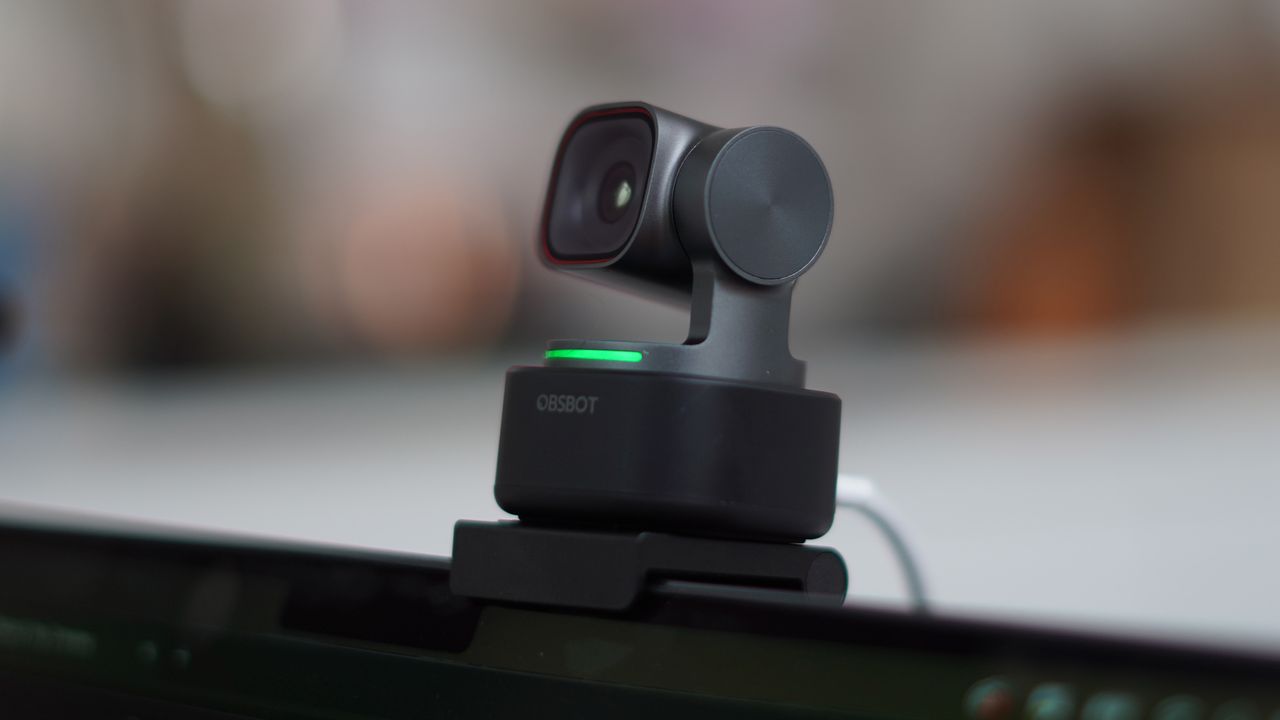
The Obsbot Tiny 3 is, it claims, not only the smallest PTZ webcam on the market, but one which now boasts significant improvements to its microphone system, offered with the prospect of offering studio-quality sound and so replacing cumbersome mic and camera rigs for streamers.

The five new audio modes, as well as the bigger image sensors, are a key part of the upgrade over the previous generation of 'Tiny' cameras. Will serious streamers be able to consider a PTZ camera only a little bigger than a soda bottle top?

In this review, I test that capability with a recording artist to verify whether the sound from the three-microphone system meets those claims. We also talk about other options...

(Image credit: Future)

Pricing

At launch in late February 2026, the Obsbot Tiny 3 is not the cheapest webcam, at $349 / £299 / AU$549, but it offers a step up in quality over what is included in the computer. Unlike the recent Insta360 Link 2 Pro launch, this camera isn't pushing the price up from the previous iteration – the Tiny 2 – though on Amazon at least I'm seeing lower prices on the previous generation.

(Launching alongside the camera is the Tiny 3 Lite, for $199 / £169 / AU$309 , though this has a lesser camera, lacking the DCG HDR and dual native ISO. This is also nudging prices up a little.)

The back of the camera on a support (borrowed, as it happened, from a different seller). (Image credit: Future)

Specs

Tiny 3

Tiny 3 Lite

Max resolution

4K / 30fps

4K / 30fps

Max frame rate

1080P / 120fps

1080P / 120fps

Sensor Size

1/1.28'' CMOS

1/2'' CMOS

Effective Pixels

50M

48M

ISO

Dual Native

Single Native

Field of View

82.4 (in 4:3 mode)

79.1 (in 4:3 mode)

The Obsbot Tiny 3 on the supplied hinge, on the back of a computer. Here the support is only partially folded out. (Image credit: Future)

Build & handling

The Obsbot really does feel small and surprisingly light, even for its small size, when you lift it out of the included travel case, especially compared to competitors.

The base is a black plastic, with a tripod screw at the bottom. At the back there is a USB-C socket and supplied with the camera is a USB-C cable and an adapter for USB-A ports for older devices.

The camera itself, which sits above the base, is a dark gray, and has the cold touch of metal rather than plastic. There is a glossy shine to the microphone array's cover, which lives behind the camera on the base (so turns with the camera).

Built like the tiny PTZ camera it is, when I opened it for the first time, there wasn't just a piece of protective film over the lens, but another over the guard that covers the mic grille, such is the delicacy of its manufacturing. (I was impressed when testing that no motion sounds were picked up.)

The camera has what appears to be a single long-thin color changing indicator light at the base of the gimbal, but in reality, this is made up of several LEDs because it can flash in sequence during software updates and the like.

Obsbot Tiny 3 travel case (next to the leg of a tripod which has nothing to do with it). (Image credit: Future)

Obsbot also provide a simple monitor clip, which is bordering on the tiny, but nevertheless manages to support the camera on the back of my MacBook Pro. It attaches magnetically to the camera (the magnet is in the camera's base), and has three hinges so can be positioned in a number of different ways. This is useful if you want to give the camera a bit of extra height.

Obsbot Tiny 3 on monitor with all hinges open – the top elements are tiny, and this is all just held on with gravity, but it works! (Image credit: Future)

As well as the hardware, Obsbot offer downloads including Obsbot Center, which allows more sophisticated control of the camera than you can get with simple USB. There are also option to buy a remote control from Obsbot,

The Obsbot Tiny 3 has identified me and I am seeing the blue indicator light – on the preview in the app I can see a box around me. (Image credit: Future)

The app is extensively equipped, with all kinds of tools, including a teleprompter. It also has an on-screen joystick control and access to the AI tracking features, which includes the ability to set up a four-camera multi-camera system and record a live stream.

Performance

It's an unusual situation for a webcam to require a review test to call upon a musician, let alone a recording artist with a single release in progress, but Obsbot make some very serious claims about the Tiny 3's studio quality sound, and Ariane X, in the midst of releasing single Not Normal, was available to help me assess that claim.

First, though, we looked at the image quality. Notice how the camera manages to pull detail in dark hair and a dark jumper.

Using the makeup features and the option of Smoothing in the Beauty mode isn't the easiest thing to find in the menus, but is effective (tested on an Apple M series machine). (Image credit: Future)

In testing, Ariane X was also very interested in the AI makeup tools. We both found it a little difficult to actually find these in the feature rich Obsbot center app, but this is something which would become less of an issue with practice.

She (not me) is someone for whom time spent applying makeup is a consideration before online meetings, so the quality of these features has the prospect to save time, and she was genuinely impressed after some tweaking. I noted that the 'Man' setting seemed to affect the background as it altered my face shape.

In the video test, you'll also see testing the gesture controls – which it generally detects well. However, when I start talking about the gestures, the camera begins and stops tracking because it also responds to voice commands.

All of this can be turned on and off in the app, but my lesson was that it's important to familiarise yourself with all the commands if you plan to leave them enabled.

The digital zoom is certainly perfectly usable up to about 2x without any serious issues in the video, while you can use it up to 4x if you choose.

In the above tests, though, I also used the mode given as an equivalent to a studio microphone, so for comparison, below, is the same song as recorded for its official release, so you can listen and compare.

For comparison, the studio recording...

Back to the review...

Admittedly, you're hearing a different set of instruments in the fully mixed and mastered recording versus the testing of the camera, which was done with a keyboard on the kitchen table.

The testing environment, however, did have decent accoustics and we were both impressed with the sound – even with the piano playing, the vocals were more dulcet, and the mic had no issue with the combination.

I did notice that the camera seemed to get a little warm if left in use for extended periods, which of course can happen. Some other features, like voice tracking, while effective at pointing the camera at the speaker, might not – even at the fastest setting – be quite as prompt as you'd hope in a setting where the people speaking are two sides of a table.

Recording artist Ariane X in the background and the Obsbot Tiny 3 with the green light indicating that that the camera is not tracking a subject. (Image credit: Future)

Overall verdict

The Obsbot Tiny 3 is an excellent webcam, with impressive video quality against its competitors. In my main test space, it had to contend with difficult and rapidly changing backlighting, which didn't seem a problem for the exposure. The camera was able to detect my, keep it in focus, and handle the shifting light. When we tried using the AI subject tracking, it didn't get mixed up even when there were two of us in the shot.

There is a bit of a question, though, as to the need for it for some users, which was brought up by Ariane X as she helped with my review. She made the not-unreasonable point that a phone, with its extensive image processing, can typically manage a slightly more flattering image than the system, though she was taken aback by the sound quality.

Could the camera replace a studio setup using a mirrorless or a phone and a studio microphone? Yes, and it could make that arrangement a lot more portable. The camera and a screen clip are very portable, especially thanks to the included case, which can definitely survive a good bit of rough and tumble. The low-light capabilities make sense with a lot of streaming setups, too.

Features

★★★★★

The camera has all the features you now associate with a webcam, including AI tracking, AI beauty tools, a powerful recording tool – a triple mic array can replace separate mics, too.

Design

★★★★☆

Impressively compact, with a well engineered hinged stand. My only concern is thermals and, perhaps, that it is too easily knocked off – it happened once during testing, though it survived unscathed.

Performance

★★★★☆

In terms of picture quality, I had very little to complain about. The image was sharp and had a lot of detail (though some feel softer is more flattering, but the app's AI can help there). Audio is close to flawless given the size.

Value

★★★★☆

Assessing the value is complex. This is not cheap for a webcam and there is no getting over that, but the sound quality means that for all kinds of applications you can legitimately save yourself the cost of a microphone.

Sign up to read this article
Read news from 100’s of titles, curated specifically for you.
Already a member? Sign in here
Related Stories
Top stories on inkl right now
One subscription that gives you access to news from hundreds of sites
Already a member? Sign in here
Our Picks
Fourteen days free
Download the app
One app. One membership.
100+ trusted global sources.