Get all your news in one place.
100's of premium titles.
One app.
Start reading
Windows Central
Windows Central
Technology
Sean Endicott

N‑Studio brings a full screen recorder and editor to the Microsoft Store with a generous free tier

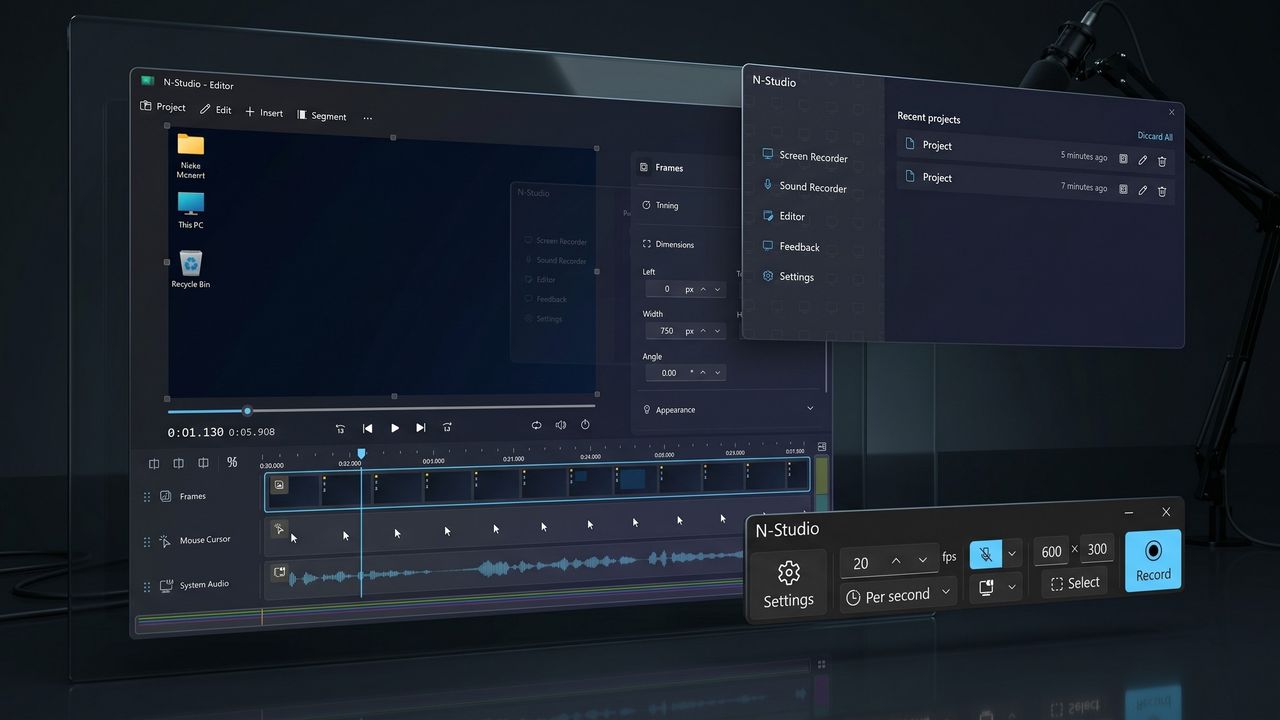
Futuristic workspace with digital screens displaying video editing software and a control panel. Cool blue lighting creates a sleek, high-tech atmosphere.

Windows 11's Snipping Tool has some new competition through the Microsoft Store. N-Studio is now available to download through the Microsoft Store, giving creators a new way to access the tool designed for screen recording and editing.

Nicke Manarin, a developer of N-Studio, shared the news on X.

You can download the Starter version of N-Studio for free through the Microsoft Store. The app has an option to upgrade to the Professional version.

The free version of N-Studio (Starter) is more robust than many free applications. Here's the full feature set, as shared by N-Tech:

  • Capture your screen freely
    • Control the framerate
      • Regular (1 to 60 fps)
      • Manual capture (via button or shortcut)
      • User interaction (mouse or keyboard events)
    • Select screen area, window or screen
    • Capture cursor and clicks
    • Capture key strokes
  • Capture audio from your microphone or system
  • Make quick adjustments before exporting
    • Trim
    • Crop
    • Resize
    • Toggle layers
  • Export to multiple formats
    • APNG, GIF, WEBP
    • MP4, MKV, MOV, WEBM
    • MP3, WAV, FLAC, ALAC, OGG
    • PSD, NSM, STG
    • JPG, PNG, BMP, AIF, HEIC
  • No limits
  • No watermark
  • No ads

The paid version of N-Studio (Professional) costs $36 or $3 per month. For that price, you get access to full edits. Here are all the features in N-Studio Professional:

  • Everything that Starter has
  • Extra capture frequencies
    • Timelapse (1-60 frames per minute)
    • Long timelapse (1-60 frames per hour)
  • Extra adjustments before exporting
    • Change framerate of animation
    • Change playback speed
  • Full-fledged editor with timeline
    • Insert layers
      • Recordings (screen or sound)
      • Media (video, image, audio)
      • Texts
      • Images
      • Shapes
      • Drawings
      • Progress indicator
      • Pixelation
      • Brightness
    • Add effects
    • Split segments
    • Resize
    • Crop
    • Trim
  • With free upgrades to minor versions (v1.X)

Is a screen recorder and editor worth $36

The free version of N-Studio is easy to recommend. It's easy to use, has a clean interface, and supports exporting in a wide range of formats. Not keeping support for hiding the cursor in videos, enabling or disabling system audio, and showing or hiding the frame behind a paywall is nice.

But the real question is if it's worth paying $36 for a screen recorder and editor. Unfortunately, I can't tell you if something fits your budget.

I will say that I like N-Studio and how all of its tools fit neatly together. While you could use Windows 11's built-in Screen Recorder and edit videos with Clipchamp or another editor, N-Studio packages things together well.

I value not having to jump between apps to streamline my workflow, and I'm willing to pay for it. But I understand that subscription fatigue is real and one-time costs add up.

My suggestion is to try the free version and test if you find yourself trying to click the features that are greyed out unless you upgrade.

Sign up to read this article
Read news from 100's of titles, curated specifically for you.
Already a member? Sign in here
Related Stories
Top stories on inkl right now
One subscription that gives you access to news from hundreds of sites
Already a member? Sign in here
Our Picks
Fourteen days free
Download the app
One app. One membership.
100+ trusted global sources.