Get all your news in one place.
100’s of premium titles.
One app.
Start reading
Digital Camera World
Sean McCormack

Lightroom is brutal, but what are your options if you want to use something else for your photos? These are the ones I'd consider

Lighroom alternatives.

Maybe it’s Lightroom Classic's sluggish performance, subscription fatigue or Adobe's obsession with shoving Generative AI into every corner of the interface that has finally done your head in.

Fair enough, you’re thinking about changing, but you still need proper photo management with non-destructive editing. What are your actual alternatives?

Capture One Pro

The pros usually go for this one. Superior tethering, better color science (especially for skin tones) and faster culling. The catalog system works similarly to Lightroom, so the transition is manageable. Downside: steeper learning curve and it's still a subscription (or an expensive perpetual license).

ON1 Photo RAW

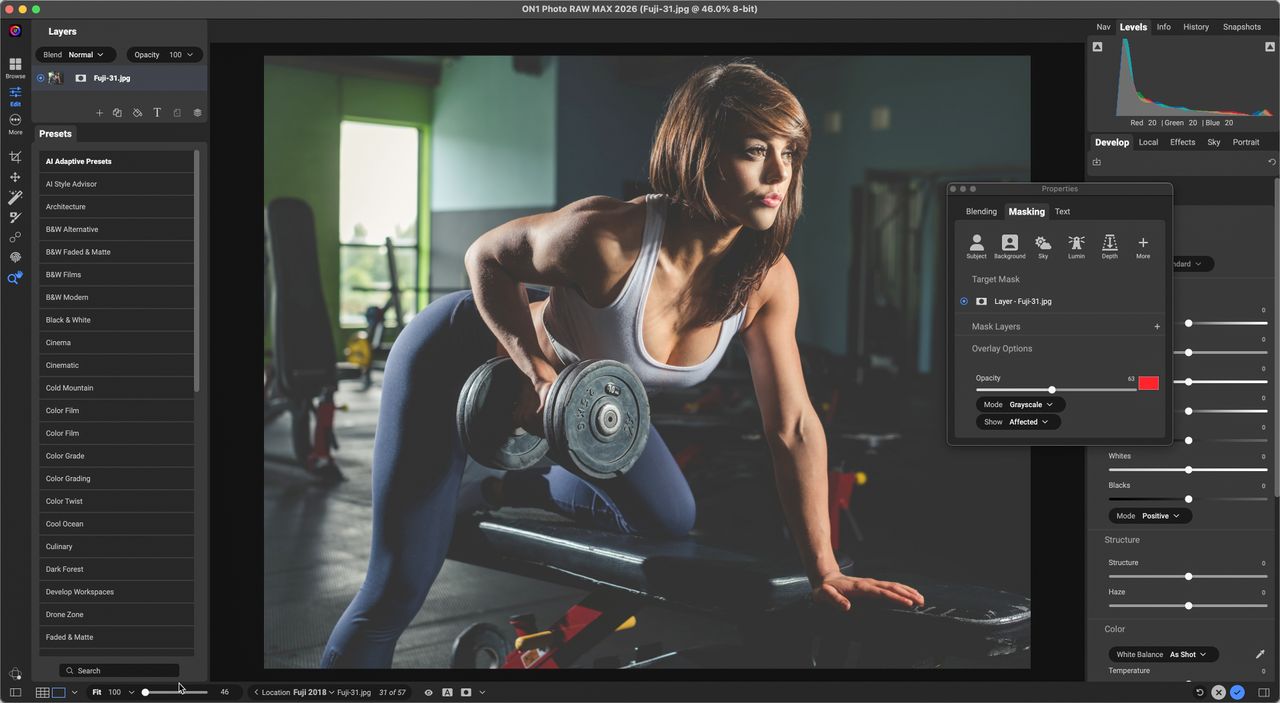
ON1 Photo RAW (Image credit: Sean McCormack)

If you prefer a one-time purchase, with no subscription, On1 Photo RAW may be your choice. Solid RAW processing, sky replacement tools, decent catalog management. Not as polished as Lightroom, but updates are genuinely useful. Good middle ground for working photographers who want to own their software.

DxO PhotoLab

Many photographers praise DxO as the best RAW processor. Its Prime noise reduction is unmatched, optical corrections are lens-specific and excellent – but the asset management is basic compared to Lightroom. You'll likely need to pair it with Photo Mechanic or another DAM solution.

Exposure X7

Exposure X7 (Image credit: Sean McCormack)

While it hasn’t seen as much in the way of updates recently, Exposure X7 is still a solid alternative to Lightroom. It has a huge focus on film emulation, which was where the plugin began. Catalog-based like Lightroom, with genuinely good film presets that aren't just Instagram filters, it manages photos competently. Less feature-rich overall, but if you love that analog look, it's purposeful.

Luminar Neo

Luminar Neo (Image credit: Sean McCormack)

Neo takes an AI-heavy approach. Sky replacement, portrait retouching, relighting – all AI-driven. Catalog management exists, but feels like an afterthought. Better suited as a Photoshop alternative than a Lightroom replacement, despite what Skylum's marketing says. Great if you want the heavy lifting done in your editing, but not so much for management.

A Photo Mechanic hybrid approach

Photo Mechanic + Affinity or Bridge + your editor of choice – this multi-software approach offers lots of advantages by separating your culling and organisation from your processing.

Photo Mechanic is lightning fast for sorting and keywording. This subscription software is not for everyone, but it’s the tool of choice for high-volume shooters such as professional press, fashion show and sports photographers.

So what's the verdict?

None of these solutions is perfect. Lightroom dominates because it genuinely solves the complete workflow problem – import, organize, edit, export. Every alternative requires some compromise. The question is, which compromise you can live with?

The best alternative may not exist, but there might be the best one for you. Try the free trials.

The option you choose will depend on whether you prioritize speed (Capture One), ownership (ON1), image quality (DxO), or workflow simplicity (stick with Lightroom and upgrade your computer).

Sign up to read this article
Read news from 100’s of titles, curated specifically for you.
Already a member? Sign in here
Related Stories
Top stories on inkl right now
One subscription that gives you access to news from hundreds of sites
Already a member? Sign in here
Our Picks
Fourteen days free
Download the app
One app. One membership.
100+ trusted global sources.