Get all your news in one place.
100’s of premium titles.
One app.
Start reading
The Independent UK
The Independent UK
Steve Hogarty

IPVanish VPN review 2026: Best for gaming with strong privacy and fast speed

IPVanish allows an unlimited number of devices to be connected under one account - (The Independent)

Gone are the days when VPNs were the sole preserve of the tech-savvy. Today, they’re an essential tool for anyone looking to browse anonymously or secure their connection on dodgy public wifi.

In a crowded market, IPVanish stands out as a veteran, having been on the scene since 2012. Its standout feature is a single subscription that covers an unlimited number of devices, placing it in an exclusive club alongside rivals such as Surfshark. This generosity is backed by a strict, independently verified no-log policy, giving you peace of mind that your data remains private.

With a server network heavily skewed towards North America, it’s a particularly strong choice for anyone wanting a US IP address. Plus, with a glut of configuration options, it offers plenty of depth for advanced users who like to tinker with their setup.

Bandwidth is unlimited and speeds aren’t capped – during testing, I found IPVanish to be fast and reliable. Keep scrolling for my full review.

Read more: Best VPN for Fire Stick and Fire TV

How I tested

To review IPVanish, I spent months testing it on a variety of platforms, including a desktop Windows PC, the Pixel 9 Pro, the Google TV Streamer and iPad Air. I measured speed using Ookla and Google’s speed test and checked compatibility with streaming services such as Netflix, Prime Video and BBC iPlayer. I researched the VPN’s privacy policy and its record on data security, and compared the cost of a subscription to similarly featured VPNs, to assess IPVanish’s pros and cons. You can read more about my testing criteria at the end of this article.

Read more: How we test VPNs at The Independent

IPVanish

Rating: 4.5/5

Number of servers: More than 2,400

Number of server countries: More than 108 countries

Number of simultaneous devices supported: Unlimited

Devices supported: Windows, macOS, Fire TV, Android, iOS, Chrome OS and Linux

Why we love it

  • Fast connection speeds
  • Highly configurable

Take note

  • Expensive after first month
  • Ugly interface
  • Some streaming services are blocked

Price

IPVanish has two tiers to choose from: essential, which has all the basic features, and advanced, which adds a secure browser, cloud backup, file sharing and phone support.

The essential tier costs £9.99 if you pay monthly, £2.92 per month when you pay yearly and £1.58 per month when you pay for two years. The advanced plan costs £11.49 monthly, £3.27 yearly and £2.39 for a two-year plan.

The prices are roughly in line with the rest of the VPN market. I’d recommend steering clear of two-year plans unless you’re absolutely sure the VPN is right for you, as you could end up locked into a service that doesn’t work for your purposes or gets slow speeds in your area – but the one-year plans beat NordVPN’s pricing (£3.79 per month for basic and £6.49 for ultimate).

European server coverage is comprehensive (The Independent)

There’s no free trial for IPVanish and payment is upfront, though you can cancel any time within the first 30 days and receive a refund. IPVanish recently started accepting GBP too, so you’ll avoid currency conversion fees when you sign up.

The advanced tier comes with 1TB of online storage with LiveDrive, priced separately the service is expensive at $14.99 (£12) per month, $4.49 (£3.65) per month for a one-year plan and $3.29 (£2.60) per month for a two-year plan.

There are much cheaper cloud storage options out there, and some free alternatives if you don’t need that much space. Dropbox and Google Drive offer 2GB and 15GB of free online storage respectively. Dropbox Plus offers 2TB (2,000GB) of storage for £7.99 per month, while Google One offers 2TB of storage for £7.99 per month.

Double-hopping lets you connect through two VPNs for extra security (The Independent)

Privacy

Your IP address and DNS are two identifying markers that can sometimes still be picked up even when you’re using a VPN, allowing websites and other services to see your true location and other details. Streaming services like Netflix and Spotify actively try to uncover this leaked information from VPNs to block users from accessing geo-restricted content.

IPVanish passes IP and DNS leak tests, meaning it doesn’t leave traces of your identity or location while you browse.

To test this, I used rival NordVPN’s series of VPN tests, as well as IPleak.net and DNSLeakTest, which confirmed that IPVanish was successfully obscuring our identity as I browsed. IPVanish was also WebRTC secure and prevented IPv6 traffic leaks in our tests.

IPVanish interface (The Independent)

IPVanish uses AES-256 encryption. Often called “military-grade” encryption by enthusiastic VPN marketers, it’s the most secure standard for transferring and storing data. AES-256 is commonly used by almost all VPNs and is strong enough for most purposes.

A kill switch shuts down internet access when the VPN is not connected so that your real identity is not suddenly exposed if your connection drops out halfway through loading a page.

By default, IPVanish uses the WireGuard and the IKEv2 protocol, but it also supports OpenVPN, a popular and trusted open-source protocol used by many leading VPNs. IPVanish is highly configurable and advanced users have a lot of buttons to play with here, including changing OpenVPN ports and scrambling server traffic to bamboozle some anti-VPN measures.

Logging

Trust is the cornerstone of online privacy. When you use a VPN you’re choosing to trust a private company rather than your internet service provider, and taking the VPN at its word that it will handle your personal information properly. It’s important to keep this in mind when comparing the privacy policies of different VPNs.

IPVanish has a clear zero logs policy, which states: “We do not keep a record of any connection, traffic, or activity data in regards to our services”. Though a VPN can be compelled by a court to hand over information about its users to the authorities, a zero log policy is one way to avoid this. By keeping no information about its users, a VPN has no information to share.

The secure browser runs entirely within the VPN's desktop app (The Independent)

A 2018 news article by TorrentFreak claimed that IPVanish had contradicted its no-logging policy in 2016 when the (then) VPN’s parent company, Highwinds Network Group, shared extensive user information with a federal investigation – reportedly for a very serious crime.

In 2017, the company was acquired by StackPath, whose CEO later stated that no logging systems existed when they took over and reaffirmed a commitment to user privacy. In 2019, StackPath sold IPVanish to J2 Global, now known as Ziff Davis. Under Ziff Davis’s ownership, IPVanish has maintained its no-logs policy, which was independently audited by the Leviathan Security Group in 2022, confirming that no logs are stored. The VPN continues to uphold a strict no-logs policy under its current ownership.

Performance

IPVanish blasts through speed tests. When connecting to servers in the UK – from our test laptop in London – our download speeds typically dropped by around 10 per cent and our upload speeds by around 25 per cent. This compares well with other VPNs we’ve tested, including top-rated services like NordVPN and ExpressVPN.

When connecting to servers further away, naturally internet speeds drop a little more. When connected to a server in the United States, our download speeds fell by around 20 per cent, and our uploads by around 40 per cent. That’s still more than enough bandwidth for streaming, torrenting and downloading, though.

Testing download and upload speeds connected to a server in Perth (The Independent)

These are rough figures. The actual speeds you get are affected by the physical distance between your true location and the location you want to appear to be connecting from, but also things like network congestion and other factors outside of your control.

So long as the VPN isn’t consistently slow, reliability is more important than top speed. IPVanish gives us strong connections without dropouts or much of a noticeable slowdown.

Because of the unusual traffic patterns coming from VPN servers, with multiple users sending simultaneous requests, Google and other big sites often flag them as suspicious. When using a VPN you’ll be asked more often than usual to prove you’re not a robot by completing a captcha (those picture puzzles where you’re asked to spot traffic lights and bicycles).

In our tests, IPVanish was particularly bad for this, sometimes locking us into an endless cycle of captchas until I switched to a new server. The flagging of suspicious IP addresses is a game of whack-a-mole between VPNs and sites like Google and Netflix, so these types of issues can clear up one day and come back the next. It’s a nuisance rather than a serious problem, however, and your mileage may vary.

IPVanish and Netflix US (The Independent/Netflix)

IPVanish and Netflix

You can watch US and UK Netflix using IPVanish.

To be clear, using a VPN to stream Netflix from a region that’s not your own violates the platform’s terms of service. That said, when connecting to a local VPN in your own country or when travelling, you should expect to be able to continue to use streaming platforms as normal and without interruption.

Streaming services attempt to block people in different countries from viewing certain movies and TV shows in order to protect local licensing and distribution deals. This means that the best VPN for streaming Netflix can change from month to month, as the service figures out new ways to identify and block VPN traffic.

In our tests, IPVanish successfully streamed Netflix in the UK and the US with no noticeable increase in buffering, dropouts or interruptions. Video quality was consistently high and I was able to stream in 4K without any problems.

IPVanish and Prime Video

I had less luck watching Prime Video shows using IPVanish. This could be because Amazon has a better idea of your true location based on your account’s activity – the platform will believe you’re travelling temporarily, rather than based in the country where your VPN server is located.

With the VPN turned on, Prime Video refused to stream any content and displayed a warning that our connection was being routed through a proxy server. This problem appears to be widespread for now, as Amazon’s anti-VPN efforts have seemingly managed to blacklist a swath of IPVanish’s IP addresses.

IPVanish had no issues streaming BBC iPlayer from a Manchester server (The Independent)

IPVanish and BBC iPlayer

You can watch BBC iPlayer while using IPVanish in 2025.

Connect to the streaming service using one of IPVanish’s UK servers and things work as they normally would. Keep in mind that accessing iPlayer from abroad using a VPN violates the service’s terms of use, even if you’re paying the TV licence.

Android and iOS apps

The IPVanish app works well on both Android and iOS devices. The plain and functional user interface won’t be winning many design awards – especially on Android, where it uses flat, outdated design elements – but the app is responsive and easy to navigate.

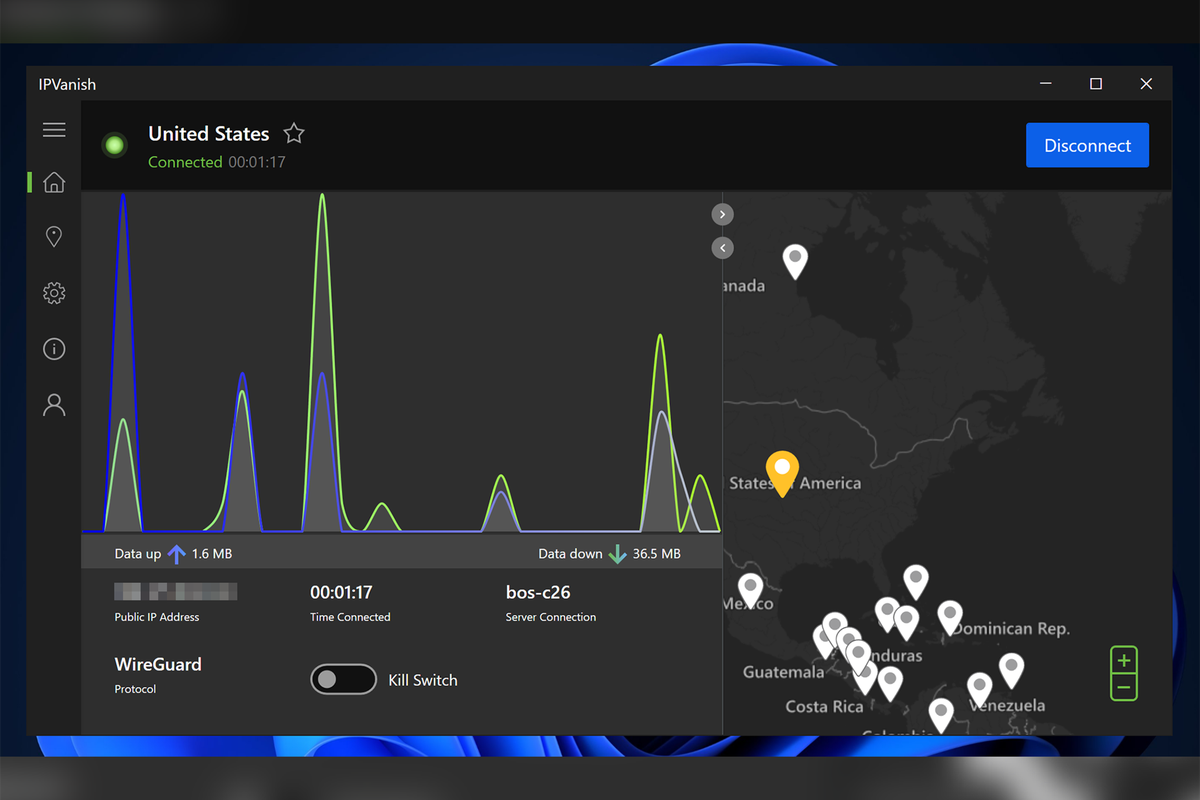
A short but helpful tutorial walks you through the steps of choosing your server location and connecting to the VPN. While connected, the app displays a graph of download and upload speeds, the server’s name, IP address and location, and how long you’ve been connected.

The Android and iPhone apps retain most of the features of the desktop VPN, such as the option to scramble traffic over the OpenVPN protocol, and the ability to set up split tunnelling to allow certain apps to connect to the internet without using the VPN. The kill switch feature requires a bit of fiddling in your phone’s settings before it works.

I especially like how the app can identify unsecured wifi networks on the fly, and automatically connect you to a VPN without having to manually select anything.

Buy now £3.8, Ipvanish.com

Your questions about IPVanish answered

Should you download IPVanish?

What it lacks in polish, IPVanish makes up for in speed. This is a fast VPN with latencies low enough to enable gaming and a server-selection list that can zero in on low-ping servers.

I liked how straightforward the installation was on Amazon Fire TV and Firestick, and how non-intrusive the desktop app is on Windows. Unlike most VPNs, IPVanish doesn’t automatically set itself to launch on startup and doesn’t hide out in your system tray when you’re finished using it. I liked that the number of devices you can use isn’t capped, either.

User feedback on Trustpilot echoes many of our own impressions. Several reviewers praised the service for being simple and fast, with one long-time user saying they’ve “never had a product issue” in years of use. Others appreciated the peace of mind it offers when banking or travelling, and a few specifically praised the customer support team for resolving issues quickly.

That said, I ran into trouble when trying to watch shows from Amazon Prime Video, but had no problems with Netflix. This could change as the VPN adds more IP addresses to outwit the streaming platforms, so it’s worth dipping your toes in with a one-month subscription before committing to a full year.

IPVanish isn’t as cheap as it once was, though it does offer benefits with the Advanced tier that similarly priced VPNs don’t. If those benefits aren’t useful for you, it could be worth shopping around for another service.

Does IPVanish use virtual server locations?

Yes, IPVanish does use some virtual server locations, which means it can provide you with an IP address for a country where the server isn't physically located. The company is upfront about this, clearly labelling all virtual locations within its app.

How much does it cost?

There are two plans. The essential plan has all of the features you really need and starts at £1.58 per month, while the advanced plan costs £2.39 per month and bundles extra like cloud backup and a secure browser.

What is the refund policy?

IPVanish offers a 30-day money-back guarantee, which essentially acts as a no-risk trial period. This allows you to sign up and test the service thoroughly on all your devices to see if it meets your needs for speed and streaming.

Which streaming services can IPVanish access?

IPVanish is generally effective at unblocking major streaming platforms. In my testing I had success with Netflix, BBC iPlayer and Disney+, but Prime Video blocked most of the VPN servers I tried. Access can change from week to week, so your mileage may vary.

Is IPVanish a good VPN for Fire stick?

IPVanish is one of the best VPNs for Fire TV stick users. Unlike some competitors that require fiddly sideloading or have clunky interfaces, IPVanish has a dedicated app available directly from the Amazon Appstore. The interface has been optimised for remote control navigation, making it incredibly simple to connect to a server and start streaming.

Is IPVanish good for using in the UK?

For most users in the UK, yes. It offers fast connection speeds and has a solid number of servers across London, Manchester, and Glasgow, which is great for maintaining speed while encrypting your data. It also works reliably with BBC iPlayer and Channel 4 if you’re travelling abroad and want to catch up on British telly.

Is NordVPN or IPVanish better?

If we’re looking at pure performance, NordVPN takes the lead. It tends to be faster, more reliable for accessing streaming services, and offers a slightly slicker app experience. However, IPVanish allows unlimited simultaneous connections, whereas NordVPN caps you at 10. If you have a household full of gadgets to protect, IPVanish is the more flexible choice.

How I tested IPVanish

To get a true measure of a VPN’s capabilities, I integrate it into my daily routine for several weeks, installing it across multiple devices and focusing on the features that matter most to users. During testing, I considered the following criteria.

Why you can trust IndyBest reviews

Steve Hogarty is an award-winning technology journalist and the former editor of PC Zone, and has been covering all things tech for IndyBest since 2021. His VPN reviews draw on extensive research into the practices and promises of the companies behind each service, as well as thorough testing across a wide range of use cases. This attention to detail makes him an excellent judge of performance when it comes to finding the best VPNs for our readers.

Want more recommendations? Check out our guide to the best cheap VPN services

Sign up to read this article
Read news from 100’s of titles, curated specifically for you.
Already a member? Sign in here
Related Stories
Top stories on inkl right now
One subscription that gives you access to news from hundreds of sites
Already a member? Sign in here
Our Picks
Fourteen days free
Download the app
One app. One membership.
100+ trusted global sources.