Get all your news in one place.
100’s of premium titles.
One app.
Start reading
Tom’s Guide
Tom’s Guide
Technology
John Velasco

I tried this new MagSafe charger that plugs into an outlet — and I can't believe no one has invented it before

Twelve South PowerBug.

I’ve tested dozens of best MagSafe chargers in the last year. From power banks that integrate MagSafe, to the 3-in-1 models that can charge all of my favorite gadgets simultaneously, there’s clearly an assortment to choose from.

But despite testing all of them, it took until now for me to come across one that ditches the cable completely and plugs directly into an outlet. That’s why I’ve been using the Twelve South PowerBug so much for the past week. At first I shrugged it off, but the more I got to use it, I began to realize it’s the perfect charger to bring with me wherever I go. Here’s why.

Adios to a charging cable

(Image credit: Tom's Guide / John Velasco)

I already carry a lot of things in my backpack, but I also find it super annoying when I have to carry pesky cables as well. The Twelve South PowerBug liberates me from the cord because this puck-shaped charger plugs into an outlet and charges my iPhones through MagSafe.

Technically speaking, it’s a 15W Qi2 wireless charging pad, which is optimized to work with MagSafe compatible iPhones and other phones that support Qi2 charging — like the Pixel 10 Pro and Pixel 10 Pro XL. Apart from the MagSafe chargers that are part of a power bank, all the rest require wires and their corresponding wall adapters to work.

With the PowerBug, however, the fact that I don’t need a wire makes it even more convenient for me to charge. Plus, I like that the prongs fold inside when I'm not using it.

It’s still a fast charger when you need it

(Image credit: Tom's Guide / John Velasco)

Sure, the 15W wireless charging speed of the PowerBug is pretty standard, especially when the iPhone 17 Pro Max supports 25W MagSafe charging. I’m not too worried about the time it takes with wireless charging, but if I were, that’s where its wired charging comes to save the day.

There’s a USB-C port on the side of the PowerBug, which delivers power delivery up to 35W. Many of the best phones support that speed, but it’s also enough to power most tablets and some laptops. In fact, I’m able to charge my Snapdragon powered HP Omnibook 5 with the PowerBug.

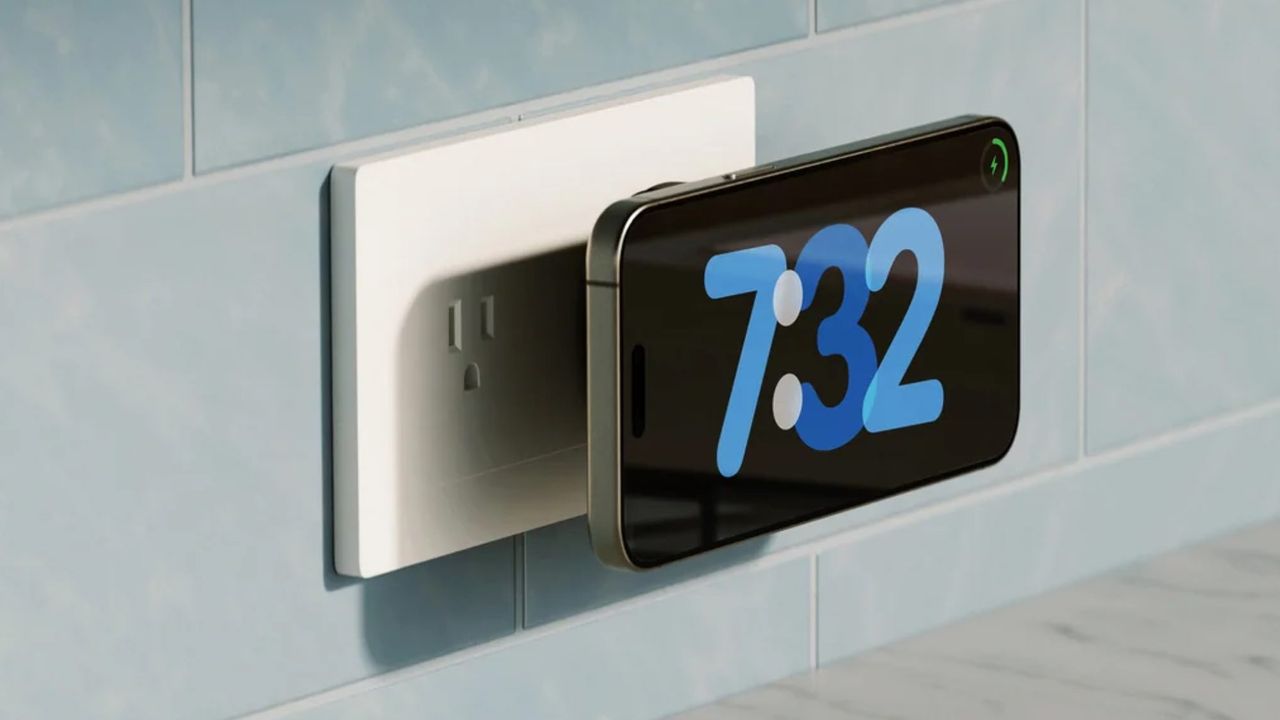
And yes, there's access to StandBy mode

(Image credit: Twelve South)

If an outlet is situated on a wall so that the charging pad of the PowerBug is facing you, using StandBy Mode with your iPhone is possible since you’d need to only position it horizontally. At home, there’s an outlet next to the nightstand on my side of the bed that’s almost eye level when I’m lying down — so it’s great that I can use StandBy mode to make it act like an ordinary alarm clock.

Obviously, this isn’t possible if the outlet is lying flat on a surface, or part of a power strip. If there’s one change I’d like to see with a subsequent model, it would be the ability to somehow tilt the charging pad — so even if it were plugged flat on a surface — it could be manipulated in such a way that it could still give me access to StandBy mode. Additionally, it’d be nice to include support for Apple’s Find My.

Apart from those things, I’ve been keeping the PowerBug in my backpack because it doesn’t take up much room.

Follow Tom's Guide on Google News and add us as a preferred source to get our up-to-date news, analysis, and reviews in your feeds.

More from Tom's Guide

Sign up to read this article
Read news from 100’s of titles, curated specifically for you.
Already a member? Sign in here
Related Stories
Top stories on inkl right now
One subscription that gives you access to news from hundreds of sites
Already a member? Sign in here
Our Picks
Fourteen days free
Download the app
One app. One membership.
100+ trusted global sources.