Get all your news in one place.
100’s of premium titles.
One app.
Start reading
The Independent UK
The Independent UK
Alex Lee

I tried Apple’s most affordable iPad – here’s my verdict

If you’re anything like me, you don’t buy an iPad for work or productivity, you buy an iPad for the fun stuff. I want an iPad to watch The Traitors in bed, or play simple, cosy games like Krispee Street to pass the time, or scroll through Vinted looking for things I really don’t need.

That’s why I’ve always gone for the base iPad when Apple has tried to seduce me into buying its more powerful or creative-driven iPad Air or iPad Pro tablets. They’re almost becoming replacements for a laptop, and I don’t need to replace my laptop.

Launched earlier this year, the 11th-generation iPad hasn’t exactly reinvented anything. It’s so similar to the 10th-generation iPad from three years ago, you might not notice any difference. Like every entry-level model before it, it isn’t drastically different from the last, but it does come with a faster chip and several improvements that should help it retain its crown as the best iPad for everyone. After living with it for a few months, here’s my verdict.

How I tested

Over the past few months, I’ve used the 11th-generation iPad as my main tablet. I’ve taken it on holiday to stream shows on the plane and in the hotel, used it to catch up on emails, browse the web and scroll through TikTok. I’ve made video calls on FaceTime and looked at how comfortable it was to type, as well as how easy to set up.

I also paid attention to the camera quality during calls and when taking photos, and made notes on the sound from the built-in speakers. And while it’s definitely not designed for this, I also tested creative apps to see whether I really needed to jump to the iPad Air, or if the regular model was good enough. You can read my full testing methodology at the end of the article.

Apple iPad 11th-generation

Rating: 4.5/5

Rear camera: 12MP

Front camera: 12MP

Processor: Apple A16

Display: 11in

Storage: 128GB, 256GB, 512GB

Battery: Up to 10 hours

Weight: 477g

Dimensions: 248.6mm x 179.5mm x 7mm

Why we love it

  • Really snappy
  • Works great with iOS 26 multitasking features
  • Well-priced
  • Comes with 128GB storage as standard

Take note

  • Screen glare is still an issue
  • Only works with Apple Pencil 1
  • Speakers could be better

Apple iPad 11th-generation: Design

When Apple redesigned the entry-level iPad in 2022, it finally ditched the home button and brought the look in line with the rest of its line-up. There’s no second big overhaul for the 11th-generation model. It keeps the same thin borders, flat-edged design, USB-C port and 10.9in display, and that’s no bad thing.

It looks modern, especially if you’re coming from one of the older, rounded-edge models. The bezels are roughly the same thickness as the latest iPad Air. You’ll really notice how much sleeker it looks if you’re upgrading from a 9th-generation iPad or earlier.

It looks more modern than the older, rounded-edge models (Alex Lee/The Independent)

The volume buttons sit neatly along the right edge when you hold it in portrait mode, with the power button on the top doubling up as a fingerprint sensor. Like the 10th-gen iPad, the 11th has a dynamic volume button, which means volume up and volume down shifts based on how you’re holding your iPad. It’s only small, but it’s such a nice little feature. It comes in the same bright and playful colours as before, including blue, pink, yellow and silver.

You don’t miss much in the design department by not going for the iPad Air or iPad Pro. The iPad Air has a slightly slimmer chassis, but I wouldn’t pay an extra £300 for that. Some might appreciate the iPad Pro’s near-borderless glass and uniform edges, however. For me, the 11th-generation iPad has a big enough screen and thin enough bezels for distraction-free streaming and light gaming. It’s lightweight and easy to hold.

Apple iPad 11th-generation: Display

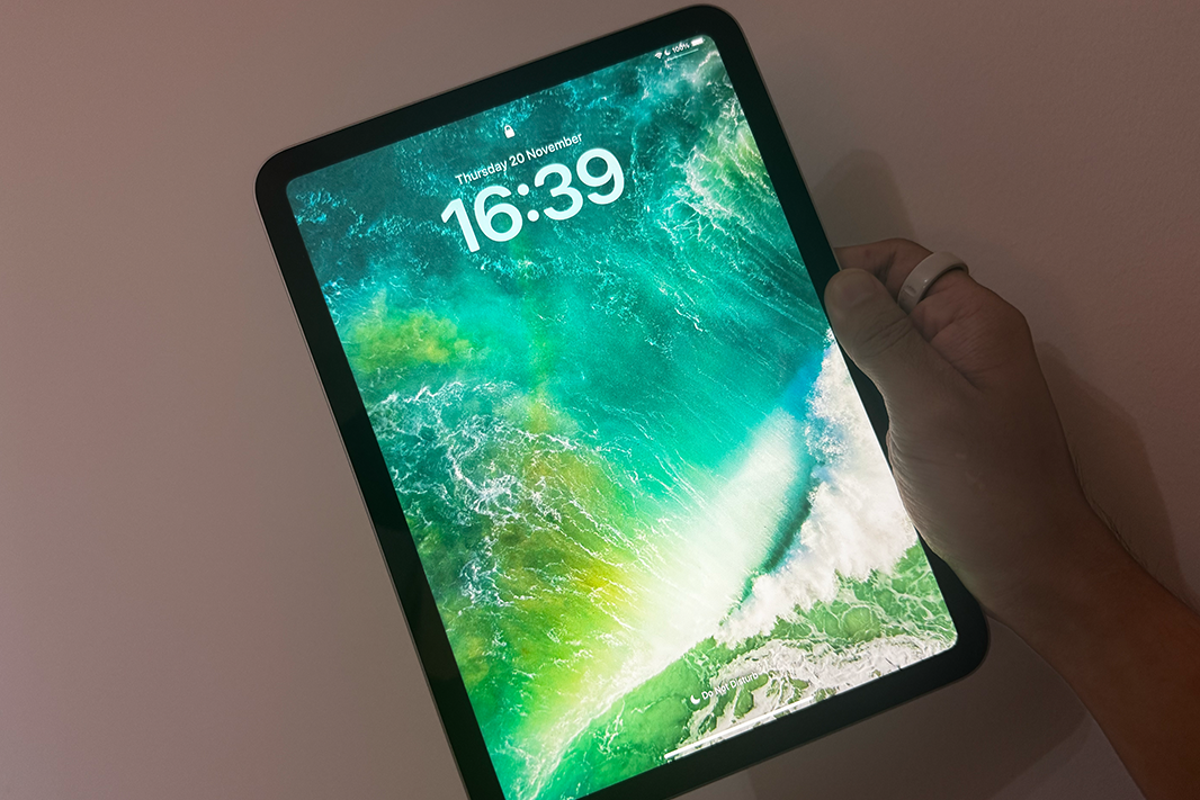
As mentioned above, the latest entry-level iPad features a 10.9in Liquid Retina display. It’s the same panel used in the 10th-generation model, with a 2360 x 1640px resolution and typical brightness of 500 nits. It’s large, sharp and bright, and while it isn’t quite as vivid as the iPad Air’s laminated screen, I really didn’t notice a big difference in everyday use. It sits slightly above full HD, making it great for streaming shows or watching films.

The main visual difference is that the Air’s laminated display brings the image closer to the surface, but this barely makes a difference to me in actual use. I’m a serial streamer and watch Netflix, BBC iPlayer, ITVX and YouTube throughout the day, and everything always looks crisp and colourful, with decent contrast and sharp detail. Even fast-moving scenes in action films never showed any signs of blurring or lagging.

Read more: Apple iPad Air review

There is quite a bit of glare when you’re facing a bright window, however. On sunny mornings, I have to crank the brightness right up to full to see the screen properly. It’s still fine for watching shows or scrolling, but it’s not the best in strong daylight.

The iPad Air and Pro handle reflections a little bit better thanks to their laminated and less reflective displays, but it’s not enough of a difference that you should consider upgrading.

Apple iPad 11th-generation: Performance

The biggest upgrade over the base iPad from 2022 is the performance. The 11th-generation iPad runs on Apple’s A16 Bionic chip – the same one used in the iPhone 15. It replaces the older A14 chip from the 10th gen, and I could feel the difference straight away. Everything from opening apps to scrolling through Safari and switching between Notes and Messages feels snappier and more responsive.

Whether I was watching Netflix or Apple TV, playing games like Stardew Valley and Dead Cells, or writing up notes, it just ran buttery smooth. Even using the new multitasking features on the iPad didn’t cause it any issues with lag. I don’t use it too frequently – as previously mentioned, I’m not a multitasker, “replace my laptop” kind of user, but when I’ve tested out things like split view and put apps into floating windows, it never slowed down or got overly warm.

The Preview app is also finally available on iPad, and I love, at last, being able to annotate and look at PDFs without having to download a separate third-party application.

If you’re upgrading from an older model, it’ll feel like a big jump in speed. Sure, it’s not much faster than the 10th gen, but the A16 will keep it future-proofed for longer through more software updates.

And while the iPad Air M3 and iPad Pro M5 are technically more powerful, most people simply don’t need that kind of performance. Unless you’re working on 4K video projects or heavy creative tasks, the regular iPad is super speedy, capable and never feels like it's struggling. I never got annoyed at it running too slowly, and it didn’t soft-shut apps in the background. Don’t get me wrong, the M-series chips are great – they’re just overkill for what most people actually do on an iPad.

iPad 11th-generation: Cameras

The cameras haven’t changed in three years, but that’s true for the pricier iPads as well – Apple just doesn’t prioritise camera upgrades on tablets. You get a 12MP rear camera and a 12MP front camera with Centre Stage (Apple’s auto-framing feature that keeps you centred). Like the previous model, the front camera sits on the long edge, which is how most people use their iPads. I used it for FaceTime calls, and it was always quick at adjusting me in frame. It’s not the most high-definition system, so you won’t be winning any portrait awards, but it’s perfectly serviceable for calls.

As with pricier models, the cameras haven’t been updated in three years (Alex Lee/The Independent)

The rear camera is fine for scanning documents or taking the occasional photo in good light. Colours look decent outdoors, though it is pretty grainy overall, as you’d expect. I don’t use my tablet as a replacement for my phone’s camera, and you really shouldn’t either.

Apple iPad 11th-generation: Audio and speakers

As someone who streams from their iPad every single day, I’m pretty picky about speakers, and the 11th-generation iPad sounds… exactly the same as the 10th-gen. Apple hasn’t updated the audio hardware, but that’s honestly fine. The stereo speakers are loud enough for watching Netflix in bed, voices come through clearly, and there’s no distortion when you turn the volume up.

That said, I think they do sound a bit tinny at times, especially with music or anything with a heavier soundtrack. You don’t get the fuller, room-filling sound of the iPad Air or Pro – those models have noticeably richer audio, but for everyday streaming and YouTube, the regular iPad has decent sound. I never felt like I had to plug in headphones to enjoy a film.

Apple iPad 11th-generation: Accessories and Apple Pencil

Accessories are the one area where the regular iPad still feels a bit behind the rest of the line-up. The 11th-generation model only works with the first-generation Apple Pencil (the one you have to plug in with an adapter). It feels a little dated, and might be a dealbreaker for some who like using an Apple Pencil without having to be constantly tethered.

That said, I don’t really use my iPad for drawing or handwriting, and if you’re anything like me, you weren’t even considering buying an Apple Pencil at all, feeling perfectly content tapping around the screen with your finger.

The iPad still supports the Magic Keyboard Folio. I didn’t test it, but it snaps onto your iPad and should make typing feel more laptop-like. It’s handy for emails and longer notes or writing articles, but again, it’s not something I’d use.

Apple iPad 11th-generation: Battery life

Battery life is still rated at around ten hours, and that’s pretty much what I got using it on a daily basis. In fact, it usually lasted a couple of days if I was just streaming two or three episodes per night. On heavier use days, it lasted comfortably from morning to evening, and I was never concerned about battery life. Just browsing or shopping? It’ll last ages.

Charging is done through USB-C, and Apple only gives you a cable in the box. No plug. Using a standard 20W charger, I got from empty to full in just over two hours. It’s not the fastest thing in the world, but because the iPad lasts so long, I never felt like I had to reach for the charger.

Apple iPad 11th-generation: Price and storage

I have to give credit to Apple here. The tech giant hasn’t just doubled the base storage to 128GB. It’s also lowered the starting price, making the regular iPad better value than ever before. The old 64GB model never felt like enough. It was a relic of the past. It filled up far too quickly once you’d downloaded apps, games and a few offline episodes for the plane, so starting at 128GB is game-changing.

The 11th-generation model now starts at £329 for 128GB, which is generally enough for most people. If you think you need it, you can also get a 256GB iPad for £429 and a 512GB iPad for £629. If there’s one reason to choose this over a Pro or Air, the price and storage size is it.

Buy now £329, Very.co.uk

Should you buy the iPad 11th-generation?

The new 11th-generation iPad might not look new, but it didn’t need much to convince me that the regular model is still the best one to buy. The A16 chip gives it a healthy speed boost, doubling the base storage finally makes sense, and the price feels actually affordable for something from Apple.

It still has its limits. The screen glare can be annoying in bright rooms, the speakers aren’t amazing, and Apple’s insistence on keeping it tied to the first-generation Pencil feels outdated. But none of that gets in the way of what most people actually do on an iPad.

If you’re anything like me and just want a tablet for everyday streaming, browsing, a spot of gaming, calls, maybe even a bit of writing, then this is absolutely the one to get. The Air and Pro are brilliant, but unless you actually need the power for creative tools, you aren’t missing out. The regular iPad just delivers the best iPad experience for the lowest price, and that’s why it’s the one I’ll continue to recommend it over the others.

Buy now

How I tested the Apple iPad 11th-generation in full

Why you can trust IndyBest reviews

Alex Lee is senior tech critic at The Independent. He has a wealth of gadget expertise and extensive testing experience to draw on, which he uses to cut through the noise of tech marketing and bring you his honest, full verdict on what’s on the market. Whether it’s his thoughts on the newest iPhone, which VPN to use, or the iPad that stands above the rest, he has it covered. Like all IndyBest reviewers, he will never recommend anything unless it’s been through thorough, hands-on testing.

For more options, read our review of the best tablets

Sign up to read this article
Read news from 100’s of titles, curated specifically for you.
Already a member? Sign in here
Related Stories
Top stories on inkl right now
One subscription that gives you access to news from hundreds of sites
Already a member? Sign in here
Our Picks
Fourteen days free
Download the app
One app. One membership.
100+ trusted global sources.