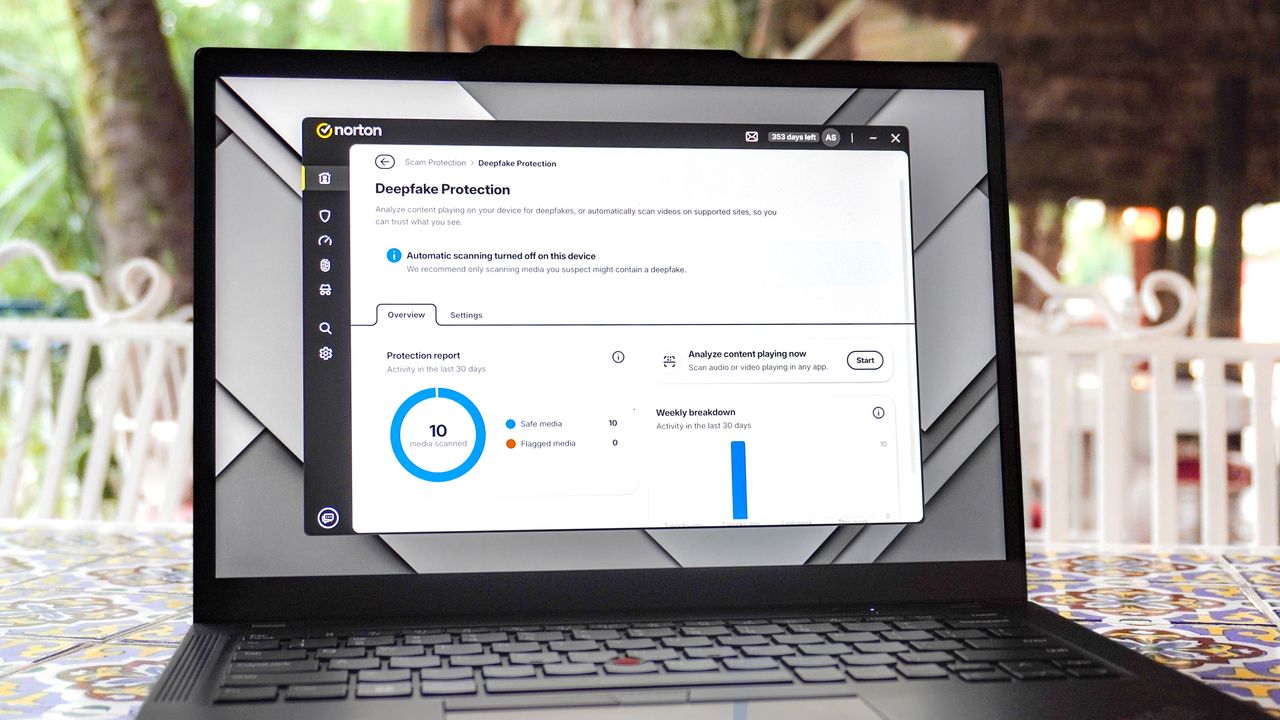
If accidentally downloading malicious apps and getting your computer infected with viruses wasn’t enough, these days, you can’t even trust your own eyes and ears thanks to deepfakes.
Just a few years ago, you only had to look out for phishing emails, fake websites and dodgy attachments from unknown senders. Now though, thanks to AI, you can just as easily be fooled by a very convincing fake image or video.

Fortunately, in the same way that cybercriminals are now using AI in their attacks, so too are cybersecurity firms. While Norton and the rest of the companies behind the best antivirus software use cloud-based AI to better analyze and detect new threats, this isn’t your only option when it comes to staying safe online.
You can also do so yourself locally but you will need a computer with its own neural processing unit or NPU. Thankfully, the best AI laptops with chips from Intel, AMD, Qualcomm and even Apple have you covered. However, when I bought my trusty ThinkPad a few years ago, this wasn’t an option yet.
After trying out Norton’s Deepfake Protection for myself though, I’ve become an NPU believer. While laptop makers tried to sell us on AI-powered features like portrait lighting, auto-framing and live captions, as it turns out, set–and-forget online security was what finally convinced me in the end.
No more second guessing
In the past, you always had to be careful when checking your inbox or navigating to unfamiliar sites. With the rise of deepfakes though, online scams can appear where you’d least expect them like on a job interview or even a video call with a loved one.
For instance, let’s say you’re looking for a new remote job and make it to the interview stage. You hop on Zoom, Google Meet or Microsoft Teams and expect the other attendees to be actual people, right? Well with deepfake videos becoming more advanced every day, they might not be.
Alternatively, maybe an urgent video or audio clip arrives in your messages from a loved one who’s in trouble. The message may look and sound just like them but the whole thing could actually be fake and an attempt to con you out of your hard-earned cash.
AI-powered scams are here to stay but if you use Norton’s Deepfake Protection, they’ll get flagged before they can do any real damage just like how its antivirus detects and prevents you from interacting with malware. From giveaway scams to crypto fraud, this feature runs locally on your device to analyze and detect synthetic voices so you don’t have to keep guessing whether or not something is real.
While I know most of us believe we’re tech-savvy enough to spot these kinds of things, that isn’t always the case. And all it takes is one slip up to end up in a very bad situation. Likewise, for those of us with older parents or relatives, we can rest easy knowing we won’t get a frantic phone call in the middle of the day as they’ll be protected.
Just like with deepfakes themselves, I had to experience this new feature for myself, so I installed Norton 360 on my laptop, toggled Deepfake Protection on and took it for a spin.
Deepfake protection (at a cost)
With Norton 360 installed on my laptop, I headed to the Scam Protection tab where in addition to Deepfake Protection, you can also enable Safe Web to keep you protected from risky websites and other online scams as well as Safe SMS which uses AI to flag scam text messages.
In Deepfake Protection’s settings, you can toggle on an auto-scan feature and another one that notifies you when AI-generated voices are being used on a site you’re visiting or in a video you’re watching. It’s all fairly simple and there aren’t too many settings to configure which makes it easy to set up regardless of how skilled you are on a computer.
In my case though, there was just one catch. Since I don’t have an AI laptop, Norton’s Deepfake Protection does require more system resources. Thankfully, my ThinkPad was powerful enough that I could just enable it right from within Norton 360. However, if you’re using an older laptop with fewer than six CPU cores and less than 8GB of RAM, you will need to manually install it but Norton walks you through the process in this support article.
While Deepfake Protection works automatically in the background, you can also manually enable it too. On the right side, there’s a Start button and clicking on it analyzes the audio or video playing in any app. This could be particularly useful if you’re on a video call in an app as opposed to through your browser.
Although I like the simplicity of Norton’s Deepfake Protection, I was a bit let down that I couldn’t manually select files for local analysis. I get that the feature runs in the background but it would be nice to be able to drag and drop pictures or videos saved on your computer — perhaps from a messaging service like WhatsApp — to have them analyzed just to be sure.
Finally sold on an NPU
During my testing, I didn’t see much of a performance hit on my ThinkPad. However, that doesn’t mean that over time, running Norton’s Deepfake Protection on a non-AI laptop won’t affect your workflow. If you’re trying to do something intensive like render video, you’re going to need all of your laptop’s processing power and something like this running in the background could slow things down.
While you can run Norton’s Deepfake Protection on older laptops, this feature and the added peace of mind it brings is what finally convinced me that paying a bit more for a computer with an NPU in its processor is absolutely worth it.
When AI laptops first hit store shelves, they were a harder sell as the features offered at the time just weren’t useful enough to justify the higher prices of these new devices. Now though, you can put that extra bit of silicon to much better use by having it proactively keep you safe from deepfakes and other online scams in the background.
Years ago when I first started covering antivirus software, its performance impact was a critical factor that couldn’t be overlooked. While this is still true today and we continue to see how running scans can affect performance, NPUs have changed things significantly. I never thought deepfakes would sell me on NPUs, here we are.
As for Norton’s Deepfake Protection, I expect it will only get better over time just as the effectiveness of its antivirus has. Sure, cybersecurity will always be a game of cat and mouse but with an NPU inside your laptop, at least you can fight that fight locally instead of over the cloud.