Get all your news in one place.
100’s of premium titles.
One app.
Start reading
Tom’s Guide
Tom’s Guide
Technology
Richard Priday

I tested Google Maps Live View vs Apple Maps Guide Me — which map app has the better AR navigation?

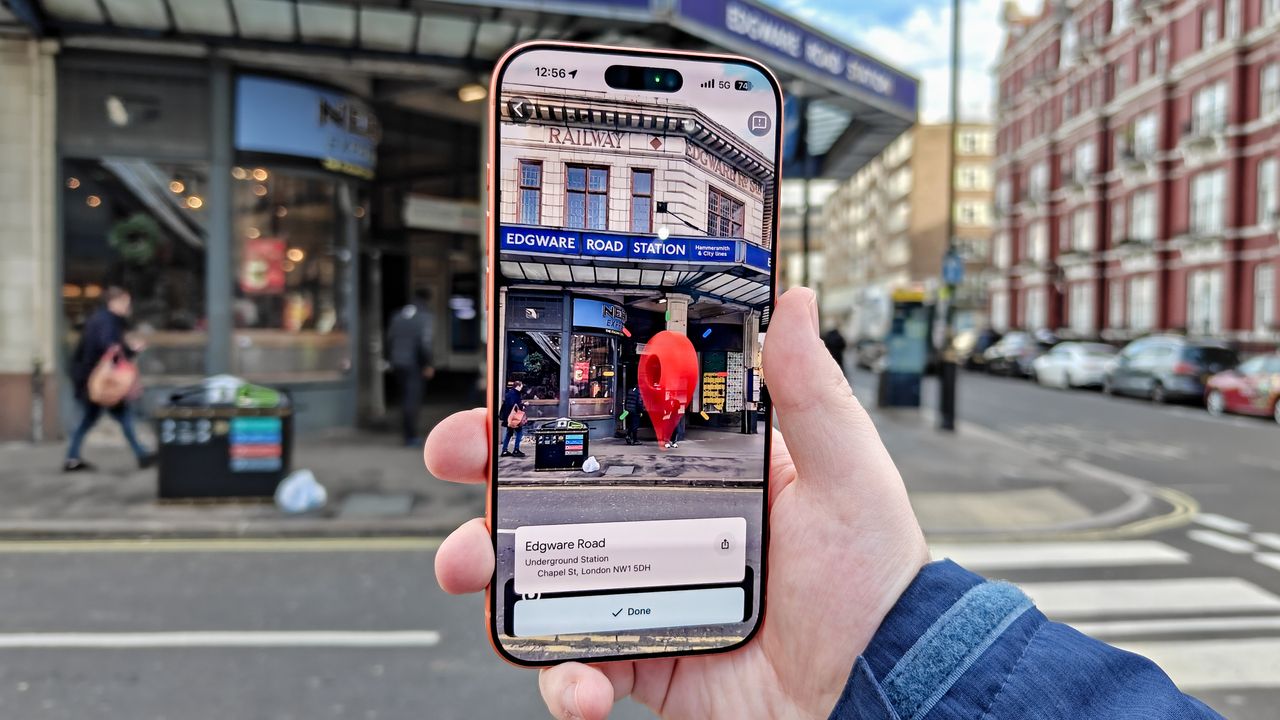
Google Maps destination marker.

Apple Maps and Google Maps have a lot in common, including AR modes to help users who want a more dynamic way of getting around than just staring at an arrow on a flat screen. But whose mode is better?

To test them out, I took a walk to a local Tube station and back, using Google Maps Live View on one leg of the journey, and Apple Maps Guide Me on the other. It wasn't exactly a difficult trip, but it showed me some key differences between these two apps — and allowed me to pick a favorite.

Read on for my impressions of Apple Maps Guide Me vs. Google Maps Live View.

Getting started

(Image credit: Tom's Guide)

Opening up Live View or Guide Me is simple enough on both apps. There's a button both prior to commencing navigation and when you're in the regular en-route view that you can press to enter AR mode.

There is also a third method - simply lifting the phone to a vertical position. Apple tells you about this option, whereas Google does not. This may be a first-time user thing, as I have definitely used Live View before, and not Guide Me, but I appreciate the heads-up from Apple in this case.

(Image credit: Tom's Guide)

Both apps will drop you back to the regular map view if you lower your phone to a horizontal position again. This seemed especially sensitive in Google Maps' case, giving you very little leeway if you need to drop your arm to get past a group of people, for example.

(Image credit: Tom's Guide)

Apple Maps Guide Me vs Google Maps Live View: Directions

(Image credit: Tom's Guide)

With the apps open, it's time to get moving. As the GIF above shows, any time you move past the virtual location of an arrow, Google Maps Live View will pop up another one. It means if you glance away for a moment, it won't take long to reorient yourself.

However, the rapid refreshing can lead to some weird effects. For instance, I ended up with an arrow at one point on my walk that seemed to direct me down a flight of stairs, simply because I'd faced that direction as the refresh order came in.

(Image credit: Tom's Guide)

This would hopefully only cause momentary confusion, but anyone in a rush or under stress would not appreciate this kind of accidental misleading.

(Image credit: Tom's Guide)

Apple Maps does not update its AR arrows anywhere near as frequently. Instead, it keeps you on track with pop-up prompts to point your phone back to the currently active arrow.

(Image credit: Tom's Guide)

What's more confusing is the fact that Apple Maps places these arrows along roadways rather than the sidewalk. It means you're constantly having to look to the side if you want to double-check the name of the road or the direction you need to continue in.

Apple Maps Guide Me vs Google Maps Live View: Detail

(Image credit: Tom's Guide)

I like how much more detail Apple Maps gives you when in Guide Me mode. In addition to the distance to the next change of direction, and the kind of turn you need to make, Apple Maps gives you more explicit written instructions, along with a rough diagram of how you'll move over or along the path or road. Apple Maps also displays the next direction in some instances to let you prepare as needed.

Meanwhile, Google Maps gives you distance, direction and a road name. That's it.

(Image credit: Tom's Guide)

However, Apple's more static direction style can sometimes interfere with its otherwise generous amount of detail. The example above shows how approaching a direction ends up obscuring the start and end of the street name, which feels like sloppy design to me.

Apple Maps Guide Me vs Google Maps Live View: Safety

(Image credit: Tom's Guide)

Both of these apps are smart enough to give you warnings about using their respective AR modes. Staring at your phone can lead to unfortunate accidents at the best of times, let alone when you're trying to navigate sidewalks full of people and roads full of vehicles.

Each time you come to a road crossing while navigating with Google Maps Live View, it pops up an overlay reminding you to check the road before you walk any further. This was sometimes a bit inaccurate, popping up well before an intersection or where there was no sign of one at all, but I'll forgive this in the name of being better safe than sorry.

Apple Maps Guide Me has a similar overlay about not checking directions while on the move. This only popped up three times during my walk, less than half of the number of interruptions that Google Maps made, and also without any clear trigger.

Apple Maps Guide Me vs Google Maps Live View: Destination marker

(Image credit: Tom's Guide)

Google Maps produces this fun animated pin to show you've arrived. It felt just as excited as I was to have made my way to Edgware Road, a rather handsome 20th-century London Underground station.

Meanwhile, Apple Maps has a static red icon, one that's also a little low-res when you're close to the destination.

(Image credit: Tom's Guide)

It's nowhere near as dynamic as the Google one, but given you're likely about to close the app to head into your destination anyway, maybe Apple's being smart by not putting in wasted effort.

Apple Maps Guide Me vs Google Maps Live View: Verdict

(Image credit: Tom's Guide)

Perhaps it's due to my greater familiarity with Google Maps, but I do think that Live View is the better AR navigation mode, on balance. Still, I believe that Apple Maps Guide Me is a) pretty close in quality and b) has a few tricks that Google would be smart to implement.

Guide Me's more detailed written instructions and directional arrows give extra reassurance that you won't get lost, which I would certainly appreciate if I was walking around an area I was unfamiliar with. But Google's more rapid direction updates, with arrows that remain on the sidewalk rather than sit in the street, feel more useful to someone trying to get around than knowing the next instruction ahead of time. Plus its intersection warnings could be literal lifesavers for preoccupied walkers.

Apple isn't Google Maps' only rival. Waze is an ever-present threat for anyone trying to navigate in a car, and may even do the job better than Google. Plus there are several other Google Maps and Apple Maps alternatives should you find neither work for you. But when it comes to AR directions, Google Maps is the winner for me.

Follow Tom's Guide on Google News and add us as a preferred source to get our up-to-date news, analysis, and reviews in your feeds.

More from Tom's Guide

Sign up to read this article
Read news from 100’s of titles, curated specifically for you.
Already a member? Sign in here
Related Stories
Top stories on inkl right now
One subscription that gives you access to news from hundreds of sites
Already a member? Sign in here
Our Picks
Fourteen days free
Download the app
One app. One membership.
100+ trusted global sources.