Get all your news in one place.
100's of premium titles.
One app.
Start reading
Tom’s Guide
Tom’s Guide
Technology
Anthony Spadafora

I found a free Mac app that solves the worst thing about USB-C cables

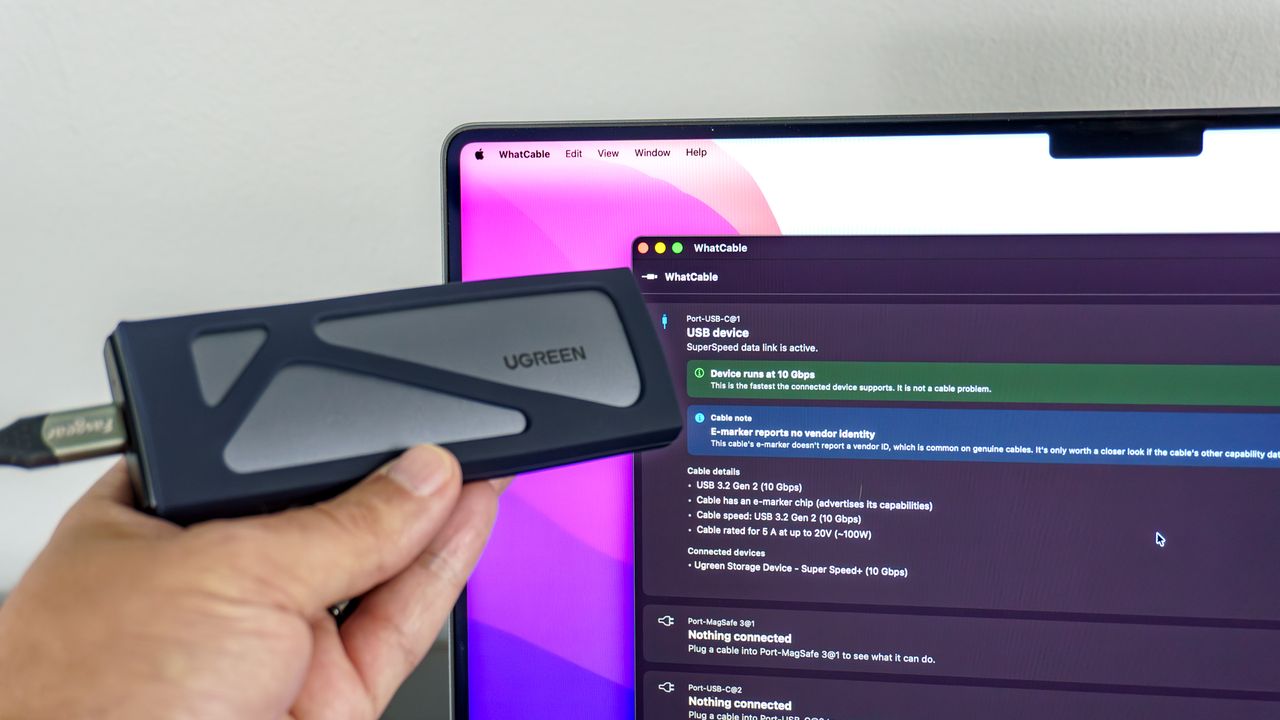
A person holding up a portable SSD in front of a MacBook Pro running the WhatCable app to test the speed of the cable connecting the two.

Over a decade ago, when we first made the transition to USB-C, cable manufacturers promised things would be different. Sure, we no longer had to worry about which side of our cables we plugged in, but now we’re facing a completely different problem: there’s no easy way to know how fast (and capable) our cables really are.

At least with USB-A to USB-C cables, the larger end often gives us some insights. For instance, USB 2.0 cables are black, USB 3.0 ones are blue, and the less aptly named USB 3.2 Gen 2x2 ones are red. With USB-C to USB-C cables, though, it’s a different story entirely.

Sign up to read this article
Read news from 100's of titles, curated specifically for you.
Already a member? Sign in here
Related Stories
Top stories on inkl right now
One subscription that gives you access to news from hundreds of sites
Already a member? Sign in here
Our Picks
Fourteen days free
Download the app
One app. One membership.
100+ trusted global sources.