Get all your news in one place.
100’s of premium titles.
One app.
Start reading
Windows Central
Windows Central
Technology
Rebecca Spear

I spent two weeks using Geekom's first 16-inch laptop — an interesting processor choice, but a solid performance from one of our favorite mini PC brands

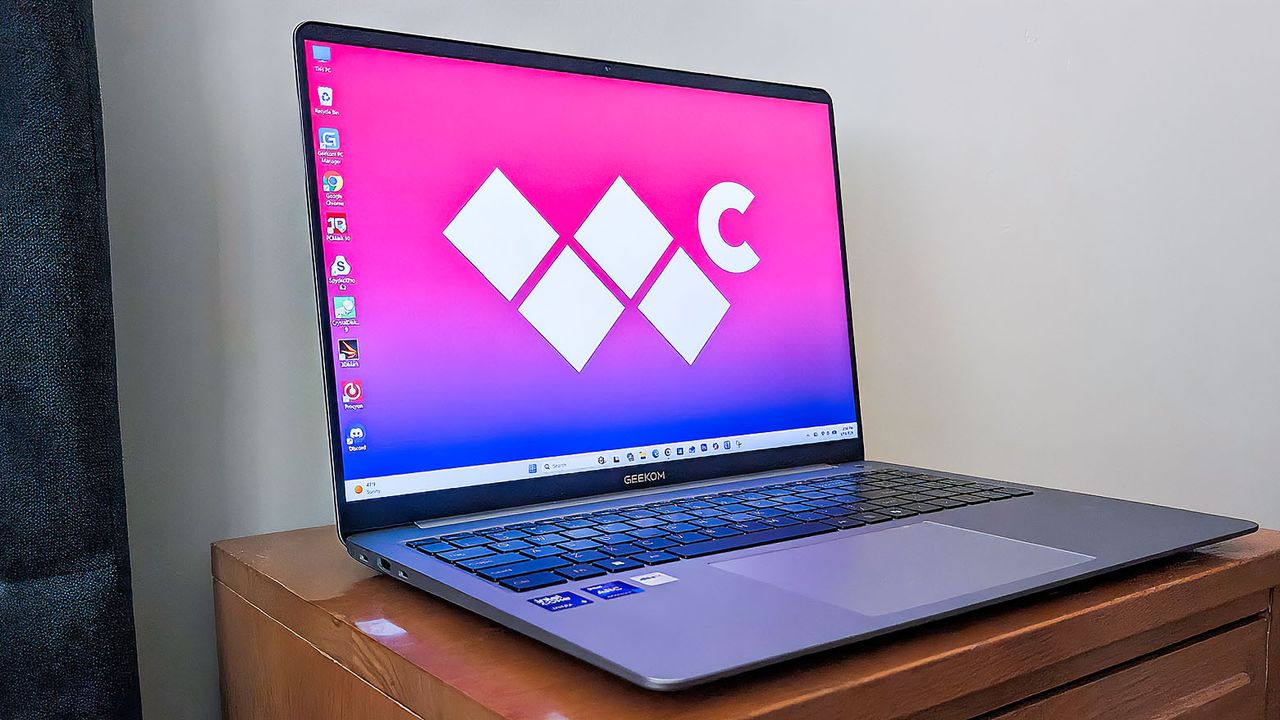
Geekom Geekbook X16 Pro on an end table and facing to the right. .

Known for its wide range of mini PCs (some of which have made it to our list of the best mini PCs), Geekom has now made its first foray into laptops this year with the GeekBook X16 Pro and smaller GeekBook X14 Pro, which mimic Apple's naming convention while sporting Microsoft's operating system.

We at Windows Central have tested and reviewed several of Geekom's mini PCs over the years and have been impressed with the company's offerings, so we were curious to check out its new laptops.

I've also spent the last two weeks using the GeekBook X16 Pro as my main laptop for work and play. Additionally, I ran this laptop through a number of benchmark tests to see what it's capable of.

It's a reliable option that scores well in some areas and could be improved upon in others, but it makes for a great laptop overall. Here's what you need to know about it.

This review was made possible thanks to a review sample provided by Geekom, which had no input nor saw the contents of this review prior to publication.

My Geekom GeekBook X16 Pro review

The GeekBook has a classy, understated design that fits in anywhere. (Image credit: Rebecca Spear / Windows Central)
There is a microSD card reader, two USB-A ports, and an audio jack on the laptop's left side. (Image credit: Rebecca Spear / Windows Central)
There are two USB-C ports and an HDMI port on the laptop's right side. (Image credit: Rebecca Spear / Windows Central)
The GeekBook X16 Pro is thin and lightweight. (Image credit: Rebecca Spear / Windows Central)

Design & Price ⭐⭐⭐⭐

With its sleek chassis, full number pad, and lightweight, the GeekBook X16 Pro is a classy-looking laptop, with a design that fits into any casual or formal setting.

Geekom GeekBook X16 Pro specs

• Display: 16-inch IPS LCD, 16:10, WQXGA (2560 x 1600) resolution, up to 120Hz refresh rate, 400 nits, 100% of sRGB
• CPU: Up to Intel Core Ultra 9 185H (16 cores, 22 threads, up to 5.1GHz Turbo Boost)
• NPU: Intel AI Boost (Up to 34 TOPS)
• GPU: Intel Arc GPU
• Memory: Up to 32GB LPDDR5 @ 7,500MT/s
• Storage: Up to 2TB M.2 2280 NVMe PCIe Gen4 SSD
• Features: Windows Hello facial recognition, MUX Switch support, per-key RGB lighting
• Dimensions: 35.3 x 24.9 x 0.68cm (13.9 x 9.8 x 0.27in)
• Weight: 1.27 kg (2.8 pounds)
• Starting price: $1,399.00 at Amazon

There are two configurations available for this 16-inch laptop, purchasable at both Amazon and Geekom's website. The first features an Intel Core Ultra 5-125H processor with Intel Arc Graphics, 32GB RAM, and 1TB SSD. It has an MSRP of $1,399, but is selling for $1,149.00 at Geekom at the time of writing.

The second configuration features an Intel Core Ultra 9-185H with Intel Arc Graphics, 32GB RAM, and 2TB SSD. This more premium option has an MSRP of $1,599.00, but is also on sale at the time of writing for $1,349.00 at Geekom.

You can get 10% off this laptop when buying from Amazon or Geekom using code WINDX16PRO. The discount code is valid until it expires on March 5, 2026.

Although less expensive than some AI laptops on the market, the GeekBook laptops also use older 100 Series Intel Core Ultra processors, which feels like an odd choice given that 200 Series were standard in 2025 and Intel just revealed its Core Ultra 300 Series chips at CES 2026 for this year's laptops. In other words, the 100 Series is old in tech years.

Typically, laptops with these 100 Series chips range from $800 to $1,800, depending on the other specs involved. As such, what you're getting with the X16 Pro is a more affordable 16-inch AI laptop than the latest Core Ultra Series 300 flagship offerings put out by the likes of Lenovo, Dell, HP, and other OEMs. As long as you don't need the latest and greatest AI processors to fit your needs, this laptop can be a more affordable choice while still netting you an AI PC.

Connectivity-wise, a healthy range of ports that includes two USB-C ports, two USB-A ports, an HDMI port, an audio jack, and a microSD card reader provides ample opportunities for displays and accessories. Even so, the laptop only weighs 1.27kg (2.8 pounds) and is only 0.68cm (0.27in) thick, making it easy to transport.

Overall, the GeekBook X16 Pro offers a sleek design with plenty of ports while not costing as much as some of 2026's other latest 16-inch AI laptops.

Display ⭐⭐⭐⭐

In a color gamut test, the GeekBook X16 Pro's display produced 98% of sRGB, 74% of AdobeRGB, and 74% of P3. (Image credit: Windows Central)

You won't be wowed by the GeekBook X16 Pro's IPS LCD display, but it definitely gets the job done without eliciting any negative comments, with a respectable color range, peak brightness, 2.5k resolution, wide viewing angle, 120Hz refresh rate, and 16:10 aspect ratio.

In a color gamut test using a colorimeter, the display produced 98% of sRGB, 74% of AdobeRGB, and 74% of P3. Meanwhile, in a brightness and contrast test, it produced 425 nits peak brightness and 1250:1 contrast.

As I previously said, it isn't a premium screen experience, but it's well-suited to most office, school, and personal uses.

Performance ⭐⭐⭐⭐

In a Geekbench 6 CPU benchmark, the X16 Pro earned a 2,375 single-core score and a 7,926 multi-core score. (Image credit: Windows Central)
In a Cinebench R24 benchmark, the X16 Pro earned a 103 single-core score and a 685 multi-core score. (Image credit: Windows Central)
In a 3DMark Time Spy benchmark, the X16 Pro earned a score of 4,109. (Image credit: Windows Central)
In a CrossMark benchmark, the X16 Pro earned a 1,865 score. (Image credit: Windows Central)
In a CrystalDiskMark benchmark, the X16 Pro SSD produced a read speed of 6,994MB/s and a write speed of 6,121MB/s. (Image credit: Windows Central)
It took the X16 Pro 3,428 seconds to transcode a 4K copy of Tears of Steel. (Image credit: Windows Central)

Is the GeekBook X16 Pro one of the most powerful laptops of 2026? No, it certainly isn't, especially considering it uses older 100 Series Intel Core Ultra processors that were released in 2023.

However, this laptop does offer solid performance that you can rely on, as long as you don't need the very latest and greatest hardware. I regularly used it to edit images in Photoshop, browse the internet, watch shows, and type up assignments, and it never gave me any issues in the dozens of hours I used it.

  • Geekbench 6 2,375 single-core | 7,926 multi-core
  • Cinebench R24 — 103 single-core | 685 multi-core
  • 3DMark Time Spy — 4,109 score
  • CrossMark — 1,865 score
  • CrystalDiskMark — Read: 6,994MB/s | Write: 6,121MB/s
  • Handbrake — 3,428 seconds

As far as thermals go, the laptop has never felt hot to the touch while I'm typing or it's set on my lap, even when I've stressed the CPU for 20 minutes straight.

That said, my biggest complaint with the GeekBook X16 Pro is its loud fans, which turn on at the least provocation and are accompanied by a high-pitched whine that can be hard to listen to.

Battery life ⭐⭐⭐⭐⭐

The laptop comes with a 65W charging adapter and a braided USB-C to USB-C cable. (Image credit: Rebecca Spear / Windows Central)

Over the course of two weeks, I used the laptop from a full battery until it turned off a few times to get a feel for its real-world battery life.

While doing typical activities like surfing the web, typing up articles, and working within projects in Photoshop, the laptop tended to last around 10 hours and 53 minutes, which isn't the longest we've seen, but definitely long enough to keep up with a typical workday.

Keyboard & touchpad ⭐⭐⭐⭐½

The keyboard buttons press in nicely and are typically well spaced, but I had to adjust to the spacing of the Shift and Enter buttons. (Image credit: Rebecca Spear / Windows Central)
There is a Copilot button on the keyboard. (Image credit: Rebecca Spear / Windows Central)

Overall, the keyboard buttons press down nicely and are well-spaced. However, I did have to get used to the placement of the Shift and Enter keys, which I accidentally kept pressing when I didn't mean to.

The keyboard also offers several useful function keys, media control keys, and a full number pad. Altogether, these features make this laptop incredibly convenient to use.

Meanwhile, a large and responsive touchpad not only makes navigation convenient but also ensures that I can make all of the selections I need without having to reattempt my efforts.

Software & AI ⭐⭐⭐⭐

Geekom PC Manager is an intuitive program with a clean interface. (Image credit: Windows Central)
As the name implied, the Quick Settings menu gives convenient access to several settings options including keyboard backlighting, function key presets, microphone settings, and more. (Image credit: Windows Central)
The PC Optimization tab allows you to quickly check for driver updates, perform cleanups, and more. (Image credit: Windows Central)

Unlike other computer manufacturers, Geekom doesn't load up its devices with a bunch of unnecessary extra software, but there are a few programs to be aware of, including Geekom PC Manager, DTS Sound Unbound, and DTS:X Ultra. As you can surmise, the first program mentioned helps you check laptop hardware performance, adjust settings, and make it easier to update drivers or run system cleanups.

Meanwhile, the two DTS programs help you maintain and manage the DTS audio system. You can change to different presets and adjust EQ settings until the speakers sound the way you want them to.

Since the GeekBook X16 Pro uses an AI processor with an NPU (neural processing unit), it is technically an AI PC, but since that processor is a two-times previous-gen chip, it doesn't offer the very best AI processing. Still, it can handle certain AI tasks better than non-AI laptops.

Everything else ⭐⭐⭐⭐

A physical slider can be moved over the webcam to better ensure your privacy. (Image credit: Rebecca Spear / Windows Central)
Rubber feet on the bottom prevent the laptop from sliding around. (Image credit: Rebecca Spear / Windows Central)
Geekom GeekBook X16 Pro packaging puts me in mind of Apple's presentation. (Image credit: Rebecca Spear / Windows Central)
You'll find the laptop, a USB-C to USB-C cable, a 65W wall charger, and manuals in the box. (Image credit: Rebecca Spear / Windows Central)

It's not always guaranteed that a laptop will have a physical webcam cover, but the GeekBook X16 Pro does, so you can better ensure your privacy by sliding it into position.

While not the most impressive speakers, microphone, and webcam I've ever used, I was able to communicate and listen to my co-workers clearly during video calls. The audio gets plenty loud and works effectively when listening to music or streaming shows as well. Meanwhile, the webcam does a decent job with accurate coloring as long as I'm in a well-lit room. Just note that it does not support Windows Hello facial login.

However, the power button above the keyboard's right side also doubles as a fingerprint reader. I set up this biometric login option when I first booted up the laptop, and it's worked accurately to quickly log me in every time I've used it.

Geekom GeekBook X16 Pro: My final thoughts

While not the most powerful AI laptop on the market, the GeekBook X16 Pro is a reliable and less expensive 16-inch option. (Image credit: Rebecca Spear / Windows Central)

✅You should buy this if ...

  • You want a reliable AI laptop that doesn't cost as much as other options.
  • You'd prefer a laptop with a full number pad and a fingerprint reader.

❌You should not buy this if ...

  • You specifically are looking for a laptop with the latest and greatest AI processors.
  • You're looking for a laptop that supports facial recognition login.

While other laptop manufacturers are releasing new flagship devices with the latest AI chips, the GeekBook offers solid performance at a lower price by utilizing older processors.

There's still ample memory and storage to keep up with modern office, school, and personal workflows, and the laptop's performance is solid, even if it isn't the most impressive option out there. It would be better if the fans weren't as loud and if it supported facial recognition in addition to the fingerprint reader.

Still, there's no denying that the GeekBook X16 Pro is a reliable laptop with plenty of useful features.

Follow Windows Central on Google News to keep our latest news, insights, and features at the top of your feeds!

Sign up to read this article
Read news from 100’s of titles, curated specifically for you.
Already a member? Sign in here
Related Stories
Top stories on inkl right now
Our Picks
Fourteen days free
Download the app
One app. One membership.
100+ trusted global sources.