
Get all your news in one place.
100's of premium titles.
One app.
Start reading
GamesRadar
GamesRadar
Technology
Tabitha Baker

I put this eight year old budget gaming mouse to the test against far newer releases, and it still comes out on top

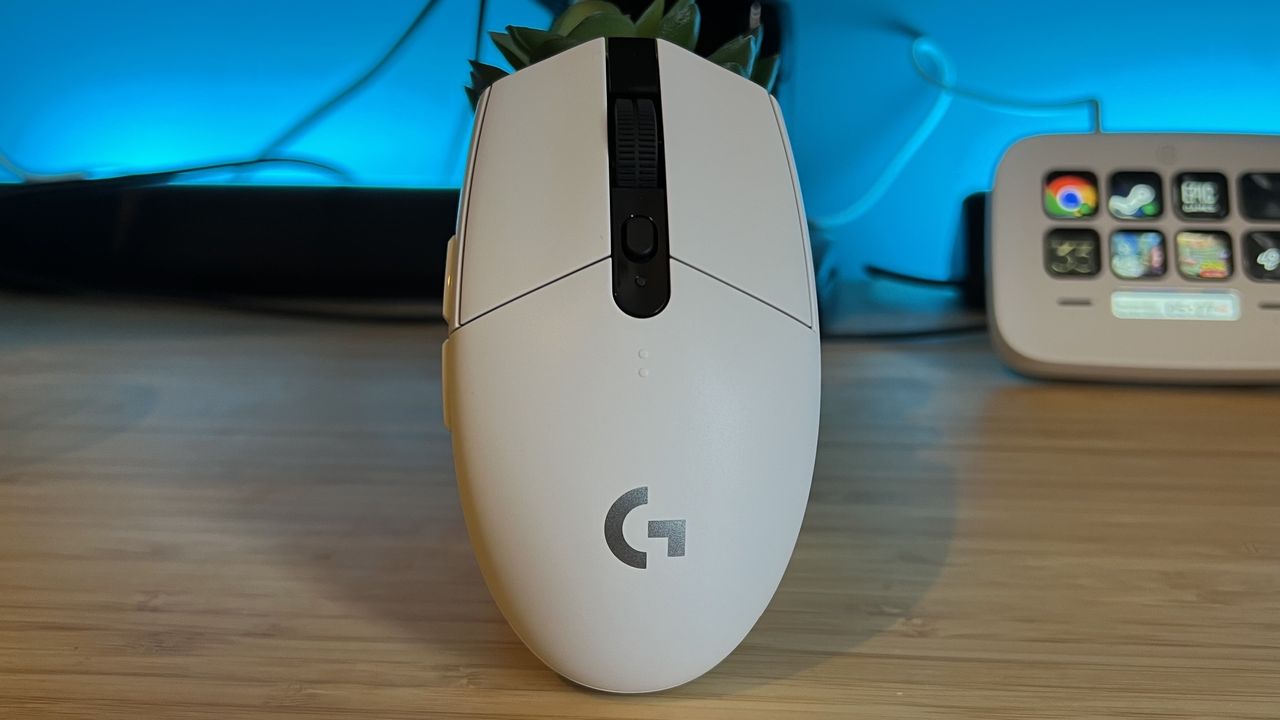
Logitech G305 Lightspeed gaming mouse standing upright on a wooden desk with blue backlighting.

The Logitech G305 Lightspeed is a veteran of the best gaming mouse world, but eight years after launch how does this budget rodent hold up against the rest of the market? Surprisingly well.

This right-handed, AA battery-powered 2.4GHz mouse has shed its $49.99 / £59.99 skin by now, often available for well under $30. That makes it one of the cheapest options on the market, but it still manages to beat SteelSeries' newer releases for battery while holding its own in the build quality arena as well. Comfortable, relatively lightweight, and sturdy on the desk, this is a must-see for bargain hunters.

Key Specs

Price

$49.99 / £59.99 (often on sale for less)

Connection

2.4GHz

Shape

Right handed

Buttons

6

DPI

12,000

IPS

400

Switches

Omron mechanical

Weight

99g (with battery)

Battery

Up to 250 hours

What I loved

Excellent price point

It's those numbers that often draw people to the Logitech G305 Lightspeed in the first place. While it still holds a $50 MSRP, this is a wireless gaming mouse that can be found for less than $30 on most days. Considering that's among the cheapest, even of the wired options, it's a serious selling point.

Brands don't often go this far down the price scale with a cord-free rodent. SteelSeries' cheapest competitor, the Rival 3 Wireless Gen 2 launched at a similar $59.99 (but is generally found for between $30 and $40 day to day) while the Razer DeathAdder V2 X Hyperspeed is rarely found for less than $40 these days.

Considering the G305 Lightspeed doesn't only drop lower than these competitors, but does so with more regularity, it's easily the cheapest mainstream option out there.

Punching above its weight in build quality

(Image credit: Future)

It might be inexpensive, but Logitech certainly hasn't cheaped out on build quality. The G305 Lightspeed was released nearly eight years ago now, but that doesn't mean it feels flimsy in the hand. I was surprised to find zero creaking or flexing around the main chassis, even when putting direct pressure on the sides or top of the casing. That's rare even for a mid-range device, let alone one that costs less than a takeout.

Yes the clicks feel slightly more hollow than the $100+ options I'm used to testing, but they're far from rattly - still tight, precise, and clean in their feel and sound. Plus the scroll wheel has a fantastic tension underneath, miles from the overly stiff or free-wheeling spins of other budget models. There's just a breath of a hint of echo from the main click (that I only heard when holding it directly up to my ear), but everything else is held firmly in place.

Rock solid performance

If it's cheap and well built, surely there must be a sacrifice in its reporting? Nope.

Even eight years after launch, the Logitech G305 Lightspeed still holds its own in the arena. Of course, this 12,000 DPI / 400 IPS Hero sensor isn't going to win a race against the Hero 2s of the best Logitech gaming mice or the high-speed eSports ambitions of Razer's flagships. Considering most casual players won't notice when that 8,000Hz polling rate is turned off and won't even move much beyond 3,000 DPI, though, this really is all you need.

It nails the necessary specs on paper, but the G305 Lightspeed keeps its word on the battlefield as well. I never noticed any jitters, click latency drops, or tracking whoopsies in my weeks of testing - this thing ran like a far more expensive rodent and I trusted it just as much when push came to shove.

Versatile design

The only area where I see the Logitech G305 Lightspeed showing its age a little is its form factor. For some reason, this flatter shape has moved out of fashion in the last few years but returning to the shapes of yore isn't a bad thing. While today's gaming mice prioritize a more bulbous, curvy shape, I've had an excellent time with the flatter chassis design here.

(Image credit: Future)

It essentially means I can stay comfortable in a palm grip thanks to the wider middle section, but the drop in height keeps fingertip and claw grips on the cards as well. I find myself in the latter position the most and never felt unsupported during longer play sessions. That's versatile in its grip type, but those with larger hands may struggle to keep their composure.

What to consider

Smaller size won't fit everyone

The shape is certainly suitable for a wide range of mousin' styles, so long as your hand size can accommodate the slightly smaller chassis stature. The G305 isn't a miniature mouse at all, but it is smaller than other rodents out there. Combine that footprint with the aforementioned flatter design and there's less for larger hands to hold onto here.

Replaceable batteries are common at this price point

(Image credit: Future)

This isn't so much a drawback of the G305 as something you'll likely need to accept if you're after a budget wireless mouse in the sub-$50 price category. Rechargeable batteries only hit the spec lists at around the $60 - $80 mark (check out the Keychron M7 8K if you're looking to move up the price list), so you'll be making do with a double-A here.

The SteelSeries Rival 3 Wireless wins on this front, though only if you're after a slower Bluetooth connection. With two triple-A batteries inside you're looking at up to 450 hours at a time. However, when that 2.4GHz dongle comes into play the G305 remains on top. The Logitech is good for up to 250 hours versus SteelSeries' 200 hours.

No Bluetooth option

(Image credit: Future)

This is the Logitech G305 Lightspeed so the brand is putting most of its emphasis on its own faster 2.4GHz connection. That means, unlike SteelSeries' entry, there's no Bluetooth connection to fall back on here. You'll need a spare USB-A slot to run the G305 from, which could get tricky if you're switching between PC, mobile, and handhelds.

Should you buy the Logitech G305 Lightspeed?

If you're going for a budget-friendly wireless gaming mouse, there's nothing else I'd recommend before the Logitech G305 Lightspeed. This is a best-in-class example of excellent value for money, with a build quality and performance that punches well above a price tag sitting slightly below its competition. Those with larger hands may struggle to keep control and multitaskers may need that Bluetooth connection back. However, in the grand scheme of value for money, Logitech beats SteelSeries and Razer hands down.

How I tested the Logitech G305 Lightspeed

I used the Logitech G305 Lightspeed for a period of two weeks prior to review, primarily testing across CS2 and Doom: The Dark Ages, with a little Planet Coaster thrown in for good measure. I used the device as my sole mouse for all gameplay and work during that time. For more information on how we test gaming mice, check out the full GamesRadar+ Hardware Policy.

For more setup inspiration, check out the best gaming keyboards and the best gaming headsets on the market.

Sign up to read this article
Read news from 100's of titles, curated specifically for you.
Already a member? Sign in here
Related Stories
Top stories on inkl right now
One subscription that gives you access to news from hundreds of sites
Already a member? Sign in here
Our Picks
Fourteen days free
Download the app
One app. One membership.
100+ trusted global sources.