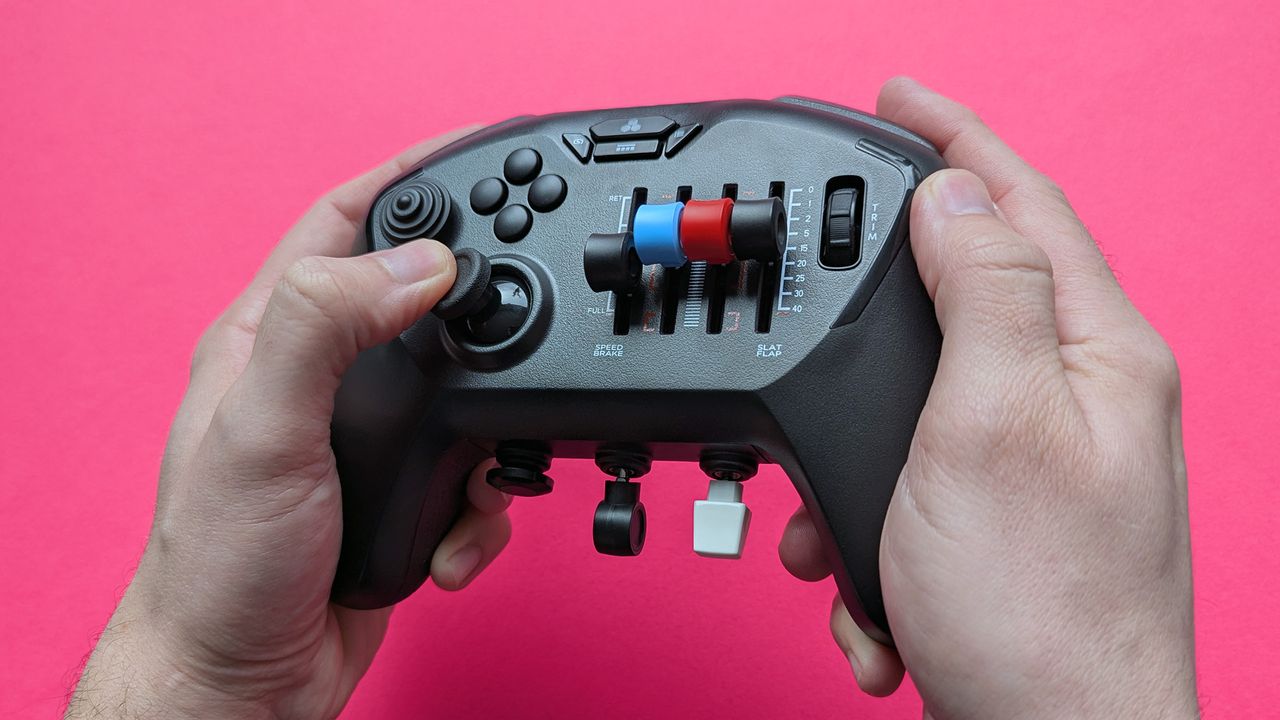
Honeycomb Aeronautical is one of those brands that thrives within its subcategory, but casual users who don't regularly trawl the flight simulator scene might not recognize it. That's generally fine because the company excels at what it does, and I've regularly recommended its full-size hardware, such as the recent Foxtrot flight stick and Bravo Lite throttle quadrant.
Still, I'm on a lifelong mission to tempt the unsuspecting public into Microsoft Flight Simulator. Sometimes that can be as letting them fly a virtual plane over a recreation of their hometown on PC; others, it's a more casual dip into the Xbox version. I saw a prototype of this Echo controller last year, and it was, in my own words, "the coolest f—ing thing I'd seen". Now, it's in my office.

Where can you buy the Honeycomb Echo?

As you might expect, you can buy the Honeycomb Echo Aviation Controller directly from the company's official store for $149.99.
Price (MSRP): $149.99 at Amazon
Platform: Windows PC
Model: HC003981
Connection: USB-A to USB-C, 2.4 GHz wireless dongle
Material: Metal, plastics
Weight: 293 g (0.64 lbs)
There is a listing for the Echo at Amazon US for $149.99, but as of writing, was out of stock.
On my side, in the United Kingdom, there's a similar listing for the Echo on Amazon UK, but it seems to have never had stock, leaving it without a price tag for now.
Back in the US, there's nothing for the Echo at Best Buy, despite a few listings for Honeycomb's other products, but that might soon change.
For now, your best bet is to pick up the Echo directly from Honeycomb with deliveries "within 1-3 working days" and a "risk-free 14-days return period", as it claims along the bottom end of its store page.
Is the Honeycomb Echo a good controller?

The Echo makes so much sense to me as a surface-level fan of the genre, meaning I love the experience of flying around the world in (post-patch) Microsoft Flight Simulator, but I've never committed to a permanent sim rig in my home. It's the kind of game that feels fine on an Xbox controller, but genuinely improves with recreations of real-world sticks, throttles, and pedals.
Honeycomb gets a lot of things right, all of which were immediately noticeable when I unboxed the real thing.
Yes, these types of Frankensteined controllers have existed before, with some gimmicks appearing frequently in the sim racing scene, but this one felt like a worthy project from the moment I saw it. Thankfully, the release model is even better than the prototype I tried. Honeycomb gets a lot of things right, all of which were immediately noticeable when I unboxed the real thing.

As tempting as it was to push and pull on the unusual-looking collection of throttle levers and switches, Honeycomb's inclusion of a high-quality carrying case earns its earliest praise. It's a semi-hardshell case, complete with a netted storage compartment for the included charging cable and slots for the various lever caps alongside its 2.4GHz wireless USB dongle.
Variety is the spice of life, and this is one of the sweetest solutions to interchangeable throttles I've seen to date.
A firm but reasonable pull removes any of the four standard circular lever caps, and I can easily swap them out for a Boeing-style speed brake and flaps — or a duo of propeller and mixture caps if I feel like flying something smaller. Variety is the spice of life, and this is one of the sweetest solutions to interchangeable throttles I've seen to date.
Moving to the meat of this thing, the throttle levers themselves have enough resistance to prevent accidental pushes when I brush them with my thumb, but aren't so stiff as to be cumbersome. The trim wheel is also particularly solid, so there's no danger of pushing that up or down, either. It's the same for the pull-out parking brake, toggled landing gear, and chunky flaps lever.

One part that definitely deserves highlighting is the Hall-Effect thumbstick, which is essentially modern controller technology that helps prevent stick drift, something I've seen happen to older joypads over the years. The thumbstick itself feels completely normal, but it does have high-end tech hidden beneath, which should help keep the Echo in good health for years.
That, and Honeycomb provides downloadable Microsoft Flight Simulator control profiles for the Echo on its official website, which skips much of the setup process. On the other hand, some simulation enthusiasts actually prefer to do this themselves, but there's nothing stopping anyone from creating a manual profile — I'll pass for now.
In MSFS, you can fine-tune the sensitivity of each digital and analog input of the Echo, and I'd personally recommend dialing down the thumbstick sensitivity. After that, everything feels great at stock settings, even if the spring-loaded rudder pedals on the back of the Echo take some getting used to. If I can figure it out, then I'm sure you'll get the hang of it.
Does the Honeycomb Echo have any issues?

Downsides to the Echo are slim, but worth mentioning. On the hardware side, the shoulder buttons are all digital; that means no analog triggers. Second, the hat switch is placed up and to the left of the thumbstick, which can make camera movements a little awkward — not impossible, but awkward — though I use two shoulder buttons for a quick look to the left and right anyway.
For software, it's the big and obvious one: no Xbox support. It's notoriously difficult to build third-party wireless controllers for Microsoft's console, but it is especially strange to hold something that feels like it belongs there. Honeycomb already built an Xbox hub as a console compatibility bridge for its PC-specific Bravo and Charlie hardware, so I'd definitely like to see a similar solution here.
Should you buy the Honeycomb Echo?

You should buy this if ...
✅ You're a traveling flight sim fan who craves portable play
✅ You don't have enough desk space for sim hardware
You should not buy this if ...
❌ You primarily play Microsoft Flight Simulator on Xbox
❌ You prefer flying virtual helicopters over planes
Honeycomb's Echo Aviation Controller is an extremely unique addition to an otherwise predictable, if stellar, lineup. I've always pushed newcomers looking for the best flight sticks for Microsoft Flight Simulator towards something like the Foxtrot for the sake of simplicity, but this has a chance to replace (or at least supplement) that recommendation.
I love seeing brands take risks on quirky hardware like this, and it's even better when they make it out of the prototype stage and prove to be much more than a gimmick. Rather than setting up full-size peripherals in the evenings, I'm finding myself reaching for the Echo far more often, but I still lament the missing Xbox support. That, and third-party storefront availability needs to improve.
Ideal for portable flights in Microsoft Flight Simulator on PC, the Honeycomb Echo is a strange yet fantastic middle ground between joypad controls and full-blown sim hardware.

Join us on Reddit at r/WindowsCentral to share your insights and discuss our latest news, reviews, and more.