
Get all your news in one place.
100’s of premium titles.
One app.
Start reading
GamesRadar
GamesRadar
Technology
Benjamin Abbott

I'm an idiot, and even I was able to make a cool Fallout action figure using this beginner-friendly 3D printer

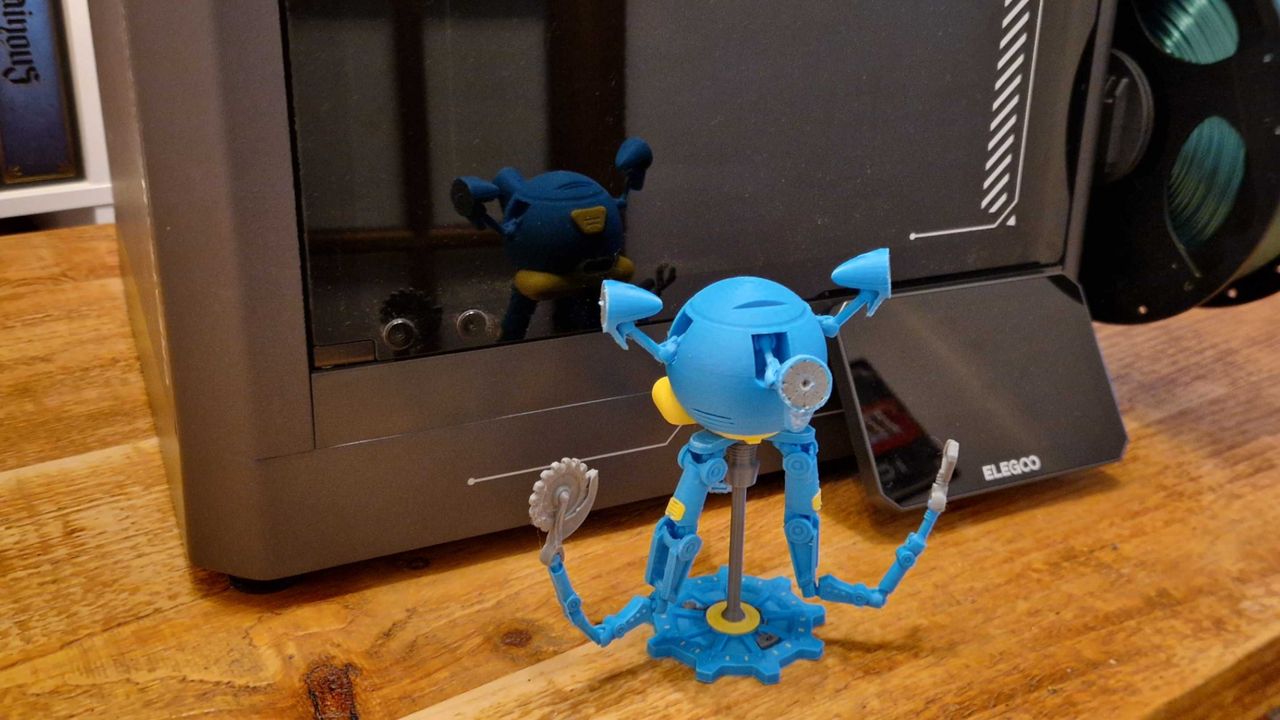
A blue and yellow Mr Handy model on a wooden table, in front of the Elegoo Centauri Carbon 2 Combo.

Please join me in a moment of silence as we mourn the poor Elegoo Centauri Carbon.

I've said before that this is one of my favorite 3D printers. Actually, my Elegoo Centuari Carbon review notes that it's the perfect entry-level machine for beginners. But now? I'm afraid to say it's been superseded by a younger, trendier model. Enter the Elegoo Centauri Carbon 2 Combo.

Yes, it looks similar to its predecessor. It boasts many of the same tricks. However, it does them all better – and with multi-color functionality. So I'm sorry to say, my Elegoo Centauri Carbon love story is over. It's all about this bad boy now.

Elegoo Centauri Carbon 2 Combo features & design

Price

$449/£399

Printer type

Filament

Build volume

256 × 256 × 256mm

Velocity

Up to 500mm/s

Acceleration

Up to 20,000mm/s²

Build plate

Dual-sided flexible

In-built camera

Yes

Leveling

Automatic

Connections

USB-A & Wi-Fi

  • 4-color printing
  • CoreXY velocity of up to 500mm/s
  • Quiet printing under 45dB

This device is pitched as a family-friendly machine. Not because kids and their parents are supposed to be using it together as a wholesome weekend activity; rather, it's designed to be quieter and less obtrusive. That means it can, in theory, be used at home without disturbing anyone else around you. Indeed, it's able to "print silently" under 45dB.

As you may be able to tell from the many reels attached to it in most promo photos, it's also a multi-color device. You can connect four kinds of filament to it at once, and – thanks to the CANVAS system tucked away on the side of the chassis – the Centauri Carbon 2 Combo will switch between them seamlessly during print projects.

(Image credit: Future/Benjamin Abbott)

When combined with full-auto calibration, a nozzle that can reach up to 350°C, a coreXY velocity of up to 500mm/s, and an enclosed system to keep things neat and tidy, this machine is a solid all-rounder.

Elegoo Centauri Carbon 2 Combo performance

  • Easy to use
  • Reliable, detailed results every time
  • Quieter than previous models
(Image credit: Future/Benjamin Abbott)

Much like the original Centauri Carbon, this printer is incredibly easy to use. Unlike the machines of old, you won't spend hours fine-tuning it; you unpack it, set off the auto-levelling, and away you go. It's as simple as that.

What follows is reliable and of an impressively high quality. These prints aren't going to rival those made on resin machines like the Creality Halot-X1 in terms of detail, but they're still great all things considered. I used this to make everything from Catan tiles (back when I 3D printed one of the best board games for my family at Christmas, which you can read about here) to Warhammer scenery and D&D props. Everything came out looking fantastic with absolutely no effort on my part, so those willing to dial in the settings even more should be very pleased.

More detail, please
(Image credit: Benjamin Abbott)

If you want to print miniatures for the likes of D&D or wargames such as Trench Crusade, you're better off with a resin printer instead. Elegoo makes machines like the Elegoo Saturn 4 Ultra 16K, which should do the job nicely and future-proof you in terms of quality.

The multi-color functionality is brilliant too, and for me, it's the biggest differentiator between this and the previous Centauri Carbon. It switches between colors with nary a complaint, and I've had next to no issues at all with snags or blockages (unlike some competitors' machines). The fact it's all fed through the dainty CANVAS system is another positive – there's no need for separate, bulky feed systems taking up space.

So, how's the noise? Although I'm not sure I'd say it goes unnoticed, the Elegoo Centauri Carbon 2 Combo is a lot quieter than the previous model. The addition of rubber feet to absorb vibrations helps, and the only trouble I had while working in the same room was it shaking the desk during certain high-speed prints. If you've got the machine set up in a spare room or garage and can shut the door, I daresay you'll barely notice it was there.

Should you buy the Elegoo Centauri Carbon 2 Combo?

(Image credit: Future/Benjamin Abbott)

If you're new to 3D printing or want an easy, all-in-one system, this is a perfect choice. Printers with larger beds and higher speeds do exist, but this more than does the job unless you have those kinds of specific needs.

Buy it if...

Don't buy it if...

How we tested the Elegoo Centauri Carbon 2 Combo

(Image credit: Future/Benjamin Abbott)

This review was conducted using a sample provided by the manufacturer.

I spent a couple of months using and living with the Elegoo Centauri Carbon 2 Combo. This involved me printing off a wide variety of items to test the machine's capabilities, ranging from board game tiles, storage items, props, and wargaming terrain.

For more on how our process works, be sure not to miss the full GamesRadar+ hardware policy.


For inspiration on what to use your printer for, why not check out the best tabletop RPGs?

Sign up to read this article
Read news from 100’s of titles, curated specifically for you.
Already a member? Sign in here
Related Stories
Top stories on inkl right now
One subscription that gives you access to news from hundreds of sites
Already a member? Sign in here
Our Picks
Fourteen days free
Download the app
One app. One membership.
100+ trusted global sources.