Get all your news in one place.
100's of premium titles.
One app.
Start reading
Tom’s Guide
Tom’s Guide
Technology
Nikita Achanta

I'm an AI skeptic but this MSI gaming monitor’s AI features are actually useful — here's what the Care Sensor does

An MSI MPG 341CQR QD-OLED X36 gaming monitor in black.

I'll be honest with you: I'm not a fan of AI. I don't agree with a lot of it for many, many reasons, and, personally, I don't find any use for it in my day-to-day life. I get by just fine without it. As someone who reviews consumer tech for a living, I've noticed a recent trend amongst manufacturers: they love slapping the word "AI" on their products, even when nothing about the product is actually powered by AI. It's a buzzword after all, right, because why would a hair styler need AI?

I'm tired of it, and I know many of my friends and the general public are too. Needless to say, I'm highly skeptical of AI, so when I found out that the gaming monitor I was testing had an "AI Care Sensor," I couldn't help but roll my eyes. But I'm not opposed to being proven wrong. The MSI MPG 341CQR QD-OLED X36 has (almost) convinced me that AI can actually be useful.

The X36 is one of the best curved monitors (a lot of) money can buy right now. It's sleek, it's good-looking, and it's got bags and bags of performance under the hood. A 360Hz refresh rate and 0.03ms response time make it one of the best monitors for gamers — and productivity power uses too, as it boasts great color coverage and accuracy. But what does the AI Care Sensor actually do? As it turns out, quite a bit!

Busting the jargon

(Image credit: Tom's Guide)

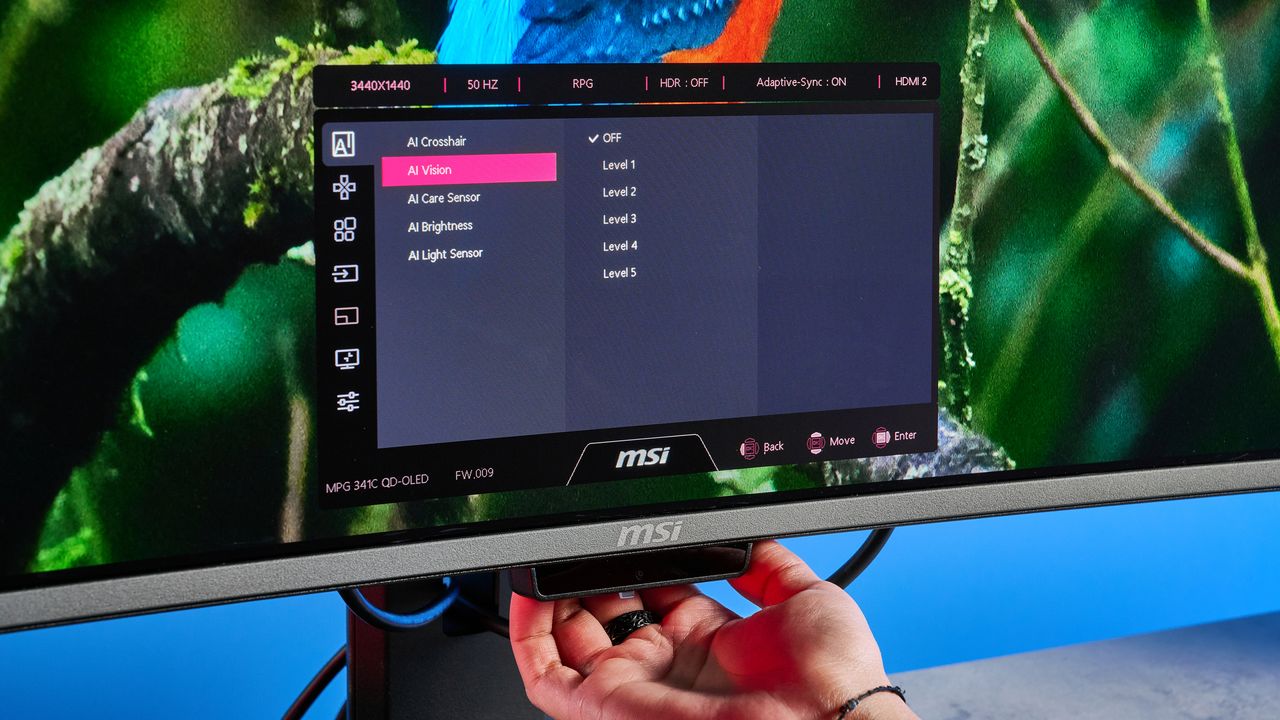
Located under the MSI logo on the front of the X36 you'll see what looks like a webcam — that's what I first thought it was. But reading the manual and going through the product page showed that it's actually an AI Care Sensor, but what does that mean? Well, it combines an integrated camera module with an on-device neural processing unit (NPU) to run human recognition algorithms in real time.

I'll bust the jargon for you: the AI Care Sensor basically detects human presence within a 75° field of view and automatically adjusts the screen depending on whether you're in front of it at any given moment. Disabled by default, you need to press the joystick and enable it via the settings menu. There are a few modes available, such as Wake On Approach, Lock On Leave, Adaptive Dimming and Auto Brightness.

(Image credit: Tom's Guide)

Once you've tinkered with the settings, the monitor will basically turn itself off as soon as you leave, and turn back on when you sit back in front of it. Adaptive Dimming saves power and protects your privacy too. Say, a colleague approaches you and you turn to face them. The monitor detects this motion and its AI chip dims the screen so that no one else can see what you've got on there — perfect for viewing sensitive and confidential documents.

This also helps prevent OLED burn-in. OLED burn-in occurs over time and isn't an immediate risk, but long-term usage can affect the brightness and pixels may lose their luminous efficiency. Adaptive Dimming essentially saves this from happening too quickly. And alongside this, the X36's AI Care Sensor automatically adjusts brightness and color temperature too, depending on the lighting conditions to ensure an optimal viewing experience.

Human detection goes a long way

(Image credit: Tom's Guide)

My job is simple: see what a manufacturer claims their product can do and then do everything in my power to either prove or disprove it. The MSI X36's bold claim of real-time human detection, at first, sounded like marketing drivel to me, but I was quickly proven wrong when I tested the monitor.

With the AI Care Sensor toggled on, the X36 automatically turned itself off within 5 seconds of my leaving the desk. As someone who sits at a desk up to eight hours, five days a week, this is a very handy feature. I get up to stretch my legs once every hour so the monitor turning itself off is extremely useful. I don't have to manually do it which saves me a minute or so.

The AI Care Sensor is adept at distinguishing between human and inanimate objects too. I placed a seal plush in front of the monitor, at different angles, to see if it mistook my inanimate desk companion and continued to stay turned on. And it didn't. I was quite impressed by this!

Am I an AI skeptic turned believer?

(Image credit: Tom's Guide)

There's no doubt about it that the MSI X36 is a very capable monitor (you can read all about its performance in my full review), and its AI Care Sensor has proven to me that AI in tech can actually be useful. But am I an AI skeptic turned believer? Not really. I still have my qualms with AI and don't necessarily believe that AI needs to be in every single product. Sticking the word "AI" in front of something like "noise cancellation" on a pair of headphones doesn't make it appealing to me when I know the manufacturer means to say its adaptive noise cancellation.

But that's not to say that it can't be used for good, as the X36 has proven to me. The AI Care Sensor works extremely well and didn't have any hiccups during my testing. I appreciated the monitor turning itself off and on, and adjusting the brightness and colors according to the lighting conditions. It's something I haven't seen on any other monitor yet. Brownie points to MSI.

More from Tom's Guide

Sign up to read this article
Read news from 100's of titles, curated specifically for you.
Already a member? Sign in here
Related Stories
Top stories on inkl right now
One subscription that gives you access to news from hundreds of sites
Already a member? Sign in here
Our Picks
Fourteen days free
Download the app
One app. One membership.
100+ trusted global sources.