Get all your news in one place.
100’s of premium titles.
One app.
Start reading
Windows Central
Windows Central
Technology
Rebecca Spear

Acer Predator XB273K V5 review — A value gaming monitor that swaps between 4K @ 160Hz and FHD @ 320Hz

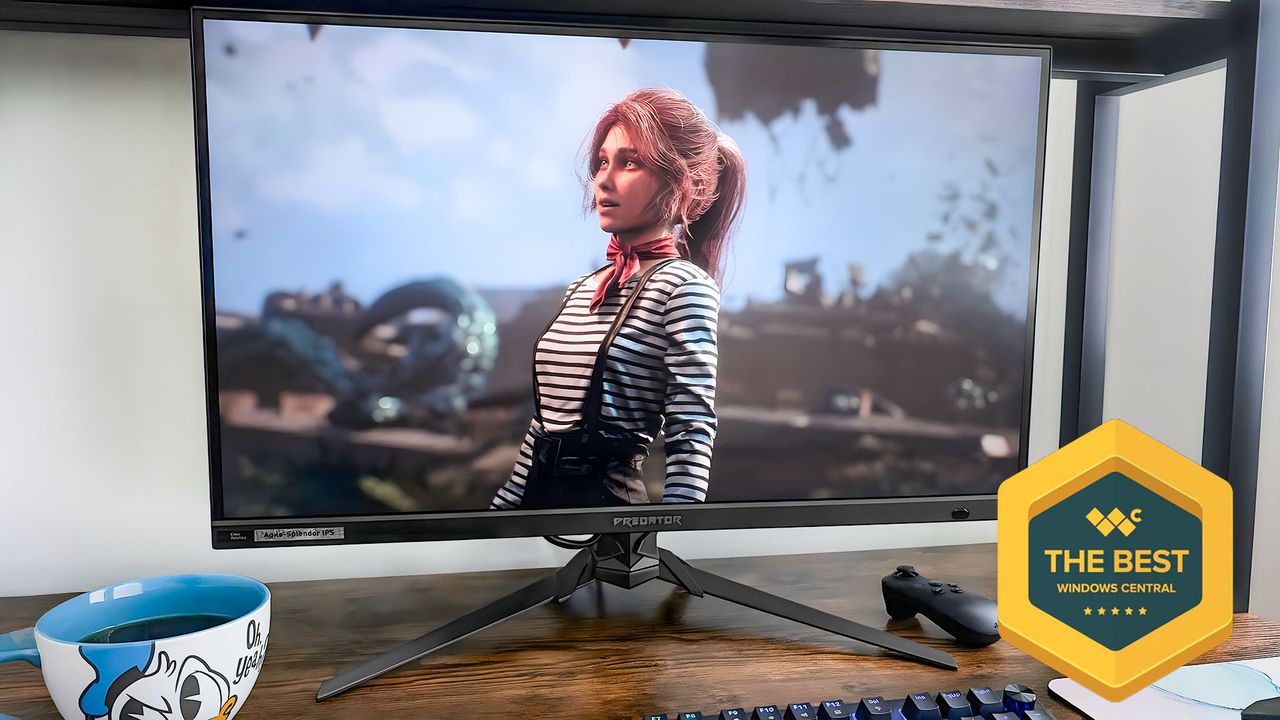
Acer Predator XB273K displaying Clair Obscur: Expedition 33. A badge in the lower left corner of the screen shows the Windows Central logo and say, "The Best Windows Central.".

Gaming monitors with the most convenient features tend to be rather costly, as any PC gamer will tell you.

Rebecca Spear, Gaming Editor

(Image credit: Windows Central)

This week: I've been replaying Clair Obscur: Expedition 33, only this time on my Xbox Ally X rather than my gaming desktop.

However, every once in a while, a standout display launches at a lower price than expected, making it that much easier to get the gaming setup you want, and that's one of the things that impressed me with the Acer Predator XB273K V5.

I've been using the Acer Predator XB273K V5 for a few months now, and it's been an absolute joy to use while playing the latest AAA games like Clair Obscur: Expedition 33.

Thanks to its many features, including its dual refresh rate and included remote, I've been able to game conveniently and smoothly. Here's what makes it such a great pick.

This review was made possible thanks to a review sample provided by Acer. The company had no input nor saw the contents of this review prior to publication.

Acer Predator gaming monitor review

The Acer Predator XB273K doesn't offer any RGB, but it does have a striking angular design. (Image credit: Rebecca Spear / Windows Central)

As Acer itself notes, Predator is a "high-performance" line of PC gaming devices from laptops to monitors. While not always the case, I've often found that many of the products in the Predator line tend to cost less than many competitors while still offering a great user experience.

Acer Predator XB273K V5 4K

• Price: $379.99 at Amazon
• Display: 27-inch, 16:9, 3840x2160 @ 160Hz / 1920x1080 @ 320Hz, anti-glare IPS display
• Features: 0.5ms, AMD FreeSync Premium, VESA DisplayHDR400, DCI-P3 90%, 400 nits, 2W speakers, adjustable stand, included Smart Dial OSD remote
• Ports: 2x HDMI 2.1, 1x DisplayPort 1.4, 1x 3.5mm audio jack
• Dimensions: 9.69 (D) x 24.19 (W) x 19.5 (H) inches
• Weight: 9.25kg (20.39lbs)

The Acer Predator XB273K V5 is a 27-inch dual refresh rate IPS gaming monitor that can swap between up to 3840x2160 @ 160Hz and up to 1920x1080 @ 320Hz, making it an ideal choice for anyone who plays a wide range of games.

It doesn't take any tools to assemble this monitor thanks to the built-in screw at its base and the stand that pops into the back of the display. Unlike many other gaming monitors out there, it also includes built-in speakers and comes with a remote for controlling the OSD (on-screen display).

Despite all of these features, this monitor only has a MSRP of $379.99, and I've already seen it on sale for just $349.99 at Amazon. This not only makes it one of the best gaming monitors out there, but an excellent value buy as well.

When I opened the box I found the monitor itself, a stand, a base, the Smart Dial remote, an HDMI cable, and the power cable. (Image credit: Rebecca Spear / Windows Central)

Acer Predator XB273K V5 4K — WHAT'S IN THE BOX?

When I opened the box I found the monitor itself, a stand, a base, the Smart Dial remote, AA batteries for the remote, an HDMI cable, and the power cable. This gives you everything you need to connect the monitor to your desktop PC or gaming laptop so you can start playing.

A sturdy build with an adjustable stand and other conveniences

The stand can be adjusted up and down. (Image credit: Rebecca Spear / Windows Central)
The base is very sturdy, but it does take up a decent amount of room on my desk. (Image credit: Rebecca Spear / Windows Central)
Thanks to the built-in screw in the base, the monitor is very easy to assembly, without tools. (Image credit: Rebecca Spear / Windows Central)
You just need to pop the stand into the back of the monitor to attach it. (Image credit: Rebecca Spear / Windows Central)
There are two HDMI ports, a DisplayPort, and an audio jack. (Image credit: Rebecca Spear / Windows Central)

There is absolutely no danger of the XB273K wobbling, thanks to the sturdy stand. However, I do wish it wasn't quite so big; as it is, it takes up a decent amount of space on my desk.

On the plus side, since the stand can be adjusted height-wise and the monitor can be tilted, pivoted, and swiveled, I never had issues getting the monitor lined up at a good position.

This stand also has a mounting screw at the top of it, so you can easily connect any accessories that you might want to use with your gaming setup.

With two HDMI 2.1 ports and a DisplayPort 1.4, it's easy to connect the monitors you want for your gaming setup. There is also an audio jack, but no USB-A or USB-C ports.

Since this monitor includes built-in 2W speakers, I didn't need to connect an external audio device in order to hear game sounds. However, it's worth noting that these speakers don't have the best range, so you might be better off with one of the best gaming headsets if you really want the best audio experience.

The included Smart Dial OSD remote doesn't need to be aimed at the monitor to work. (Image credit: Rebecca Spear / Windows Central)
Two AA batteries are included in the box for the OSD remote. (Image credit: Rebecca Spear / Windows Central)
There is a sensor on the bottom right of the display. (Image credit: Rebecca Spear / Windows Central)
In addition to the power button, there are three buttons and a joystick for interacting with the OSD. (Image credit: Rebecca Spear / Windows Central)
A quick side menu pops up when first interact with the monitor's back buttons or remote. (Image credit: Rebecca Spear / Windows Central)
The OSD is well organized and gives plenty of settings and modes to choose from. (Image credit: Rebecca Spear / Windows Central)

I preferred to use the Smart Dial remote since the back buttons don't perfectly lineup with OSD side menu and the remote doesn't need to be point at the display for it to work.

This display's OSD menu can be interacted with in two ways, either using the buttons on the back or by using the included Smart Dial remote.

I preferred to use the Smart Dial since the back buttons don't perfectly lineup with the OSD side menu. What's more, the remote doesn't need to be point at the display for it to work. Plus, the convenience of being able to press the DFR button on the remote when I want to swap between settings is incredibly convenient.

Great motion clarity and a respectable color range

The Acer Predator XB273K produced a very nice 100% of sRGB, 86% of AdobeRGB, and 93% of P3 in a color gamut test. (Image credit: Windows Central)

I played dozens of games during my time with the Acer Predator XB273K V5, and it always worked beautifully with crisp resolution, great coloring, and excellent motion clarity. And all this without being an OLED panel.

RELATED: IPS LCD vs OLED vs tandem OLED vs QD-OLED vs QLED vs AMOLED vs Mini LED: Which is the best display?

Thanks to DFR (Dynamic Frequency & Resolution), which allows me to quickly swap between 3840x2160 @ 160Hz and up to 1920x1080 @ 320Hz, I was always able to find the settings that best fit my current gaming sessions.

When I used my colorimeter during a color gamut test, the display produced a very nice 100% of sRGB, 86% of AdobeRGB, and 93% of P3. It's worth noting that while this monitor does support HDR-400, I found that I did have to manually turn it on since the Auto option in the OSD didn't seem to actually work.

In SDR mode, the display only reaches about 250 nits of brightness, but in HDR mode, it manages to hit around 450 nits, which is much more ideal.

Acer Predator XB273K V5 4K review: My final thoughts

The XB273K V5 monitor is a great value buy given its many features, conveniences, and relatively low price. (Image credit: Rebecca Spear / Windows Central)

✅You should buy this if ...

  • You love the idea of swapping between 3840x2160 @ 160Hz and 1920x1080 @ 320Hz.
  • Your computer has an AMD Radeon Graphics card to take advantage of AMD FreeSync Premium.
  • You want a monitor with built-in speakers and an adjustable stand.

❌You should not buy this if ...

  • You'd prefer a monitor that offers an OLED display.
  • You're looking for a gaming monitor with colorful RGB lighting.
  • You need a monitor with a smaller base or USB ports.

There are hundreds of gaming monitors on the market right now, but with the XB273K, Acer has created a display that stands out from the crowd.

Its great color gamut, HDR support, motion clarity, and dual refresh rate already make it an attractive option, but then it also offers a highly adjustable stand, tool-less assembly, AMD FreeSync Premium support, and a convenient Smart Dial remote so you can easily swap between refresh rates and resolutions.

Overall, the only shortcomings this display has are relatively minor. So, given everything the Xbo273K has going for it, it really is an ideal IPS gaming monitor for those who don't want to spend too much.

Gaming monitor FAQ

What is AMD FreeSync Premium?

FreeSync Premium is the middle tier of adaptive sync technology that AMD provides. This technology synchronizes the refresh rate from the monitor and the refresh rate from the graphics card together to reduce or eliminate screen tearing in gaming.

What is DFR in monitors?

DFR can stand for Dynamic Frequency & Resolution, and refers to technology that allows a monitor to quickly swap between specific refresh rate and resolution combinations.

What is VRR?

Variable refresh rate is a technology that helps align a monitor's refresh rate with a computer's output, greatly reducing or even eliminating screen tearing.

To learn more, go to our guide on FreeSync and VRR.

What is refresh rate and why is it important for gaming?

Refresh rate specifically refers to how often a screen refreshes itself with a new image; this speed is measured in Hertz (Hz). A higher refresh rate provides smoother motion clarity while also reducing lag, so you can have a better playing experience.

With competitive or fast-paced video games, it's ideal to have a monitor that can reach a refresh rate of 144Hz to 240Hz.

What is response time and how does it affect gaming?

Response time refers to how quickly a monitor's pixels change color; this is measured in milliseconds (ms). The faster the monitor's response time, the better it can accurately show smooth visuals without causing motion blur or ghosting from lingering too long on a past image.

Typically, with gaming, 5ms is ideal for more casual gaming, while around 1ms is best for fast-paced competitive games.

Follow Windows Central on Google News to keep our latest news, insights, and features at the top of your feeds!

Sign up to read this article
Read news from 100’s of titles, curated specifically for you.
Already a member? Sign in here
Related Stories
Top stories on inkl right now
One subscription that gives you access to news from hundreds of sites
Already a member? Sign in here
Our Picks
Fourteen days free
Download the app
One app. One membership.
100+ trusted global sources.