Hi, I'm Kaycee. Welcome to Hidden iPhone Tips, a weekly column where I dig into the best iOS features Apple doesn't tell you about.
My phone number got compromised recently and scam calls started flooding in. Multiple calls daily from unknown numbers offering fake support, delivery notifications, and phishing attempts pretending to be my bank.
iOS 26 introduced a feature that changed this completely. Instead of my phone ringing for every unknown caller, iPhone now forces them to identify themselves first. And since enabling, I haven't had a single scam call. Here's how the call screening feature on your iPhone works and why it's more effective than silencing unknown callers entirely.
Your iPhone forces callers to identify themselves
When an unknown number calls, your iPhone intercepts it before ringing. The caller hears an automated message asking them to state their name and reason for calling. They record a brief response, which iPhone transcribes in real-time.
You receive a notification showing the caller's response as text. From there, you can answer the call, send it to voicemail, or decline it entirely. The caller waits while you review their message — they don't know whether you're screening them or genuinely unavailable.
Scammers almost always hang up when prompted to identify themselves. Robocalls can't respond to the prompt at all. Legitimate callers simply state who they are and why they're calling, then you decide whether to answer.
The feature only activates for numbers not in your contacts and not recently called. People you know ring through normally without screening.
How to enable Screen Unknown Callers
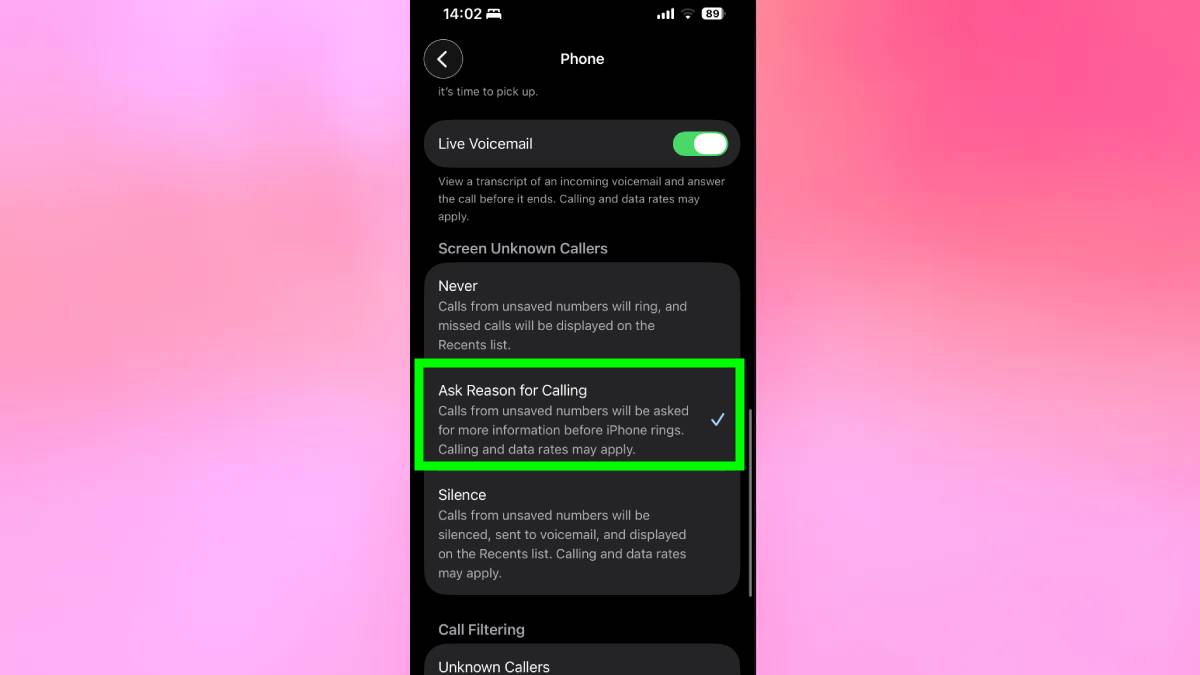
Go to Settings, Apps, and Phone. Then scroll down to Screen Unknown Callers and select Ask Reason for Calling. The feature activates immediately.
From now on, unknown callers get prompted to identify themselves before your phone rings. You'll see transcripts of their responses and decide whether to answer.
Why this beats Silence Unknown Callers
iPhone's other option, Silence Unknown Callers, sends all unknown numbers directly to voicemail without ringing. This blocks scammers effectively, but it also blocks legitimate calls you actually need.
Doctor's offices call from rotating numbers. Delivery drivers use different phones. Job recruiters reach out from business lines. Service providers use central switchboards. If you silence all unknown callers, you miss appointment reminders, prescription notifications, delivery updates, and important business calls.
Ask Reason for Calling solves this by screening instead of blocking. Scammers won't leave legitimate screening responses. They're calling thousands of numbers hoping for easy targets who answer immediately. When forced to identify themselves, they hang up and move on.
I haven't answered a scam call since enabling this feature. The legitimate calls I've screened all identified themselves clearly, and I answered knowing exactly who was calling and why.