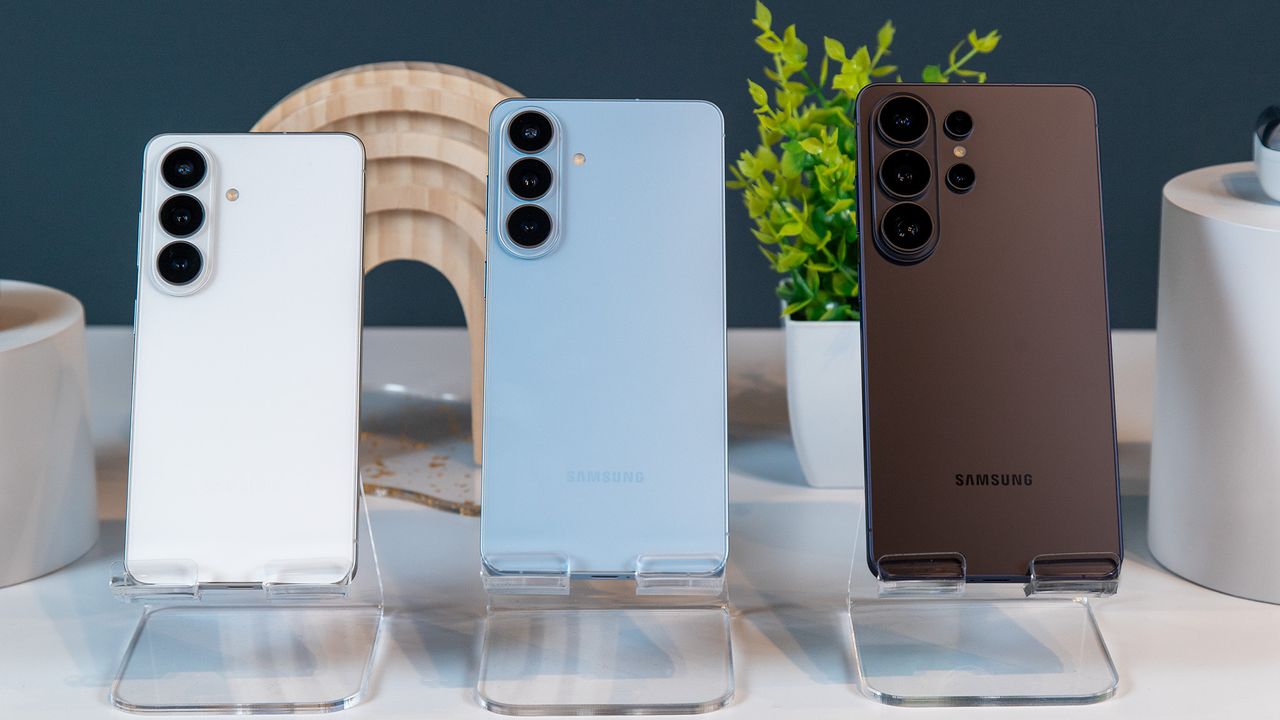
The new Galaxy S26 series has landed, and while the phones themselves may not look like huge departures from their predecessors, Samsung has packed in a number of useful innovations and welcome spec bumps. The Galaxy S26 Ultra, in particular, brings the most interesting features, including upgraded cameras and a new display technology that negates the need for a privacy screen protector.
But most interesting of all is how Samsung is positioning these phones. The deep integration of AI shows how the Galaxy S series is following in the footsteps of Google’s Pixel, transforming its suite of AI features into something more proactive and ingrained into each experience.

My hands-on time with the Galaxy S26 series left me quite impressed, even if many of the new features reminded me of the Pixel 10 series and even Motorola.
This year, Samsung decided to keep the design of the Galaxy S26 family a bit more unified. That means, instead of the Ultra looking like a distant, but better cousin, all phones look nearly identical. Aside from the new vertical camera housing for the main three cameras on each phone, I didn’t notice much difference from last-generation phones. However, it’s when I looked closer at the Galaxy S26 Ultra that I noticed its corners are more rounded, which gives it a softer, less stern look.
Samsung says the Galaxy S26 Ultra is also its thinnest Ultra phone, and at first glance, it certainly looks it. When I put it next to the Galaxy S25 Ultra, I could barely tell the difference, but the weight difference is more noticeable, as the S26 Ultra doesn’t feel like an absolute brick in your hand.

The design changes with the Galaxy S26 and S26 Plus are even less noticeable, but now, every phone comes in the same colors, meaning you won’t have to opt for the Ultra model for your favorite hue. The new flagship color is Cobalt Violet, which is a sort of purplish gray. I don’t find it particularly stunning, especially compared to last year’s Navy Blue, but it’s nice.
Speaking of colors, the S Pen is still here, and the tips are color-matched to the phone, though for some reason the Sky option doesn’t match the pen's body.

To be honest, I didn’t spend much time with the base model or Plus, as their changes are minimal aside from the new Snapdragon Elite 8 Gen 5 for Galaxy. The S26 has a larger battery, a slightly larger display (sorry, small-phone lovers), and now starts at 256GB (finally!). The Plus has faster wireless charging, which appears to be the only significant change.
Oh, and don’t expect magnetic charging on these phones. Qi2 is supported, but you’ll need to pick up a case to use it.

The Ultra, however, had some interesting tricks up its sleeve to further set it apart from its siblings. Perhaps my favorite new hardware feature is the Privacy Display, the first of its kind on a smartphone. Using some new display tricks, the Galaxy S26 Ultra can hide content on your screen when viewed from an angle. When it’s enabled, it gives the same effect as someone using one of those privacy screen protectors, making the screen appear very dim on the sides.
According to Samsung, this is achieved through the display's pixel structure, which includes two types of pixels: those that project light to the front of the screen and those that project light to the sides, enabling better viewing angles. When the privacy screen is enabled, those latter pixels are essentially dimmed, so the contents still appear clear to you, but anyone else trying to sneak a peek won’t get to see your spicy messages.
The best part is that it’s customizable; you can have Privacy Display off most of the time but enabled for certain apps or even notifications, so onlookers can still see the rest of the screen, while notifications themselves are obscured. It’s quite clever, and the effect is, well... effective. It’s just unfortunate that this feature is limited to the Ultra.

Additionally, the Ultra is also getting brighter images, thanks to Samsung giving the main 200MP camera and 50MP telephoto camera wider apertures. This allows more light into even darker scenes, which is always nice until you see how noisy it can get. However, Samsung thought of that, too… the new AI-based ISP kicks in to greatly reduce noise and enhance detail, and the photos and videos I saw during my hands-on in a dark room and a fish tank looked pretty incredible.
But of course, I can’t talk about these phones without mentioning AI, and boy, is there a lot. Several demos showed how Samsung is taking many features we saw in the Pixel 10 series and giving them a Galaxy makeover.
Now Nudge, for example, takes after Magic Cue by surfacing relevant information and contextual suggestions. I was shown an example of someone asking for photos from an Australia trip, and Now Nudge surfaced a button to “Share photos.” The result was a gallery of photos taken in Australia that you could quickly select and send.

Samsung is also introducing call screening for unknown numbers, an improved audio eraser that works with third-party apps like Netflix and YouTube, and a new screenshots section in the Gallery that automatically organizes your screenshots so you can find them more easily.
Photo Assist also borrows from Google Photos, allowing users to naturally tell the phone to make certain changes without having to search for options. I took a selfie with the improved selfie camera, then took a photo of a hat, and asked Photo Assist to add the hat to my photo. It knew what I meant and put the hat on my head in a way that looked pretty natural. I also did the same with a cake that had a piece missing, asking it to "fix the cake." Voilà! It was whole again.

This ability to use natural language with AI was a big theme with the Galaxy S26 series. The upgraded Bixby better understands what you want based on what you tell it and can surface various phone settings on the fly, so you don’t have to dig for them.
Perhaps most impressive is the Automatic app action, which uses Gemini to perform tasks for you, like calling an Uber. You can tell Gemini to book an Uber from point A to point B, and it will go through the steps as you normally would, but in the background (or you can watch it, if you want). It will stop at the end, so you can confirm it, or you can stop it at any time during the process in case you want to make changes.
This isn’t the first time I’ve seen this example, but it’s great to see that Samsung and Google are shipping this functionality to the masses and that it seems to work quite well.

Honestly, I’m quite excited to spend more time with the Galaxy S26 series to really put the new AI through its paces. It truly feels like Samsung took some of the best Pixel features and slapped One UI on it, which isn’t a bad thing.
Of course, this won’t come cheap. The base Galaxy S26 and S26 Plus just got a price bump to $899 and $1,099, respectively, both $100 more than their predecessors, while the Galaxy S26 Ultra remains the same $1,299.
I’m not a huge fan of the price increase, but it seems likely a result of the memory shortage plaguing the industry. It also makes the Ultra that much more enticing, since the price difference is now smaller. However, we’ll have to wait and see if the new AI, improved cameras, and cool new privacy screen are enough to pull consumers in.