Whatever your reason for wanting one — to become a content creator, because you're always in voice calls, or even because you want to dabble in music — choosing the best microphone for you can feel impossible.
That's even without considering the differences between easy-to-use USB microphones and more flexible, professional XLR microphones. What if you could choose a microphone that does both just as well, though? That's where HP and HyperX are coming in with the FlipCast, an ultra-premium microphone that tries to be the best of both worlds.

I've been using the HyperX FlipCast, and it is a really good, high-end microphone for a variety of use cases. It's also expensive, lacks a mount or stand in the box, and falls behind in software customization compared to other options. Whether it'll be worth spending this much depends on how much you value that dual USB/XLR input capability.
This review was made possible thanks to a review sample provided by HP. HyperX and HP had no input nor saw the contents of this review prior to publication.
Refined hardware and excellent audio quality


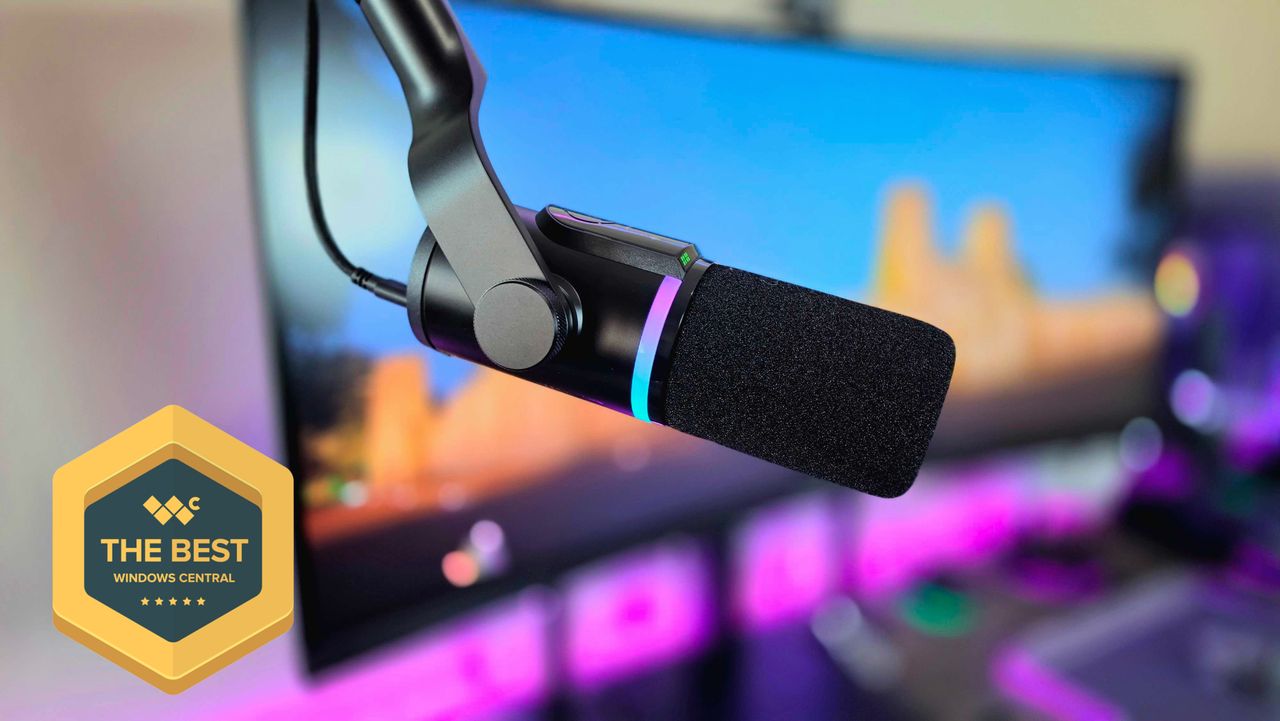
Like many of the most popular professional-grade microphones, the HyperX FlipCast is a front-address dynamic microphone with a sleek, matte black cylindrical design. Of course, it also boasts some of the gamer-esque details I expect from HyperX.
• Microphone: Front-address, dynamic capsule, cardioid polar pattern, 20-20,000Hz frequency response, 192KHz sampling rate
• Connectivity: USB Type-C, XLR
• Features: RGB light strip, multi-level LED meter, multi-function dial, built-in high pass & presence boost filters, touch-sensitive mute button, HyperX NGENUITY software support, universal mount support (3/8-inch & 5/8-inch threads)
• Weight: 572g (1.26lbs)
That includes the RGB light strip in the middle, which is fully customizable... but turns off when the microphone is muted. This is similar behavior to the HyperX QuadCast 2 S I reviewed, but the FlipCast also has an LED indicator strip that turns red when muted, so I wish I could choose to have the RGB lighting stay on.
Speaking of that LED indicator meter, it's one of the FlipCast's best design features. By default, it indicates audio levels, but the multi-function wheel behind it can switch between headset volume, monitoring levels, and microphone gain. In general, the FlipCast's onboard controls are intuitive and useful, even if the touch-sensitive mute button feels a little too easy to press.
It all helps the FlipCast look and feel like the premium microphone its price tag suggests, but how good it is at actually capturing sound is obviously even more important.
The HyperX FlipCast is absolutely a high-resolution microphone with some serious recording props, even if it doesn't boast a wide array of different pickup patterns. It's a front-address microphone, so you'll want it pointing directly at your mouth.
Overall, audio quality is deep, clear, and consistent, exactly as I expected. The FlipCast feels similar in quality overall to the aforementioned QuadCast 2 S, but its AI noise cancellation is even better. This microphone is genuinely among the best at filtering out unwanted background noise, even without relying on the high-pass and presence boost filters built into the FlipCast.
I wouldn't say the FlipCast decidedly takes the crown among other high-end microphones in this price bracket (companies like Shure still wear that crown), but it certainly doesn't disappoint.
USB and XLR versatility, but simple software

The biggest selling point for the HyperX FlipCast is the inclusion of both USB and XLR connectivity. All-in-one USB microphones can be more affordable and are far easier to set up and use, but XLR microphones can deliver greater audio fidelity and support modular upgrades and enhancements.
Why would you want both in one microphone? Well, the FlipCast can support a dual-PC setup with simultaneous USB and XLR, or be easily used with different setups, but the real advantage is that you can invest in a great plug-and-play microphone now, and then upgrade to a more professional XLR setup down the line without having to buy a new mic.
The HyperX FlipCast isn't unique here, but dual USB/XLR microphones aren't exactly common — especially from major brands. The most well-known is likely the Shure MV7+, which you can get for $299.99 at Amazon.com and is critically acclaimed.
That microphone is a fair bit more expensive than the FlipCast (and also doesn't include a stand in the box), but you're also getting Shure's legendary audio quality and greater suite of software features and integration. This is the FlipCast's greatest weakness; HyperX NGENUITY is intuitive, but it lacks the deeper customization that brands like Shure and AVerMedia offer for their microphones.
It's also worth mentioning that, if you're confident you'll never want a full XLR recording setup, you can get an excellent USB microphone for less (like the aforementioned HyperX QuadCast 2 S, which does have a stand in the box).
HyperX FlipCast review: My final thoughts

✅You should buy this if ...
- You want a microphone with both USB and XLR connectivity.
- You need intuitive onboard controls and software.
- You want consistently great audio recording and noise cancellation.
❌You should not buy this if ...
- You don't really need a high-end XLR microphone.
- You don't want to pay extra for a proper microphone mount.
The HyperX FlipCast is an excellent studio-grade microphone that's competing with some of the most popular on the market, with consistently great audio quality, an attractive and intuitive design, and surprisingly effective AI-powered noise cancellation.
It can also grow with you thanks to USB and XLR connectivity, which is a huge boon for anyone investing in themselves for content creation or other professional endeavors. That makes the HyperX FlipCast a top-notch option in my eyes, but just because other high-end, front-address microphones forgo including a stand in the box doesn't make it any less annoying here, and you're already paying a nice chunk of change for the FlipCast.
Still, HyperX is once again proving its accessories aren't just for gamers with the FlipCast. It may not be the absolute best microphone across every category, but it does deliver more than enough to earn my recommendation. If this is the microphone for you, the HyperX FlipCast is now available for $229.99 at BestBuy.com and at Amazon.com.
If you also want the exact microphone arm mount I used, that's the HyperX Caster available for $139.99 at HP.com. Check out my in-depth HyperX Caster review for more information on it.
If you're looking for a microphone that can grow with you, the HyperX FlipCast delivers the quality and fidelity alongside dual USB/XLR connectivity, making it a great choice for plug-and-play or professional setups. It's not immediately the best across the board, but this is still an awesome microphone.

Follow Windows Central on Google News to keep our latest news, insights, and features at the top of your feeds!