Get all your news in one place.
100’s of premium titles.
One app.
Start reading
Creative Bloq
Creative Bloq
Technology
Brandon Liao

How Photoshop filters helped me make the concept art for Spectre Divide

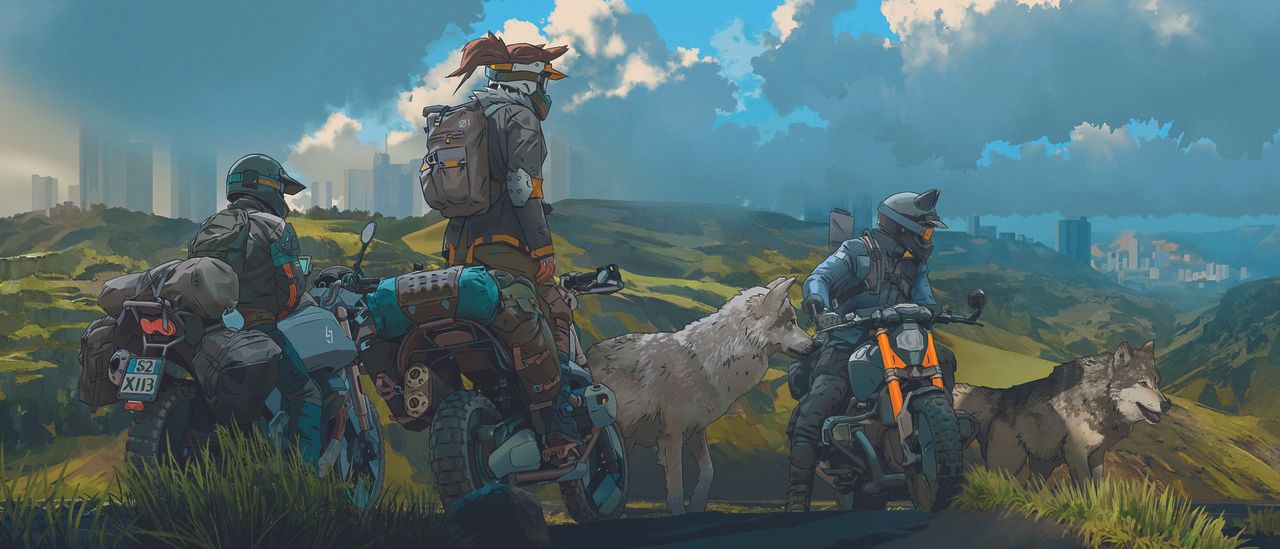
Concept art showing a landscape scene with green hills and trees.

This illustration was created as part of the visual development effort to conceptualise the world of Spectre Divide, a first-person shooter. The image depicts a part of Wildhaven District in Breakwater, one of the settings where the game takes place. The goal was to create several illustrations together, so speed was a factor.

The artwork made heavy use of filters in Photoshop that gave the photos used a more gouache-like look. This gave me a workable base before painting in earnest. Digital art programs such as Photoshop have many tools. Finding creative uses for them is half the work and fun of digital painting.

This was my process for creating this work, from preparing the photo to the final render, broken down into three steps. For more ideas, see our roundup of Photoshop tutorials.

01. Prepare the photo base

With a composition already in mind, I start the painting with a photo that I expand using Photoshop’s Generative fill. This creates a base for applying filters on top of, removing artefacts and noise that come with using that tool.

I use a few adjustment layers to adjust and bring out the new base’s colours.

(Image credit: Brandon Liao)

02. Add elements to the scene

Using custom watercolour and gouache Photoshop brushes, as well as more photos, I paint in detailed natural elements, replace the clouds and sky, and add distant city buildings.

I want to mimic watercolour and gouache backgrounds similar to those seen in classic anime films.

03. Refine the foreground

I add characters, as well as grass and rocks to create a better sense of visual space and depth. The figures are photo references with painterly filters applied to them. I then paint over them and add line work.

Finally, I colour grade the image with a mix of adjustment layers including LUTs.

This article originally appeared in ImagineFX. Subscribe to ImagineFX to never miss an issue. Print and digital subscriptions are available.

Get the gear

If you need tools for your own digital art, see our pick of the best drawing tablets and the best laptops for drawing or check below for deals on kit that we've reviewed on the site.

Sign up to read this article
Read news from 100’s of titles, curated specifically for you.
Already a member? Sign in here
Related Stories
Top stories on inkl right now
One subscription that gives you access to news from hundreds of sites
Already a member? Sign in here
Our Picks
Fourteen days free
Download the app
One app. One membership.
100+ trusted global sources.