Get all your news in one place.
100’s of premium titles.
One app.
Start reading
Creative Bloq
Creative Bloq
Technology
Raymond Tan

How I created the tense urban scenes in my graphic novel

Graphic novel art from Made in Manila.

This scene is from Made In Manila, a graphic novel that I’m currently working on. For a project like this I start by writing a research checklist and grounding abstract ideas with sketches.

Digital art software like Photoshop and Blender help me to paint the scene broadly with an understanding of space, form and light. I then finish it off with stylised line work that expresses my style and influences.
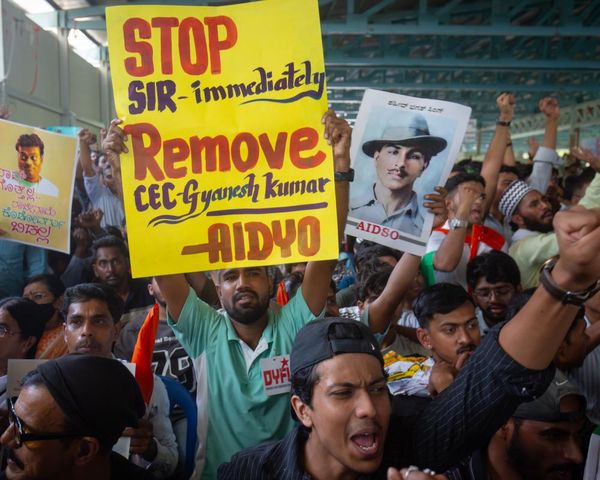
Details add to the story – not just the image’s density – by communicating the illustrations’ visual subtext of eyes. Once the silhouettes and colours harmonise, I lit it dramatically with story-driven intent. Well-planned lighting always enhances a piece.”

01. Start simple and graphic

My approach comes from the basic structure of painting and then combining it with line work. I start by establishing the purpose of this shot, then the Notan design principle helps to make it readable with lighting and contrast.

Visualising the composition is easier thanks to the harmony of light and dark, and the shapes that I like

02. Paint, flats and line work

I begin with rough line work to define the visual information, then paint broadly to establish mood and colour. I treat each panel as a painting; shaping silhouettes and overlapping forms to build depth and avoid tangents.

Once the scene reads clearly, I simplify the colours into flats and finish with refined line work to sharpen the read and stylisation.

03. Light and colours

A key step is selecting the ambient light’s hue (sky) to establish the palette (flats), followed by adding ambient occlusion for depth. On the darks, I add artificial lights for colour accents.

To elevate the visual impact, I use a key light (sun) to highlight interesting subjects, and finish with a soft bloom, blending the cel-shading to enhance the vibe

(Image credit: Raymond Tan)

For more inspiration, see our roundup of Photoshop tutorials.

This article originally appeared in ImagineFX. Subscribe to ImagineFX to never miss an issue. Print and digital subscriptions are available.

Sign up to read this article
Read news from 100’s of titles, curated specifically for you.
Already a member? Sign in here
Related Stories
Top stories on inkl right now
One subscription that gives you access to news from hundreds of sites
Already a member? Sign in here
Our Picks
Fourteen days free
Download the app
One app. One membership.
100+ trusted global sources.