
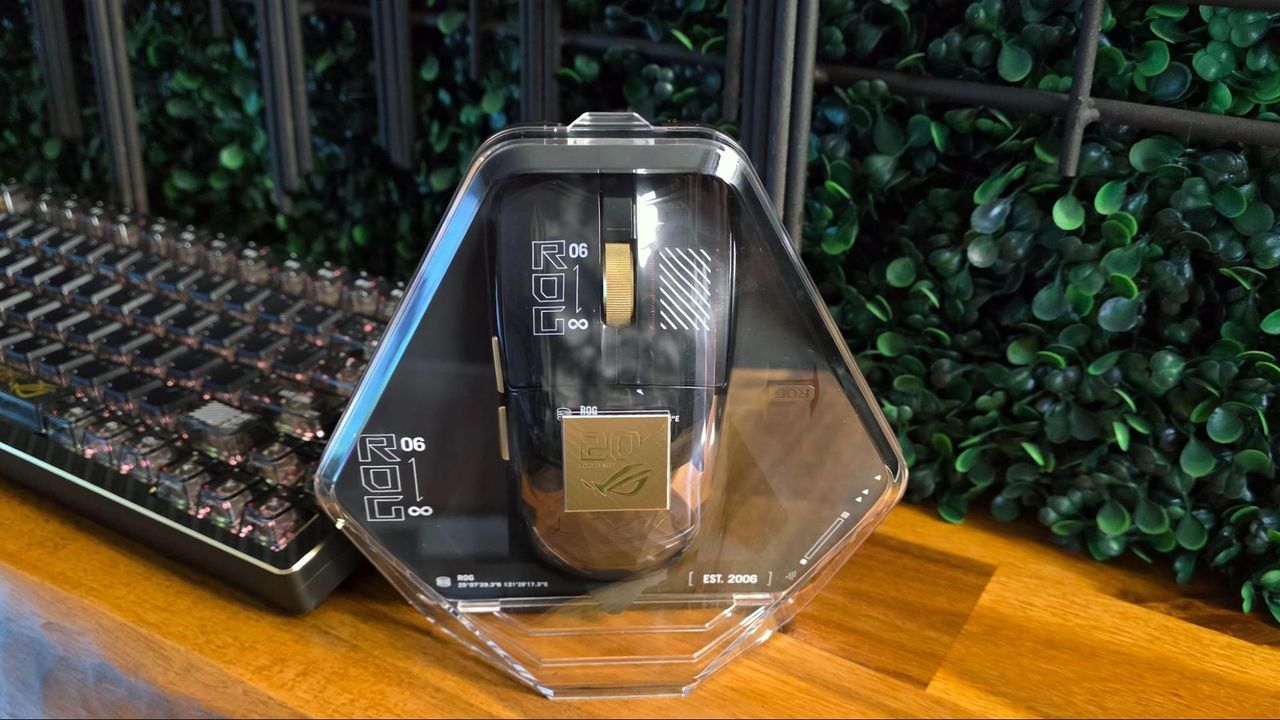
Believe it or not, it’s been 20 years since Asus launched its high-end Republic of Gamers gaming line with the first ROG Crosshair, back in 2006 (see our recent review of the commemorative Crosshair 2006 motherboard). And because the sub-brand has since branched out to encompass nearly every aspect of gaming hardware (and also… noodles), Asus is celebrating this platinum milestone with, among other things, new 24K gold-plated peripherals.
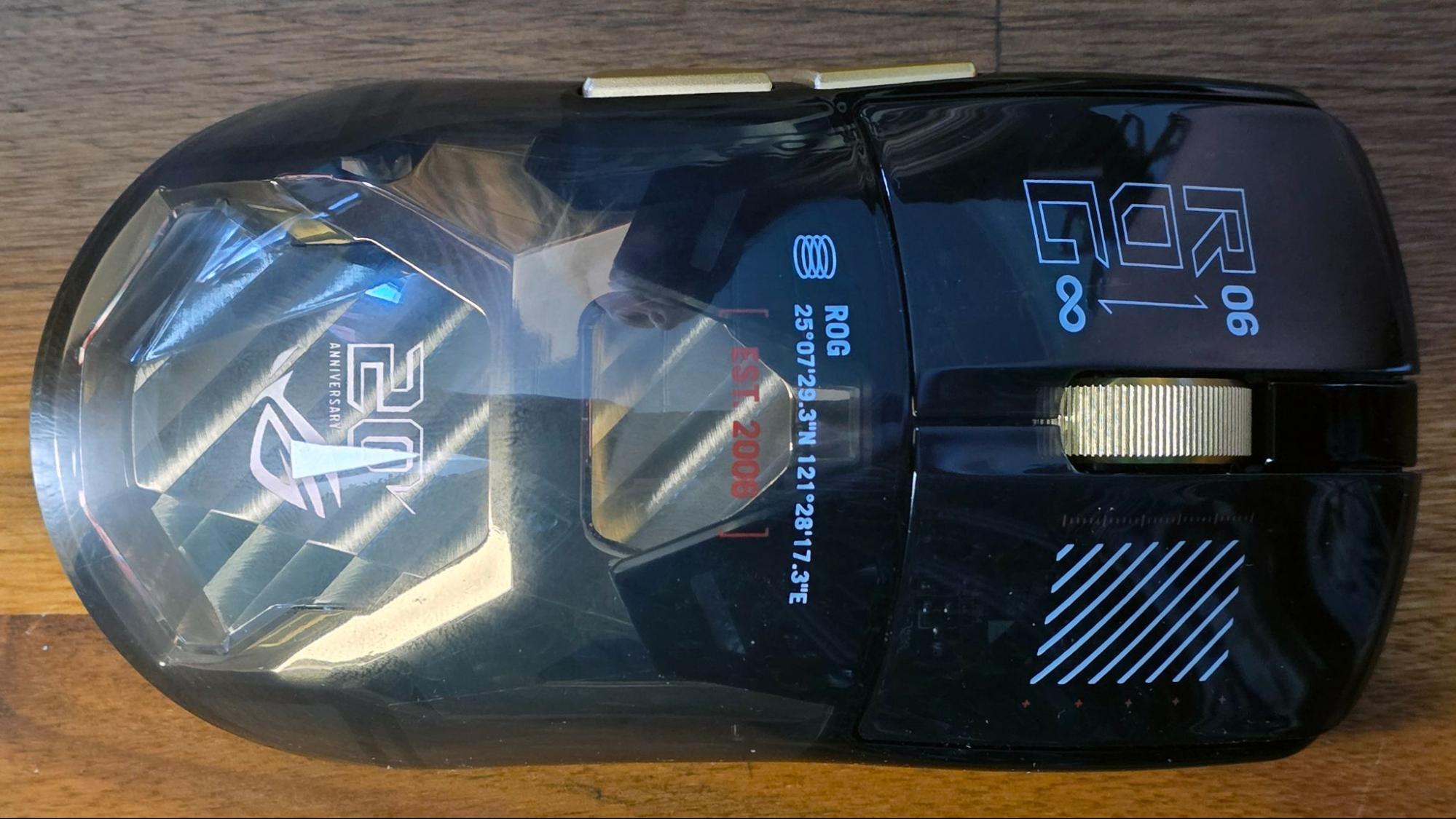
Here we are looking at the ROG Harpe II Extreme Edition 20 wireless gaming mouse, which sports a transparent rear section with a gold metal interior surrounding an RGB 20th anniversary ROG logo (which pulses in a gold color by default). It also features a gold metal scroll wheel and side buttons, gold-colored accents on the bottom Corning Gorilla Glass mouse feet, along with white and red lettering on the mouse itself, including a bold “ROG 06 ←→ ∞” graphic on the left mouse button, which implies the Republic of Gamers will outlive the heat death of the universe.
All of this sounds like manufactured opulence and gamer posturing – and it is, as Asus has priced this mouse at $259.99 USD. But Asus has spent the last two decades crafting generally well-designed high-end hardware around its ROG brand, and the ROG Harpe II Extreme Edition 20 is no exception.
Specs and Design
Connectivity |
Wireless RF2.4G + Bluetooth6.0 (3 devices) + Wired USB 2.0 |
Sensor |
AimPoint Pro 65K 65,000 DPI (<1% CPI deviation) |
Resolution |
100 ~ 65,000 DPI |
Max Speed |
800 IPS |
Max Acceleration |
70G |
RF2.4G & wired mode Polling Rate |
125/250/500/1,000/2,000/4,000/8,000 Hz |
BT Polling Rate |
250 Hz (can adjust to 125Hz in Gear Link) |
Switch |
ROG 100M Optical |
Separated L/R Buttons |
Yes |
Programmable Buttons |
5 |
Aura Sync |
Yes |
Shape |
Right-handed ambidextrous |
Battery Type |
475 mAh Li-ion battery |
Cable Type |
2.0 m meter ROG Paracord |
OS |
Windows 10/ 11 |
Onboard Memory |
5 Customizable Profiles |
Product Dimension |
126.1(L) x 63.9(W) x 39.7(H) mm |
Weight |
82 grams |
MSRP |
$259.99 USD |
Those who dare to splurge on this mouse will also get the company’s SpeedNova 8K wireless tech (via a svelte USB-A dongle), nicely clicky optical switches, and the company’s latest AimPoint Pro 65K mouse sensor that, at least on paper, seems to match the best options from PixArt. It’s all wrapped up in an 82-gram package that, while far from the lightest mouse around, is certainly light enough for serious, long-haul gaming sessions.
Apart from the fancy triangular fold-out packaging, Asus also includes a plastic display case for the mouse, complete with a clear lid with a gold 20th Anniversary ROG logo, and a silicon bed for the mouse, with an included slot for the 8K transceiver (the mouse itself sadly has no housing for the USB dongle). Some will see this as extra unnecessary packaging, but this is the kind of mouse you might want to show off more than most – and the triangular pod looks like it could be a small cryogenic chamber, designed to get this mouse to infinity, and beyond – or at least help it last until ROG’s 40th anniversary while still looking good.
The exterior shape and design of the ROG Harpe II Extreme Edition 20 should feel comfortable and familiar to connoisseurs of high-end gaming mice, as it’s based on the second-gen Harpe Ace. It’s a mid-sized mouse that doesn’t break the mold in terms of hand feel, button layout, or button count. Aside from the left and right main buttons and the scroll wheel, you get the two gold buttons on the left side.
On the bottom of the mouse, aside from the glass glides and the fancy sensor, there’s a switch for the three modes (2.4 GHz wireless, wired, and Bluetooth), as well as DPI and Pair buttons, the latter for Bluetooth or for pairing the mouse to another compatible 2.4 GHz transceiver. As you would expect, the front edge houses a USB-C port for charging and / or wired use.
Accessories
The accessory box first greets you with a simple graphical tutorial about how to clean the mouse (a small cloth is included). And considering this is a glossy rodent with a see-through back, you should expect to be wiping down the Harpe II Extreme Edition 20 fairly often if you want it to look its best. I do have to wonder worry what the transparent palm area will look like after years of regular use – no matter how often you clean it.
Aside from said cloth, you get a braided 6.5-foot USB cable, a dongle extender to bring the transceiver closer to your mouse, an extra set of mouse feet, and some pre-cut (and ROG-adorned) grip tape. I’m not often one to add grip tape to my mouse, but this one is particularly glossy and slippery, so you might want to consider it.
Also in the box are a foil-adorned ROG 20th anniversary card and a set of similar stickers.
Web-based adjustability
I’m not the biggest fan of Armory Crate (or any gaming peripheral software suite, to be honest), so I like that Asus makes heavy use of its Gear Link (https://gearlink.asus.com/) web app for mouse control here. With the mouse plugged into your system, you can dig pretty deep into the settings via the site.
There are sections for button assignments, SpeedShift settings, and performance. The performance section is pretty deep, with angle tuning / snapping, DPI adjustments (in four presets, or adjustable on the X and Y axis via a slider or letting you punch in specific numbers), and debouce delay.
There are also sections for lighting adjustments, power settings, and calibration for specific mouse pad surfaces (with presets for several Asus products).
A separate Zone Mode section lets you adjust the polling rate (which, like most 8K mice, defaults to 4K out of the box), as well as select the frame rate of the sensor and whether or not the transceiver runs in a dynamic power mode or max power (for the best possible connectivity). I would expect that if you leave the transceiver at max power and the mouse running at 8K, you’ll likely have to charge your mouse quite often. But I didn’t have the Harpe II Extreme Edition 20 long enough to judge battery life in different modes.
Gaming (and working) with the Asus Harpe II Extreme Edition 20
I only had about a week to use the mouse before heading to Taiwan for Computex 2026. But in that time, I used it as my daily driver for work and gaming. And as I would expect for a mouse this expensive, I didn’t have any major complaints. Apart from the slick, glossy surface (which took some adjustment coming from the matte mice I’ve been using lately), the Harpe II Extreme Edition 20 pretty quickly felt like an extension of my mouse hand, letting me game and work mostly without thinking about it (to me at least, this is an important feature in a mouse).
Whether I was using an aluminum mousepad, a more traditional flexible mouse surface, or even the cherry wood of my desk, the sensor performed flawlessly. And the buttons were where my thumb expected them to be, with a cool metallic feel that’s subtle but appreciated (especially as temperatures get warmer).
The editor in me missed the dual-mode scroll wheel of my MX Master 4 for quickly scrolling through large documents, but this, of course, isn’t a productivity mouse. The gamer in me, though, would have liked to see a DPI button on the top of the mouse, when shifting between fast-paced FPS titles like Borderlands 4 and Doom: The Dark Ages, and RTS and casual titles that require a different level of cursor control. It’s not exactly difficult to lift the mouse up and cycle through settings via the button on the bottom, but having that button behind the scroll wheel would make things more convenient.
Bottom Line
The gold-and-black design of the Harpe II Extreme Edition 20, along with its busy graphics, is something you’re likely going to love or hate. But it’s hard to fault the internal components of this mouse, with 8K polling and one of the highest-DPI sensors on the market. How many of us actually need this level of hardware to get the most from our games is debatable. But the ROG brand tends to lean toward the high-end, so no one should expect mid-range components in ROG peripherals. This is a mouse for those who know what they’re after, appreciate ROG’s legacy, and aren’t afraid to splurge when it comes to their gaming gear.
Part of me would have appreciated a slightly lighter weight and a couple more buttons, but you can find those features in other mice from Asus (and its gaming peripheral competitors, of course). As a tech-upgraded, gold-emblazoned cursor controller that both feels and looks premium, the Harpe II Extreme Edition 20 reflects back to ROG’s past (borrowing its shell design from the Harpe II Ace), while reaching toward the future (with its 65K sensor and web-based interface).
It’s also a damn fine gaming mouse for the here and now, as long as you can afford it. And don’t expect to be able to save up forever to afford it. Asus says it will be available from June 2026 through the end of the year.