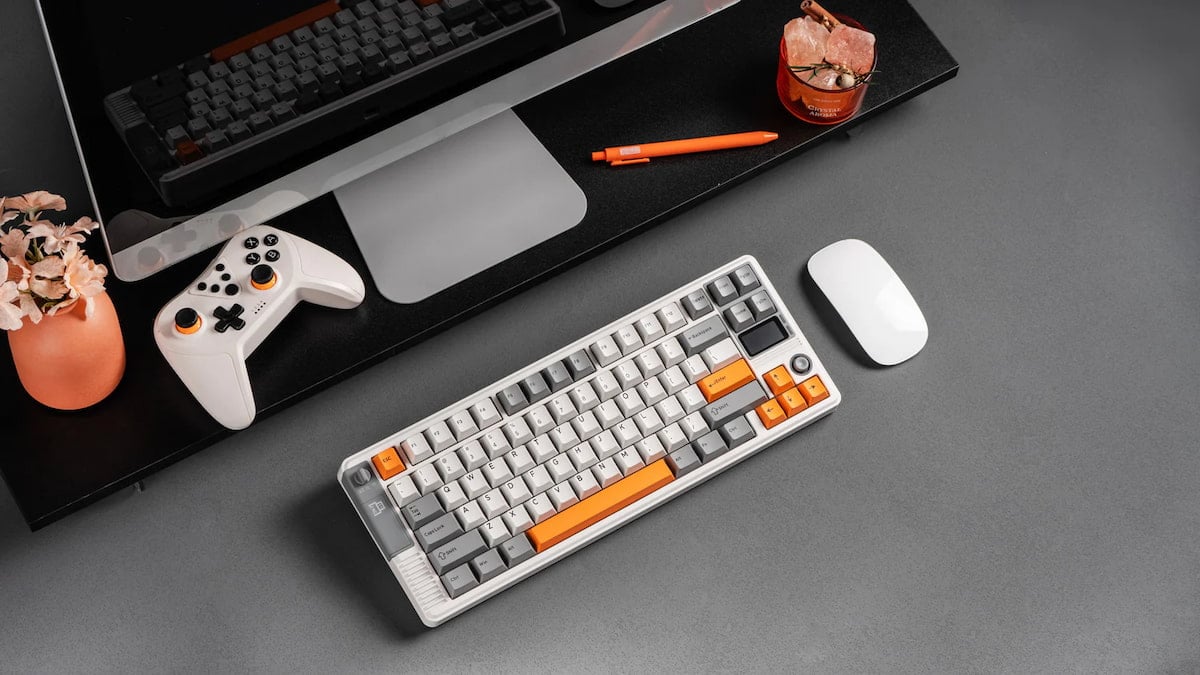
There are endless options when it comes to choosing a mechanical keyboard for your setup. Almost every keyboard can get the basics right, which is why a lot of attention is directed to the design. And this is where EPOMAKER RT85 stands out.
The EPOMAKER RT85 is a 75 percent wireless mechanical keyboard with 82 keys and hot-swappable keycaps that costs $85.99. It has a retro-esque design with a customizable LED screen and a unique joystick. This one arrived in white, grey, and orange colors with the Wisteria V2 Linear Switch, but there’s also a green and white version available, as well as two more switch types.

A solid mechanical keyboard is a must-have for gaming and comfortable work. If you’re going for style, the choice sometimes falls onto less-known brands, including EPOMAKER. For those of you interested but unsure, here’s our complete review of EPOMAKER RT85.
Feeling retro (Box, design, and build)

The box comes with the keyboard itself, a plastic cover, a Type-C to USB-A cable, a tool for swapping keycaps and switches, two extra switches, and a manual. However, you need to download the full manual from the website to learn all the Fn keybinds, as strangely, the keys don’t have their default alternate functions (like stop and play music) printed on them.
Design-wise, the keyboard looks fantastic, with a somewhat retro vibe and colors, at least in the white and orange variant. The build is from sturdy plastic. There are also two stands in the back to adjust the angle with thick rubber pads to prevent the keyboard from slipping.
Is this thing on? (Setup)
EPOMAKER RT85 has three connection types: Bluetooth, wired, and 2.4 GHz. You can easily switch between connection types using the switch in the top left, where you can also find the USB adapter. It’s fast, straightforward, and takes no effort.
To properly set up the keyboard, its lighting, and the LED display, you need the dedicated EPOMAKER driver software. The software can be a little gimmicky, but you must launch it at least once for the LED display to sync the date and time with your PC. After that, you can safely delete it if you don’t care for further customization.
Not a workshop from the 70s (Customization)

The EPOMAKER driver software is extensive and offers a ton of customization options, including the default key rebindings, functions, and macros.
For lighting customization, there are multiple patterns, colors, and lighting sections, with an option to save presets for later use. One possible dealbreaker is the color vibrancy. Some colors are pretty dim. What’s worse, the white color looks cyan, which can affect your setup’s aesthetic if that’s what you’re going for.
This could be because of the light diffusers on Wisteria Linear V2 switches. According to the product page, the Creamy Jade Switch doesn’t have a light diffuser, so it might be worth considering them if you decide to pick the keyboard up yourself.
To customize the LED screen, there’s a whole drawing board to put together frame-by-frame animations or upload your own media. There’s also a library of community-made creations for you to use. The screen is limited to images/videos, so the default widget is a bit more handy, featuring time, date, and charge status.
The last button is the joystick below the display. It can adjust the PC’s volume and cycle through keyboard lighting effects, but unfortunately, you cannot customize it. While volume control isn’t the worst thing to have, it would be nice to be able to change it.
Keeping the modern feel (Typing and gaming)

This version features linear switches that are on par with more widespread red switches. Thanks to the sound-dampening gasket, the keyboard sounds soft and smooth, akin to what you might hear in a keyboard ASMR video.
When gaming, the keyboard feels responsive, on the same level as my Razer Huntsman Mini. The keys have a bit more travel time, and while it’s not an issue on linear switches, it still requires a little time getting used to.
According to the official documentation, the RT85 has a 6ms latency in wired mode, 12ms in 2.4Ghz mode, and 18ms in Bluetooth. It also has a 1000hz polling rate in wired and 2.4Ghz modes and 125hz in Bluetooth mode. And while it’s nearly impossible to measure latency without dedicated tools, I haven’t experienced any input issues when typing or gaming with this keyboard.
Making the most out of every minute (Battery use)
The keyboard has an 8,000mAh battery that supports up to 24 hours of continuous use with the LED screen and backlight. In practice, you can expect to charge it every four days or around 100 hours, even if you spend most of your time at your PC. This is because the keyboard turns off both the screen and backlight after a few minutes of inactivity and enters sleep mode after 30 minutes (you can customize the timers through the software).
The main issue with the battery is that the charge indicator on the LED screen or in the software never reaches the maximum, even after seven hours of being plugged in. This means you never know when it’s at 100 percent, making it difficult to understand when you can calmly switch to wireless mode for maximum efficiency.
Verdict

Depending on the type of user you are, this might be a great addition to your setup. If you just want a cool-looking keyboard for work or gaming, the RT85 is a great choice, as long as you don’t set the backlight to white. For $85.99, it costs considerably less than something like the Razer Huntsman Mini, which is priced at $129.99.
The devil is in the details, though, especially if you want to use the keyboard to its maximum potential. Keys not displaying their default secondary functions, a non-customizable joystick, and the fact that you never know if the keyboard is fully charged are all minor issues that shouldn’t exist in the first place at this price tag.
For customization enthusiasts, using the official driver software, setting up different keys, functions, and more, may also take a little more time than you’d want. The upside, though, is the endless options and settings for you to tweak.
- Retro-design and quality build
- Smooth and satisfying typing feel and sound
- Decent battery life
- Extensive customization options
- White lighting color looks like cyan
- Battery charge status is never at full charge
- Non-customizable joystick
- Keys don’t show their default secondary functions
- Occasionally slow and unintuitive software