Get all your news in one place.
100's of premium titles.
One app.
Start reading
Tom’s Guide
Tom’s Guide
Technology
Peter Wolinski

Dyson’s 2-in-1 purifier fan is the perfect way to beat the summer heat — except for one major flaw

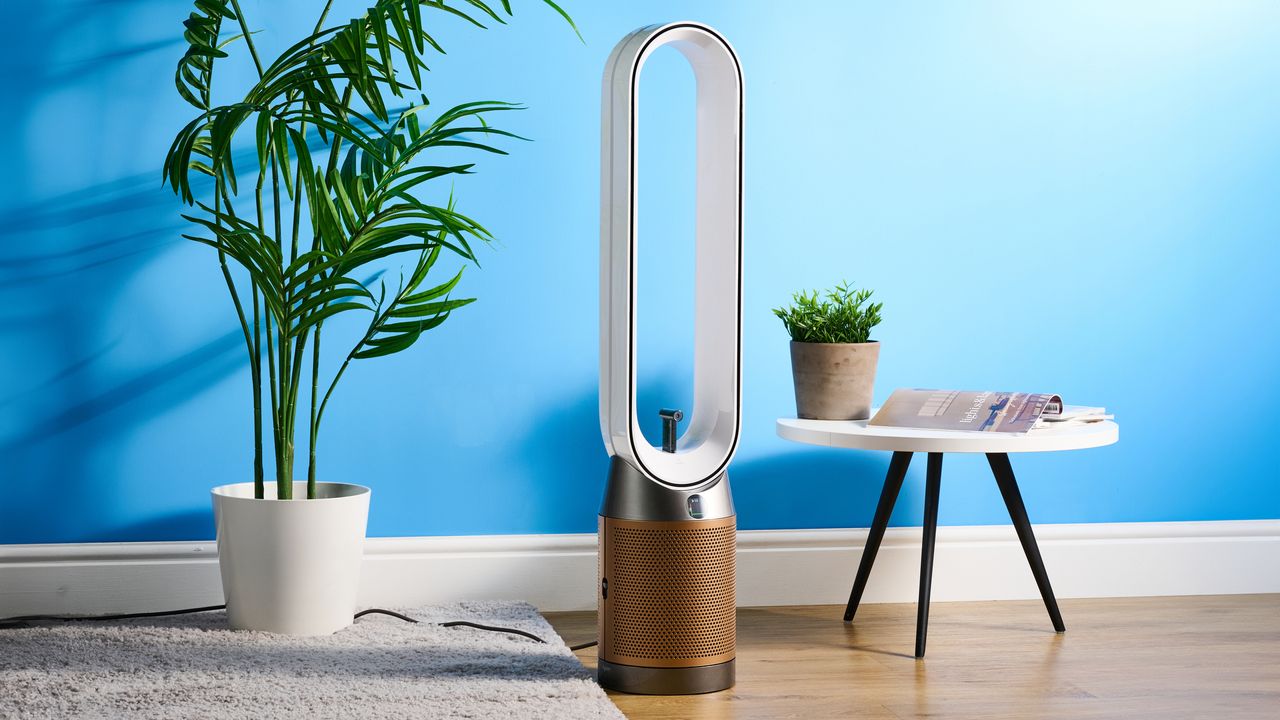
The Dyson Find+Follow Purifier Cool PC3 in a lounge with a blue wall in the background.

The Dyson Find+Follow Purifier Cool PC3 (bit of a tongue-twister, right?) is a 2-in-1 floor fan and air purifier, designed to help keep your home air healthy while you stay cool.

As you can probably already tell from the image up there, it looks about as quintessentially Dyson as it’s possible to get and comes with equally Dyson-esque build quality. It’s a strong air purifier and boasts a range of useful features in its app. Plus, none of its rivals on our roundup of the best air purifiers include a fan, either.

Unfortunately, the Dyson looks and build quality also bring the inevitable Dyson premium: this thing is extremely expensive. The cooling function, meanwhile, isn’t much better than that of a standard blade fan.

But could this still be the right air purifier for you? Find out in my full Dyson Find+Follow Purifier Cool PC3 review.

Dyson Find+Follow Purifier Cool PC3 review: Specs

Price

$849 / £549

Size

41.3 x 8.6 inches

Weight

12 lbs

Room coverage

290 sq ft

Air flow

76 gallons / sec

Filter(s) type

HEPA H13; K Carbon; SCO

Oscillation angle

350 degrees

App connectivity

Yes

Dyson Find+Follow Purifier Cool PC3 review: Price & availability

(Image credit: Future)

The Dyson Find+Follow PC3 costs $849 from Dyson in the U.S. and £549 in the U.K., so you’re paying the usual Dyson premium. The U.S. price is especially high, and if you can’t stretch that far, I’d advise looking at the Windmill Air Purifier ($299) or Blueair Blue Signature ($499, although often discounted at Amazon) — these are two of our favorite air purifiers.

The Dyson somewhat justifies an enlarged price tag over rivals. Firstly, it’s also a fan, which the Windmill and Blueair aren’t. It packs the usual beautiful Dyson build quality and beautiful modern styling; plus connectivity with the Dyson app. So, if you already use Dyson gear, the PC3 will blend in seamlessly from both an aesthetic and user-interface standpoint.

Still, $849 is wildly expensive, and there isn’t really any way to make it make sense. It’s an extravagance. You want Dyson, you have to pay the Dyson tax.

Dyson Find+Follow Purifier Cool PC3 review: Design

(Image credit: Future)

The PC3 design is archetypal Dyson — gloss-white finish; premium bronze base; confident curves contrasted with clean, straight lines. It’s pure neo-noughties, and I love it. It pairs extremely well with my DysonSolarcycle Morph desk lamp, which I also have in a bronze finish.

It feels like a Dyson product, too — extremely high quality. I moved my two review units around the house a lot during testing. Annoyingly, there are no wheels, so I simply scooped my forearm through the top of the fan loop to carry it around. I neither heard nor felt a single groan or unnerving sound while doing so.

(Image credit: Future)

The air purifier uses HEPA filters, which are the bare minimum you should look for in any air purifier or vacuum cleaner. These filter out 99.95% of particles, including viruses, bacteria, spores, pollen and pet dander. There’s a carbon filter to trap the potentially harmful byproducts of combustion, including NO2; and a Selective Catalytic Oxidation (SCO) filter, which traps toxic formaldehyde and, according to Dyson, never needs replacing.

Dyson Find+Follow Purifier Cool PC3 review: Setup & use

The Dyson PC3 is extremely easy to set up as it comes pre-assembled. You simply unbox and unpackage it and it’s basically ready to go. You can use it without the Dyson app, but I wouldn’t advise doing so. There’s a QR code on the packaging for downloading the app.

(Image credit: Future)

Once in the app, there’s a simple setup process to pair the fan to your app via Bluetooth. This works flawlessly each time (I had two PC3s to set up) and takes a minute or so. You then choose your room and, voilà, you can use the app as a remote control. The app is fantastic, giving you control over modes, fan speed, precise fan direction and rotation, and air purification. The controls are straightforward and all self-explanatory.

There’s a remote control included, which attaches to the top of the fan magnetically and features the same controls as in the app. But although any changes you make on the remote will be shown on the PC3’s LED display, it’s still way more intuitive to see exactly what you’re doing in the Dyson app.

The remote’s buttons aren’t backlit, either, so it’s impossible to see what you’re pressing at nighttime. It’s handy for making basic adjustments during the day, I guess, and will be necessary if multiple people want to adjust the fan (visitors, or in an office).

Dyson Find+Follow Purifier Cool PC3 review: Performance

The PC3 serves dual purposes. Not only is it an air purifier, but one of Dyson’s renowned standing cooling fans. I’ll evaluate both separately, as well as the Find+Follow mode and noise levels.

Air purifier

(Image credit: Future)

Firstly, I’ll discuss the PC3’s air purification, which is pretty good. According to Dyson, a single fan purifies rooms up to 27m², filtering over 290 litres per second. The PC3 filters and tracks a variety of contaminants, which can be viewed in basic form on the display, or in detail via the app.

  • PM2.5 — Particulate matter smaller than 2.5 microns, including smoke, burning candles and industrial emissions
  • PM10 — Particular matter smaller than 10 microns, including pollen and allergens
  • VOCs — Volatile organic compounds, such as cooking odors, burning fuel, perfume and cleaning products
  • NO2 — Nitrogen dioxide and oxidizing gases, the remnants from combustion, including from cooking and vehicles
  • The PC3 also tracks general air quality, which is affected by all the above

Initially, I ran the air purifier in my living room, which is next to a busy road, keeping the windows open to see if there was any spike in NO2 emissions. If there were, these proved easy work for the PC3, which kept NO2 and air quality in the green.

I ran the same tests in my kitchen with the doors and windows to my garden open, to induce some PM10 allergens like pollen into the room. The grass pollen count in my area was moderate to high, but even so I couldn’t get a reading on the PC3.

(Image credit: Dyson / Future)

So, I subjected the air purifier to some sterner tests. I first cooked homemade pizza in my oven. After it was done, I deliberately left semolina flour and cornflour to burn on my pizza steel inside the oven. Then I opened the oven door.

The PM2.5 and PM10 immediately spiked, and my kitchen air quality was sent straight into the red (very poor). Within 30 minutes, the PC3 in auto mode had pulled the air quality back into yellow (fair). By 2.5 hours later, the air quality was back in the green (good).

I then ran a closed-door, closed-window and closed-curtain test in my bedroom, which is smaller. I sprayed lots of aerosolized dry anti-perspirant, lit a candle and burnt several matches down to the wick before blowing them out and letting them smoke. I could literally taste how disgusting the air was in the room. PM2.5 and PM10 figures went through the roof, this time the worst level: purple (severe). The PC3 automatically ramped up to max power and cleared the room back to green (good) in around 30-minutes. The smell of the aerosol was cleared earlier, though, in around 10 minutes.

(Image credit: Dyson / Future)

These rates are fairly good in my book. The Windmill Air Purifier and Blueair Blue Signature — two of our favorite air purifiers — will clear candle smoke or a handful of flour in minutes, but the test I subjected the Dyson to was way more extreme, and it only took half an hour to get air quality levels from severe back to good.

Cooling fan

I tested the PC3 at the perfect time — a heatwave hit the U.K. just two days after I started testing. Temperatures hit 33C, or 91F, and if you’ve ever been to Britain in the summer, you’ll know we don’t do aircon in our homes.

(Image credit: Future)

The PC3 definitely helped keep my wife and I cooler than if we’d had no fan. Unfortunately, though, the PC3 isn’t worth spending the money on if you’re only after a cooling fan. The performance wasn’t any better than my $50 conventional bladed fan.

At night, with the PC3 at the foot of my bed and running at full blast, the fan wasn’t strong enough for air to reach my face and keep me cool. I had to dig out my small bladed fan to put on my bedside table. At close quarters, this felt as powerful and cooling as the Dyson.

On a positive note, the PC3 has a rear diffusion mode, which is useful. This diffuses cooler air out of the rear of the fan loop, rather than directly at you through the front — it’s better for gentler, longer-term cooling in less extreme ambient temperatures.

Find+Follow

(Image credit: Future)

The PC3’s Find+Follow setting uses a sensor and subject detection to detect, lock onto and track subjects round the room, following them with the fan (there’s no recording taking place, though, for the security conscious). It’s kinda cool, accurately detecting and following you when you walk nearby. With more than one person detected, it’ll automatically rotate to hit them both, so no need to keep setting rotation angles manually as people move.

(Image credit: Dyson / Future)

There are a few problems, though. Firstly, it doesn’t work with animals. In the hot weather, I wanted my dogs to get some breeze, so I had to set the rotation angle manually. Secondly, the detection range is a little narrow, so it failed to find me a few times, and I had to manually start a detection sweep. Finally, it had trouble recognizing people when they sat down on a low sofa or lay down, meaning I had to set the rotation manually again. These issues undermined the hands-off experience Find+Follow is supposed to allow.

Noise levels

(Image credit: Decibel X / Future)

The PC3 obviously makes noise. It’s a whopping great big fan. It isn’t that loud though, and at full power (10) it was peaking at 57.6dB on DecibelX — equating to other household appliances like a dishwasher. There’s a night mode, which turns off the display and pares back the noise a little, but at its quietest, the PC3 still operates at 50dB.

This is obviously rather noisy in the dead of night. I’m used to running a dehumidifier at night, so running the PC3 at full pelt didn’t bother me. But if you’re a sensitive sleeper, the noise may still be an issue. Check out the Dyson HushJet Compact Air Purifier instead, which operates at just 27dB.

Dyson Find+Follow Purifier Cool PC3 review: App

(Image credit: Dyson / Future)

The Dyson app is fairly good. It’s a little janky sometimes, failing to connect to my Dyson Solarcycle Morph desk lamp. But with the PC3, I have no complaints. As I’ve detailed throughout, the app is by far the easiest and most insightful way to control the PC3. Being able to visualize the controls on your smartphone instead of the tiny LED screen is super handy. And then there are the in-depth graphs to show you real-time and longer-term air quality. Without the app, I’m not sure I could’ve scored this product as highly.

Dyson Find+Follow Purifier Cool PC3 review: Storage & maintenance

(Image credit: Future)

If (like me) you don’t have a large house, storing this badboy is gonna be a problem. The PC3 is very tall, and although narrow (making it easy to fit into narrow spaces), still takes up as much real estate as a floor lamp. If you’ve already got a floor lamp where a floor lamp should go, well, the PC3 will need to stand awkwardly wherever it can. And with no folding or dismantling possible, what you see is what you get.

Maintenance is fairly simple: just replace the filters when needed. Dyson recommends changing every 12-months, or when the app/LED counter reaches 0%. I ran both my fans at full tilt for around a week (day and night), and the percentage dropped to 97%. That was quite an extreme test, though, and home users should only need to replace one a year.

(Image credit: Dyson / Future)

The PC3 uses Dyson’s 360-degree combined HEPA H13 + K-Carbon filter, which costs $89 / £85 each. Replacing the filters couldn’t be easier: press the button to release the case covers, remove the filters, insert new ones, then close it all back up again.

Dyson Find+Follow Purifier Cool PC3 review: How does it compare?

(Image credit: Future)

In terms of its purifying, the Dyson is a match for other large rivals like the Windmill Air Purifier, albeit much more expensive and bulky. The Windmill is much more understated, design-wise, blending in perfectly alongside a laundry basket in our review — that might be the one to go for if you’re not a fan of the Dyson’s “statement piece” design. If you’re short on space (or indeed cash), meanwhile, the Blueair Blue Signature or Shark NeverChange Compact Pro are much better choices.

I’d only really recommend spending extra on the PC3 over any of its rivals if you have other Dyson products using the app and/or you need a 2-in-1 fan and purifier — none of our favorite air purifiers offer that. Still, you can grab a cheaper, older model like the Dyson PC1 ($549) and get many of the same core benefits.

Dyson Find+Follow Purifier Cool PC3 review: Verdict

(Image credit: Future)

The Dyson Find+Follow Purifier Cool PC3 is an excellent air purifier, cleaning extremely polluted air in under 30 minutes during testing. For moderate day-to-day use, it’ll have no issues keeping the air in your home healthy. It packs a variety of very useful features, not least the Dyson app, which is critical to the PC3’s user-friendliness. There’s also the Find+Follow function, which is cool, but a little flawed. And of course, there’s the built-in floor fan, which our other favorite air purifiers don’t offer.

That said, it’s heinously expensive in the U.S., and rather difficult to justify. If you really need a 2-in-1 purifier and fan combo, it could be worth the spend. And if you have other recent Dyson gear, the PC3 will fit in both aesthetically and technologically, thanks to the ecosystem-wide Dyson app.

At the end of the day, the PC3 is a Dyson. It’s expensive, arguably overpriced, but would I give it back? Only if forced.

Sign up to read this article
Read news from 100's of titles, curated specifically for you.
Already a member? Sign in here
Related Stories
Top stories on inkl right now
One subscription that gives you access to news from hundreds of sites
Already a member? Sign in here
Our Picks
Fourteen days free
Download the app
One app. One membership.
100+ trusted global sources.