
Get all your news in one place.
100’s of premium titles.
One app.
Start reading
Tom’s Hardware
Tom’s Hardware
Technology
Ben Stockton

Developer's 1994 Linux desktop recreation runs in your browser as a modern web app — open-source project brings old-school CDE interface back from the dead and features classic 90s web browser, text editor, and more

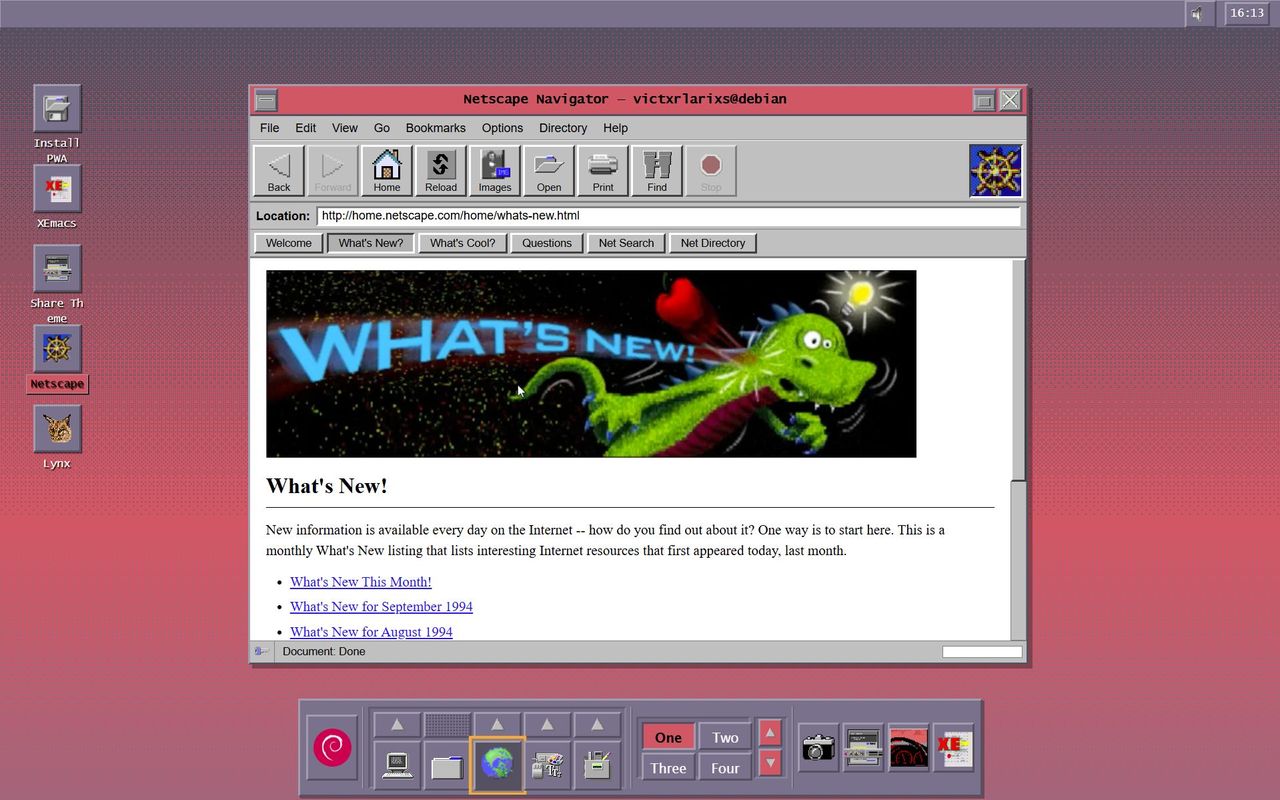
CDE Time Capsule project screenshot showing 1990s-style Linux.

If you're tired of the modern internet, then why not dial back to the 1990s? One nostalgic developer has recreated the pinnacle of early Linux operating systems with the so-called CDE Time Capsule. Posted as an open-source project on GitHub under the GPL license, but accessible via its own website, the project has faithfully recreated the appearance of a Debian Linux installation, circa 1994.

For those who didn't get to experience those early Unix-based operating systems, they borrowed a lot from the -Unix part of their name. CDE, or the Common Desktop Environment, was the desktop environment used on Unix-based systems until successors like GNOME and KDE were released by the end of the decade. It was jointly developed by a number of big firms, including HP, IBM, and Sun, and first launched back in June 1993.

This new project, fully available for you to try on its own domain but available for you to run locally, seeks to capture that mid-1990s experience in full. The developer, Victor Larios, describes it as "a modern Progressive Web App that brings 1990s Unix to any device. Desktop, tablet, phone—the experience adapts. Touch gestures on mobile. Keyboard shortcuts on desktop. Always authentic."

Ambitious, indeed. It certainly looks the part, with 76 authentic color palettes and 198 original XPM backdrops used in the original release. It has a pseudo boot sequence that lets you watch as the "system initializes," after which you're pushed straight into the CDE desktop.

This isn't just a visual spectacle, as it actually works, at least partially. It has a desktop, an icon bar at the bottom, a top bar with "system info" and the time, and a workspace switcher that lets you switch between four virtual desktops. It has its own web browser (Netscape, naturally), a terminal, the XEmacs text editor, a file manager to manage your files, along with system apps to control the pseudo system processes. There are heavy customization options available, too, to let you switch up how the environment looks and feels.

Five minutes of playing around with the environment show how faithfully it appears to be replicated, but enough to show up its limitations. For obvious reasons, the Netscape browser doesn't quite work as you'd expect, with only a limited selection of hard-coded pages, with their faithful '90s designs, able to be viewed. Still, the project is quick, responsive, and (from what I can tell) bug-free, and works well on different devices, including on mobile.

While the limitations do exist, the project is well documented over at its GitHub site, with guides for both new users and power users to get the most out of it, as well as developers who might want to contribute. If you want to "experience the legend," then you can, without installing it natively, over at the specially-hosted project website, although installing it is as simple as double-clicking the 'Install PWA" button in any modern browser.

Follow Tom's Hardware on Google News, or add us as a preferred source, to get our latest news, analysis, & reviews in your feeds.

Sign up to read this article
Read news from 100’s of titles, curated specifically for you.
Already a member? Sign in here
Related Stories
Top stories on inkl right now
One subscription that gives you access to news from hundreds of sites
Already a member? Sign in here
Our Picks
Fourteen days free
Download the app
One app. One membership.
100+ trusted global sources.