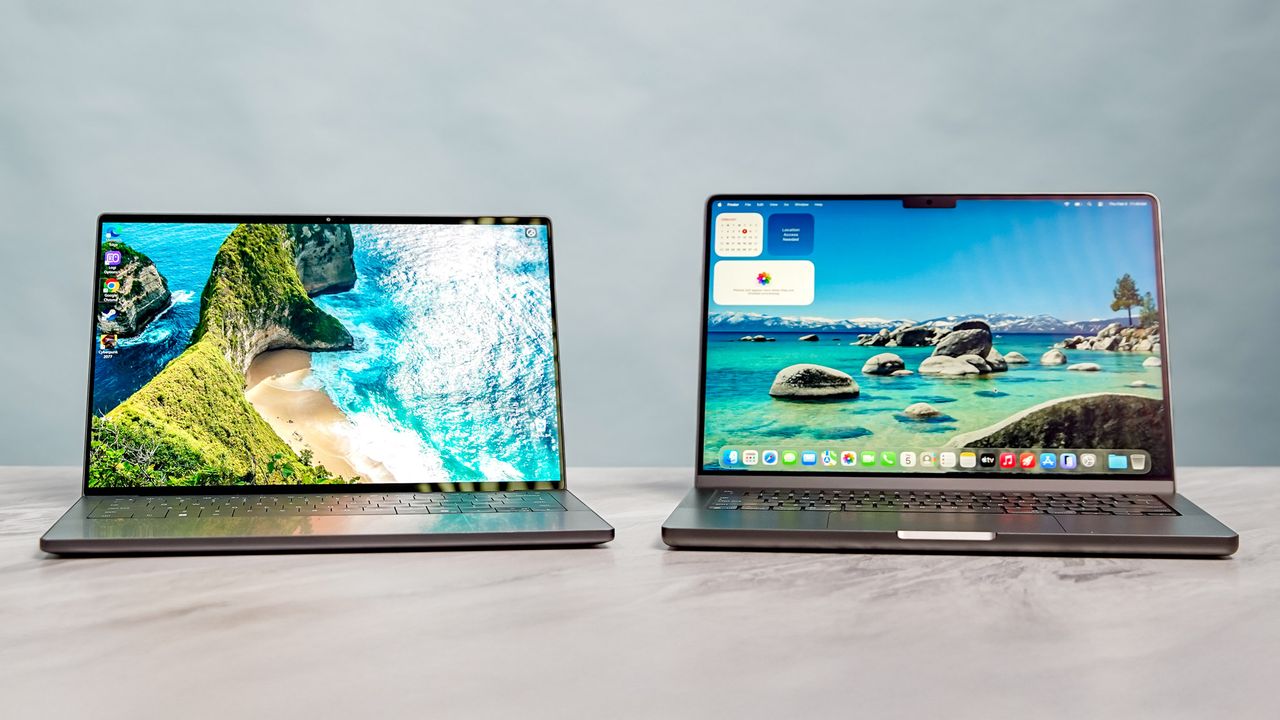
The Dell XPS 14 (2026) is a welcome return for the iconic laptop brand. This model features a more practical design, a gorgeous OLED panel option, strong Panther Lake performance, and epic battery life. While it has a smaller screen and lacks an SD card slot, its positives outweigh the negatives. The XPS is back!

The MacBook Pro M5 improves on its predecessor thanks to its powerful M5 chip and faster SSD. Though it's not a revolutionary update from before, it's a fantastic option for power users who demand a powerful and portable notebook with epic battery life.
The Dell XPS 14 (2026) is a fantastic return to form that’s also a showcase for Intel’s Panther Lake chip. This new laptop features a practical design that still feels futuristic. Its tandem OLED makes everything practically pop off the screen, while the powerful and energy-efficient processor delivers strong performance for all-day use.
Though the new XPS 14 is unquestionably one of the best Windows laptops, it still has to contend with the mighty MacBook Pro 14-inch. Though the Mac's design remains unchanged, the Apple M5 chip at its core offers incredible and sustained performance. If you’re looking for pure performance-per-watt, this is the laptop to beat for heavy workflows.
Now that Dell has ditched the “Premium” branding, our long-running XPS vs. MacBook face-off is officially back! Below, I’ll detail everything you need to know about the new Dell XPS 14 and MacBook Pro 14-inch M5 to help you decide which laptop to get. Let’s get into it!
Dell XPS 14 (2026) vs. MacBook Pro 14-inch M5: Specs
Dell XPS 14 (2026) |
MacBook Pro 14-inch M5 |
|
Price |
$1,599 (starting) |
$1,599 (starting) |
CPU |
Intel Core Ultra 5 325 |
Apple M5 (10-core) |
GPU |
Intel Graphics |
10-core GPU |
RAM |
16GB |
16GB |
Storage |
512GB |
512GB |
Display |
14-inch non-touch 2K 120Hz |
14.2-inch Liquid Retina XDR |
Battery Life (Lab) |
12:23 (OLED) / 20:41 (LED) |
18:00 |
Weight |
3.0 pounds |
3.4 pounds |
Dell XPS 14 (2026) vs. MacBook Pro 14-inch M5: Price

You’d expect the MacBook Pro M5 to be the pricier option, given Apple’s reputation as the premium price leader. But in a surprising turn of events, the company’s latest Pro laptop can actually be the cheaper choice.
Right now, the Dell XPS 14 starts at $1,599. While that’s roughly the same price as the entry-level MacBook Pro M5, that Dell configuration runs on a lower-end Intel Core Ultra 5 325 chip featuring standard Intel Graphics. This model also lacks a tandem OLED touch panel. In other words, you’re getting less for the same price.
The XPS 14 model I reviewed, with its Core Ultra X7 358H CPU with Intel Arc Graphics, 32GB of RAM, 1TB SSD, and OLED touch display, retails for $2,199. As you’ll see below, even with those higher specs, the MacBook Pro M5 has more to offer — for $600 less.
Winner: MacBook Pro 14-inch M5
Dell XPS 14 (2026) vs. MacBook Pro 14-inch M5: Design

Dell ditched the controversial features that frustrated users, specifically the invisible trackpad and capacitive touch row, and returned to a design that prioritizes usability.
You now get a tactile row of physical function keys and a haptic trackpad with etched boundaries so you can actually feel where it ends. It’s a slim, CNC-machined aluminum slab that weighs just 3.0 pounds, making it noticeably lighter and more portable than the MacBook Pro M5.
The MacBook Pro M5 is slightly heavier at 3.4 pounds and hasn't changed its look much in recent years. It still features the notch at the top of the display and that rock-solid unibody chassis. While the Mac is incredibly well-built, Dell’s redesign feels fresher and more focused on correcting past mistakes. Plus, the XPS 14’s lighter weight makes it a better travel companion.
I’ll give the win to the XPS 14 here, though the MacBook Pro’s design is still great.
Winner: Dell XPS 14
Dell XPS 14 (2026) vs. MacBook Pro 14-inch M5: Display

Here’s where things start getting interesting. While both laptops utilize different display technologies, they rank among the best screens out there. You can’t lose with either, but those differences do matter.
The MacBook Pro 14 uses a Liquid Retina XDR (Mini-LED) panel that’s known for its extreme HDR brightness and buttery smooth ProMotion 120Hz refresh rate. It’s an incredible screen for video editors who need color accuracy and high peak brightness.
Dell XPS 14 (2026) |
MacBook Pro 14-inch M5 |
|
Nits (SDR/HDR) |
355 / 381 nits |
558 / 1109 nits |
sRGB |
126.6% |
115.4% |
DCI-P3 |
89.7% |
81.7% |
Delta-E (Lower is better) |
0.20 |
0.20 |
Conversely, the tandem OLED panel on the XPS 14 is also serious business. By stacking two layers of OLED pixels, Dell has created a display with the inky blacks and infinite contrast of OLED, but with significantly higher brightness and better durability against burn-in, according to Dell.
Side-by-side, the XPS 14’s panel looks punchier and more vibrant than the MacBook’s Mini-LED. Unless you specifically prefer the Mac’s taller aspect ratio and better color accuracy, the XPS 14 wins on pure visual wow factor.
Winner: Dell XPS 14
Dell XPS 14 (2026) vs. MacBook Pro 14-inch M5: Performance

Intel talked a big game when it announced its Panther Lake chips, and boy, it wasn’t kidding. While Apple’s M5 chip is still the undisputed performance king, Intel’s latest is at least catching up.
Dell XPS 14 (2026) |
MacBook Pro 14 M5 |
|
Geekbench 6 (Single/Multi) |
2,867 / 16,927 |
4,288 / 17,926 |
Handbrake (Min:Sec) |
4:32 |
3:31 |
On the Geekbench 6 CPU performance test, the MacBook Pro M5’s single-core score of 4,288 and multi-core score of 17,926 both outpace the XPS 14. In our Handbrake video transcoding test, the MacBook Pro finished over a minute faster than the Dell.
While the XPS 14 is incredibly snappy and more than capable of handling everyday workloads, the M5 chip is in another league when it comes to raw computational speed and single-core efficiency. The MacBook Pro crushes this round.
Winner: MacBook Pro 14-inch M5
Dell XPS 14 (2026) vs. MacBook Pro 14-inch M5: Gaming performance

Neither of these are "gaming laptops," but both can hold their own for casual sessions.
The XPS 14 I reviewed relies on the integrated Intel Arc graphics within the Panther Lake chip. It managed a playable 39 fps in Shadow of the Tomb Raider and 36 fps in Borderlands 3. With Intel’s frame and resolution boosting XeSS enabled, you can get games to run at close to or above 60 frames per second.
Dell XPS 14 (2026) |
MacBook Pro 14-inch M5 |
|
Borderlands 3 |
36 fps |
32 fps |
Cyberpunk 2077 |
14.9 fps |
43 fps |
Shadow of the Tomb Raider |
39 fps |
57 fps |
Gaming on the MacBook Pro M5 can be a dicey proposition. In optimized titles like Cyberpunk 2077 (running on Mac-specific settings), it hit an impressive 43 fps, and it dominated in Shadow of the Tomb Raider at 57 fps. However, the MacBook is still held back by a smaller library of native games.
If you want access to the widest gaming library possible without jumping through hoops, the XPS 14 is the best bet. Since it supports games built on the ubiquitous x86 architecture, I’m giving the win to the XPS 14.
Winner: Dell XPS 14
Dell XPS 14 (2026) vs. MacBook Pro 14-inch M5: Battery life

This is usually the part where MacBooks easily take the win. While that’s still true in this specific case, the story isn’t so cut and dry, depending on which XPS 14 configuration you opt for.
Battery Test |
Time (hours:mins) |
Dell XPS 14 (2026, Tandem OLED) |
12:23 |
Dell XPS 14 (2026, 1200p LED) |
20:41 |
MacBook Pro 14-inch M5 |
18:00 |
In our battery test (continuous web surfing at 150 nits), the MacBook Pro M5 lasted 18 hours. That is an incredible result to be sure. That easily outlasts the OLED XPS 14 I reviewed, which clocked an average of 12 hours and 23 minutes. While that gap is certainly huge, nearly 12 and a half hours is actually very commendable for an OLED Windows laptop.
However, the LED model of the XPS 14 we tested lasted an epic 20 hours and 41 minutes. That makes it one of the longest-lasting laptops we have ever tested at Tom's Guide. Dell has proven that Windows on x86 can outlast the MacBook, provided you're willing to skip the OLED and CPU upgrade.
Winner: Dell XPS 14 (for the LED model), MacBook Pro 14-inch M5 (for the OLED/XDR comparison)
Dell XPS 14 (2026) vs. MacBook Pro 14-inch M5: Bottom line
The Dell XPS 14 (2026) is an awesome redemption story. It fixes the major design flaws of the previous generation and introduces a tandem OLED display that’s a marvel to behold. If you want the best-looking screen on a Windows laptop, wider game support, and a lightweight design that can last for 20+ hours (on the LED model), the XPS 14 is the notebook to get.
Dell XPS 14 (2026) |
MacBook Pro 14-inch M5 |
|
Price and value (15 points) |
10 |
13 |
Design (15 points) |
14 |
12 |
Display (15 points) |
15 |
13 |
Performance (20 points) |
15 |
20 |
Gaming performance (15 points) |
12 |
10 |
Battery life (20 points) |
12 |
18 |
Total (out of 100) |
78 |
86 |
However, the MacBook Pro 14-inch M5 is the better overall value. You get faster performance, longer battery life compared to the OLED Dell, and a more robust port selection that includes a dedicated SDXC card slot.
For Windows loyalists, the XPS 14 comes with my highest recommendation. But if you aren't tied to an OS or just like Apple, the MacBook Pro M5 is the laptop to beat.
Overall Winner: MacBook Pro 14-inch M5

Follow Tom's Guide on Google News and add us as a preferred source to get our up-to-date news, analysis, and reviews in your feeds.