Get all your news in one place.
100's of premium titles.
One app.
Start reading
T3
T3
Technology
Max Freeman-Mills

Dell XPS 14 (2026) review: The best Windows laptop of the year?

Dell XPS 14 review.

Long live XPS, eh? After a slight rebranding debacle in 2025, during which Dell retired all of its laptop sub-brands, it's now seen the light and brought XPS back into the fold – and it's done it in some style. The 2026 refreshes of the XPS lineup are finally here, and I've had the XPS 14 for a couple of weeks to see how it stacks up.

Without spoiling my verdict entirely, what I've experienced has been probably the slickest Windows hardware I've got my hands on in years, and the first proper competitor to the peerless MacBook Pro in terms of a genuine day-to-day recommendation for people. Its price makes that a harder sell, to be fair, but purely in terms of the experience on offer, the XPS 14 (2026) is something special.

Price and Availability

Unveiled at the CES tech show at the turn of the year, you can now order the XPS directly from Dell, in both its 16-inch and 14-inch variants. I've tested the XPS 14, but in its most highly-specced version (featuring a Series 3 Intel Core Ultra X7 358H and a touchscreen). This version costs a whacking £2,198.99 here in the UK (or $2,309.99 in the US).

The lowest-spec version offers a Series 3 Intel Core Ultra 7 355, instead, and comes in at £1,599 or $1,699.99, which is more competitive – but remains a pretty tall order. Still, the redesign underlines that this is a premium laptop, so the proof is in the pudding, as I'll get to below.

Design and Specs

(Image credit: Future | Max Freeman-Mills)

For a long time, the XPS line had stuck to a fairly tried-and-true design language that involved a wedge-like taper for its laptops, but in bringing the brand back from the dead, Dell has also given it a hardware makeover. I can't allege that it's actually copied Apple's homework, but anyone who's handled a recent MacBook will be in familiar territory.

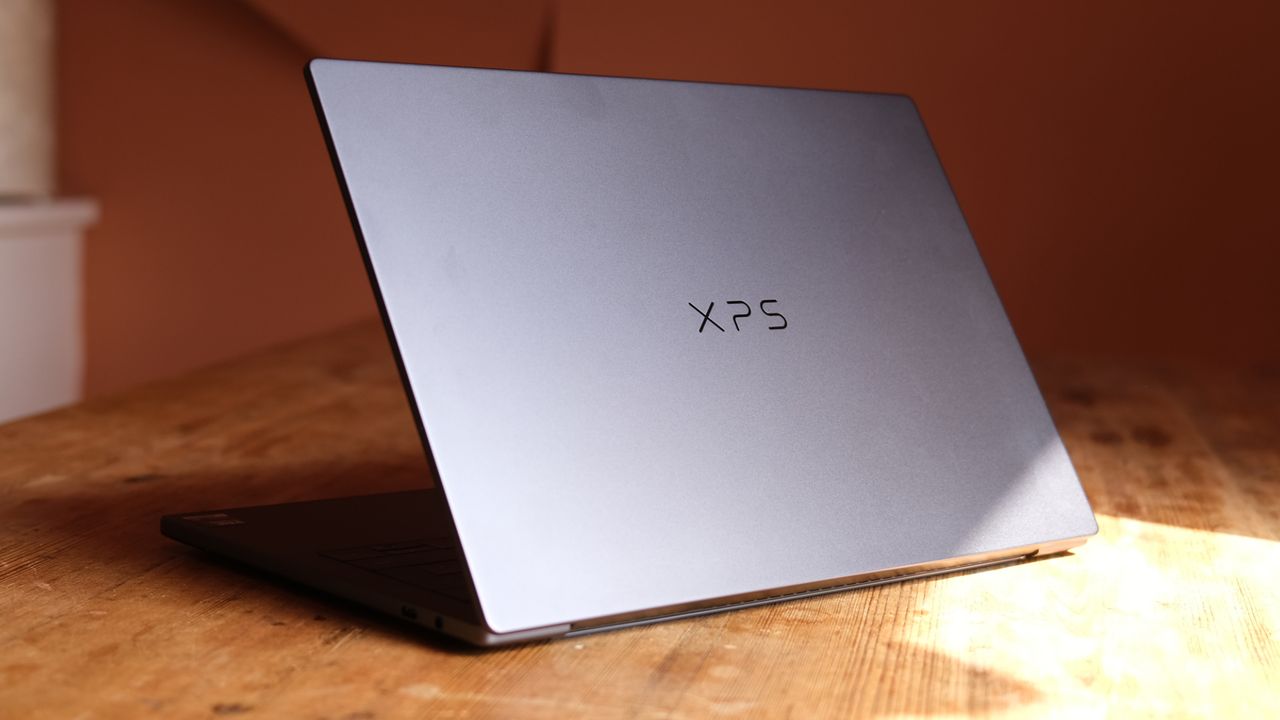
Now, the 2026 version of the XPS 14 is flat with rounded edges, spreading its thickness evenly. It has a slight lip where the top meets the bottom, which you fairly easily grip to open the laptop, and it's 14.62mm thick throughout. That makes it really compact and packable, but it's worth pointing out that it feels super solid in your hands.

The laptop is made from CNC aluminium, and that gives it a really premium feeling that is again familiar from Apple's best work. But part of what I've really loved is how it's finished. It has a dark grey, almost blue finish that looks great in different lights, but the inside surface hosting the keyboard and trackpad is in a slightly contrasting soft finish that pairs so nicely.

Weighing in at 1.36 kg, it's not the lightest laptop in the world, but it has that premium feeling that makes it feel well worth the heft, in my view. The design isn't without some downsides, though. The chief one is that Dell is sticking to a low-on-ports vision that now feels a few years outdated.

One side of the XPS 14 houses a 3.5mm audio jack and a USB-C port, while the other side offers up two more USB-C ports – all three of those USB-C options have Thunderbolt 4, Display Port 2.1 and power delivery, so they're all really flexible. Still, for a high-end professional laptop like this, there's no substitute for the ease of an HDMI port, and plenty of people would welcome an SD card reader, too.

Still, I owned an XPS for years that had such fun design touches as a webcam on the bottom of the screen to ensure that you looked terrible on every video call, so the vast majority of design notes here are positive (including the webcam now being above the screen).

The keyboard is nice and sizeable, with big keys that take some getting used to, but which feel pretty great under your fingers. It's paired with a touchpad that you can almost lose sight of, so subtle are its edges, but it feels good in use and has solid haptic feedback.

That takes us to what's inside the laptop – and it's a bit of a specs list. The cheapest version of the XPS 14 comes with 16GB of RAM, with steps up taking this to 32GB. The cheapest build comes with a non-touch display at 2K resolution, as does the middle option, while only the tested version offers a 2.8K OLED that's touch-enabled.

The lowest-cost version also has a Series 3 Intel Core Ultra 5 325 powering it; an 8-core chip with Intel Graphics and no B390 iGPU. Either of the step-up models has the same 16-core Series 3 Intel Core Ultra X7 358H with the Arc B390 for graphical oomph.

Interestingly, all three versions come with 512GB of SSD space, which is a little cheeky in the more expensive versions' case. There are a host of rivals offering 1TB as standard for this sort of price, and Dell should really be matching that, I'd say.

Performance

(Image credit: Future | Max Freeman-Mills)

I'm now quite a few laptops deep into my experience with Intel's Series 3 chips (otherwise known as Panther Lake) and I've yet to encounter a version that feels underpowered. There are quite a few variants to try, of course, but the Core Ultra Ultra X7 358H that I've been using is super-capable.

It's not quite the absolute top-end chipset, but that's a bit like criticising an Apple M3 Max for not being the M3 Ultra – if you really need that power, you can find a machine that includes it. For most people, though, the X7 358H is plenty beastly enough. It's chewed through image-editing tasks with no hitches, and my normal workload of open Chrome tabs, Slack and WhatsApp windows has it barely breaking a sweat.

This really comes into focus when you put the laptop through its gaming paces. The version I tested includes the B390 iGPU, and it performs so impressively, as I've found on other Panther Lake chips. In Doom: The Dark Ages, I've been able to get benchmark results hovering around 50fps on low settings, with some variance according to whether you target performance or quality using Intel's XeSS upscaler.

Even more impressively, I've been able to get a solid 65fps result from Cyberpunk 2077 on its low preset, which is immensely playable and far prettier than its nomenclature suggests. These are demanding games, so indie titles, older games and those with less photorealistic graphics could well be extremely fluid on this laptop, which is quite a boast.

Like some other Panther Lake machines I've used, the XPS 14 isn't afraid to spin up its fans pretty immediately when you put the chip under a little load, but they're not offensively loud, and that's a worthy price to pay for heat management and therefore performance.

Plus, the version of the laptop I tested had a gorgeous 2.8K OLED display that made actually looking at whatever I was doing a further pleasure. OLED displays are thankfully no longer the rarity they used to be among the best laptops, but they're still a real treat to use, especially when they're this sharp. It can also get up to 120Hz, which makes it extremely smooth, as a bonus.

Battery life can stretch to up to 31 hours according to Dell, although I didn't get anywhere near that number, especially if benchmarking. Still, in regular working use I was able to get through a whole day on battery power without dipping below 20%, which means that I feel confident in the XPS 14 as an all-day machine for light to moderate use.

Impressively, that webcam that I mentioned earlier is a 4K one, which is really rare in laptops that I've tested. It even has HDR (high dynamic range), and that delivers clarity in recordings and video calls that puts some others to shame. It doesn't have a privacy shutter, though, which is a surprising omission.

Verdict

(Image credit: Future | Max Freeman-Mills)

The XPS is back in a big way – and after positive early impressions, it's great to confirm that this 2026 model is a major return to form, too.

The Dell XPS 14 is just about the most desirable non-gaming Windows laptop I've tested in years, and it's the first one that's had me genuinely wondering if I'd rather use it than my MacBook Pro.

It has a gorgeous design featuring a classy new chassis, superb Intel Panther Lake power at its heart, a beautiful OLED display in this premium model, and a keyboard that's pleasant to use.

All that makes it a laptop with basically no rough edges other than an undeniably steep asking price – but for those with generous workplaces or budgets of their own, this feels like a slam dunk from Dell.

Also consider

While I've mentioned the MacBook Pro a couple of times in this review, the MacBook Air remains the smart buy for most people, and given how it undercuts the XPS 14, it's a much more efficient pick if you want a capable laptop and don't mind limited ports. Of course, it means giving up on Windows, but that might be fine for you.

If you want a Windows laptop that's even lighter than the XPS 14, consider Asus' new Zenbook A14 or A16, which is incredibly thin and great to use. It's less premium in terms of build quality, and swaps Intel out for the latest wave of Qualcomm chips, but is no less capable as a work machine for that change.

Sign up to read this article
Read news from 100's of titles, curated specifically for you.
Already a member? Sign in here
Related Stories
Top stories on inkl right now
One subscription that gives you access to news from hundreds of sites
Already a member? Sign in here
Our Picks
Fourteen days free
Download the app
One app. One membership.
100+ trusted global sources.