Get all your news in one place.
100's of premium titles.
One app.
Start reading
Windows Central
Windows Central
Technology
Sean Endicott

Copilot Keyboard launches in Japan, but it’s the return of the dolphin “Kyle” stealing the spotlight

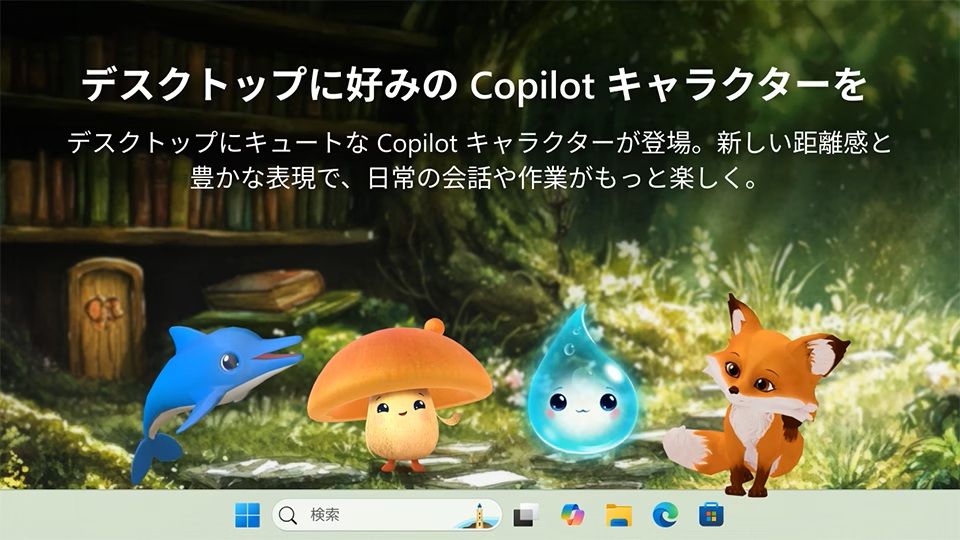
Cute animated characters, including a dolphin, mushroom, water droplet, and fox, stand on a desktop backdrop. A forest and wooden bookshelf create a whimsical atmosphere. Japanese text is displayed.

A new product by the Microsoft AI team improves the experience of entering Japanese characters on your PC. Following six months of testing, Copilot Keyboard is now available for free on Windows.

Copilot Keyboard is an IME (Input Methad Editor), meaning it allows users to input text from languages that do not work well with a QWERTY keyboard.

Usually, an IME requires manual updating to incorporate new concepts or terms. Copilot Keyboard uses AI to add new terms to conversation suggestions. One of its key features is adding words that appear on popular social media sites.

It also supports importing a user's dictionary data from the legacy Microsoft IME.

The app supports Copilot Search, so you can look up a definition without having to switch to a browser.

The standard Microsoft IME will continue to be available, even if you install Copilot Keyboard. Users can swap between the two through Windows Settings.

Copilot Keyboard appears to be a useful tool that makes it easier to input Japanese characters. I confess that I cannot speak, write, or read Japanese, but I'll take the word of the Windows team behind the tool.

It also has a cool concept that I think should be tested in the main Copilot app. When you install Copilot Keyboard, it can place a floating Copilot button on your desktop that you can drag and drop items into.

I'd like to see a similar floating button added to Copilot for Windows as an option. I'm sure some people would be against the feature being on by default or built into Windows 11, so it makes more sense to have it as an optional feature within an app.

If you don't want to have the Copilot logo appear on your desktop but still want the drag and drop functionality, Copilot Keyboard has you covered.

You can set Copilot Keyboard to show the Copilot icon on your desktop, which is the default, or show one of the AI characters.

Copilot Keyboard includes several AI characters, including one that will look familiar to some who used Office in the 90s. Kyle the dolphin first appeared in Office 97 in Japanese editions of the productivity suite.

Kyle eventually became available in other regions, though you had to go out of your way to download the dolphin. Kyle stuck around for about a decade before being retired.

The return of Kyle is a nice nostalgia bump for those who used the assistant years ago.

Join us on Reddit at r/WindowsCentral to share your insights and discuss our latest news, reviews, and more.

Sign up to read this article
Read news from 100's of titles, curated specifically for you.
Already a member? Sign in here
Related Stories
Top stories on inkl right now
One subscription that gives you access to news from hundreds of sites
Already a member? Sign in here
Our Picks
Fourteen days free
Download the app
One app. One membership.
100+ trusted global sources.