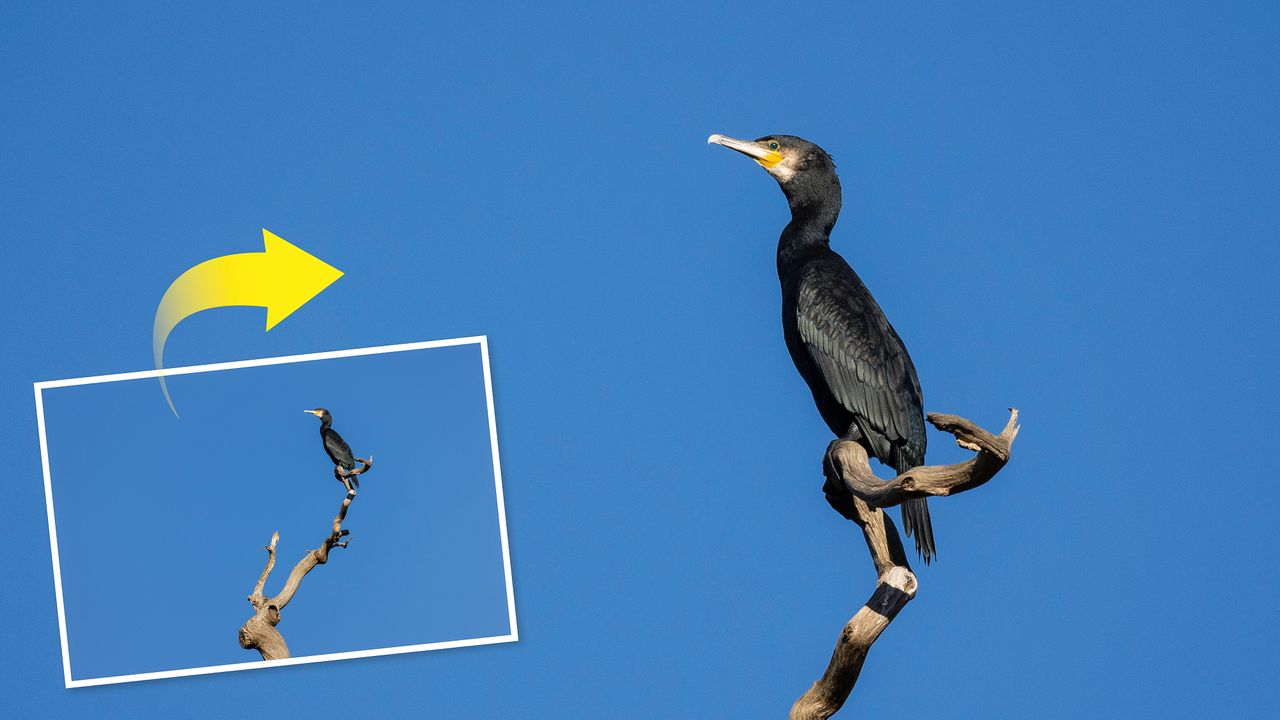
The 1.6x Cropping/Aspect Ratio setting is available on every Canon EOS R full-frame mirrorless camera including the EOS R6, R6 Mark II and R6 Mark III, and the EOS R5 and R5 Mark II, and yet it’s hardly ever talked about. Which I think is nuts as it’s a brilliant setting that instantly turns a 400mm lens into 640mm for mega telephoto reach.
I’m not a Canon EOS camera snob and will happily shoot with an old APS-C DSLR or a new full-frame EOS R mirrorless camera. While I generally prefer to shoot with a full-frame camera – for better quality images with larger pixels, true focal lengths especially at the wide end of lenses, and better bokeh at wider apertures – I also love shooting with 1.6x crop-sensor cameras like the old EOS 7D Mark II or the EOS R7 mirrorless. For shooting wildlife or sports, you can’t beat the benefit of having an extended reach at the longer end of super-telephoto lenses for frame-filling shots.

But now you don’t need to carry both an APS-C camera for distant subjects as well as a full-frame camera for everything else!


But aren’t the crop-mode images severely smaller and low-res? You may be pleasantly surprised. For instance, the Canon EOS R5 Mark II has a 45-megapixel sensor. Even when using the crop mode, you end up with large images – the EOS R5 Mark II full-size full-frame images are 8192x5464 pixels, whereas in the 1.6x crop mode they’re still a very large 5088×3392 pixels. Still more than enough/too big for most people’s needs.
Even on the older Canon EOS R6 in crop mode you get very usable 3408x2272-pixel images (full-frame uncropped images are 5472x3648 pixels).


In fact, I can’t remember the last time I didn’t crop full-size RAW images when editing from their maximum size as they’re just too big and unnecessary. I usually use images at a more practical 3000x2000 pixels when outputting RAW edited images for mag or web use, and for clients.
Speaking of editing images, here’s a top tip for you – when editing your crop mode RAWs, you’ll need to switch off Profile Corrections under the Optics tab in Adobe Camera Raw / Lightroom, otherwise you get light corners in your images like an old-fashioned vignette.