Get all your news in one place.
100's of premium titles.
One app.
Start reading
Digital Camera World
Matthew Richards

Yashica FX-D 300 review: a digital compact camera with a 1970s SLR look and feel, that aims to give you that retro feelgood factor

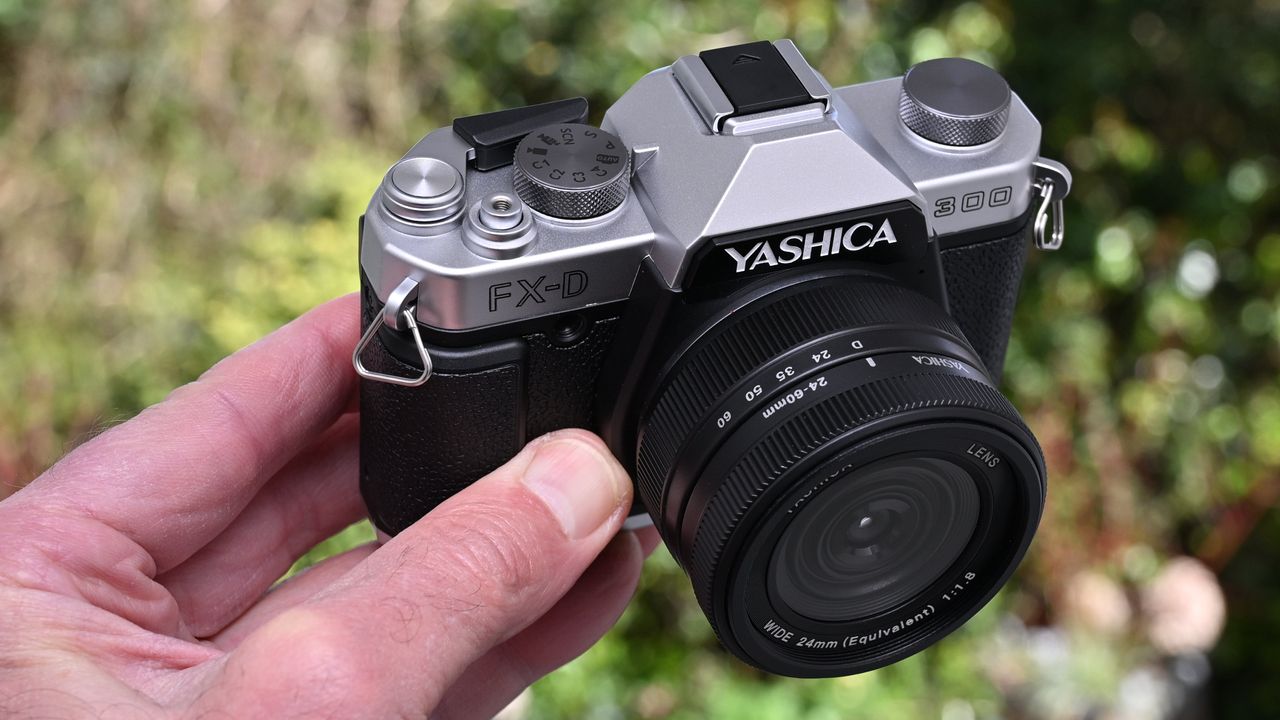
Yashica FX-D 300 product shot.

The 1970s probably won’t go down as the most stylish decade of all time. I’m thinking bellbottom trousers, platform shoes, high-waisted jeans and big hair. And yet there were some properly stylish cameras from the 70s, including the Yashica FX-3 which was launched in 1979. It was a highly popular and very attractive 35mm reflex film camera, fully mechanical with a reputation for being robust and durable. The new Yashica FX-D series of cameras take their styling cues from the FX-3 and bear more than a passing resemblance, at a cursory glance.

Under the skin, the 13-megapixel FX-D 100 and the 50-megapixel FX-D 300 and FX-D S300 are entirely different to the FX-3 in every way. For a start, the new digital cameras aren’t made by the Yashica of bygone times, but by a Hong Kong company that paid for the name. They’re also relatively plasticky and feel like some of the style points are just there for show. The FX-D cameras can’t compete with the best retro cameras on the market but aim to offer a viable alternative to some of the best cheap cameras out there. Let’s take a closer look.

The FX-D 300 looks like a ‘proper’ film camera with a viewfinder, interchangeable lens and ‘film advance lever’. In real life, it has none of these. (Image credit: Matthew Richards)

Yashica FX-D 300: Specifications

Photo Resolution

50MP effective

Video Resolution

4K30

Image Sensor

1/1.56" CMOS

Selfie mirror

Flip screen

Display

2.8-inch flip LCD

Touchscreen

No

Battery

Li-ion

Connections

USB-C, Mic

Size (WHD)

120x84x86mm / 4.7x3.3x3.4in

Weight

408g / 14.4oz

Yashica FX-D 300: Price

The FX-D 300 sits in the middle of the three current FX-D models in terms of price. The cheaper FX-D 100 is based around a small 13MP 1/3-inch sensor and priced at $359 / £259 / AU$557, while the FX-D 300 features a physically larger 1/1.56-inch 50MP sensor and optical image stabilization, with a price currently set at $445 / £389 / AU$852.

Topping the lineup is the FX-D S300, which is essentially the same as the FX-D300 but adds an electronic viewfinder, at $569 / £479 / AU$ TBA.

All in all, the price of the FX-D 300 is pretty comparable to that of the Yashica City 300, which is a similar camera but with more modern styling.

Yashica FX-D 300: Design & Handling

The Yashica FX-D 300 aims to be two cameras in one, offering alternative styles of shooting for a more digital or analog type of experience. Let’s start with digital. There’s a conventional 4-way pad around the back of the camera and a few other function buttons, as well as a lever for operating the digital zoom facility. There’s also a button up in the top left corner with a film canister icon on it. Press this and you can select alternative ‘digital’ styles like Standard, Natural, Vivid, B&W and various other options.

Conventional ‘digital’ controls include a time-honored 4-way pad in the usual place, but the back of the imitation viewfinder housing just has a blanking plate and a pair of status LEDs. (Image credit: Matthew Richards)

Up on top, there’s a shooting mode dial just to the right of the ‘viewfinder’, which gives access to Auto, Program, Scene modes, Video, four custom setups and the like. I say ‘viewfinder’ but while the cowl on the top of the camera is shaped like a classic viewfinder, it serves no practical purpose and is blanked off with a black panel at the back that just has a couple of status LEDs.

On the plus side, it does at least host a hot shoe for adding a flashgun. There’s no dedication for the likes of TTL flash metering, so any universal flashgun like the similarly retro Godox iA32 should suffice.

The top panel looks suitably old-school, right down to the round, cylindrical shutter button and ‘film advance lever’. (Image credit: Matthew Richards)

Even more curiously, there’s also a film advance lever up on top, to the right of the faux viewfinder. Pull it back just a little and it stays in place, putting the camera into its more analog style of shooting. Every time you take a shot, it’s displayed on the rear screen and stays there until you use the lever to ‘wind it on’ in readiness for the next shot.

Yashica claims that this enables a different analog rather than digital style of workflow, helping to slow things down and give you a more genuine feel of shooting with film, although the process is still digital and there’s no physical film involved.

Draw back the film advance lever a little and it stays in place ready for operation, while putting the camera into ‘film’ shooting mode. (Image credit: Matthew Richards)

That film canister button on the back of the camera now gives access to six separate film simulations. In Yashica’s language, these include Ruby 60s for soft and nostalgic warmth, Sapphire 70s for cool tones, classic Yashica 400 for portraiture, Golden 80s for a sun-soaked look, and finally Mono 400 and B&W 400 for alternative retro black & white styles.

The left-hand control dial on the top panel gives access to alternative image styles in digital mode, and to film simulations when you’re in film mode. (Image credit: Matthew Richards)

Shifting back onto the top of the camera, there’s an unlabeled dial on the left hand side. As with the film canister button on the back of the camera, this gives access to different digital picture styles when you’re shooting in ‘digital’ mode, and to the various film simulations when you pull out the film frame advance lever a little, to engage film mode. You can customize any of the digital or film styles using the menu system.

The rear screen can flip around to face the front which is ideal for selfies and vlogging. However, it’s not fully articulated, which would have been helpful for high-level and low-level shooting. (Image credit: Matthew Richards)

Although the camera doesn’t have a viewfinder, one plus point is that the rear screen is articulated and can flip around for viewing from the front of the camera. This is a big plus point for shooting selfies, or for vlogging if you switch to the camera’s movie capture mode which offers resolutions up to 4K30.

However, it’s typically hard to see the screen clearly for composing images or shooting video in bright sunny conditions, in the absence of a viewfinder. The screen is also a bit on the small side, measuring 2.8 inches, and has a particularly low resolution of 640x480 pixels. The only upside of this is that it helps to drive down the cost of the camera.

A flap on the side of the camera reveals the microphone input socket and USB-C port. (Image credit: Matthew Richards)

Further features on the front panel of the camera include a switch for regular autofocus mode or ‘real time autofocus’ tracking. There’s also an autofocus assist lamp for use in low lighting conditions, plus a sculpted hand grip that was absent on the original FX-3 film camera.

A microphone input socket and USB-C port are hidden away on the side of the camera beneath a flap. You can use the USB-C port for recharging the Li-ion battery that’s supplied with the camera, as well as for transferring data or using the Yashica as a computer-connected camera. There’s also built-in Wi-Fi and the camera is supported by the Yashica smartphone app.

Digital zoom is available in steps of 24mm, 35mm, 50mm and 60mm (full-frame equivalent) via a control ring on the lens. This is in addition to the ‘digital’ zoom lever on the back of the camera, which works in a different way. (Image credit: Matthew Richards)

The alternative touch-and-feel styles extend to zooming. The FX-D 300 actually has a fixed focal length lens, whereas the FX-D 100 boasts a 3x optical zoom lens as well as 4x digital zoom. The upshot is that the FX-D 300 is limited to a 4x digital zoom facility, which is always second-best. As I mentioned earlier, there’s a zoom lever on the back of the camera which you can nudge to the right or left to zoom in or out respectively.

But the lens also has a control ring for zoom, with a ‘Digital’ mode plus marked increments of 24, 35, 50 and 60. These operate in click steps and enable you to select the respective focal length in millimeters (full-frame equivalent). Unlike zooming with the rear lever, the image is cropped as you step through the zoom range from 24mm (50MP) to 35mm (24MP), 50mm (12MP) and 60mm (8MP).

Look closely at this image and you’ll see a large clear plastic circular disk that covers pretty much the whole circumference of the chunky lens. The front optical element is comparatively tiny so it appears that the large disk is only there for show. A downside is that it could make the actual lens more susceptible to ghosting and flare. (Image credit: Matthew Richards)

Yet another difference is that the FX-D 100 enables manual focusing, whereas the FX-D 300 only has autofocus. That’s despite having yet another retro flourish in the shape of a round microprism/split screen in the center of the rear screen. Again, this serves no practical purpose.

A flap on the bottom panel of the camera reveals the removeable Li-ion rechargeable battery and the SD (SecureDigital) memory card slot. I’m pleased that it’s for a full-sized SD card and not the tiny microSD format. (Image credit: Matthew Richards)

Yashica FX-D 300: Performance

Perhaps I expect too much but I’m getting a bit fed up with cheap cameras that have relatively small image sensors yet claim to offer huge resolutions of 50 megapixels or more. For example, the Yashica City 100 is badged as a 72MP camera but is at least honest enough to say that its native resolution is just 13MP. That’s certainly not the case with many cheap cameras on the market these days.

For its part, the FX-D 300 has a physically larger 1/1.56" CMOS sensor which does actually have a ‘50MP’ resolution, akin to the camera modules in high-end camera phones. The question is whether that translates into good image quality?

This small 800x600 pixel crop from a 50MP image (shown below) reveals the degradation in image quality when using the full-resolution 50MP setting. (Image credit: Matthew Richards)

When I tried shooting in the default 50MP resolution, I was disappointed with the image quality. Photos looked very much like they’d been digitally interpolated, taking on a pixelated and blotchy appearance. They still looked interpolated but to a lesser extent at the medium 24MP and it was only at the lowest setting of 12MP that I felt the results looked relatively natural and unadulterated.

Perhaps that’s why you’re limited to shooting at 12MP if you select the JPG + DNG file format option, which captures images in both JPEG and RAW quality modes. You need to be careful though, as the JPG + DNG option becomes unavailable if you’re using the ‘digital’ shooting mode and rotate the zoom control ring on the lens away from its D setting. The following gallery of three shots shows the difference in quality when shooting JPEGs at the 50MP, 24MP and 12MP image size settings.

There’s a variety of different options when shooting in ‘digital’ mode, and the standard, natural, vivid, monotone and other options are all fairly appealing. There are also options that accentuate different red, green, blue and yellow tones, as well as warm, cold and retro effects. Switch to film simulations and there’s another broad range to choose from.

As I’ve mentioned, these include Ruby 60s, Sapphire 70s, Yashica 400, Golden 80s, Mono 400 and B&W 400. Each has its different interpretation of color rendition, contrast, grain and more. You’ll either love them or hate them, or maybe just feel lukewarm about them. If you kinda like them but would rather give them a tweak, there are options to customize them to your fancy.

As you might expect, the different film simulations are represented by film canister icons on the menu screen. They each come with options for tailoring the simulation to your specific preferences. (Image credit: Matthew Richards)

With the upsized 1/1.56-inch image sensor but higher resolution of this camera compared with the 1/3-inch sensor of the City 100, I found image noise to be pretty similar at high ISO settings. Like most comparable cameras, the FX-D 300 thrives on good lighting and struggles to maintain fine detail, dynamic range and low noise under low lighting conditions. Even so, like the City 100, this camera fares much better than some contenders and delivers reasonably detailed images with restrained noise all the way up to its maximum sensitivity setting of ISO 3200.

This indoor shot captured under dull ambient lighting was taken at the camera’s maximum sensitivity setting of ISO 3200. It looks fairly grainy without much in the way of fine detail but I’ve certainly seen worse. (Image credit: Matthew Richards)

Yashica FX-D 300: Sample Images

The following gallery includes shots of the same garden scene under the same overcast lighting conditions, featuring various colors of plants, flowers and pots, along with the neutral tones of paving slabs. All six default film simulation modes are shown, and each shot was taken at the lowest resolution setting of 12MP.

This second gallery comprises a number of shots taken in the English city of Bath on a sunny morning. I used both the maximum resolution of 50 megapixels and the minimum 12 megapixel option throughout testing, along with the Standard picture style. You’ll notice a couple of sequences of the same subject matter, taken at the shortest and longest zoom setting, with one or two extra shots in between.

Yashica FX-D 300: Video

The camera’s maximum video resolution is 4K30. Smaller available options include 2.7K at 60fps or 30fps, and 1080p or 720p, both at 120fps, 60fps or 30fps. The file format for all of them is MP4/H.264. The camera features an internal microphone plus a standard hack socket for an external mic. Other video functions include slow-motion recording, loop recording, time-lapse recording and a pre-recording option.

Above: video sample shot with the FX-D 300

Yashica FX-D 300: Lab results

There are few direct rivals to the FX-D 300, leaving us with a very limited selection of cameras which we've previously lab tested that can be used as comparisons. The Kodak Pixpro FZ45 is a basic compact camera that costs way less than the Yashica, while the Panasonic Lumix FZ80D costs more but has a far broader zoom range. The Fujifilm X-Half is over double the price of the FX-D 300, but has a similar theme of film photography emulation.

We were only able to lab test the resolution of the FX-D 300, as the camera lacks manual exposure control which we require in order to conduct our dynamic range and signal-to-noise lab tests.

Resolution (line widths/picture height):

(Image credit: Future)

We tested the FX-D 300 in its native 12MP shooting mode, and its maximum 50MP mode. In both cases the overall detail resolved was almost identical. The 50MP shots resemble upscaled 12MP shots with edge sharpening, but no additional fine detail.

Consequently, the FX-D 300 resolves no more detail at low sensitivities than the $100 Kodak FZ45, while the 17.7 megapixel Fujifilm X-Half captures noticeably more detail than the '50' megapixel FX-D 300.

Yashica FX-D 300: Verdict

I’m sure there are people who will love the Yashica FX-D 300. I’m all for retro styling and love my Nikon Z fc. But everything on my Nikon is there for a reason and serves a purpose. I can’t say the same of viewfinder cowls that don’t house an actual viewfinder, and feel that the Yashica’s ‘film advance lever’ is a bit of a gimmick. If I want to slow things down and take the time to pause and review between shots with other cameras, I can simply apply an instant review option in the menu system.

Then there’s the large plastic disc across the front of the lens which I assume is to give it the look of a larger optic but in fact only seems to increase the risk of ghosting and flare. It’s interesting that the Hong Kong-based company more recently launched the Yashica FX-D S300, which looks pretty much the same as this camera but actually does have a viewfinder. I do appreciate that the more basic FX-D 300 drives down the cost but I feel a bit that it smacks of fakery, like having an air intake scoop on the hood of a car that doesn’t actually pass any air through.

Features

★★★☆☆

The articulated rear screen is a genuinely useful feature, unlike the fake viewfinder and dubious film advance lever.

Design

★★★★☆

The camera feels a bit plasticky but certainly looks that part, with smart retro styling and good handling overall.

Performance

★★★☆☆

50 megapixels is a bridge too far but the camera delivers decent image quality at its lowest 12MP setting.

Value

★★★☆☆

It’s not great value in the UK and even less so in the USA, compared with other ‘cheap’ cameras on the market.

(Image credit: Matthew Richards)

Alternatives

Sign up to read this article
Read news from 100's of titles, curated specifically for you.
Already a member? Sign in here
Related Stories
Top stories on inkl right now
One subscription that gives you access to news from hundreds of sites
Already a member? Sign in here
Our Picks
Fourteen days free
Download the app
One app. One membership.
100+ trusted global sources.