What a Verified Digital Signage Platform Actually Proves About Your Screens
A verified signage platform records what played, confirms it reached the glass, and restores the screen when it did not. Three claims, and vendors rarely separate them. Almost every product on the market delivers the first, a smaller group delivers the second, and the third is where the category thins out. The gap matters most in the US, where co-op reimbursement and franchise compliance both run on evidence rather than assurance.
Verified digital signage: four things vendors call verification
The word covers four distinct capabilities, and a shortlist built without separating them will compare products that answer different questions.
Device monitoring tells you whether a player is online, when it last synced, and whether a content file failed to load. Every platform has it, and it is the weakest form of evidence in the group: a player can be perfectly online while the display in front of it shows nothing.
Proof of play is a log. It records what content played, when, where and for how long, and it is generated automatically by the player software and written back to the CMS. One vendor puts the boundary plainly: proof of play is not device monitoring and not scheduling — it is a log-based report. Navori, Broadsign, ScreenCloud and TelemetryOS all support it, and Yodeck and Play put it on their upper tiers rather than the entry plan.
Screenshot capture goes one step further by returning an image of what the player believes it is rendering, either on demand or on a schedule. Look offers live and scheduled screenshots; TelemetryOS pairs screenshot capture with timestamped logs and CSV export.
Proof of performance is a different product entirely. It answers whether anyone saw the content, using camera-based audience analytics, footfall counters or dwell sensors. Useful for advertising valuation, irrelevant to whether the screen was on.
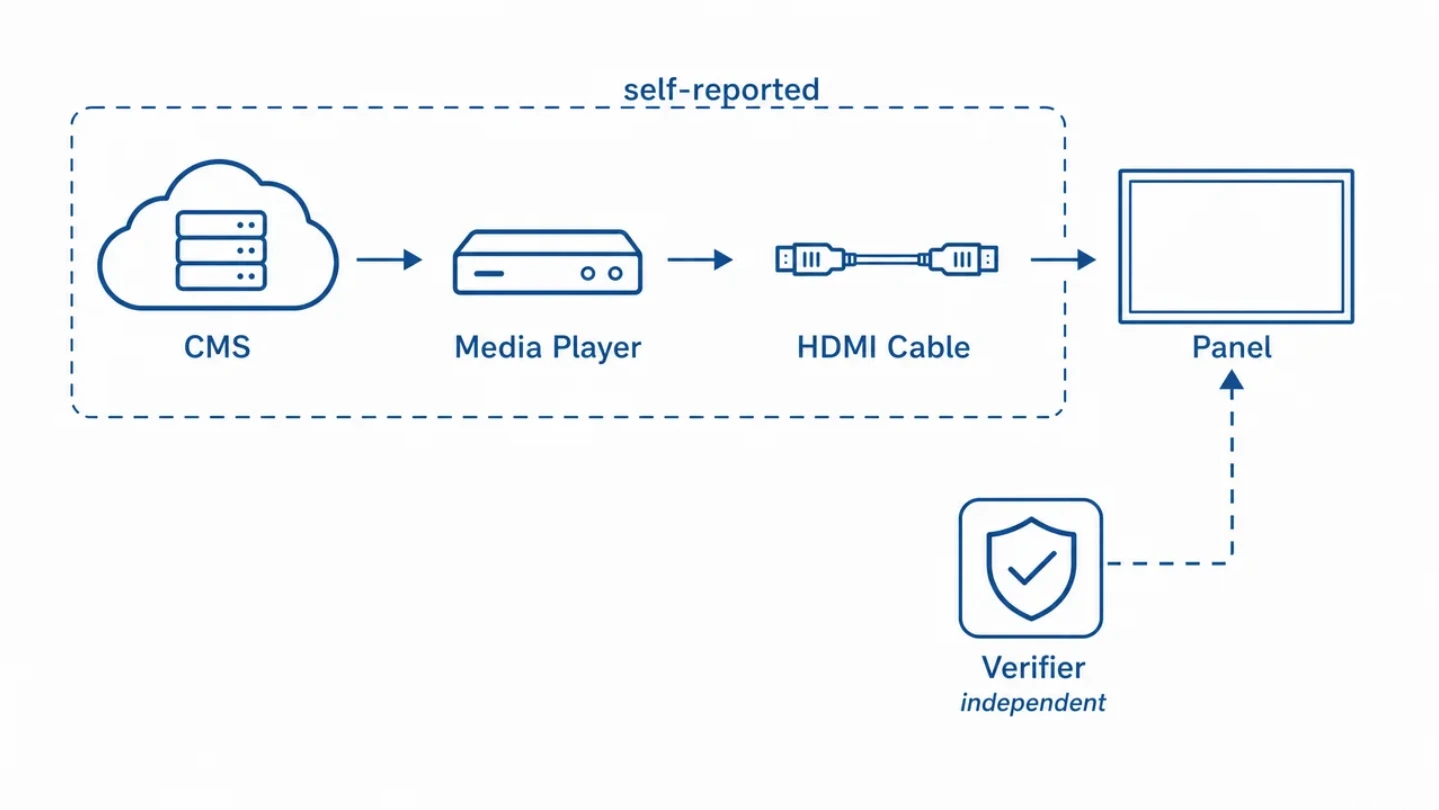
Three of those four are generated by the player, about itself. That is the structural fact the rest of this article turns on.
What proof of play records, and what it cannot record
A single proof-of-play entry is more detailed than most buyers expect. A standard record carries the content ID or filename, the campaign name, an exact timestamp, the screen ID, the location name and screen group, the playback duration and the play count for the reporting period. Reports export as CSV, PDF or through an API, and can be delivered automatically to a brand partner by email or SFTP. Retention typically runs from 90 days to two years, and twelve months has become a common commitment for audit-facing deployments.
Two failure modes recur often enough to be worth naming before a campaign starts.
The first is that logs cannot be reconstructed. Proof of play is not generated retroactively, so logging has to be enabled before the campaign launches; discovering the gap afterwards means there is no report to produce.
The second is incomplete coverage. If five screens sat offline during a campaign, the report shows the missing plays, and the brand partner will query them. That is the correct behaviour — but it also means the log accurately records an absence it cannot explain, and cannot tell you whether the screen was unplugged, frozen, or simply switched to another input.
There is a third limit, less often stated. Every mechanism above depends on the player being in a position to report honestly about itself. A frozen player can continue writing playback events for content it is no longer rendering, and a scheduled screenshot can return a cached frame. A display switched to a different HDMI source produces a log identical to one showing your content.
Where a verified signage platform stops being software
The remote-recovery tools the category relies on have the same dependency. HDMI-CEC — the protocol that lets a player switch a display on, off, or back to the right input over the same cable — is a command the player sends. If the player has hung, nothing is sent. Deep-standby and eco power modes switch the display's CEC receiver off entirely, which means the panel cannot be woken by that route at all, and on several commercial models CEC ships disabled by default. RS-232 gives a steadier channel on commercial panels, and Wake-on-LAN works over the network, but both still originate from something that has to be running.
Decker built its verified signage platform around the truck-roll problem: a separate device sits outside the player, confirms with photo evidence what is actually on the glass, and restarts the screen or returns the HDMI input without a site visit. Because that device does not depend on the player's state, it reports the faults the player cannot — a hung process, a panel in deep standby, a source switched by someone with a remote control.
The trade-off is that verification runs on hardware rather than in software, so it is an add-on on paid plans rather than something every screen carries by default. Below a handful of screens at one site, where somebody walks past the display daily, the economics do not justify it, and the vendor says as much.
Why US operators buy playback verification
Three buyer types drive most of the demand, and none of them is buying reassurance.
Co-op advertising and brand reimbursement. A proof-of-play record functions as a delivery receipt — the artefact advertisers, brand partners and auditors accept in place of an estimate. For billing disputes and co-op reimbursement claims, the difference between a timestamped log and a scheduling screenshot is the difference between a defensible answer and a guess.
Franchise brand compliance. Operators running screens across franchised locations track five numbers: screen uptime, the share of screens currently showing approved content, average approval-to-publish time, local-zone usage, and the sales lift tied to a campaign. Automated alerts do the enforcement — an email or SMS the moment a screen drops offline or an edit is attempted outside the approved zone, with the event landing in an audit log. Tying those figures to franchise performance reviews is what turns a brand standard into something enforceable.
Advertising networks. Selling airtime makes verification a billing input rather than an operational nicety, which is why per-play logging, retention and exportable reports are standard in that tier of the market.
The cost of an unverified screen
The arithmetic is less abstract than it looks.
A truck roll — dispatching a technician to a site — runs between $150 and $1,000 per visit depending on distance and contract. Per-screen software across the mainstream platforms runs $8 to $30 a month. One visit therefore costs somewhere between six months and ten years of subscription for that screen, and the visit does not end there: a dark screen also triggers store communication, replacement logistics, content rescheduling and lost display time.
At network scale the reserve gets planned explicitly. A practical five-year allowance for maintenance, spare parts, labour, logistics and downtime on a twenty-screen deployment lands between $10,000 and $30,000. Against that, the software line is a rounding error, and the question stops being which platform is cheapest.
There is also a misreading worth correcting. Vendor uptime commitments describe the cloud, not the glass. OptiSigns publishes a 99.99% monthly service level — about five minutes of platform unavailability a month, with service credits of 10%, 30% or 100% as the figure degrades. That guarantee covers the CMS being reachable. It says nothing about whether a panel in a store is displaying anything, and the two numbers are routinely conflated on shortlists.
For reference on the scale involved: 99.9% availability is roughly 8.7 hours of downtime a year, or 43 minutes a month; 99.99% is about 52 minutes a year.
How to check whether a platform is actually verified
Five questions separate the claims faster than a feature grid.
What does the dashboard show when the display is powered off but the player is online? If the answer is a green status, the system is measuring the server and the device, not the screen.
Who generates the screenshot? If the player produces it, a hung player can return a stale frame. Ask what happens when the rendering process stops but the device stays reachable.
How long are playback logs retained, and in what format? Ninety days is common; audit-facing deployments usually want twelve months, with CSV or API export rather than a dashboard view.
What exactly can be recovered remotely? Player restart, display power, and HDMI input switching are three separate capabilities. Most platforms offer the first; the second and third depend on CEC, RS-232 or Wake-on-LAN being available and enabled on the panel.
Is proof of play on the plan you are buying? On several platforms it sits two tiers above the entry price, which changes the comparison materially.
What the evidence levels actually prove
Four layers, four different claims, and they are not interchangeable.
|
Layer |
What it proves |
What it misses |
Who generates it |
|
Device monitoring |
The player is reachable and synced |
Everything happening after the HDMI cable |
Player |
|
Proof of play |
A timestamped record of content, duration and play count |
Whether the frames reached the panel |
Player |
|
Screenshot capture |
What the rendering process believes it is showing |
Frozen processes, cached frames, wrong input |
Player |
|
On-glass confirmation |
What the panel is displaying, with photo evidence |
Nothing in the chain above it |
Device outside the player |
Read as a stack, the pattern is clear: each layer inherits the blind spot of the one below it, because the same component reports on all three. Independence is the property that distinguishes the fourth, not resolution or refresh rate.
That does not make the first three optional. Proof of play is what a brand partner accepts for reimbursement, and no camera or verifier replaces a timestamped log for billing. The practical position for a US operator running screens across locations is that logs answer the commercial question and independent confirmation answers the operational one — and a shortlist built as though one covers both will eventually produce a clean report for a screen nobody has looked at in a month.