Get all your news in one place.
100's of premium titles.
One app.
Start reading
TechRadar
TechRadar
James Rogerson

Wear OS 7 has landed — here are the 5 biggest new features you need to know about, from live updates to widget creation

Various Wear OS 7 features.
  • Wear OS 7 is rolling out now
  • It's initially available for the Pixel Watch 4, 3, and 2
  • Three major changes are available now, including live updates, but Gemini Intelligence features are coming later

It’s a big day for Google — and anyone with a device running Google’s software — because not only has the company launched Android 17, we've also been treated to Wear OS 7.

This smartwatch update doesn’t contain quite as much new stuff as Android 17, but there are three major new features and improvements on day one — with more to come over the next few months.

So it’s worth downloading, and it’s initially available for the Google Pixel Watch 4, the Pixel Watch 3, and the Pixel Watch 2. Below, you’ll find full details of what it includes now, and what’s coming later.

Day one Wear OS 7 features

The following three features are available now with the Wear OS 7 update, so you’ll be able to try them out as soon as you download it.

1. Live updates

(Image credit: Google)

The biggest Wear OS 7 feature that’s available now is live updates, meaning that you can track things like deliveries and sports scores live on your wrist, just like you already could on your phone.

You’ll be able to see an icon at the bottom of the watch face which you can tap on to view live details.

Similarly, there will also be a card at the top of the notifications feed which can display some information — such as the estimated arrival time of a food delivery — but which when tapped on will provide other details too, such as the delivery code you’ll need to give.

2. Improved battery life

The Google Pixel Watch 4 (Image credit: Future/Jacob Krol)

Google has also worked behind the scenes in Wear OS 7 to deliver power optimizations, which the company claims will increase your watch’s battery life by up to 10% compared to on Wear OS 6.

The exact improvement will probably depend on which watch you have, but Google hasn’t got more specific than that.

3. An audio switcher

(Image credit: Google)

The third and final day one Wear OS 7 feature is a new audio output switcher, which lets you use your watch to choose which of your devices you want to play audio through — be it a speaker in your home, your phone, your headphones, or whatever else.

You can already do all this from your phone, but this is a potentially convenient alternative if you don’t have your phone to hand.

Coming soon

The following two features are also classed as being part of Wear OS 7, but they’re not available quite yet. Instead, they should arrive over the next few months once Google adds Gemini Intelligence to its smartwatches.

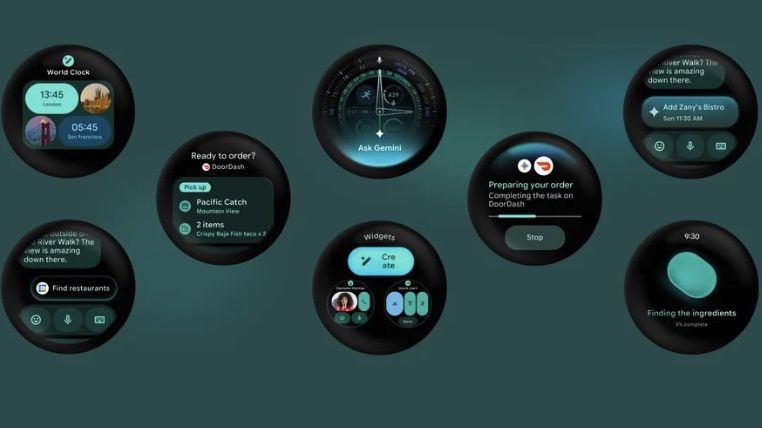
4. Create My Widget

(Image credit: Google / Future)

Create My Widget is one of the big features that Gemini Intelligence is set to power, with this allowing you to create “custom dashboards” for your smartwatch simply by describing the functionality you want and leaving Gemini to create them. A similar feature is also coming to Android, as pictured above.

5. Task automation

(Image credit: Google)

Task automation will allow you to ask Gemini to do things for you, such as placing an order on a food delivery app, and this isn’t just coming to phones — you’ll also soon be able to ask for and track task automations from your wrist.

Sign up to read this article
Read news from 100's of titles, curated specifically for you.
Already a member? Sign in here
Related Stories
Top stories on inkl right now
One subscription that gives you access to news from hundreds of sites
Already a member? Sign in here
Our Picks
Fourteen days free
Download the app
One app. One membership.
100+ trusted global sources.