
Get all your news in one place.
100's of premium titles.
One app.
Start reading
PC Gamer
PC Gamer
Jacob Fox

This web tool now lets you compare gaming mouse shapes in full 3D and let this mouse nerd tell you why that's important

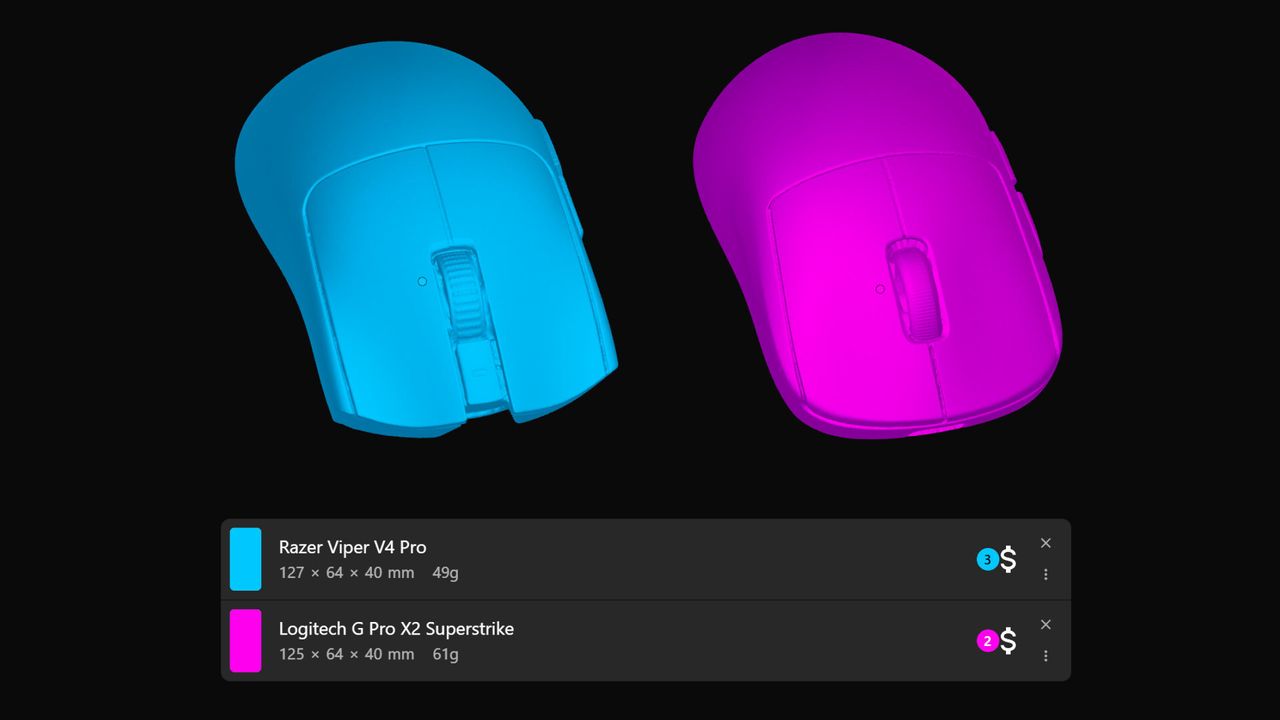
Side-by-side 3D renders of the Logitech G Pro X2 Superstrike and Razer Viper V4 Pro gaming mice on eloshapes.com.

Hearken, fellow gaming mouse nerds. Tighten your suspenders, strap in, and feast your eyes on the glory that is 3D mouse shape comparisons. We've been graced by the existence of EloShapes for some time, but previously it only let you visually compare 2D mouse outlines—now we get it in three dimensions.

Apart from just being incredibly cool, if you're wondering what you actually get from it, just think of it as a tool to compare mice to baselines you already know. For instance, if you know you like a Logitech Superlight shape, then you can see how similar another mouse is that you're considering buying if you're looking for something new.

And, of course, if you have experience with a few different mice, you'll be able to get a better idea of what a new mouse that you've not tried is like. For instance, if you see a mouse that has a shape more similar to a Razer Viper than a Logi Superlight, and you've tried both of these, then you'll have a better idea how it will feel in-hand compared to other kinds of shapes.

To use the tool, hover over Mice in the top menu and click Compare. Then add whichever mice you want to add to the comparison (it's better to keep it to two, if possible, to save things from getting too confusing) and select 3D at the bottom. From there, you can choose whether to compare them side-by-side or stacked.

Comparing two mice when stacked is probably the most useful, as it gives you an easier visual cue to any differences, but there's one crucial trick you shouldn't miss. To get a better picture, hover over the name of each mouse, as this highlights the rendering of the one you're hovering over, even if it's smaller and 'inside' the other mouse, but it still keeps the other one faintly visible.

(Image credit: EloShapes, eloshapes.com)

For instance, as you can see in the image above, doing this gives you a better picture of how the front of the Logitech G Pro X2 Superstrike compares to the more flared and taller Razer Viper V4 Pro's left and right mouse buttons.

Of course, nothing can compare to actually testing a mouse yourself, or if you can't do that, then checking out one of our spectacular reviews should do the trick. But if you know what you like or have a pretty good idea, this is another great tool for the arsenal when you're making a purchasing decision.

Sign up to read this article
Read news from 100's of titles, curated specifically for you.
Already a member? Sign in here
Related Stories
Top stories on inkl right now
One subscription that gives you access to news from hundreds of sites
Already a member? Sign in here
Our Picks
Fourteen days free
Download the app
One app. One membership.
100+ trusted global sources.