
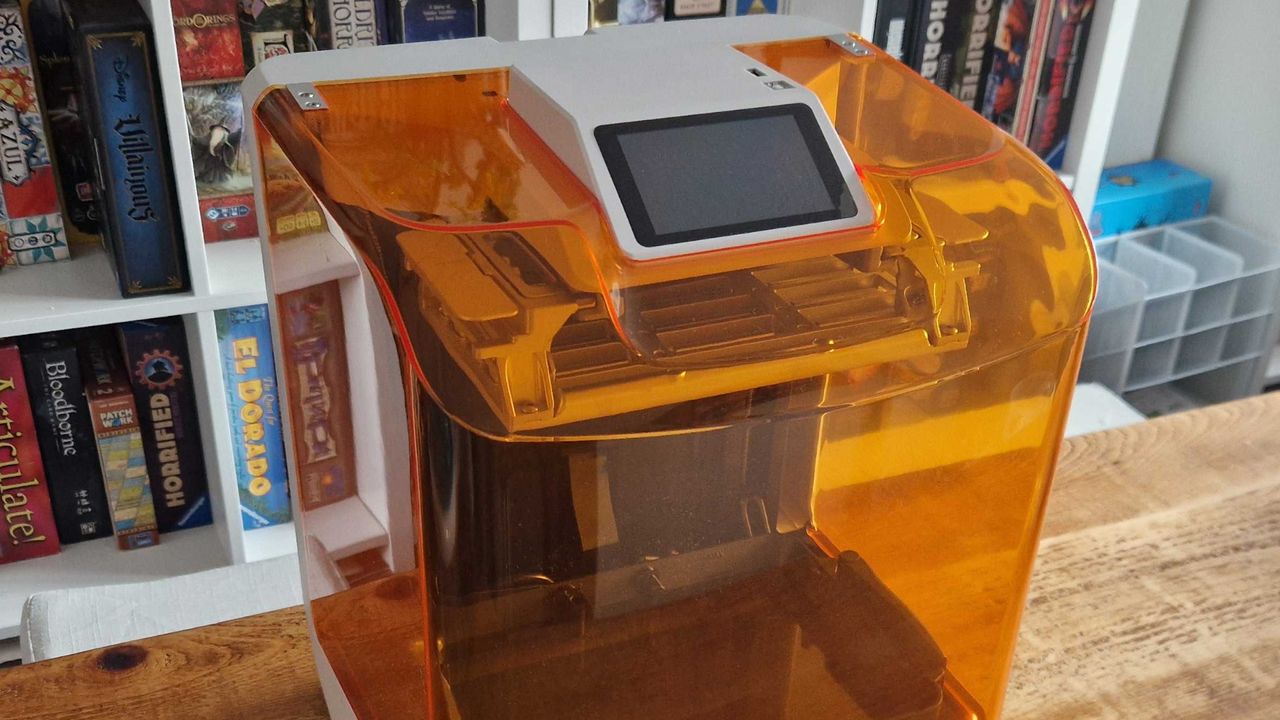
It sounds silly, but the thing I hate most about resin 3D printing is the mess – and the Creality Halot-X1 seems to agree that it sucks. Sure, it's got an impressive 16K resolution for its prints and sports a fancy new mechanism that promises to provide better results. But many ease-of-use features seek to minimize that hassle, and adding a resin feed system only improves things.
This also makes it a great choice for beginners. Actually, I'd argue that the Creality Halot-X1 is a good introduction to the hobby for newcomers regardless of whether you want to make proxies for Warhammer or miniatures to serve in the best tabletop RPGs.
Creality Halot-X1 features & design
Printer type |
Resin |
Resolution |
16K (15120x6230px) |
Build volume (LxWxH) |
211.68mm x 118.37mm x 200mm |
Speed |
Up to 170mm/h |
Screen |
10.1in 16K Mono LCD |
Build plate |
Twist-to-release |
In-built camera |
No |
Leveling |
Automatic |
Connections |
USB-A & Wi-Fi |
- Novel lifting print system
- Twist-to-release build plate
- 16K resolution, at high speed
Many 3D printers have specific features they'll hinge themselves around, but the Halot-X1 says "why limit yourself?" It gives everything a good go; there's a high print speed of up to 170mm/h, a user-friendly interface to keep things simple if you're new to all this, the option to add resin management for easier extraction/heating, latches on the vat rather than screws, 16K resolution for more detailed prints, and what it calls a "true leveling-free" experience. However, the real trump card lies in the new printing structure and its build plate.

For starters, the build plate isn't lowered into the resin vat as per usual. Instead, the resin vat is raised up to the plate instead. According to Creality, this improves stability and is meant to remove mold lines.
Similarly, the plate itself is just as novel. Rather than having to scrape off your models (a process that can scratch the surface and be an overall pain in the ass), you twist to release everything attached to it.
Creality Halot-X1 performance

- Easy to get started with
- Twist-release plate is excellent
- Reliable, high-quality results
Because it's pitched as an all-rounder, I decided to throw the Creality Halot-X1 in at the deep end; e.g. line it up with some D&D minis and see how it gets on. This thing is supposed to be truly leveling-free and beginner-friendly, so I should be able to just unbox the thing and set it off… right?
As it turns out, yes – that's exactly what you can do. After selecting a standard tabletop RPG model, a larger monster, and some terrain, I left it to its thing. The results were surprisingly good. Actually, the only issues I had were due to external factors (my printing area is pretty cold, which is another point in its favor considering how it handled that like a champ) and manual supports on Heroforge models that I didn't manage very well.
Does the new motion structure make a difference, though? This is where it becomes difficult to tell for sure unless you're printing all the time. 3D printers are like modern TVs; they're getting to the point where the quality of upper-end machines like this is so high you'll struggle to tell the difference between the results. Basically, any improvement over top-tier competitors like the Elegoo Saturn 4 Ultra 16K feels small enough that you may need to squint to see it.

If you don't fancy the mess of resin or want to focus on cosplay and scenery, filament printers are perfect - and the Elegoo Centauri Carbon 2 Combo is an excellent entry-point to that world. Actually, it's now my go-to recommendation.
The tilt-release plate is a more noticeable improvement. Classic print removal can be a pain (sometimes literally, if you don't have a good grip and your scraper accidentally slips), and this is much, much easier. In much the same way, the vat latches are so much better than the standard screws you'll see elsewhere. It's far less messy in practice, as is the idea of having the screen at the top of the machine rather than at the bottom where it's likely to be hit with drips.
Getting the resin extractor will only help in this regard. While it's pretty slow at removing or adding resin, it cuts out a lot of messiness by handling all that for you. As someone who hates the mess of resin printing, this won me over.
Should you buy the Creality Halot-X1

If you're new to resin printing or want an easy, no-fuss solution, the Creality Halot-X1 will do the trick. Its prints are of a high quality and it has plenty of bells and whistles, yes, but the real winner here lies in its ease-of-use solutions. It removes plenty of my personal pain-points with resin printing (the mess and faff involved), so if you're in the same boat, I'd highly recommend it.
Buy it if...
Don't buy it if...
How I tested the FLSUN T1

This review was conducted using a sample provided by the manufacturer.
I tested the Creality Halot-X1 across a few weeks with a variety of different print projects, mostly from Loot Studios. As usual with our 3D printing process, these ranged from a standard D&D character miniature and a terrain piece to a larger monster model.
For more on our process as a whole, don't miss this guide to how we test hardware.
For more cool gear you can make yourself, why not check out the best Lego sets?