Get all your news in one place.
100’s of premium titles.
One app.
Start reading
Tom’s Guide
Tom’s Guide
Technology
Richard Priday

This file transfer app has changed my life — I'm annoyed I didn't find it sooner

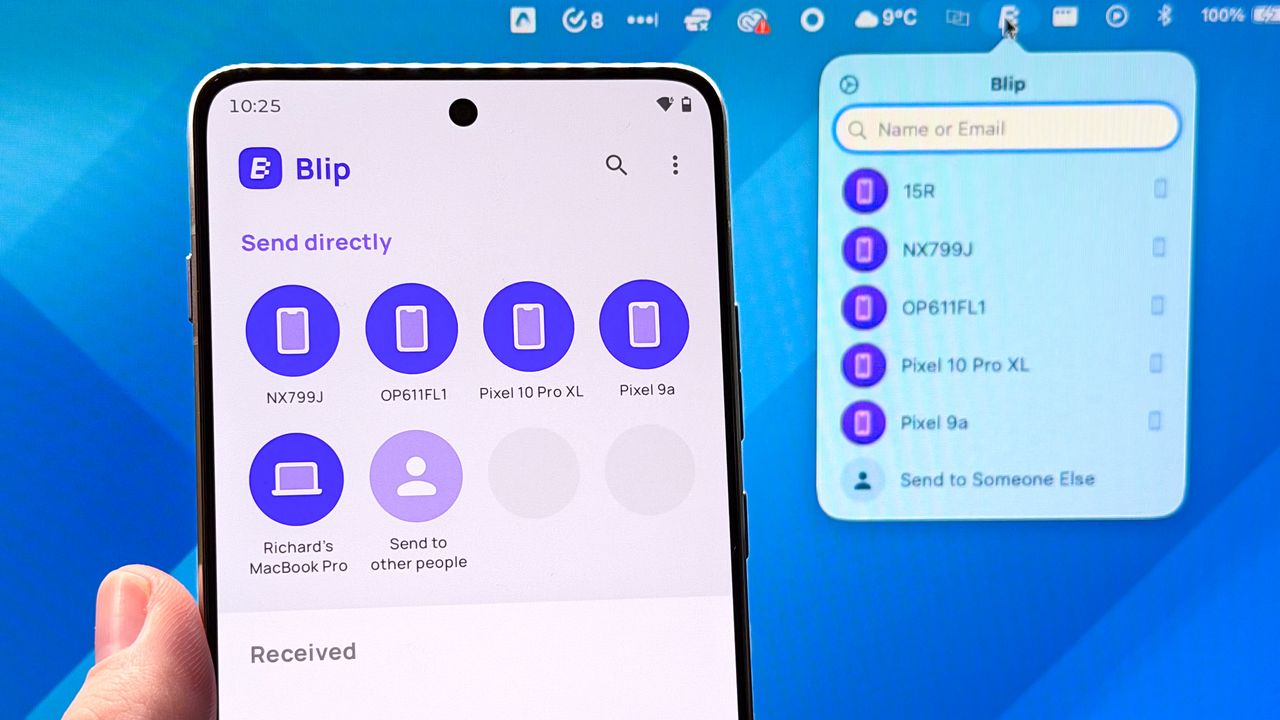
Blip on Android phone and macOS.

For as often as I swap phones for my job, I don't really switch up the Android apps or iOS apps I use all that much. I'll download a new game every so often, but my workflow hasn't meaningfully changed in years. That is until recently, when I discovered a wonderful app that has totally erased a long-standing painpoint of mine when it comes to transferring files.

As an iPhone and Mac user, AirDrop is invaluable for sending files around. And when I'm in Android land, Google Quick Share acts as an equivalent local wireless transfer service, plus Android phones generally play nicely with Windows if you plug them.

But that still leaves cross-OS file transfer in a tricky spot, especially if you want a no-fuss, wireless option.

I've had rough experiences with Google's official Android File Transfer tool, and a couple of third-party options I tried didn't. But happily, I found Blip, and now this whole trouble is resolved.

Oh how my heart does skip when I think about Blip

Having launched over two years ago, and with half a million downloads to its name on the Google Play Store alone, Blip is hardly a secret. But I'm here to sing its praises all the same, because more people need to know about this invaluable app.

(Image credit: Tom's Guide)

By installing the app on my MacBook, and then on any Android phone I wanted, I can easily send files between the two. You need to make an account, but it's free to use for individual users, and has apps for macOS, Windows and Linux, as well as iOS/iPadOS and Android.

(Image credit: Tom's Guide)

After that, you can select a device to send items to, pick files and photos, either in your apps of choice or in Blip's file browser, and watch as your stuff flies rapidly from one device to another.

(Image credit: Tom's Guide)

There's no file size limit (although you can only send 60 items total at a time in my experience), and it moves directly from one device to another via Wi-Fi, so no need to worry about copies of sensitive data being retained on cloud servers.

Some Android phone brands are doing their best to crack the AirDrop problem, with models like the Oppo Find X9 Pro, Honor Magic 8 Pro and even the Google Pixel 10 all offering solutions of one kind or another. But Blip is a solution that doesn't require a specific brand or model of phone — as long as you're running Android 9 or later, you're good to go. And if the worst happens and Apple decides to block these workarounds, that's not going to impact Blip.

Given how much I've fallen in love with Blip over the past couple of months that I've been using it, I'm resolving to make 2026 the year I try a wider variety of apps, old and new. If you have any recommendations, please let me know!


Follow Tom's Guide on Google News and add us as a preferred source to get our up-to-date news, analysis, and reviews in your feeds.


More from Tom's Guide

Sign up to read this article
Read news from 100’s of titles, curated specifically for you.
Already a member? Sign in here
Related Stories
Top stories on inkl right now
One subscription that gives you access to news from hundreds of sites
Already a member? Sign in here
Our Picks
Fourteen days free
Download the app
One app. One membership.
100+ trusted global sources.