When I first downloaded the iOS 27 developer beta, I was genuinely impressed by Siri's makeover. It's finally outgrown basic commands, morphing into a full-fledged chatbot and bringing major upgrades across the system.
Apple even gave Siri its own dedicated app, making it easy to hop back into past threads. And thanks to iCloud syncing, a conversation started on your iPhone sits waiting for you when you open your Mac.
Then I took a closer look at my history, and reality set in. There, neatly archived and synced across my devices, was a chronological list of my late-night curiosities, messy half-baked thoughts, and text drafts. Apple assumes you want to keep that paper trail forever.
So, I immediately dived into Settings to see if I could sort it out, and, thankfully, there’s an easy fix.
Why forever is a problem
Under the old rules, Siri was ephemeral: ask a question, get an answer, done. iOS 27 flips that model. By saving everything by default, Apple turns Siri from a quick tool into a permanent digital diary.
The issue isn't just about someone reading over your shoulder, it's data bloat. Because these chats sync through iCloud across your devices, an indefinite log creates an avoidable footprint. Every health symptom you look up, draft message, and rabbit hole builds into a detailed map of your personal habits sitting in the cloud.
Convenience is great, but hoarding years of unfiltered search context is an unnecessary privacy liability when an auto-delete setting exists.
How to set an auto-delete timer for Siri
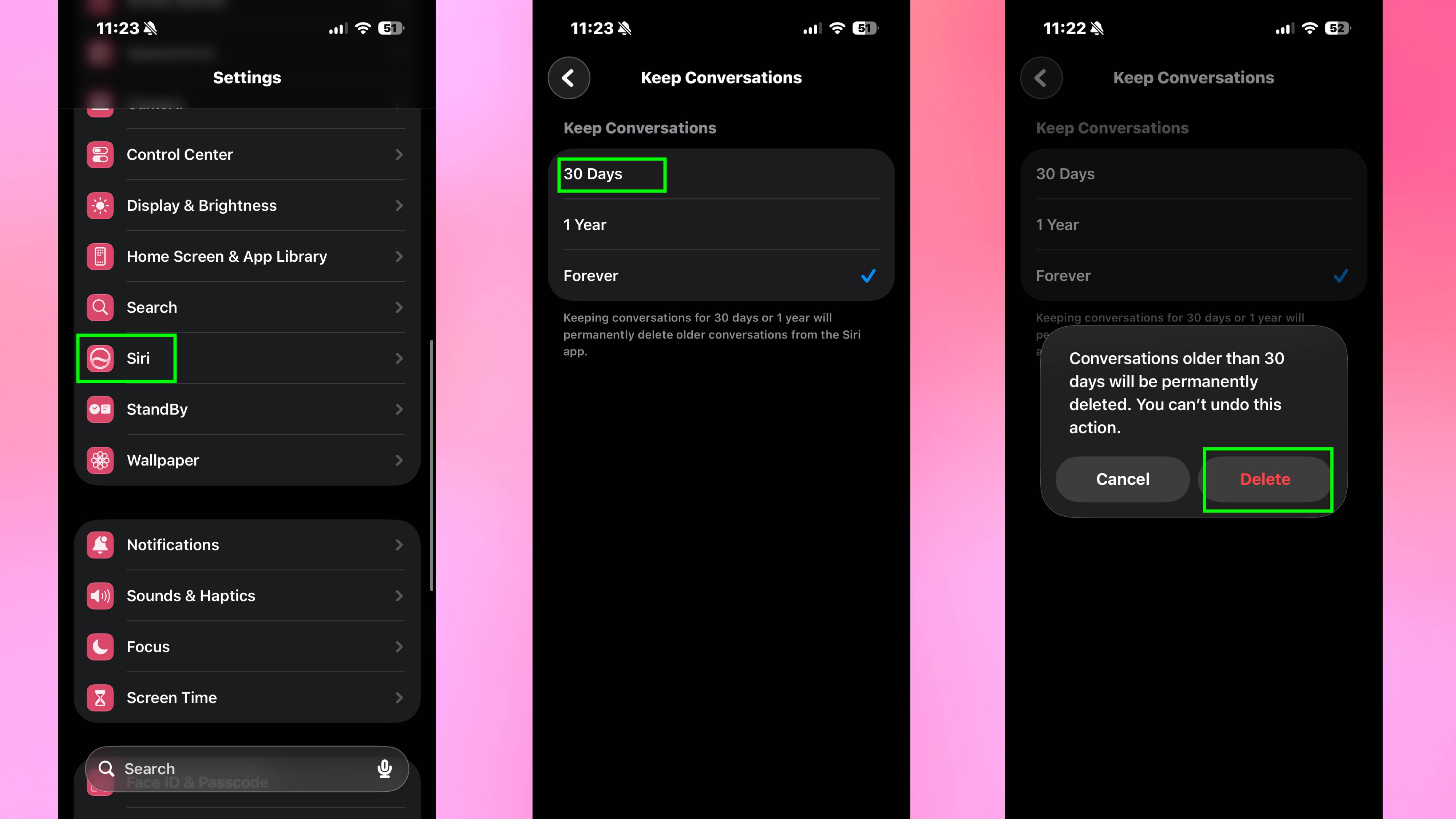
Reining in Siri's memory only takes a few taps. Open Settings on your iPhone, tap Siri and select Keep Conversations. From here you can change the setting from Forever to either 30 Days or 1 Year.
Once selected, iOS 27 will automatically purge any Siri conversations older than your chosen timeframe. Now you can actually enjoy Siri’s new AI powers without worrying about your past queries coming back to haunt you.